
You are using an out of date browser. It may not display this or other websites correctly.
You should upgrade or use an alternative browser.
You should upgrade or use an alternative browser.
XF 2.3 Why is the site redirected here with every core update of the site?
- Thread starter msb
- Start date
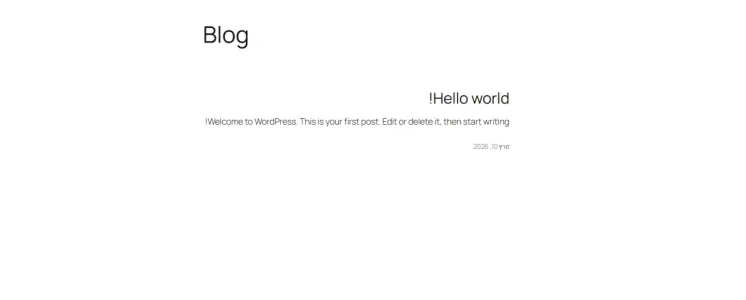

Friend that installation is from WordPress here is xenForo. Do we need more details about your problem?

Strange redirect issue after installing the core – looking for advice
I have a website with a forum installed, and every time I install or update the forum core, the website starts redirecting to the WordPress blog / Hello page instead of loading the forum.
The strange thing is that everything works normally before reinstalling the core, and the problem appears immediately after the core installation.
I’m trying to figure out what could be causing this:
I’d really appreciate any advice on where I should look to find the source of the redirect.
I have a website with a forum installed, and every time I install or update the forum core, the website starts redirecting to the WordPress blog / Hello page instead of loading the forum.
The strange thing is that everything works normally before reinstalling the core, and the problem appears immediately after the core installation.
I’m trying to figure out what could be causing this:
- Could the core installation be replacing or modifying a file?
- Could this be related to .htaccess or rewrite rules?
- Could WordPress be taking over the index.php file?
- Is there a setting in the forum core that needs to be changed so the forum remains the main site?
I’d really appreciate any advice on where I should look to find the source of the redirect.

Only when it's not configured properly.Has anyone experienced something similar on a site running both WordPress and a forum?
Without seeing your .htaccess or other configuration details, it's hard to guess.
But consider these hints:
1) When you go to your website, what is the default landing page? Is it landing in Wordpress? Or, is it landing in XenForo?
2) Is your XenForo in a sub folder from the web root? (eg: https://example.com/forumgoeshere)
3) In your XenForo ACP settings, what page is set for your home page? (ACP > Setup > Options > [Basic Options] > "Home Page URL"? What about the "Board URL"?
4) Do you have any other settings that would capture site entry and dump it on that Wordpress page?
When this issue happens, what do you do to fix it?
Yes, of course, it's updating the forum software. But, it shouldn't be changing the server configuration that it's hosted on.Could the core installation be replacing or modifying a file?
Possibly, Would need to see what those look like to get an idea.Could this be related to .htaccess or rewrite rules?
Yes, it could. Depending on the server settings for default page scope. This relates to my hint above (#2). It could be loading whatever the default page for the server is based on .htaccess or other deeper configuration.Could WordPress be taking over the index.php file?
Refer to points #2 and #3 above. These are related to this question.Is there a setting in the forum core that needs to be changed so the forum remains the main site?
It shouldn't be so complicated to figure out, but we can't do any surgical fixes without seeing the problem first hand. Everything above is just theory based on past experiences. When I get a site that has conflicting setups with XenForo and Wordpress, 99% of the time it's a server configuration user where XF and WP are fighting each other for control.
If you're absolutely stuck, reach out to someone like @MySiteGuy that can provide a direct service to assist you. Although, I think if you follow the general troubleshooting path above, you should be able to solve this. I'd be surprised if it was anything overly complicated.
Just to clarify my issue:
I’m not talking about the XenForo core, and it’s not happening when I manually install WordPress.
The problem occurs when WordPress performs an automatic core update.
After the automatic WordPress update, the main domain starts loading the WordPress "Hello" blog page instead of XenForo.
If I restore the correct XenForo index.php, the forum works normally again.
So it seems that during the automatic WordPress core update, something is changing or replacing the index.php in the web root, causing WordPress to take over the site's main entry point.
Could this be related to how WordPress and XenForo are configured in the same web root, or to the server's default document / rewrite configuration?
I’d especially like to understand why the automatic WordPress update would affect the XenForo index.php.
I’m not talking about the XenForo core, and it’s not happening when I manually install WordPress.
The problem occurs when WordPress performs an automatic core update.
After the automatic WordPress update, the main domain starts loading the WordPress "Hello" blog page instead of XenForo.
If I restore the correct XenForo index.php, the forum works normally again.
So it seems that during the automatic WordPress core update, something is changing or replacing the index.php in the web root, causing WordPress to take over the site's main entry point.
Could this be related to how WordPress and XenForo are configured in the same web root, or to the server's default document / rewrite configuration?
I’d especially like to understand why the automatic WordPress update would affect the XenForo index.php.
Ah... yeah, that's the issue. XF and Wordpress are fighting one another. Wordpress has it's own index.php and so does XenForo. Both cannot co-exist in the same folder like this. When Wordpress updates, it's going to update it's 'core' which includes that index.php file.
The standard practice and most reasonable fix to have either XenForo -OR- Wordpress in a subfolder from the root.
So long as both exist in the root location, they will continue to have this battle over index.php.
Sorry, I read it completely backwards as to what was getting overwritten, but this makes perfect since based on your statement of restoring the Index.php.
I think it would be best to move one or the other to a subfolder to resolve this repeating conflict.
Edit: A historical thread about the same points.
The standard practice and most reasonable fix to have either XenForo -OR- Wordpress in a subfolder from the root.
So long as both exist in the root location, they will continue to have this battle over index.php.
Sorry, I read it completely backwards as to what was getting overwritten, but this makes perfect since based on your statement of restoring the Index.php.
I think it would be best to move one or the other to a subfolder to resolve this repeating conflict.
Edit: A historical thread about the same points.

It isn't a good idea to host WordPress on the same folder you host XenForo. Both platforms should be on independent folders.Just to clarify my issue:
I’m not talking about the XenForo core, and it’s not happening when I manually install WordPress.
The problem occurs when WordPress performs an automatic core update.
After the automatic WordPress update, the main domain starts loading the WordPress "Hello" blog page instead of XenForo.
If I restore the correct XenForo index.php, the forum works normally again.
So it seems that during the automatic WordPress core update, something is changing or replacing the index.php in the web root, causing WordPress to take over the site's main entry point.
Could this be related to how WordPress and XenForo are configured in the same web root, or to the server's default document / rewrite configuration?
I’d especially like to understand why the automatic WordPress update would affect the XenForo index.php.
Having said this, you can avoid this issue by renaming the WordPress index file from index.php to wp-index.php.
Then, update .htaccess to route WordPress requests to wp-index.php:
Code:
# BEGIN WordPress
<IfModule mod_rewrite.c>
RewriteEngine On
RewriteRule .* - [E=HTTP_AUTHORIZATION:%{HTTP:Authorization}]
RewriteBase /
RewriteRule ^index\.php$ - [L]
RewriteCond %{REQUEST_FILENAME} !-f
RewriteCond %{REQUEST_FILENAME} !-d
RewriteRule . /wp-index.php [L]
</IfModule>
# END WordPress
Then, you could chmod 444 XenForo index.php file so it won't be overwritten by WP on a next update
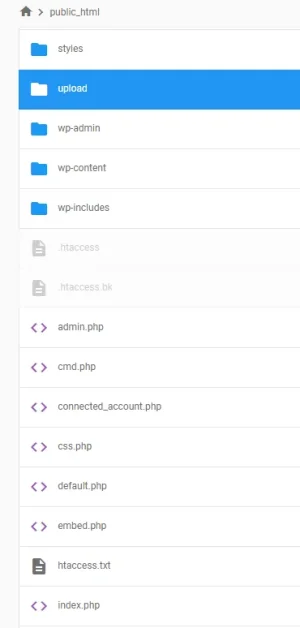
Yes, you have both XenForo and WordPress on the same folder (public_html).
If there is nothing on WordPress, why do you still keep it?

Trust AI as you trust a lawyer. You must understand what you are doing. Otherwise you'll find issues and could make a mess regarding SEO and conflicts between both platforms. Move XenForo to a different folder (name it "community", for example) and that will get rid of the issues.I installed using GPT
The general rule of security is to remove things you are not using. Having a Wordpress installation sitting there for no actual purpose is a bad idea. Just remove it if you're not actively using it. If you want use it the future, please get some assistance. Or, at least, install it somewhere else other than where XenForo is installed. Do not rely on ChatGPT or other LLM's to give you the right instructions.This did not solve the problem now. Should I uninstall WordPress?
Last edited:
Similar threads
- Locked
- Question
- Replies
- 15
- Views
- 3K

- Replies
- 4
- Views
- 1K

