
You are using an out of date browser. It may not display this or other websites correctly.
You should upgrade or use an alternative browser.
You should upgrade or use an alternative browser.
way to put a user ban button/option on the view topic
- Thread starter Bubstar
- Start date


TPerry
Well-known member
Not that hard if you are talking about banning a user.. .you can already do it directly by clicking on their name on the post itself that they made, have their "blurb" kick up and then click on the moderator tools gear in the upper right hand corner.
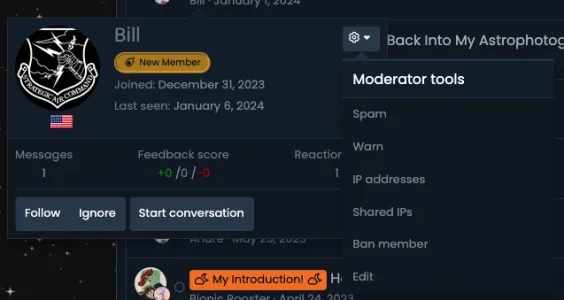
That way, you don't "accidentally" click on something on someones post and it end up banning them. Takes a few more clicks, but it fits better into the moderator tools honestly.
That way, you don't "accidentally" click on something on someones post and it end up banning them. Takes a few more clicks, but it fits better into the moderator tools honestly.

There is no problem to do several clicks but n that menu there's no a ban option, only a warn one.Not that hard if you are talking about banning a user.. .you can already do it directly by clicking on their name on the post itself that they made, have their "blurb" kick up and then click on the moderator tools gear in the upper right hand corner.
View attachment 296721
That way, you don't "accidentally" click on something on someones post and it end up banning them. Takes a few more clicks, but it fits better into the moderator tools honestly.
Maybe I miss out some setup into the admin panel please?
TPerry
Well-known member
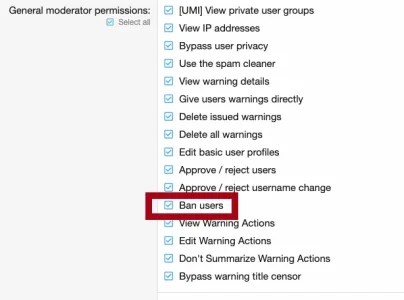
Make sure you have all moderator permissions. Being set as an Administrator (or SuperAdmin) does not equate having Moderator rights. They are two different roles.There is no problem to do several clicks but n that menu there's no a ban option, only a warn one.
Maybe I miss out some setup into the admin panel please?
TPerry
Well-known member
It's worth checking the permissions for the Moderators regularly... sometimes when you install a new add-on, it may not default to moderation options for that add-on being enabled.Thank you, I didn't knew the option is off by default. )