User Title Ladder by Waindigo [Deleted]

I altered the code a bit to get the HTML5/CSS3 feel with semantic code and some nice animation. I hope @Waindigo likes the result and conciders some of the changes for future update.

waindigo_trophy_progress_trophyprogress:

Code:
<xen:if is="{$xenOptions.waindigo_trophyProgress_showInSidebar} && {$visitor.user_id}">
    <xen:require css="waindigo_trophy_progress_trophyprogress.css" />
 
    <xen:require js="js/waindigo/trophyprogress/progress_bar.js" />
 
    <div class='section'>
        <div class='secondaryContent clearfix'>
            <h3>{$currentTrophyTitle}</h3>
            <div class='footnote'>{xen:phrase waindigo_progress_to_next_level_trophyprogress} {$nextTrophyTitle}:</div>
            <div class='TrophyProgressMeter'>
                <span class='TrophyProgressGraphic' role='progressbar' aria-valuenow='{$levelProgress}' aria-valuemin='0' aria-valuemax='100' style='width:{$levelProgress}%'>
                    <span class='TrophyProgressCounter'>{$levelProgress}%</span>
                </span>
            </div>
            <a id='levelUp' href='help/trophies'>{xen:phrase how_to_levelup}</a>
        </div>
    </div>
</xen:if>

waindigo_trophy_progress_trophyprogress.css:

Code:
.TrophyProgressMeter
{
    height: 26px;
    margin-top: 4px;
    padding: 2px;
    background: @content.background-color;
    border: 1px solid @primaryLighter;
    border-radius: 6px
}

.TrophyProgressGraphic
{
    display: block;
    height: 26px;
    background: -webkit-linear-gradient(-45deg, #5fbb1f 25%, #56aa1c 25%, #56aa1c 50%, #5fbb1f 50%, #5fbb1f 75%, #56aa1c 75%, #56aa1c);
    background: linear-gradient(-45deg, #5fbb1f 25%, #56aa1c 25%, #56aa1c 50%, #5fbb1f 50%, #5fbb1f 75%, #56aa1c 75%, #56aa1c);
    background-size: 40px 40px;
    -webkit-animation: progress 3s linear infinite;
    animation: progress 3s linear infinite;
    border-radius: 4px;
    text-align: right;
}
 
.TrophyProgressCounter
{
    padding: 0 10px;
    color:#fff;
    font-size:18px;
    line-height:27px
}
 
#levelUp
{
    float:right;
    margin-top:3px;
    cursor:help
}
 
@-webkit-keyframes progress {
    from {background-position: 0 0}
    to {background-position: 40px 0}
}
@keyframes progress {
    from {background-position: 0 0}
    to {background-position: 40px 0}
}

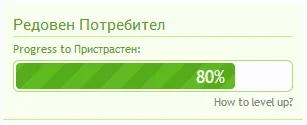
Here's the final result:
progress.webp

One can adjust the colours to their needs.
 
@Waindigo if we want to only display the trophy progress block on the Forum List (homepage) instead of on sidebar top of every page (with one sidebar), what should i edit?
 
I'd like to see that add-on updated for XF 1.4, this is what I currently get:

Code:
An exception occurred: No entry is registered for key 'trophyUserTitles' in /var/www/mart/f/library/XenForo/Application.php on line 969

XenForo_Application::get() in Waindigo/TrophyProgress/Listener/FrontControllerPreView.php at line 13
Waindigo_TrophyProgress_Listener_FrontControllerPreView->run() in Waindigo/TrophyProgress/Listener/FrontControllerPreView.php at line 60
Waindigo_TrophyProgress_Listener_FrontControllerPreView::frontControllerPreView()
call_user_func_array() in XenForo/CodeEvent.php at line 90
XenForo_CodeEvent::fire() in XenForo/FrontController.php at line 156
XenForo_FrontController->run() in /var/www/mart/f/index.php at line 13
 
Will this one works fine with XF 1.4 new feature?
I'm using message count for user titles.
 
@Waindigo

Hello, I'm unable to install this addon in version 1.0.1a. If I do so, it just leaves a blank page and gives me this server error message:
Code:
Fatal Error: syntax error, unexpected '['
Vor 13 Minuten - library/Waindigo/TrophyProgress/Listener/FrontControllerPreView.php:90

I can install the Addon in Version 1.0.1 though.
I'm using Xenforo Version 1.3.5
 
Last edited:
@Waindigo this addon is causing server errors on try to update it after install 1.4 RC1:
Code:
Error Info
ErrorException: Fatal Error: syntax error, unexpected '[' - library/Waindigo/TrophyProgress/Listener/FrontControllerPreView.php:90
Generated By: Max Bacon, A moment ago
Stack Trace
#0 [internal function]: XenForo_Application::handleFatalError()
#1 {main}
Request State
array(3) {
  ["url"] => string(56) "http://.com/admin.php?add-ons/install-upgrade"
  ["_GET"] => array(1) {
    ["add-ons/install-upgrade"] => string(0) ""
  }
  ["_POST"] => array(3) {
    ["resource_url"] => string(72) "http://xenforo.com/community/resources/trophy-progress-by-waindigo.2355/"
    ["_xfToken"] => string(8) "********"
    ["_xfConfirm"] => string(1) "1"
  }
}
 
Last edited:
I altered the code a bit to get the HTML5/CSS3 feel with semantic code and some nice animation. I hope @Waindigo likes the result and conciders some of the changes for future update.
Yes, please. It resolves my exact issue from user of "what is it? how do i progress?"

$currentlevel didn't work for me, does that have to be added somewhere?

One can adjust the colours to their needs.
How so? I'm only a beginner at CSS, and couldn't work out where it was.
 
Hey @zagorskey i'm using your code it feels nice.
But one problem, if the bar gets too sort, like user is 7% for next title atmm, it breaks :
2Pc1TnI.png

Any idea for CSS tweak for min-size of progress bar or just let the text float instead?
 
This looks awesome - is there any way to expand this so the bar will appear below a user's avatar on each post he/she makes?
 
It seems the bar is not fully working on a [bd] Widget Framework Widget Page. It does show up below the visitor panel by default, but does not show any progress. Any hint on how to get that working?Unbenannt-2.webp
 
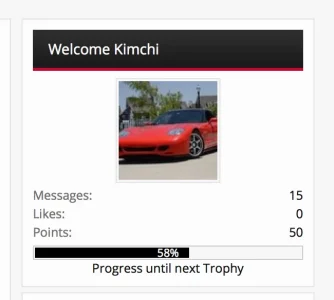
Changed the visitor panel to integrate the progress bar.

Visitor Panel
Code:
<xen:if is="{$xenOptions.waindigo_trophyProgress_showInSidebar} && {$visitor.user_id}">
<xen:if is="{$visitor.user_id}">
<xen:require css="waindigo_trophy_progress_trophyprogress.css" />
<xen:require js="js/waindigo/trophyprogress/progress_bar.js" />

   <div class="section">
     <div class="secondaryContent">
       <h3>Welcome {xen:helper username, $visitor, 'NoOverlay'}</h3>
       <p class="trophycenter"><xen:avatar user="$visitor" size="m" img="true" /></p>
       <div class="visitorText">     
       <div class="stats">
       <xen:hook name="sidebar_visitor_panel_stats">
         <dl class="pairsJustified"><dt>{xen:phrase messages}:</dt> <dd>{xen:number $visitor.message_count}</dd></dl>
         <dl class="pairsJustified"><dt>{xen:phrase likes}:</dt> <dd>{xen:number $visitor.like_count}</dd></dl>
         <dl class="pairsJustified"><dt>{xen:phrase points}:</dt> <dd>{xen:number $visitor.trophy_points}</dd></dl>
       </div>
       </xen:hook>
     </div>     
       <span class="TrophyProgressMeter"><span class="TrophyProgressGraphic" style="width: {$levelProgress}%">&nbsp;</span><span class="TrophyProgressCounter">{$levelProgress}%</span></span>
       <p class="trophycenter">Progress until next Trophy</p>
     </div>
   </div>
</xen:if>
</xen:if>

<xen:include template="ad_sidebar_below_visitor_panel" />

waindigo_trophy_progress_trophyprogress.css
Code:
p.trophycenter
{
   text-align: center;
}

.TrophyProgressMeter
{
   display: block;
   padding: 1px;
   border: 1px solid @primaryLighter;
   border-radius: 0px;
   background-color: @content.background-color;
   margin-top: 4px;
   font-size: 8pt;
   line-height: 10px;
}

   .TrophyProgressMeter .TrophyProgressGraphic
   {
     display: inline-block;
     width: 0%;
     height: 10px;
     background-color: #000000;
     text-align: right;
   }
   
   .TrophyProgressMeter .TrophyProgressCounter
   {
     display: inline-block;
     height: 10px;
     padding: 0 10px;
   }
   
   .TrophyProgressMeter .TrophyProgressGraphic .TrophyProgressCounter
   {
     color: @primaryLightest;
   }
 

Attachments

  • Screen Shot 2015-02-16 at 11.27.08 PM.webp
    Screen Shot 2015-02-16 at 11.27.08 PM.webp
    16 KB · Views: 18
I altered the code a bit to get the HTML5/CSS3 feel with semantic code and some nice animation. I hope @Waindigo likes the result and conciders some of the changes for future update.

waindigo_trophy_progress_trophyprogress:

Code:
<xen:if is="{$xenOptions.waindigo_trophyProgress_showInSidebar} && {$visitor.user_id}">
    <xen:require css="waindigo_trophy_progress_trophyprogress.css" />

    <xen:require js="js/waindigo/trophyprogress/progress_bar.js" />

    <div class='section'>
        <div class='secondaryContent clearfix'>
            <h3>{$currentTrophyTitle}</h3>
            <div class='footnote'>{xen:phrase waindigo_progress_to_next_level_trophyprogress} {$nextTrophyTitle}:</div>
            <div class='TrophyProgressMeter'>
                <span class='TrophyProgressGraphic' role='progressbar' aria-valuenow='{$levelProgress}' aria-valuemin='0' aria-valuemax='100' style='width:{$levelProgress}%'>
                    <span class='TrophyProgressCounter'>{$levelProgress}%</span>
                </span>
            </div>
            <a id='levelUp' href='help/trophies'>{xen:phrase how_to_levelup}</a>
        </div>
    </div>
</xen:if>

waindigo_trophy_progress_trophyprogress.css:

Code:
.TrophyProgressMeter
{
    height: 26px;
    margin-top: 4px;
    padding: 2px;
    background: @content.background-color;
    border: 1px solid @primaryLighter;
    border-radius: 6px
}

.TrophyProgressGraphic
{
    display: block;
    height: 26px;
    background: -webkit-linear-gradient(-45deg, #5fbb1f 25%, #56aa1c 25%, #56aa1c 50%, #5fbb1f 50%, #5fbb1f 75%, #56aa1c 75%, #56aa1c);
    background: linear-gradient(-45deg, #5fbb1f 25%, #56aa1c 25%, #56aa1c 50%, #5fbb1f 50%, #5fbb1f 75%, #56aa1c 75%, #56aa1c);
    background-size: 40px 40px;
    -webkit-animation: progress 3s linear infinite;
    animation: progress 3s linear infinite;
    border-radius: 4px;
    text-align: right;
}

.TrophyProgressCounter
{
    padding: 0 10px;
    color:#fff;
    font-size:18px;
    line-height:27px
}

#levelUp
{
    float:right;
    margin-top:3px;
    cursor:help
}

@-webkit-keyframes progress {
    from {background-position: 0 0}
    to {background-position: 40px 0}
}
@keyframes progress {
    from {background-position: 0 0}
    to {background-position: 40px 0}
}

Here's the final result:
View attachment 79292

One can adjust the colours to their needs.
I've included this in the latest update. Thanks.

I will add you as a contributor to the add-on so that you can have access to all the premium features.
 
So without any donation, free version is not compatible with BD Widget Framework?
 
So without any donation, free version is not compatible with BD Widget Framework?
This add-on will now work fine with BD Widget Framework, unlike previously. However, if you want the widget, you will have to make a contribution or become a premium member.
 
It was a pleasure contributing to this update :) I know a lot of people really wanted the Widget Framework functionality.
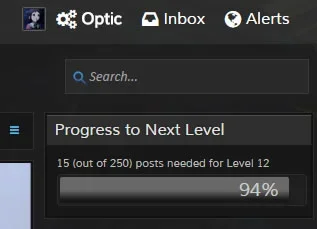


Widget Framework renderer in use:
progress-to-next-level.webp


Postbit bar in use:
progress-bar-postbit.webp
 
Last edited:
Back
Top Bottom