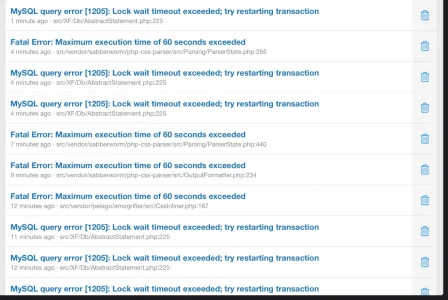
Pepe2012 Well-known member Licensed customer Sep 20, 2026 #1 I'm trying to run an add-on and I keep on getting timed out. How do I fix this??
ForumDevs Active member Licensed customer Sep 20, 2026 #2 Pepe2012 said: I'm trying to run an add-on and I keep on getting timed out. How do I fix this?? View attachment 345152 Click to expand... You should increase max_execution_time and make sure memory_limit is set to 256M at least: Code: max_execution_time = 300 memory_limit = 256M Last edited: Sep 20, 2026 Upvote 0 Downvote
Pepe2012 said: I'm trying to run an add-on and I keep on getting timed out. How do I fix this?? View attachment 345152 Click to expand... You should increase max_execution_time and make sure memory_limit is set to 256M at least: Code: max_execution_time = 300 memory_limit = 256M
Pepe2012 Well-known member Licensed customer Sep 20, 2026 #3 ForumDevs said: You should increase max_execution_time and make sure memory_limit is set to 256M at least: Code: max_execution_time = 300 max_execution_time = 256M Click to expand... Thank you, how do I do so? Upvote 0 Downvote
ForumDevs said: You should increase max_execution_time and make sure memory_limit is set to 256M at least: Code: max_execution_time = 300 max_execution_time = 256M Click to expand... Thank you, how do I do so?
ForumDevs Active member Licensed customer Sep 20, 2026 #4 Pepe2012 said: Thank you, how do I do so? Click to expand... If you use cPanel you can follow this guide: How to Use the MultiPHP INI Editor in cPanel | InMotion Hosting In this article, we will show you how to use cPanel's MultiPHP INI Editor to modify your PHP configuration. www.inmotionhosting.com Otherwise, ask your hosting. They should be able to make the changes. Upvote 0 Downvote
Pepe2012 said: Thank you, how do I do so? Click to expand... If you use cPanel you can follow this guide: How to Use the MultiPHP INI Editor in cPanel | InMotion Hosting In this article, we will show you how to use cPanel's MultiPHP INI Editor to modify your PHP configuration. www.inmotionhosting.com Otherwise, ask your hosting. They should be able to make the changes.