Tickets: Help Desk and Knowledge Base

Tickets: Help Desk and Knowledge Base [Paid] 2.12.4

No permission to buy ($60.00)
I think I've found another issue in 2.11.0. I have a ticket status called Pending with "Include tickets in this state in the moderator bar ticket count" disabled.

My default ticket view is Open tickets, and I intentionally include both Open and Pending statuses in that view so staff can work from a single queue.

However, the moderator bar count also includes the Pending tickets. For example:
  • 1 Open ticket
  • 4 Pending tickets (include_in_counts = 0)
  • Moderator bar shows 5 instead of 1

I verified the following:
  • Removed orphaned files using php cmd.php xf:file-clean-up NF/Tickets
  • Rebuilt the add-on
  • include_in_counts is correctly stored as 0 in the database
I also found that if I remove Pending from the default "Open tickets" view, the moderator bar immediately changes from 5 to 1. However, this also removes the Pending tickets from the queue, which is not the desired behaviour.

It looks like the moderator bar count is using the default ticket view count instead of respecting the include_in_counts status option.

Is this intended behaviour, or is it a regression in 2.11.0?

This is fixed in v2.11.1. It was a bug where include_in_counts wasn't being respected when the tickets in the default view were counted. Thanks for the detailed report. :)
 
I think I've found another issue with guest tickets.

When a guest creates a new ticket, the CAPTCHA works correctly and Cloudflare Turnstile is displayed as expected. However, when the same guest tries to reply to the ticket, no CAPTCHA is displayed at all. Submitting the reply then results in:

"CAPTCHA verification failed. Please try again."

I checked the request and found that the POST to /ticket/{id}/add-message does not contain a cf-turnstile-response token.

I also checked the page itself:
  • The guest ticket creation form correctly displays and initializes Turnstile.
  • The guest reply form does not display any CAPTCHA.
  • There is no cf-turnstile-response element in the DOM.
  • No Turnstile request to challenges.cloudflare.com is made on the reply page.
  • The affected ticket page and add-message request are both CF-Cache-Status: DYNAMIC, so this doesn't appear to be related to caching.
  • I reproduced it in private browsing and with another browser.
I also checked the reply form template and noticed this condition:

data-xf-init="attachment-manager quick-reply{{ !$internal && $xf.visitor.isShownCaptcha() ? ' guest-captcha' : '' }} ticket-quick-reply"

On the affected guest reply page, guest-captcha is not present in the rendered HTML, which means $xf.visitor.isShownCaptcha() appears to be evaluating to false there, even though the backend still requires CAPTCHA validation when the reply is submitted.

As a test, I changed the condition to:

data-xf-init="attachment-manager quick-reply{{ !$internal && !$xf.visitor.user_id ? ' guest-captcha' : '' }} ticket-quick-reply"

After making this change, Turnstile appeared correctly on the guest reply form and the reply was submitted successfully without the CAPTCHA validation error.

So this seems to confirm that the issue is related to the $xf.visitor.isShownCaptcha() condition on the guest reply form not matching the CAPTCHA requirement enforced by the backend. Could you take a look?
 
Last edited:
The ? operator needs to have the left-hand side wrapped in brackets like so; (!$internal && $xf.visitor.isShownCaptcha()) ? ' guest-captcha' : ''

That said, this should properly be $xf.visitor.isShownCaptcha() ? ..., but that requires a small tweak to remove the $internal conditional on the captcha javascript check.
 
Last edited:
Hi @Naz

Thank you for implementing the internal messaging system. However, I’ve noticed an issue where, if an internal message is quoted, its content becomes visible to users who do not have permission to view internal messages.

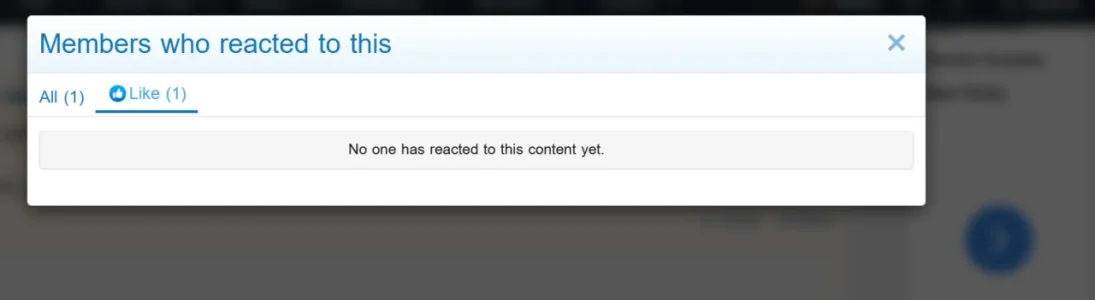
Another issue I’ve been experiencing is with the reaction list. It shows the total number of reactions, but the usernames of the users who reacted are not displayed. I’m currently using @Xon Content Ratings.


1786664523907.webp
 
Another issue I’ve been experiencing is with the reaction list. It shows the total number of reactions, but the usernames of the users who reacted are not displayed. I’m currently using @Xon Content Ratings.
This affects stock XF reactions as well.
 
  • Like
Reactions: KSA
A small update that may help narrow this down further.

@Xon, I also tested your suggestion and a few variations around the "guest-captcha" condition.

The original code is:

data-xf-init="attachment-manager quick-reply{{ !$internal && $xf.visitor.isShownCaptcha() ? ' guest-captcha' : '' }} ticket-quick-reply"

I first tried the parenthesized version you suggested:

{{ (!$internal && $xf.visitor.isShownCaptcha()) ? ' guest-captcha' : '' }}

but that alone did not resolve the issue for me.

I then tested your suggestion of removing the "$internal" condition from the "guest-captcha" check. What appears to be working correctly is keeping the CAPTCHA JavaScript loading condition unchanged:

Code:
<xf:if is="!$internal">
    <xf:js src="xf/captcha.js" min="1" />
</xf:if>

and changing only "data-xf-init" to:

data-xf-init="attachment-manager quick-reply{{ $xf.visitor.isShownCaptcha() ? ' guest-captcha' : '' }} ticket-quick-reply"

With this combination, in my testing so far:
  • Previous ticket messages remain visible to guests.
  • Turnstile is correctly displayed on the guest reply form.
  • Guest replies can be submitted successfully.
  • The CAPTCHA validation error no longer occurs.

I also tested removing the "$internal" condition from the CAPTCHA JavaScript loading itself, but in my testing that caused a side effect where previous ticket messages were no longer visible to the guest.

So far, keeping the JS condition as-is while removing "$internal" only from the "guest-captcha" expression appears to resolve the original issue without breaking the ticket view. I'll continue monitoring it in case there are any edge cases.

Thanks @Xon, your suggestion definitely pointed me in the right direction. Hopefully these results also help with the proper fix.
 
Last edited:
Thanks @Xon, your suggestion definitely pointed me in the right direction. Hopefully these results also help with the proper fix.
I've contributed a fix for the issue which ended up just removing the $internal check, but @Naz is looking into improving how quoting an internal message can accidently leak internal messages as the editor is in the 'public' reply setting.
 
Naz updated Tickets: Help Desk and Knowledge Base with a new update entry:

Version 2.12.0

  • Add an activity log entry when a ticket is mentioned in another ticket.
  • Add an activity log entry when a ticket has been opened for someone else.
  • Add an option to prevent internal messages from being quoted accidentally. Enabled by default.
  • Add a style property to control whether the sidebar remains sticky when viewing tickets. Enabled by default.
  • Add support for opening a ticket for a user on their behalf.
  • Add a link to invite participants to a ticket to the ticket...

Read the rest of this update entry...
 
Hi @Naz

Thank you for implementing the internal messaging system. However, I’ve noticed an issue where, if an internal message is quoted, its content becomes visible to users who do not have permission to view internal messages.

Another issue I’ve been experiencing is with the reaction list. It shows the total number of reactions, but the usernames of the users who reacted are not displayed. I’m currently using @Xon Content Ratings.


View attachment 342909

This affects stock XF reactions as well.

Thank you @Naz

I can confirm the cited issue has been resolved.
 
Naz updated Tickets: Help Desk and Knowledge Base with a new update entry:

Version 2.12.1

  • When viewing a ticket, collapse consecutive groups of activity log items together.
  • Adjust how the status of a ticket is displayed on views by default.
  • Add display options to control whether category, priority, and status are shown on ticket views.
  • Add support for filtering by status and priority in the filter menu.
  • Adjust how category counts are displayed by default.
  • Disable the sticky sidebar by default instead.
  • Fix race condition when replying to a ticket and...

Read the rest of this update entry...
 
Back
Top Bottom