The Meta Bot is causing insane traffic!!

MapleOne

Well-known member
Licensed customer
Screenshot (43).webp


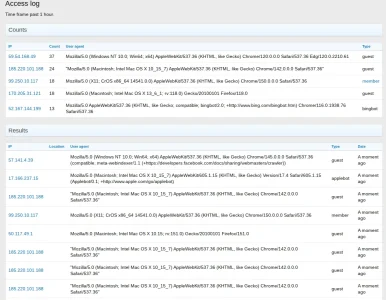
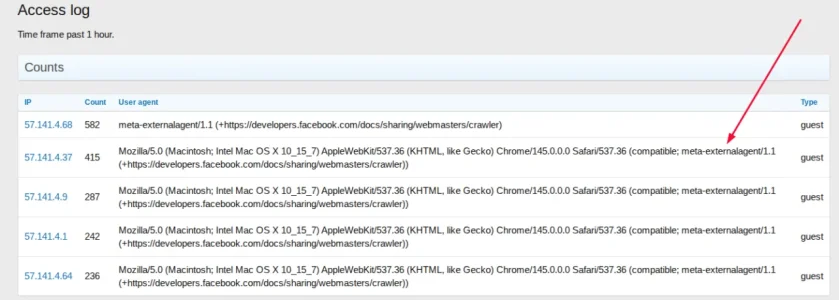
Look at that!!

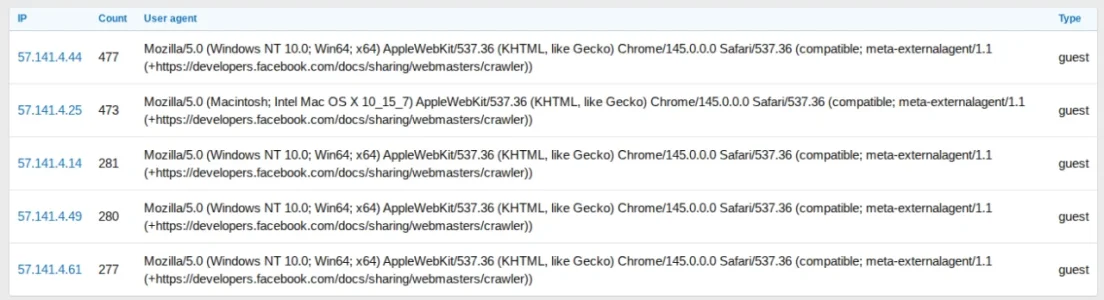
The top 5 access request on my forum causing the too many connections error are all caused by META

Going to block the meta-externalagent using this extension

Will post back if it made any difference or not.

 
Screenshot (96).webp

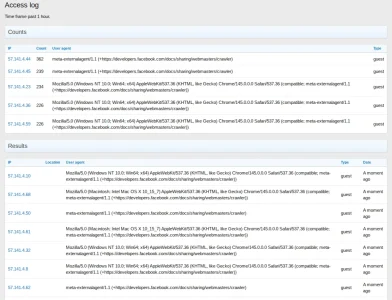
Got rid of the meta agent in the first line but not the additionals which leads me to believe the others are imitations and not the real meta bot.

Anyone got an idea what I should put in the block to get rid of the others?
 
Anyone got an idea what I should put in the block to get rid of the others?
A simple filter expression for "meta-externalagent" in your .htaccess should do the job and block these requests. Other than that in your case these requests seem to come for one single network which belongs to meta. Easy to block this in .htaccess or your firewall alternatively. In my case the requests with meta-externalagent came almost exclusively from client ip-ranges, not from Meta/Facebook. According to the description of the bot by Meta it serves for rendering previews of shared content, however, it serves also other purposes that are left very open, possibly including scraping content for AI training. Which would explain the amount of requests you see. Blocking this thing is therefor highly recommended.
 
Screenshot (99).webp

Upon research I found out facebook disguises their agent as a standard mozilla agent so the above solutions in the posts above did not work.

On Xenforo cloud I blocked the entire facebook IP range which still means they are using a database connection but it is small compared to a full page load with all addons active.

I also did the robots file which technically does nothing but research said facebook respects that file. I have my doubts because they are already showing shady behaviour disguising the robot agent name.

My too many connections are still occasionally present but greatly reduced.

On Xenforo cloud one cannot fully use Cloudflare but from what I see even people using cloudflare are struggling.

I dont know why facebook hits my site so much, it is the singe biggest user eating up my resources, it does not stop, day after day.

Here it is this morning

Screenshot - 2026-09-17T084457.239.webp
 
Got rid of the meta agent in the first line but not the additionals which leads me to believe the others are imitations and not the real meta bot.

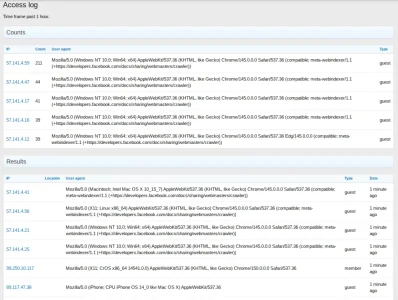
According to your screenshot they all come from 57.141.4.x which is AS32934 (Facebook, Inc.), so they all come from Meta.

Anyone got an idea what I should put in the block to get rid of the others?

You could block the IP range for access in ACP. Not a scalable solution but as long as they come from this network it will do the job.
 
I also did the robots file which technically does nothing but research said facebook respects that file. I have my doubts because they are already showing shady behaviour disguising the robot agent name.

This bot does not respect robots.txt and Facebook says this openly in their description of the bot. One reason to simply block it completely.
 
Upon research I found out facebook disguises their agent as a standard mozilla agent so the above solutions in the posts above did not work.

Does not make sense. As long as meta-externaleagent is part of the user agent string (which it is) it should be no big deal do block these based on useragent. I would have expected that the add on of @AndyB would be capable of that. You do not have to put the full user agent string into a filter, just the part that is relevant for filtering. No idea how Andy's add on works but I would assume that is works like that, too.
 
No you just use the agent name and since they disguise as Mozilla, if you add that it will most likely block browsers. I tried it and I got the same error message the user agent would get.

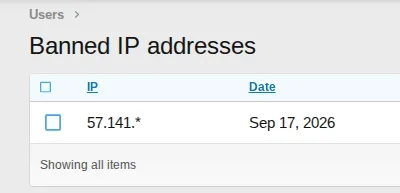
I did end up blocking the IP in the Xenforo control panel 57.141.* which is exclusively used by Meta so that took a load off.

The thing is both solutions still means you are using resources because it actually allows the bots on the site but it's minimal because only the error page loads using far fewer resources (connections) than a full page load with all active addons.
 
Screenshot - 2026-09-17T202029.905.webp


Success!!!​


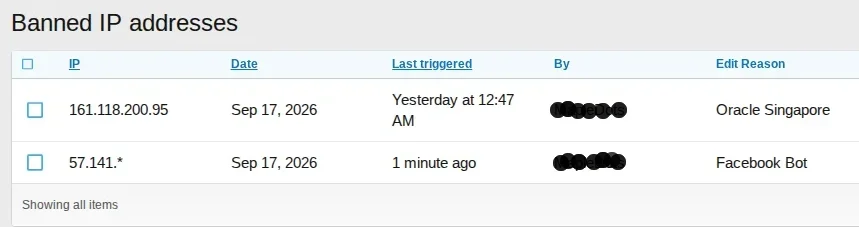
After banning IP 57.141.* in admin cp
After adding meta-externalagent to Andy's Block Bots

Took a few hours but as you can see it worked like a charm.

Had a new one as well some Singapore Bot and I banned it's IP as well
 
If you want, you could use this (made the tool last week with some Grok AI coding): https://tools.amaterrible.dev/xf2ipbantool/?asn=32934&merge=1 - download the XML file after poking the Query RADB button. Once downloaded, you then use the IP Banning import tool to upload the XML file to your board. It'll make quick work of banning ASN 32934 (Meta) from being able to use your forum.

As for the Singapore bot, that's a larger issue... an AI-scraper botnet https://xenforo.com/community/threads/crazy-amount-of-guests.233649/ - 75 pages as of this post.
 
If you want, you could use this (made the tool last week with some Grok AI coding): https://tools.amaterrible.dev/xf2ipbantool/?asn=32934&merge=1 - download the XML file after poking the Query RADB button. Once downloaded, you then use the IP Banning import tool to upload the XML file to your board. It'll make quick work of banning ASN 32934 (Meta) from being able to use your forum.

As for the Singapore bot, that's a larger issue... an AI-scraper botnet https://xenforo.com/community/threads/crazy-amount-of-guests.233649/ - 75 pages as of this post.

Thanks for the advise but simply banning the Meta IP address has ended my conundrum. My traffic is under control and works like a charm.

I also banned the Singapore IP and traffic is perfect, down to a constant 400 guests, down from thousands.

What did I block?

Screenshot (9).webp

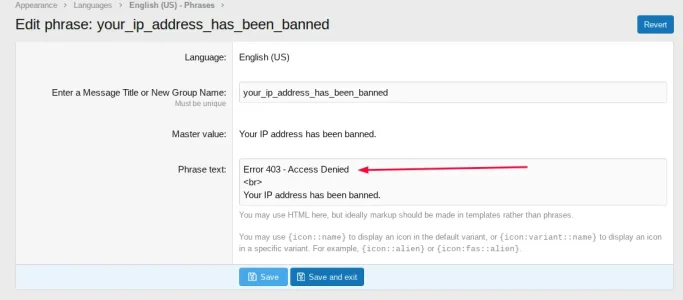
It takes a couple days to have effect, I also added a 403 error on top of the standard Xenforo banned message so the bots knew why they were banned and after a couple of days the bots stopped returning.

Screenshot (7).webp


I deactivated all addons and the ban part alone is doing the job, I use Andy's Access Addon to watch who is there and as you can see today it is all quiet. I will check daily and if another bot takes up too many resources I will ban it as well. The cat and mouse game everyone is talking about has not happened with me, it was just a couple of bad actors so far and they were easily taken care of. I am currently not getting a single too many connections message from my Xenforo installation and that has been the case for a few days now.

Screenshot (8).webp

So for me the issue is currently resolved and I will post back here if I see a change.

PS. Yes banning bots via IP still allows them to come and use small resources but all the addons and connections don't load, they get a standard page and I found adding the 403 message did make a difference and they stopped coming after a couple of days. Keep in mind without the ban the full page and all the addons would load using far more connections. Bots do see the error and yesterday I saw only teo attempts by Meta/Facebook to hit the site compared to thousands before. The Singapore bot has also not shown up again.
 
it is all quiet. (...) The cat and mouse game everyone is talking about has not happened with me, it was just a couple of bad actors so far and they were easily taken care of.
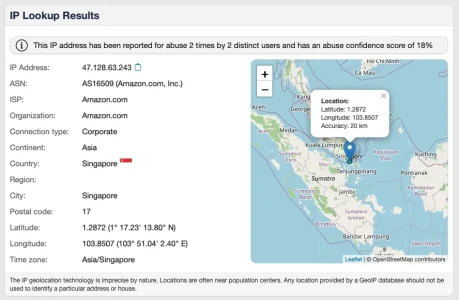
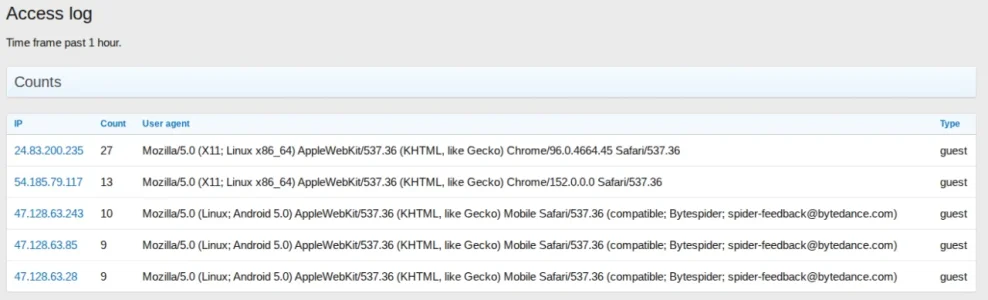
Clearly depends on what your goal is. If you only care for server load you may have reached a (temporary) calm down - but clearly not a sustainable and scalable solution. If you care for content theft you have not even started. Looking at your "it is calm" screenshot shows Bytespider (notorious for scraping) with three instances from Singapore alone, using AWS.

Bildschirm­foto 2026-09-20 um 14.38.22.webp

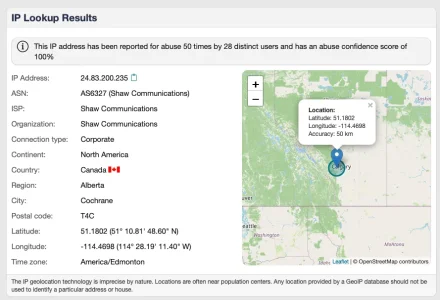
a notorious scraping server from Canada:

Bildschirm­foto 2026-09-20 um 14.36.09.webp

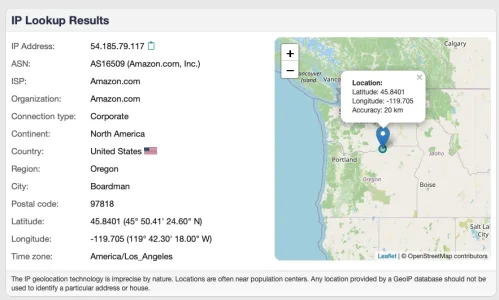
and another bot coming via AWS:

Bildschirm­foto 2026-09-20 um 14.37.34.webp

So I you want to keep your house clean rather than just hinder it from collapsing there is probably some work to do...
 
So I you want to keep your house clean rather than just hinder it from collapsing there is probably some work to do...

In my case the forum is just under 1000 members and I personally don't care what the bots are scrapping, in fact I like when I ask AI a specific question relating to my forum and it says.... According to (my site) the information is....

The only thing I am woried about is that I dont run out of resources and for a number of days now I am having no resource abuse, everything is perfect with under 400 guests constant. The server handles that well and if it increases I can block the offending Bots.

Yes I know its cat and mouse but its working for me, resources have dropped significantly and I am not looking to install significant modifications/addons if my resources are being properly managed.

Some people (like me) are looking for a simple solution to the TOO MANY CONNECTIONS issue only and the above has fixed it for me.

If I see any of the bots you mentioned using significant resources I will ban them and the 403 message (for the banned IP's) seems to keep them away.

So I agree with you, it is not the solution for everyone but for people in my situation it might work and the key is to install Andys Access Log because it clearly shows the biggest culprits. Block them and the smaller traffic ones are not a concern.

 
So I agree with you, it is not the solution for everyone but for people in my situation it might work and the key is to install Andys Access Log because it clearly shows the biggest culprits. Block them and the smaller traffic ones are not a concern.

I have used this add on in the past and while it is helpful as it shows you the countries of visitors w/o using Cloudflare it is limited to the last hour, so it just gives you a momentary snapshot and needs either constant monitoring or helps more in an emergency situation. For a systematic approach to eliminating bots other ways of monitoring seem more suitable.

Given your goals I understand the way you are doing this. With some luck it will be enough. Sadly chances are high that sooner or later you will hit a dead end this way. It all depends from weather one or more big scraper waves will hit you.
 
I have used this add on in the past and while it is helpful as it shows you the countries of visitors w/o using Cloudflare it is limited to the last hour, so it just gives you a momentary snapshot and needs either constant monitoring or helps more in an emergency situation. For a systematic approach to eliminating bots other ways of monitoring seem more suitable.

Just a footnote on that part

The most abusive bots hit the site hundreds of times per hour and don't leave, you can check most anytime and see them on the site. The last hour is all you need to see a bot hitting your site 700+ times because if you login 12 hours later they are still there.

I saw two of the most abusive bots on constantly, banned them and my resources got under control. So I really don't need to see 1-2 days worth of records, I only need to see what is currently causing my resource issue. I ban them and check back the next day and if desired I can ban the smaller resource hogs but quite honestly I don't mind 3-400 guest showing on my board. When they hit 3-4 thousand then I know I have some blocking to do and allowing META on my board was hitting 3000 guests every time I checked the board. A far cry from the 400 I have now.

Again, It was one of Andys addons where I read to add a 403 error and to my surprise META virtually stopped visiting, I see maybe 1 or two visits on occasion but it sees the 403 error and seems to leave the site.

Keep in mind blocking an IP still hits the page with nominal resources so if my block was not working I would still be getting thousands of Meta hits, which I am not.

Simple solution, no addons, all it needs is to keep an eye on the amount of guests on the board. If they climb too high I know I have some banning to do. If under a 500 I don't worry about it. You can set the guest value what you are comfortable with and ban the most active bots.

I still think Xenforo not having the 403 error on the banned phrase needs to change, without that bots don't know they are blocked and keep returning. Now they return but seem to almost never come back. (the banned ones that is)
 
I have these ASN's blocked for Singapore and Asia which seem to be the main culprits from that part of the world - note I looked up the ASN's individually myself to block them, but AI categorised them as cloud hubs - which makes sense.

The AS Numbers in bold are data centres in Singapore (which will have multiple IP's). Huawei is in there as well.

Tencent & Alibaba Cloud Hubs: 132203, 45090, 133478, 132591, 139341, 137876, 58835, 37963, 38369, 45104, 134963, 141180, 136907, and 24429


However I blocked them in Cloudflare, so I'm not sure if it would affect any API's or other things you use.

I'm wondering if meta-externalagent is known for this as I found my server had blocked it without me doing anything.
 
Last edited:
Screenshot (60).webp


Meta is pummeling my site again today but because 57.141.* is banned they just see the generic 403 message and my resources are nicely intact with no error messages. Seems like every few days they try again to train their MUSE piece of crap.

I won't be unbanning them anytime soon and am happy to announce at this point I ma just using the built in Xenforo IP ban and all is great.

Other services are getting bigger announcing PRO upgrades and difficult solutions to implement, for me the most basic of things did the job. Simple IP blocking for Meta.

Really check your logs guys, I have two separate sites on two separate servers and META is pummeling both. Block them and don't let them steal your information!!!!!
 
Back
Top Bottom