
XF 2.2 PHP 8.0.18 creating site breaking errors, anyone else confirm?

bzcomputers

Well-known member
Licensed customer
My server automatically upgraded to latest PHP 8.0.18 about 2 hours ago and ever since it has been an onslaught of errors. A lot of them just PHP warnings related to add-ons, which appear to be coming from a different level of error/warning reporting on PHP 8.0.18. But there are also some styling/css erors that are making XenForo unusable for users.

Had to revert back to PHP 7.4.29 - site works fine and no errors or warnings.
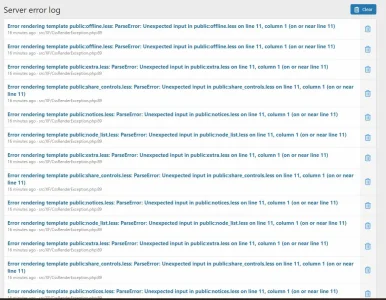
xf-errors3.jpg
 
You didn't mention what version of XenForo you have running. There have been various improvements on PHP 8 with XF over the last few versions.

What version of XF is that?

For Addons, you would need to confirm with the author(s) about compatibility with PHP 8.x.x -- that's not going to a XF specific issue.
 
The errors shown above were with all add-ons disabled running default theme.
Understood. We don't have any errors currently but we did have some prior the upgrade to XF 2.2.9 we did on Friday last week. (We already cleared them, so I can't see the history on which types they were...)
 
So the error was still happening even with the add-on disabled and no custom code related to it in the extra.less template?

It appears that it could of just been a delay/cache of config.php. I don't think all add-ons were actually disabled when the errors were still occurring. I just had never needed to disable add-ons through config.php before and wasn't expecting the delay.
 
Technically disabling listeners is not the same as disabling add-ons.

It should really only be done to recover from a disaster which renders you unable to access the admin control panel.

Disabling listeners prevents code from executing from add-ons but template modifications and pre-compiled templates may still execute problematic code as was likely the case here.

Also disabling listeners doesn’t really help narrow down issues related to a specific add-on as it’s all or nothing.

Otherwise the recommended approach is to disable the add-ons from within your admin control panel if that is an option. Disable all, re-enable each one by one, until you find the one that triggers it.

Disabling all add-ons can be done in one click.
 
Unfortunatley, the issues were causing the styling to fail for the admin control panel too, making it unusable. The only way I knew to try and recover from that was to disable the listeners first, then I had a working admin control panel where I could test add-ons one by-one.
 
Back
Top Bottom