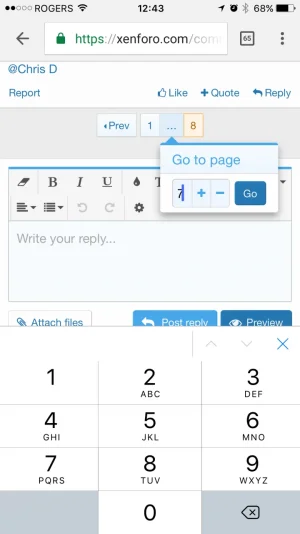
Fixed Page pop up numeric entry iOS appears not to work

Digital Doctor

Well-known member
Licensed customer
Affected version
Latest
IMG_1728.webp


I'm on page 8 and when I type 7 to go back to page 7, I think I've done it right but it actually is page 87.
 
Ideas:

1) don't bring up the keypad to start, clicking on the field can bring up the number entry.

2) bring up the suggested page as highlighted text so clicking a number replaces the initial suggestion.

3) display two numbers in the number field so at least I know I'm requesting page 87.
 
moreover, as we enter number through numeric keyboard, enter/go key doesn't work by letting us visit desired page it just highlights "go" onscreen, serving half the purpose of numeric keypad.
 
I've increased the width of the number field so that the whole number is visible. As for not bringing up the keyboard by default, that somewhat defeats the purpose of the control, as its only function is to allow you to type a number.
 
Back
Top Bottom