
You are using an out of date browser. It may not display this or other websites correctly.
You should upgrade or use an alternative browser.
You should upgrade or use an alternative browser.
XF 2.3 Make size=2 larger than 10px
- Thread starter rebelde
- Start date

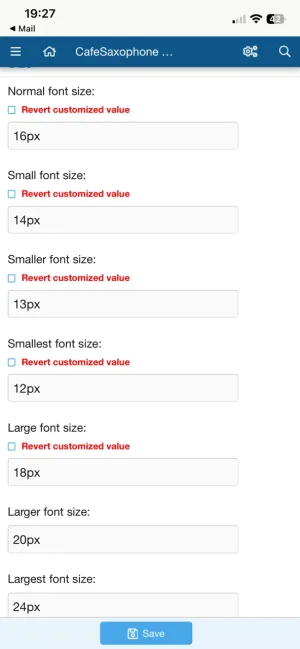
I think you mean typography. But there is no size=2 just small medium large etc which seem to work just fineSize=2 at 10px is too small. How can I make it bigger than 10px?
Adjusting topography > Size does nothing and no size is set to 10px.
Thanks!
Thank you, but there is!But there is no size=2
From my post above
[SIZE=2]The BBcode is that and it shows as 10 px.
The resulting HTML:
<span style="font-size: 10px">Any ideas?
Since the BBCode doesn't get labelled in the resulting HTML with a class (which is a shame) you'll have to replace the existing
So in the ACP go to Content - Custom BB codes and Add BB Code.
Fill it in something like:
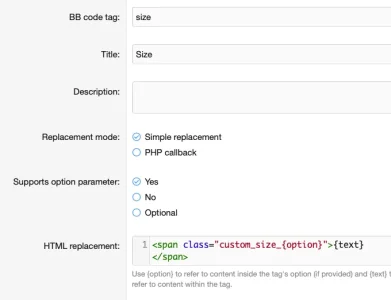
Don't forget to add a regex in the advanced options to restrict the option parameter to something simple to prevent anyone injecting anything nasty - so for instance say
Then in your
Setting those to be whatever you want for your site, be that percentages, ems, pixels, whatever and allowing you to easily adjust it in the future. Something roughly like this should allow you to effectively set the size to something more suited to your site.
[size=n] BBCode with your own version that does this. We do this loads on our sites where we don't want users splashing colours or various font sizes all over the place.So in the ACP go to Content - Custom BB codes and Add BB Code.
Fill it in something like:
Don't forget to add a regex in the advanced options to restrict the option parameter to something simple to prevent anyone injecting anything nasty - so for instance say
/^[0-5]$/ to limit it to 0-5 for instance. Obviously you might want to do a proper job and fill in the description and examples for usage and so forth.Then in your
extra.css (Appearance - Templates) we can add the classes for our new "size" elements:
CSS:
.custom_size_0 { font-size: 20%; }
.custom_size_1 { font-size: 50%; }
.custom_size_2 { font-size: 90%; }
.custom_size_3 { font-size: 100%; }
.custom_size_4 { font-size: 130%; }
.custom_size_5 { font-size: 150%; }Someone else might have a better idea, but other than that I think you'd need to write an add-on to change the underlying behaviour. The rendering code is in
The code that renders the actual HTML tag is in a function just above that, so that could be overridden to return something more like the custom tag rather than a fixed style. The other option and probably the most in keeping with how it's currently done would be to have an add-on that exposed options/variables for each size and used those instead of the hardcoded ones when rendering the tag.
/src/XF/BbCode/Renderer/Html.php around line 1400 and the sizes seem hardcoded there:
PHP:
            switch ($inputSize)
            {
                case 1: return '9px';
                case 2: return '10px';
                case 3: return '12px';
                case 4: return '15px';
                case 5: return '18px';
                case 6: return '22px';
                default: return '26px';
}Text
I just took the font size tab out of the toolbar altogether, I don't really see a use for it at all on our forum.
Thanks for the detailed response. I was hoping it was easier to do than redefining SIZE, but that might be my only option.
I just took the font size tab out of the toolbar altogether, I don't really see a use for it at all on our forum.
The problem is old messages, not newer ones.I just took the font size tab out of the toolbar altogether, I don't really see a use for it at all on our forum.
That is probably the way I would go, but I think we will just have to leave it alone for now. I think we are getting a new editor for XF 2.4. Hopefully, sizes won't be hard coded there.write an add-on to change the underlying behaviour.
In that case I’m sure you can solve the older posts with a database query find/replace.The problem is old messages, not newer ones.