
Back when we talked about what's new under the hood in XenForo 2.4, we said we'd be focusing on developer tools and features that have become commonplace in other frameworks, such as Laravel. Today's HYS is a big one in that regard: database schema migrations.
If you've used migrations in pretty much any other modern framework this will all feel very familiar. If you haven't, don't worry, the concept is simple.
Migrations live in a
Which gives you a new file, something like
And that's it. No upgrade step methods named after version IDs, no remembering which step number you're up to and, as with everything using the schema manager and query builder, it works whether you're running MySQL or SQLite.
For developers there are a few CLI commands to make life easier while you're working:
Progress is saved after every batch, so if an upgrade is interrupted it just picks up where it left off. If you need something to run outside of the migration itself, migrations can also queue jobs, either to complete before the add-on is reactivated (
 Installing and upgrading works just as it does now. The main thing you might notice is that larger upgrades are a bit more forgiving, as they work through in smaller steps and resume if something interrupts them.
A few things worth knowing when you do:
So our recommendation is:
As ever, let us know if you have any questions below. We're looking forward to seeing what you do with it!
If you've used migrations in pretty much any other modern framework this will all feel very familiar. If you haven't, don't worry, the concept is simple.
What is a migration?
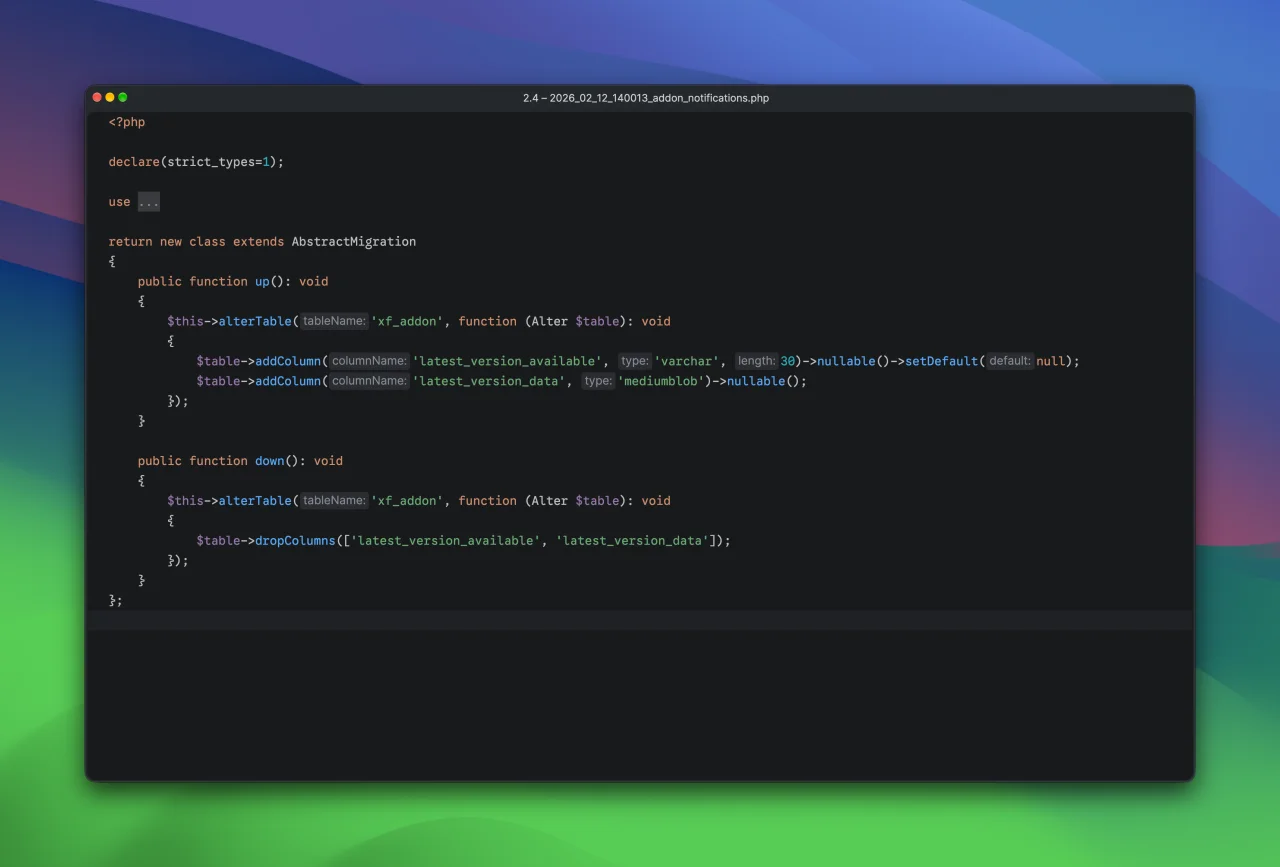
A migration is a small file that describes one change to the database. Adding a table, adding a column, changing an index, converting some data, that sort of thing. Each migration has anup() method that makes the change and, optionally, a down() method that reverses it.Migrations live in a
_migrations directory in your add-on, they're named with a timestamp so they always run in the order they were written, and XenForo records each one as it runs. That means XenForo always knows exactly which changes a forum already has and which ones it still needs.Making a migration
There's a new make command for this:
Code:
php cmd.php xf-make:migration --addon=Demo/Portal add_view_countWhich gives you a new file, something like
src/addons/Demo/Portal/_migrations/2026_10_08_141500_add_view_count.php. Fill in the up() and down() methods using the schema manager you're already used to:
PHP:
<?php

declare(strict_types=1);

use XF\Db\Migration\AbstractMigration;
use XF\Db\Schema\Alter;

return new class extends AbstractMigration
{
    public function up(): void
    {
        $this->alterTable('xf_demo_portal_item', function (Alter $table): void
        {
            $table->addColumn('view_count', 'int')->setDefault(0);
        });
    }

    public function down(): void
    {
        $this->alterTable('xf_demo_portal_item', function (Alter $table): void
        {
            $table->dropColumns('view_count');
        });
    }
};
And that's it. No upgrade step methods named after version IDs, no remembering which step number you're up to and, as with everything using the schema manager and query builder, it works whether you're running MySQL or SQLite.
Running migrations
For admins, migrations simply run as part of installing or upgrading an add-on, exactly where upgrade steps run today, whether that's in the admin control panel, the CLI or a batch install.For developers there are a few CLI commands to make life easier while you're working:
xf-migrate:runruns any pending migrationsxf-migrate:statusshows which migrations have run and which are pendingxf-migrate:rollbackrolls back the last batch, for when you need another go at a migration you're still writing
Bigger changes
Some changes need to touch a lot of data, say backfilling that new column for every row. Rather than trying to do it all in one go and hoping the request doesn't time out, a migration can implement abatch() method and work through the data a chunk at a time:
PHP:
public function batch(MigrationBatch $batch): bool
{
    $ids = \XF::query('xf_demo_portal_item')
        ->select('item_id')
        ->where('item_id', '>', $batch->position)
        ->orderBy('item_id')
        ->limit(500)
        ->fetchAllColumn();

    if (!$ids)
    {
        return true;
    }

    // ... update this batch of rows ...

    $batch->advance(end($ids));

    return false;
}
Progress is saved after every batch, so if an upgrade is interrupted it just picks up where it left off. If you need something to run outside of the migration itself, migrations can also queue jobs, either to complete before the add-on is reactivated (
insertImmediateUpgradeJob()) or to run in the background afterwards (insertPostUpgradeJob()).What does this mean for admins?
Quite importantly, not much Installing and upgrading works just as it does now. The main thing you might notice is that larger upgrades are a bit more forgiving, as they work through in smaller steps and resume if something interrupts them.What does this mean for developers?
First of all, nothing you have today stops working. YourSetup class, its install steps and upgrade steps all work exactly as before, and you can start using migrations whenever you're ready.A few things worth knowing when you do:
- On a fresh install, your
Setupinstall steps run first and then your migrations run on top. So the simplest approach is to leave your install code as it is and make any future changes as migrations. A brand new add-on doesn't even need install steps at all, it can just be migrations. - If your install code already builds your latest schema, you can return
truefrominstallIncludesMigrations()in yourSetupclass and your migrations will be marked as done on install rather than being run. - Uninstalling still goes through
Setup::uninstall(). Migrations are not rolled back when an add-on is uninstalled. - Once your add-on has migrations,
xf-addon:build-releasewon't let you add new upgrade steps for the version you're releasing. Upgrade steps always run before migrations, so mixing the two could mean an upgrade step runs before the change it relies on.
Supporting XenForo 2.3 and 2.4 at the same time
XenForo 2.3 doesn't know what a migration is so it will simply ignore your_migrations directory. If a single release of your add-on supports both 2.3 and 2.4, any database changes still need to be upgrade steps so that forums on 2.3 get them too. Upgrade steps continue to work in 2.4, so this is completely fine.So our recommendation is:
- While your add-on supports XenForo 2.3, keep using upgrade steps.
- From the first release that requires XenForo 2.4 (
2040010in therequiresection of youraddon.json), switch to migrations.
And XenForo itself?
We've moved over too. All of the database changes in XenForo 2.4 are written as migrations and our install data is now generated from them, which, as a nice side effect, means a fresh install and an upgraded forum always end up with exactly the same database.As ever, let us know if you have any questions below. We're looking forward to seeing what you do with it!
