
XF 2.3 How to define .pairs colors?

Cannabis Ape

Active member
Licensed customer
Because I need different colored pairs for different sections. In the example I changed Joined: and Last seen: To white but it also changes Messages, reaction score and points to white too. And everything else that is defined by .pairs of which I can see now; Threads, Messages and Members under forum statistics are white too making them invisible. Quite annoying. Is there a way to define each of them so I don't have to ask every time?

Same for
.tooltip--member .tooltip-content {
color: white;
text-align: left;
}
It will change the administrator and viewing forum list to white but also the numbers 0 0 0
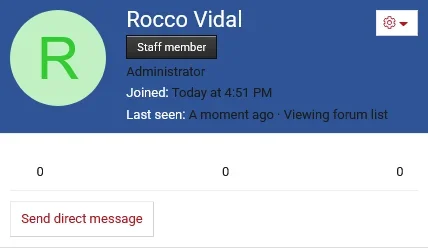
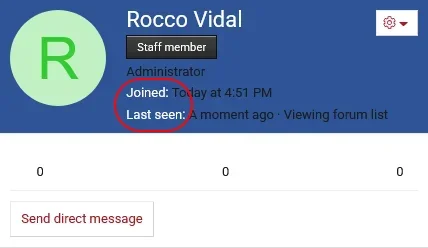
Screenshot 2026-06-15 at 19-16-27 Ondeugend Nederland Forum.webp
 
You need to scope the selector to the specific parent container. For example, for the member tooltip blurb labels:
CSS:
.tooltip--member .memberTooltip-blurbContainer .pairs > dt {
    color: #fff;
}
 
You need to scope the selector to the specific parent container. For example, for the member tooltip blurb labels:
CSS:
.tooltip--member .memberTooltip-blurbContainer .pairs > dt {
    color: #fff;
}
What exactly was that suppose to do in the image because added it to the extra.less but don't see any change.
 
Try it once with !important just to confirm whether the selector is targeting the correct element:
CSS:
.tooltip--member .memberTooltip-blurbContainer .pairs > dt {
    color: #fff !important;
}
ss.webp
 
Try it once with !important just to confirm whether the selector is targeting the correct element:
CSS:
.tooltip--member .memberTooltip-blurbContainer .pairs > dt {
    color: #fff !important;
}
View attachment 339912
Ah yeah I already had that one right, it was the others that were in issue but I think I got it. Had to scroll down and add "color: white;" to certain parts that didn't had color in it originally. Been 5 years I worked with Xenforo, I'm a bit rusty 😆 Thanks for the replies.
 
Back
Top Bottom