
XF 1.5 How to change the default template for email users?

Walkman Archive

Active member
Licensed customer
Hi there,

When an user registers in our community, it receives an email with this look:
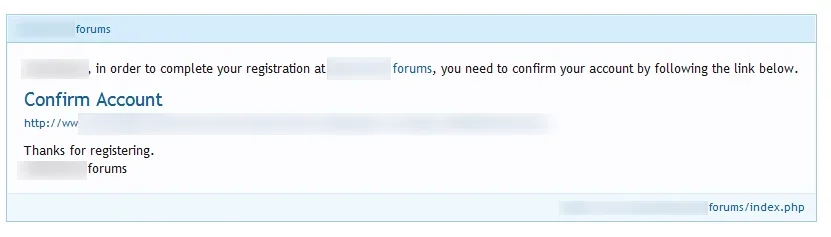
confirm email.webp
but If I send an email to any user using the Users > email users, it's a plain text.
How can I use that template for emailing?

(excuse me if it is a dumb question)

Thanks,
 
It's not clear what you're asking.

I think you mean you want to style the emails you manually send from the ACP?
If so, you just use regular HTML/CSS and style it as required.

If you want to copy the default email template, you will need to enable debug mode to access the template.
 
Hi Brogan,

What I mean is: how to add those blue bars and the styling when I send an email from the CP > USers > Email Users?
Why don't they appear by default?
I'd prefer to just add the text as if I was posting and not bothering with their styling...
 
@Brogan sorry to bother you yoda of awesome XF wisdom... I wonder if you could help with a small question kinda within this same vein... I send out site emails from a 'noreply' address - is there a template I could modify to add in a "do not respond to this email" type message?

Thanks sir!
 
Back
Top Bottom