
Does anyone know how we can add hover text / title / tooltip to the badge?
I think it is hard coded in templater.php


Does anyone know how we can add hover text / title / tooltip to the badge?


I know the image I provided was just a sample. If you want the real one it is https://codinghelp.site/userbanners/admin.pngHi @Erin Nicole , when I click on the image you provided, I get this which indicates it might be a bad link
View attachment 262715
You must add it to the "extra.less" (as described in the instructions) in Templates and make sure nothing is mistyped. If you are still unable to get it to work, give me temp access to the template area and I will see what I can do.Doesn't seem to work for me. I uploaded my user group banners to a directory I created called userbanners and pointed the CSS to them by going to https://codinghelp.site/userbanners/image.png (pointing to each image)
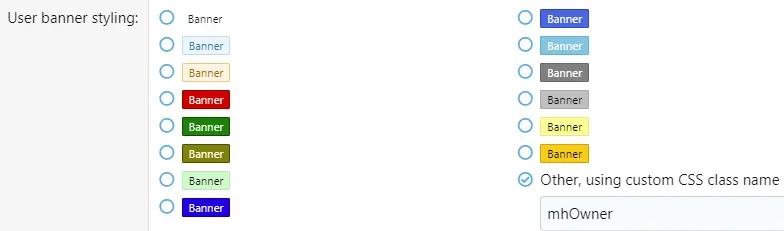
Then I updated the roles in the settings by using the custom CSS class name I created which was adminBadge (for one of them) and nothing updates.
I even tried adding the CSS to the usernameCSS section and that did not work.
That's where I have it on all of my themes.You must add it to the "extra.css" (as described in the instructions) in Templates and make sure nothing is mistyped. If you are still unable to get it to work, give me temp access to the template area and I will see what I can do.

////////// START - Group Banner/Badge CSS //////////
/* Adds userBanner to memberHeader-banners and memberTooltip-banners */
.userBanner.mhOwner{
     background-image: url('/ranks/Spinosaurus.png');
     display: block;
     background-size: 250px; // adjusts size of background image
     background-position: 1.5% 0%; // adjusts image position (x% y%)
     background-repeat: no-repeat;  // keeps image from repeating
     text-indent: -7px;  // shifts text left or right
     padding-top: 45px;  // adjusts distance from image to text (group name)
     text-align: left;
     color: transparent;  /* remove slashes if you want to hide the text */
}
/* Additonal adjustments for message-userBanner Only */
.userBanner.mhOwner.message-userBanner {
     background-position: 50% 0%; // adjusts image position (x% y%)
     text-indent: 0px;  // shifts text left or right
     text-align: center;
}
/* Adjusts size, position, or removal of banner image in Mobile view */
@media (max-width: 650px){
.userBanner.mhOwner.message-userBanner.userBanner {
  // background-image: none; /* remove the slashes to remove image in mobile view */
     display: inline-block;
     background-size: 35px; // adjusts size of background image
     background-position: 0% 0%; // adjusts image position (x% y%)
     text-indent: -7px;  // shifts text left or right
     padding-top: 37px;  // adjusts distance from image to text (use with image)
  // padding-top: 0px;  /* remove the slashes and delete line above to remove image in mobile view */
     text-align: left;
}
}

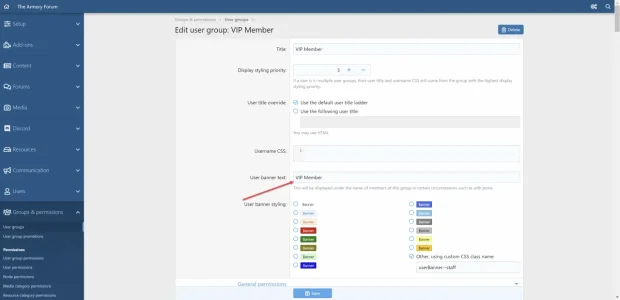
Yea... I honestly hope 2.3 or 2.4 or something will have an easy way to use custom role images without needing to add a bunch of custom CSS.@KensonPlays Make sure that the "User banner text" block has text inside. Don't ask me why, but they made it that way.
View attachment 268943
Glad I could help. Good like with the site.Yea... I honestly hope 2.3 or 2.4 or something will have an easy way to use custom role images without needing to add a bunch of custom CSS.


We use essential cookies to make this site work, and optional cookies to enhance your experience.