XF 2.3 How does <xf:checkboxrow> works?

BredyAK

Member
I want to create an option with <xf:checkbox> created in <xf:foreach>, but it seems <xf:checkbox> is invalid inside <xf:checkboxrow>.
How to create a checkbox list option?
 
Ah yes. Sorry for forgetting it.

I want to create a list of checkbox, I tried:
Code:
<xf:checkboxrow
    label="{$option.title}"
    hint="{$hintHtml}"
    explain="{$explainHtml}"
    html="{$listedHtml}"
    rowclass="{$rowClass}"
    listclass="listColumns">
    <xf:foreach loop="$groups" value="$group">
        <xf:option name="{$inputName}[groups][{$group.value}]" value="{$option.option_value.{$group.value}}">
        {{ $group.label }}
        </xf:option>
    </xf:foreach>
</xf:checkboxrow>
It shows all of the user groups name, and got data as {groups: {"1": "1", "2": "2"}} in backend.
How can I make it outputs the format like {groups: [1, 2]}?
 
you need to loop the options as you have, but you're missing the xf:checkbox declaration.


as an example from the account_preferences template:

Code:
<xf:checkboxrow label="{{ phrase('content_options') }}">
                <xf:option value="watch_no_email" name="option[creation_watch_state]" checked="{{ $xf.visitor.Option.creation_watch_state ? true : false  }}"
                    label="{{ phrase('automatically_watch_content_you_create...') }}">
                    <xf:checkbox>
                        <xf:option value="watch_email" name="option[creation_watch_state]" checked="{{ $xf.visitor.Option.creation_watch_state == 'watch_email' }}"
                            label="{{ phrase('and_receive_email_notifications') }}" />
                    </xf:checkbox>
                </xf:option>
                <xf:option value="watch_no_email" name="option[interaction_watch_state]" checked="{{ $xf.visitor.Option.interaction_watch_state ? true : false  }}"
                    label="{{ phrase('automatically_watch_content_you_interact_with...') }}">
                    <xf:checkbox>
                        <xf:option value="watch_email" name="option[interaction_watch_state]" checked="{{ $xf.visitor.Option.interaction_watch_state == 'watch_email' }}"
                            label="{{ phrase('and_receive_email_notifications') }}" />
                    </xf:checkbox>
                </xf:option>
                <xf:option name="option[content_show_signature]" checked="{$xf.visitor.Option.content_show_signature}"
                    label="{{ phrase('show_peoples_signatures_with_their_messages') }}" />
            </xf:checkboxrow>
 
you need to loop the options as you have, but you're missing the xf:checkbox declaration.


as an example from the account_preferences template:

Code:
<xf:checkboxrow label="{{ phrase('content_options') }}">
                <xf:option value="watch_no_email" name="option[creation_watch_state]" checked="{{ $xf.visitor.Option.creation_watch_state ? true : false  }}"
                    label="{{ phrase('automatically_watch_content_you_create...') }}">
                    <xf:checkbox>
                        <xf:option value="watch_email" name="option[creation_watch_state]" checked="{{ $xf.visitor.Option.creation_watch_state == 'watch_email' }}"
                            label="{{ phrase('and_receive_email_notifications') }}" />
                    </xf:checkbox>
                </xf:option>
                <xf:option value="watch_no_email" name="option[interaction_watch_state]" checked="{{ $xf.visitor.Option.interaction_watch_state ? true : false  }}"
                    label="{{ phrase('automatically_watch_content_you_interact_with...') }}">
                    <xf:checkbox>
                        <xf:option value="watch_email" name="option[interaction_watch_state]" checked="{{ $xf.visitor.Option.interaction_watch_state == 'watch_email' }}"
                            label="{{ phrase('and_receive_email_notifications') }}" />
                    </xf:checkbox>
                </xf:option>
                <xf:option name="option[content_show_signature]" checked="{$xf.visitor.Option.content_show_signature}"
                    label="{{ phrase('show_peoples_signatures_with_their_messages') }}" />
            </xf:checkboxrow>
Thank you for your response.
It shows a list with user groups correctly now, but the value was not saved.
This is my code:
Code:
<xf:checkboxrow label="{$option.title}"
                hint="{$hintHtml}"
                explain="{$explainHtml}"
                name="{$inputName}[userGroups]"
                value="{{ $option.option_value.userGroups ?: [] }}">
    <xf:foreach loop="$userGroups" value="$userGroup">
        <xf:option label="{$userGroup.label}" value="{$userGroup.value}">
        </xf:option>
    </xf:foreach>
</xf:checkboxrow>
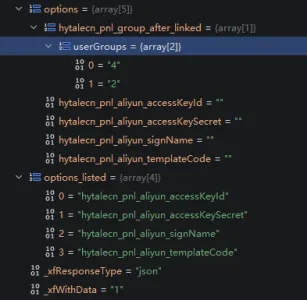
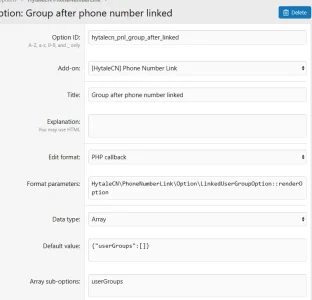
I found the option/update action needs an options_listed in request body, and my option key is not in it, so this option was ignored. What causes that?
 
Last edited:
the code still does not have the checkbox template code around the option.
When I have:
HTML:
<xf:checkboxrow label="{$option.title}"
                hint="{$hintHtml}"
                explain="{$explainHtml}"
                name="{$inputName}[userGroups]"
                value="{{ $option.option_value.userGroups ?: [] }}"
                listclass="listColumns">
    <xf:foreach loop="$userGroups" value="$userGroup">
        <xf:checkbox>
            <xf:option label="{$userGroup.label}" value="{$userGroup.value}" />
        </xf:checkbox>
    </xf:foreach>
</xf:checkboxrow>
I got Tag foreach contains an unexpected child element.
(Got Tag checkboxrow contains an unexpected child element. if I place the <xf:checkbox> outside <xf:foreach>)
 
Back
Top Bottom