I've tried it and I don't see any change, maybe my problem is the size of the main page. I use cloudflare I have no banner or other type of ads this can slow the site, it's a problem that I no longer know how to solve...

You are using an out of date browser. It may not display this or other websites correctly.
You should upgrade or use an alternative browser.
You should upgrade or use an alternative browser.
Google's latest complaint
- Thread starter rickhz
- Start date
how i can set a dimensions for this other pics? i have try only put a dimension on the logo. thanks so much for the help
I have edited and removed posts from this thread, as well as one signature.
Please refer to the rules regarding posting inappropriate content -- https://xenforo.com/community/help/terms/ -- that includes URLs in code tags.
Please refer to the rules regarding posting inappropriate content -- https://xenforo.com/community/help/terms/ -- that includes URLs in code tags.

why do you ask this in a thread about Google's Core Web Vitals ?how i can set a dimensions for this other pics?
prolly he's not a customer?@Brogan
With all due respect, but how du you expect users to help other users/customers if we can't cite URLs/code of the websites they are asking for help?
The site rules are clear - links of that nature must not be posted.@Brogan
With all due respect, but how do you expect users to help other users/customers if we can't cite URLs/code of the websites they are asking for help?
Customers can submit tickets for official support, otherwise community members can provide support via conversation.


I think brogan meant that you can make the site public in a clear way if it is for adults, (example.com).
i have sent you a pm, sorry about this and thanks for the help really appreciate@Brogan
With all due respect, but how do you expect users to help other users/customers if we can't cite URLs/code of the websites they are asking for help?
oh, right... oops)
Well, its's your forums and your rules, but IMHO that's nonsense.otherwise community members can provide support via conversation.
I am definitly not going to waste my time by giving answers via conversation for questions that could be usefurl for other customers as well

Last edited:
I accidentally deleted metadatalogo url , can anyone show a screenshot what was the url to insert? thanks in advance
Why do you ask this in a thread about Google's Core Web Vitals ?I accidentally deleted metadatalogo url , can anyone show a screenshot what was the url to insert? thanks in advance
for this reason , i just try this stepAh found it.
If you add a custom logo, there is no way to add proper dimensions in the control panel.
This is causing the shift.. this should be optimized in XF I guess:
View attachment 230125
Once I revert this to the original logo, the CLS score is 0!
edit: After adding width/height properties to the img logo tag in PAGE_CONTAINER, the CLS score is fine again.

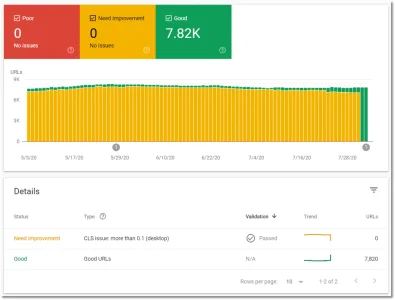
https://www.seroundtable.com/google-measures-web-vitals-29886.html
Googlebot (or Lighthouse, or PageSpeed Insights) measures lab data, which is hypothetical performance data in a pretty ideal environment. This isn't representative of what actual users see - but that's more important...
So Google Search looks for a mix of lab data and real user metrics (rUM, e.g. the Chrome UX report) to determine performance signals. You wanna take a look at both, too.
Lab data gives you a good idea where to dig deeper, rUM is harder to get & gives you a better perspective.
And that's the cool thing about the GSC web vitals report - it shows you limited data (b/c not every URL might have enough rUM data) but it's real user metrics! So if something is "poor" there, it means real users suffered. You wanna fix that for sure.

Is that the size of the raw image, or the image as displayed?PAGE_CONTAINER:
Code:<div class="p-header-logo p-header-logo--image"> <a href="{{ ($xf.options.logoLink && $xf.homePageUrl) ? $xf.homePageUrl : link('index') }}"> <img width="...px" height="...px" src="{{ base_url(property('publicLogoUrl')) }}" alt="{$xf.options.boardTitle}" {{ property('publicLogoUrl2x') ? 'srcset="' . base_url(property('publicLogoUrl2x')) . ' 2x"' : '' }} /> </a> </div>
ETA: I don't see this code anywhere in my page_container.
Similar threads

- Replies
- 3
- Views
- 102
