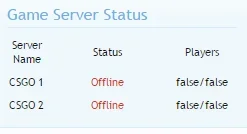
Game Server Status Check [Paid] [Deleted]

Small bug to report.

In stentor_server_list_maintemplate.css:
Code:
.icon {
    padding:3px;
    width:17px; 
    height:17px;
}

I think this overrides the other icon CSS, in the default Xenforo editor, this happens:
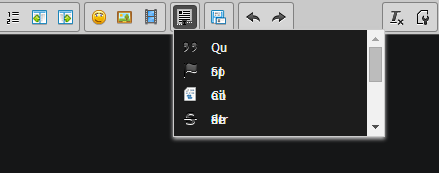
929d48b6b303bb6a08f33b9229eeff6c.png


Changing the width to something larger fixes this, but I'd assume that messes up the icons if you have them enabled.
 
Hello,

i bought your very interesting and useful Addon yesterday and set it up.

Unfortunately it doesn't work on my Forum, i tired Teamspeak 3 , Minecraft and Team Fortress 2 Servers.

There isn't any text showing the Server is Offline/Online or if they are Players Online.

I've uploaded a Screenshot, what could be the Issue?

Thanks in advance and would like to see more coming like Playernames, Score, Ping.

greeTings,
Doug Heffernan
 

Attachments

  • gameserver-not-working.webp
    gameserver-not-working.webp
    10.9 KB · Views: 33
Hello,

i bought your very interesting and useful Addon yesterday and set it up.

Unfortunately it doesn't work on my Forum, i tired Teamspeak 3 , Minecraft and Team Fortress 2 Servers.

There isn't any text showing the Server is Offline/Online or if they are Players Online.

I've uploaded a Screenshot, what could be the Issue?

Thanks in advance and would like to see more coming like Playernames, Score, Ping.

greeTings,
Doug Heffernan

Hi, if you could message me your server ip and a picture of youre config i'll sort this out for you right away.


Small bug to report.

In stentor_server_list_maintemplate.css:
Code:
.icon {
    padding:3px;
    width:17px;
    height:17px;
}

I think this overrides the other icon CSS, in the default Xenforo editor, this happens:
929d48b6b303bb6a08f33b9229eeff6c.png


Changing the width to something larger fixes this, but I'd assume that messes up the icons if you have them enabled.

Well, this is just poor code on my part, I should really know about general class names by now, i'll sort it in the next version
 
Were you able to fix this issue, I'm having exactly the same problem on my website.

Hello,

JoeGrandy coul help me with a temporarily fix by replacing the following code in the "index.php":
Search for:
PHP:
dirname($_SERVER['PHP_SELF'])
and replace with:
PHP:
dirname($_SERVER['HTTP_HOST'])

Hope i could help you also.

greeTz,
Doug Heffernan
 
JoeGandy updated Game Server Status Check with a new update entry:

Update 1.3.7

Updates
  • Finally got around to fixing find the script list, uses 3 methods then if that fails we have a fall-back url in the config.
  • Added a brand new automated payment system, rather than relying on emails (If you have already bought the plugin i sent you login details to store.joe.lc via email, check spam folders)

Read the rest of this update entry...
 
Issues with the payment system have now been resolved, sorry about that to the people wishing to buy.
 
I got a small problem: I cant change the position of the addon (its fix on the 1st position) and I cant change the title of the widget or well it's not working^^.
Any help yet?

Kind regards
 
Joe, I have just downloaded this & tried to install it (both 1.3.8 version and 1.4.0 versions on your store page) - Both are displaying the following errors. error.webp

Any help in fixing this would be appreciated.
 
Back
Top Bottom