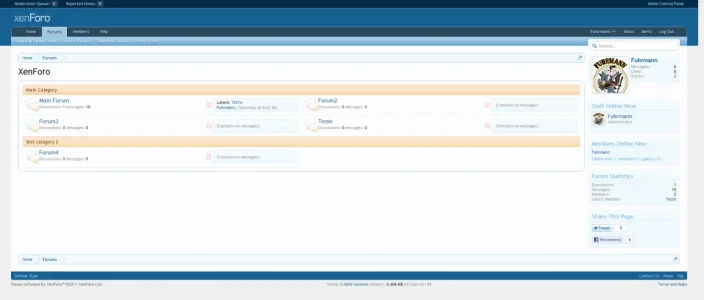
Forums in 2 Columns

Mufasa

Active member
Is there a mod or a template modification to put forums in 2 columns?

CATAGORY 1
Forum 1 | Forum 2
Forum 3 | Forum 4

They dont have to have number of discussions or last person to post.

Thanks!
 
2dmh6jk.png

Not so good, lol.
 
http://thesupportforum.co.cc

A demo site for when its all set up. I dont like localhost lol.

Try this:

add the following code to your EXTRA.css:

Code:
.sectionMain {
overflow: auto;

}

.nodeList .node.level_2 {
float: left;
width: 50%;
}

And oh, revert the modifications in templates you did above. Then after insert this code above in EXTRA.css.

Please, post your feedback!:)


Here is what will be (my test board)

Sem título.webp
 
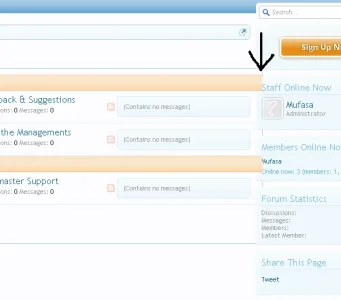
I found a little bug with this tho, you have to have an even number of forums for it to work efficiently, otherwise it will mess up like my image i posted earlier.

 
I found a little bug with this tho, you have to have an even number of forums for it to work efficiently, otherwise it will mess up like my image i posted earlier.

Replace the code i gave you above and put this in your EXTRA.CSS, dont forget to replace the old css with this one:

Code:
.sectionMain {
overflow: hidden;
}

.nodeList .node.level_2 {
float: left;
width: 50%;
}

.nodeList .categoryStrip {
width: 100%;
overflow:hidden;
}

imagem.webp
 
That didnt do anything, so i did this:

.nodeList .categoryStrip {
width: 98%;
overflow:hidden;
}

Worked better, but ive still got that blue outline hanging over, doesnt really matter but if there is a fix would be great :p
 
There you go. Much better thanks.

So the complete code is:

Add to EXTRA.css the following:

Code:
.sectionMain {
overflow: hidden;
width: 98% !important;
}

.nodeList .node.level_2 {
float: left;
width: 50%;
}

.nodeList .categoryStrip {
width: 98%;
overflow:hidden;
}
 
There you go. Much better thanks.

So the complete code is:

Add to EXTRA.css the following:

Code:
.sectionMain {
overflow: hidden;
width: 98% !important;
}
 
.nodeList .node.level_2 {
float: left;
width: 50%;
}
 
.nodeList .categoryStrip {
width: 98%;
overflow:hidden;
}


This only works so long as you keep the browser window wide. If you narrow it down, the forum titles go all vertical on you. Looks horrible.
 
Bringing up something old but this looks great on my forum but there are errors. Is there a solution yet or another thread somewhere?

Thank you
 
Back
Top Bottom