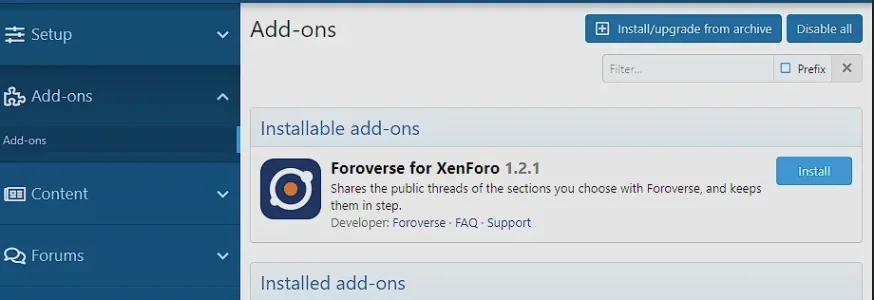
Foroverse for XenForo

Foroverse for XenForo 1.2.5

No permission to download
Tried to confirm email for test account and see

403​

This action is unauthorized.
OK, I tried again and (I think) it was confirmed.

But when I try to link the account via replying to a post I get this error notice (on my forum)

This account can't be linked to Foroverse.
 
OK, I tried again and (I think) it was confirmed.

But when I try to link the account via replying to a post I get this error notice (on my forum)

This account can't be linked to Foroverse.

Is it a valid account? I mean not disabled/rejected or spam cleaned?
What account is it ? I'll have a look and see if I can find something that clears things up.
 
About the missing threads: when you share a new section, Foroverse imports it in two passes. First come the threads started in the last 90 days, newest first. Then a full check brings in everything else in that section, including older threads with new replies, which sit at the top of your forum. That runs in the background, so for a big section it can take a little while. If those four still aren't there in an hour or so, let me know which ones and I'll look into it.
The latest threads are still not there.

It is the first 4 here:


Also one of the the stickies, one of which is only a couple of days ago.
What account is it ? I'll have a look and see if I can find something that clears things up.
It's my test account Dusty. Does it have to have the same name as the account to link to? No, changed it to the same name (it's now Curtis) and get the same response.

I did link my main account, cafesaxophone, to Administrata, however there was an error, but then I found I was logged in and I could post to Administrata via Foroverse
 
Last edited:
Suggestion: would it be possible to mark specific threads to be ignored in Foroverse?
 
The latest threads are still not there.

It is the first 4 here:


Also one of the the stickies, one of which is only a couple of days ago.

It's my test account Dusty. Does it have to have the same name as the account to link to? No, changed it to the same name (it's now Curtis) and get the same response.

I did link my main account, cafesaxophone, to Administrata, however there was an error, but then I found I was logged in and I could post to Administrata via Foroverse
Thanks. I checked your Breakfastroom on Foroverse. Every thread started in the last 90 days is there, including Motorbikes. Your community page opens on the Latest tab, which orders threads by the date they were started, so Motorbikes (started 30 September) sits a few places down. The Active tab orders them by latest reply, like your forum does.

What's missing are the older threads that have new replies: Do you read books?, watches, Mike's musings, Daily Check In and Recording Thread. Those come in with the full check that runs after you share a section, and on your forum that check didn't finish. That's on our side, I'm looking into why.

You can start the check again yourself: Setup › Foroverse, Health tab, "Check everything again". You can use it once an hour.

The names don't need to match. You can link any Foroverse account to any account on your forum.

That message is about the account you're signed in with on cafesaxophone.com when you click link, not your Foroverse account. Which forum account were you signed in with at that moment? If it's a test account you made on your forum, check it in your admin panel: Users › List all users › that account › "User state". It needs to be Valid. Also check that it isn't listed under Logs › Spam › Spam cleaner log.

Good to hear your main account linked and posting to Administrata works.

I have thumbnails of first image ticked, but is showing the full image.

I see them as thumbnails:
1791901373423.webp

Does it look differently for you?
 
I see them as thumbnails:
Maybe we mean different things. I think of thumbnails as very small versions. Not to worry though it's not a problem.
You can start the check again yourself: Setup › Foroverse, Health tab, "Check everything again". You can use it once an hour.
Just checked again those threads are still missing. Should I turn it off and on again maybe
That message is about the account you're signed in with on cafesaxophone.com when you click link, not your Foroverse account. Which forum account were you signed in with at that moment? If it's a test account you made on your forum, check it in your admin panel: Users › List all users › that account › "User state". It needs to be Valid. Also check that it isn't listed under Logs › Spam › Spam cleaner log.
No the test account is valid. I just keep getting: This account can't be linked to Foroverse.
 
Maybe we mean different things. I think of thumbnails as very small versions. Not to worry though it's not a problem.
I think so. ;) All good though. The images shown on Foroverse are the correct ones in size as we designed it.
Just checked again those threads are still missing. Should I turn it off and on again maybe
No, there is a minor sync issue on our end, this will be resolved soon.
No the test account is valid. I just keep getting: This account can't be linked to Foroverse.
Also looking into this.
Edit: You are positive that the linked account is the same as your logged in account? And that you are not trying to link one account to another that's been linked before?
 
@Mr Lucky I just registered a fresh account on Cafesaxophone and linked it to Foroverse without any problem. So the add-on and your forum's setup are fine; it's something about the account you're using itself.

That message only appears for an account that is disabled or rejected, or that has an entry in the spam cleaner log that was never restored. Since Curtis shows as Valid, please check Logs > Spam > Spam cleaner log for Curtis. If it's there (for example from trying the spam cleaner on the test account), restoring it or simply making a new test account will fix it.

Also worth a quick check: make sure the top right of your forum says Curtis when you click to link, since the check runs on whichever account is signed in at that moment.

Let me know if you run into any issues.
 
Since Curtis shows as Valid, please check Logs > Spam > Spam cleaner log for Curtis. If it's there (for example from trying the spam cleaner on the test account), restoring it or simply making a new test account will fix it.
That was it. Years ago I had tested the spam cleaner on Curtis! Linked up now.
 
Foroverse updated Foroverse for XenForo with a new update entry:

See why an account can't be linked

This update tells you exactly why an account can't be linked to Foroverse.

New: when the add-on refuses to link an account, it now writes the exact reason to your forum's server error log (Logs > Errors > Server error log). The entry names the account and where the link was refused, and says why: the account is banned, its user state isn't Valid, or the spam cleaner was used on it and it was never restored (with the date and who applied it). It also tells you what to change to allow...

Read the rest of this update entry...
 
@Mr Lucky your threads issue has been resolved, as it was a time-out on our end. I see it's currently importing and counting over 7300 threads. Those missing topics will likely be included. But I'll check once the import has been completely done.

Edit: all good to go!
 
Last edited:
And now, add a Single Sign On. Then every attending Forum cann use "Login with XenoVerse"
 
S
@Mr Lucky your threads issue has been resolved, as it was a time-out on our end. I see it's currently importing and counting over 7300 threads. Those missing topics will likely be included. But I'll check once the import has been completely done.

Edit: all good to go!
Thats odd because I’m still missing the first five threads.
 
Also, after I uninstalled it, it didn't seem to remove the files, and it appears that I have to manually delete them via Filezilla:
foroverse removed.webp
 
We will be looking into this.
Thanks!

Also got this error:

Code:
XF\Db\Exception: Foroverse for XenForo: MySQL query error [1406]: Data too long for column 'data_key' at row 1 src/XF/Db/AbstractStatement.php:225
Generated by: Gizmo Oct 13, 2026 at 11:08 PM
Stack trace
            INSERT INTO xf_data_registry
                (data_key, data_value)
            VALUES
                (?, ?)
            ON DUPLICATE KEY UPDATE
                data_value = VALUES(data_value)
        
------------

#0 src/XF/Db/Mysqli/Statement.php(207): XF\Db\AbstractStatement->getException('MySQL query err...', 1406, '22001')
#1 src/XF/Db/Mysqli/Statement.php(83): XF\Db\Mysqli\Statement->getException('MySQL query err...', 1406, '22001')
#2 src/XF/Db/AbstractAdapter.php(96): XF\Db\Mysqli\Statement->execute()
#3 src/XF/DataRegistry.php(207): XF\Db\AbstractAdapter->query('
            INSERT INTO...', Array)
#4 src/addons/Foroverse/Community/Service/RefusalNote.php(78): XF\DataRegistry->set('foroverseCommun...', Array)
#5 src/addons/Foroverse/Community/Pub/Controller/LinkController.php(62): Foroverse\Community\Service\RefusalNote::write(Object(SV\ConversationEssentials\XF\Entity\User), 'link')
#6 src/XF/Mvc/Dispatcher.php(364): Foroverse\Community\Pub\Controller\LinkController->actionLink(Object(XF\Mvc\ParameterBag))
#7 src/XF/Mvc/Dispatcher.php(266): XF\Mvc\Dispatcher->dispatchClass('Foroverse\\Commu...', 'Link', Object(XF\Mvc\RouteMatch), Object(Foroverse\Community\Pub\Controller\LinkController), NULL)
#8 src/XF/Mvc/Dispatcher.php(121): XF\Mvc\Dispatcher->dispatchFromMatch(Object(XF\Mvc\RouteMatch), Object(Foroverse\Community\Pub\Controller\LinkController), NULL)
#9 src/XF/Mvc/Dispatcher.php(63): XF\Mvc\Dispatcher->dispatchLoop(Object(XF\Mvc\RouteMatch))
#10 src/XF/App.php(2840): XF\Mvc\Dispatcher->run()
#11 src/XF.php(850): XF\App->run()
#12 index.php(23): XF::runApp('XF\\Pub\\App')
#13 {main}
Request state
array(4) {
  ["url"] => string(110) "/index.php?foroverse/link&code=OBKltqoCKfoSIz8KAnOihRcfflN1Ig1fTsPuF08r&state=4ng3Waoq9pHf3l3DZCpnDapVlf4V6gDw"
  ["referrer"] => string(22) "https://foroverse.com/"
  ["_GET"] => array(3) {
    ["foroverse/link"] => string(0) ""
    ["code"] => string(40) "OBKltqoCKfoSIz8KAnOihRcfflN1Ig1fTsPuF08r"
    ["state"] => string(32) "4ng3Waoq9pHf3l3DZCpnDapVlf4V6gDw"
  }
  ["_POST"] => array(0) {
  }
}

 
And now, add a Single Sign On. Then every attending Forum cann use "Login with XenoVerse"
It's already there. Every forum that connects with the add-on can show a "Sign in with Foroverse" button on its login and register pages. It must be enabled by the admin of course.

1791985870897.webp

1791985949019.webp

Setup => Foroverse, on the Members tab:
  • Sign in with Foroverse: on by default once your forum is connected. Members who already have an account here link it with their password once, and from then on they're signed straight in.
  • Allow registration: off by default. If you turn it on, people without an account on your forum can create one through Foroverse. Foroverse has already verified their email, so your forum doesn't send a second confirmation, and your approval queue and spam checks still apply.

Both switches sit under account linking, so linking needs to stay on for them to work.
 
Back
Top Bottom