Resource icon

Font Awesome on Menu and Sub Menus

Last edited:
How can I add custom icons?

See post by Chris D at https://xenforo.com/community/threads/replace-fa-node-icon-with-an-image.135695/post-1183162

Add to extra.less template:

Code:
/* change forum nodes from FA to icons Chris D */
.node-icon i { display: none; }
.node-icon { background-image: url('styles/default/xenforo/xenforo-favicon.png'); background-repeat: no-repeat; background-position: center; }
.node--read .node-icon { opacity: 0.5; }

Replace styles/default/xenforo/xenforo-favicon.png with an icon of your choice. You can find many free ones at


I found it works best at sizes from 32x32 to 50x50.
 
Thanks, you're very kind. But that only change forum nodes. Im using this pugin for that.

I want to add custom icons in menu (navbar).
 
Any update of the submenu menu icons for 2.3.11?
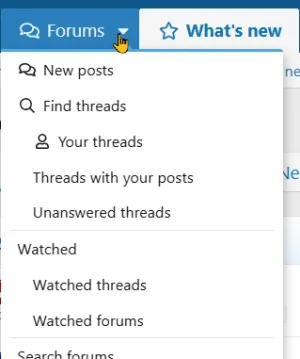
If you mean the drop-down menus, you can just use the data nav ID in extra.css.

Like under Forums, for example

1783971948162.webp

This is done just by adding the following in extra.css

CSS:
// SUBMENUS
[data-nav-id="newPosts"]:before { .m-faIcon(@fa-var-comments); margin-right:5px }
[data-nav-id="findThreads"]:before { .m-faIcon(@fa-var-search); margin-right:5px }
[data-nav-id="yourThreads"]:before { .m-faIcon(@fa-var-user); margin-right:5px }
// END SUBMENUS
 
Thanks, you're very kind. But that only change forum nodes. Im using this pugin for that.

I want to add custom icons in menu (navbar).
Sorry, just seen this, you could do something like..

CSS:
[data-nav-id="newPosts"]:before{
    content:"";
    display:inline-block;
    width:16px;
    height:16px;
    margin-right:6px;
    background:url('https://xenforo.com/community/data/avatars/s/57/57960.jpg?1701363194') center/contain no-repeat;
}
 
Back
Top Bottom