
XF 1.4 Extra.css not fully working after update

Daniel-SP

Well-known member
Licensed customer
Hello guys,

After updated the xenforo and my theme to lasted version, even keeping the same class, looks like its using the main css values for some classes ( not for all)

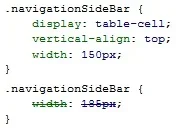
Check the sample above. My extra css is setting it to 185px but its using the configuration from the main theme css.

I have other functions that are replacing correctly. If I put to "block"the 150px value, it gets the 185px correclty.
 

Attachments

  • Sidebar.webp
    Sidebar.webp
    4.6 KB · Views: 10
Hello guys,

After updated the xenforo and my theme to lasted version, even keeping the same class, looks like its using the main css values for some classes ( not for all)

Check the sample above. My extra css is setting it to 185px but its using the configuration from the main theme css.

I have other functions that are replacing correctly. If I put to "block"the 150px value, it gets the 185px correclty.

Is it a problem for you to use !important?

.navigationSidebar {width: 185px !important;}

That will override the 150px setting without having to remove anything.

I tend to use !important quite often w/ extra.css and I have yet to run into any bad issues.
 
Is it a problem for you to use !important?

.navigationSidebar {width: 185px !important;}

That will override the 150px setting without having to remove anything.

I tend to use !important quite often w/ extra.css and I have yet to run into any bad issues.
Thanks for the help. I used if but I didn`t see that my code was wrong. Don't ask me how it was working before. hhehe..

It was like:

.navigationSideBar {
width: 185px; !important
}

Just switched the ; after the important word and worked well.

Thanks again.
 
Back
Top Bottom