XF 2.3 Error importing SQL dump from Cloud: Duplicate entry for primary key

JimH

New member
I'm in the process of migrating from Cloud to self-host and encountering some unexpected headwinds. As a test, I'm trying to reconstruct my database using one of the auto-generated Cloud backups, and I'm getting a 'duplicate entry for primary key' error in the xf_session_activity table. From what I gather, this table is especially volatile, and because the site remains active while these Cloud backups are taken, I'm wondering if they might be capturing a torn/broken state. Thoughts? I'm tempted to simply delete all the entries in this table to unblock myself, but I feel like I shouldn't have to do something like that with an official backup. 😬
 
Solution
Ok! I want to thank those who've replied here. I believe I've solved this, and it's my fault. I'm using a shared host here, and phpMyAdmin is configured for a 50Mb maximum upload size. To deal with this, I'd used a tool called SQLDumpSplitter to break my dump into four pieces. AVOID THIS TOOL! Feeling paranoid this morning, I decided to do a test: I ran the tool again and set the number of chunks to 1. The output file was about 1% larger than the input. I'm going to diff them and see exactly what changed, but suffice it to say I was horrified. Opening and re-saving the original dump using TextEdit yielded a byte-for-byte match. After seeing this, I used TextEdit to snip out just the xf_session_activity table and I...
Are you importing into a Windows based MySQL server by any chance?

I ran into this error when creating a local dev copy of my production server - prod is running on Linux, local dev on Windows.

The cause was an issue translating binary fields between platforms (doesn't happen on Linux <-> Linux exports/imports) and the solution was to do the database dump using the --hex-blob flag.

See: https://dev.mysql.com/doc/refman/8.0/en/mysqldump.html#option_mysqldump_hex-blob
 
don't even import the session table rows, it's not needed.
Well, that's somewhat reassuring. I'll drop those rows for now. If the database dump has consistency issues though, I might just be seeing the tip of the iceberg, no?

Are you importing into a Windows based MySQL server by any chance?
Thanks Slim! Nope. This is MariaDB running on a shared Linux web host. For better or worse, I have no control over how the dumps are done. This is XenForo's Cloud hosting doing the backups.
 
I'm trying to reconstruct my database using one of the auto-generated Cloud backups, and I'm getting a 'duplicate entry for primary key' error in the xf_session_activity table.

This type of errors happens because the backup is trying to insert or update a record with a value that already exists in a field that has a unique constraint. The unique constraint could be a primary key, unique index, or unique key. Because primary keys are and should be unique, MySQL will refuse to insert the duplicate and throw the error that you got. Can you post the full error message?
 
you are on the site/new db.
you were on the old site/old db while performing the dump.

there's a conflict trying to bring that session over.


Just don't bring it over, start empty, XF will re-start new sessions for everyone.
 
Can you post the full error message?
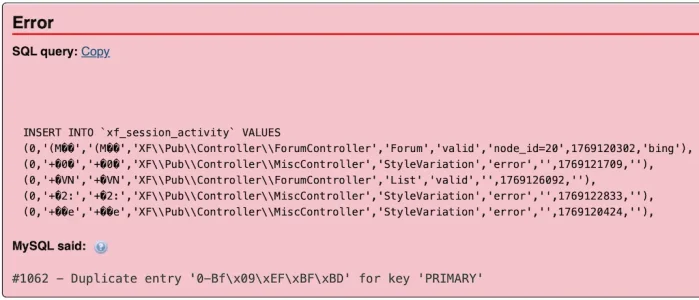
The full error message basically includes the whole table, which includes some private information. Here's what phpMyAdmin shows though:

1770487052277.webp

This is being imported into an empty db, so any duplication is in the dump itself. FWIW, I've set the db collation to utf8mb4_general_ci, though the collation doesn't seem to matter (I should admit that I'm hardly a SQL whiz). I still get this error with the default collation, which in our case was utf8_swedish_ci.
 
Ok! I want to thank those who've replied here. I believe I've solved this, and it's my fault. I'm using a shared host here, and phpMyAdmin is configured for a 50Mb maximum upload size. To deal with this, I'd used a tool called SQLDumpSplitter to break my dump into four pieces. AVOID THIS TOOL! Feeling paranoid this morning, I decided to do a test: I ran the tool again and set the number of chunks to 1. The output file was about 1% larger than the input. I'm going to diff them and see exactly what changed, but suffice it to say I was horrified. Opening and re-saving the original dump using TextEdit yielded a byte-for-byte match. After seeing this, I used TextEdit to snip out just the xf_session_activity table and I imported that into a new db. No errors.

The moral of this story (or one of them): Don't casually trust tools you download. I'm both embarrassed and relieved.
 
Solution
Ok! I want to thank those who've replied here. I believe I've solved this, and it's my fault. I'm using a shared host here, and phpMyAdmin is configured for a 50Mb maximum upload size. To deal with this, I'd used a tool called SQLDumpSplitter to break my dump into four pieces. AVOID THIS TOOL! Feeling paranoid this morning, I decided to do a test: I ran the tool again and set the number of chunks to 1. The output file was about 1% larger than the input. I'm going to diff them and see exactly what changed, but suffice it to say I was horrified. Opening and re-saving the original dump using TextEdit yielded a byte-for-byte match. After seeing this, I used TextEdit to snip out just the xf_session_activity table and I imported that into a new db. No errors.

The moral of this story (or one of them): Don't casually trust tools you download. I'm both embarrassed and relieved.


To import large databases on shared hosting, it's better to import via cron:
mysql -u 'database_user' -p'database_password' database_name < sql_file_name_with_full_path


Example:
mysql -u 'test_user' -p'123456' test_db < /home1/test/public_html/db.sql
 
Back
Top Bottom