
just the throttling errors. i tried uploading a fresh image. preview does not appear. but full attachment does load and appear just fine. probably shouldn't use this considering the throttling issues i continue to face on cloudflare.

![[DigitalPoint] App for Cloudflare®](/community/data/resource_icons/8/8750.jpg?1692633961)

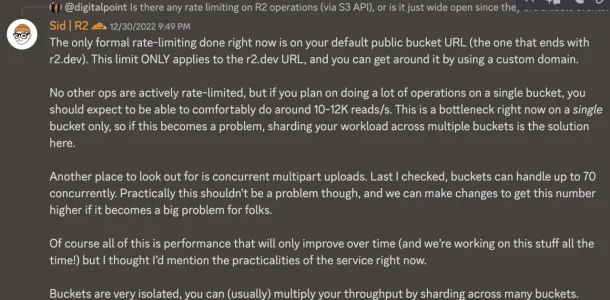
Well according to Cloudflare, R2 endpoints don't have any API throttling. No idea why they are throttling you for API calls, but R2 calls are supposedly not throttled at all (I checked with them on that). Which makes sense since they are more or less billable events.just the throttling errors. i tried uploading a fresh image. preview does not appear. but full attachment does load and appear just fine. probably shouldn't use this considering the throttling issues i continue to face on cloudflare.
Can you post a screenshot of your bucket with some of the file paths? Make sure they are similar to the screenshot I posted. Specifically, the path/filenames need to be similar (like no extra characters or leading slashes). Digging through XenForo's code, the error you see is when it can't find the object by the path XenForo gives.a direct link to attachment like this publicly accessible is also not working. my data folder is currently being copied so waiting for that to finish.


 rclone.org

Does anyone have any tips in regards to moving large amounts of data to R2? I have over 120GB that will need to be moved.
Once I copy the images over and turn on the add-on can I remove the images from my server or do they ned to remain?Use rclone copy command to copy all the files over, then run it again once you turn the option on in the add-on.
It works like rsync and will only copy over new files the second time. That will help minimise down time of images not working.
You can remove them (they aren't used for anything at that point). It makes sense to do some sanity checks on that much data though... maybe keep them there for a bit while you do some spot checking that everything moved and the expected number of objects/files are in the respective buckets. Basically don't click the button to move all the data, delete all the source data and then check to see if it all moved okay (wrong order). haha
But once you are happy with how it looks, the source data/files aren't used for anything whatsoever.

Ya, I haven't deleted any of mine either. I haven't had any issues/problems or missing files, it just feels strange to delete them. hahI'm still checking things over a week later .... Too scared to delete the old files yet
Manage R2 API Tokens link there to generate yourself some for this (can delete them when you are done).
Thanks, looks like rclone is working.I could tell you how to programmatically generate an Access Key ID and Secret Access Key from your existing token, but the easier thing is to go into Cloudflare -> R2, and in the upper right there's aManage R2 API Tokenslink there to generate yourself some for this (can delete them when you are done).
When you go in there, ignore your existing tokens (don't try to generate one for an existing token), instead just do Create API Token. I ran into an issue where I tried to generate a R2 token for an existing API token and it wiped out all the permissions on my existing token. So just keep them separate for this.
Correct. You have to enable (and pick which bucket). Until it’s enabled, it will just work like it’s always worked (local file system or whatever you are using as your file system adapter).Looks like this is going to take a hot minute to complete.
Will new attachments only write to r2 once I turn this on?
Easy enough! Before I started copying I tested the connections for a few minutes and some attachments saved to r2. Sounds like I should be live with this tomorrow. This was perfect timing as I was filling up my storage and was looking at using S3 this weekend. My backups are going to be a lot smaller in another week or so!Correct. You have to enable (and pick which bucket). Until it’s enabled, it will just work like it’s always worked (local file system or whatever you are using as your file system adapter).
And ya… 120GB is a lot of data to move around. Your bottleneck is most likely going to be the network connectivity of your server.

[*]ErrorException: Failed to write files for DigitalPoint/Cloudflare action, including src/addons/DigitalPoint/Cloudflare/Setup.php
[*]src/XF/Error.php:77
[*]Generated by: Tracy
[*]January 6, 2023 at 5:34 AM

Stack trace
#0 src/XF.php(219): XF\Error->logError('Failed to write...', false)
#1 src/XF/Job/AddOnInstallBatch.php(158): XF::logError('Failed to write...')
#2 src/XF/Job/AddOnInstallBatch.php(79): XF\Job\AddOnInstallBatch->stepInit(Object(XF\Timer))
#3 src/XF/Job/Manager.php(260): XF\Job\AddOnInstallBatch->run(8)
#4 src/XF/Job/Manager.php(202): XF\Job\Manager->runJobInternal(Array, 8)
#5 src/XF/Job/Manager.php(118): XF\Job\Manager->runJobEntry(Array, 8)
#6 src/XF/Admin/Controller/Tools.php(122): XF\Job\Manager->runByIds(Array, 8)
#7 src/XF/Mvc/Dispatcher.php(352): XF\Admin\Controller\Tools->actionRunJob(Object(XF\Mvc\ParameterBag))
#8 src/XF/Mvc/Dispatcher.php(259): XF\Mvc\Dispatcher->dispatchClass('XF:Tools', 'RunJob', Object(XF\Mvc\RouteMatch), Object(SV\UserMentionsImprovements\XF\Admin\Controller\Tools), NULL)
#9 src/XF/Mvc/Dispatcher.php(115): XF\Mvc\Dispatcher->dispatchFromMatch(Object(XF\Mvc\RouteMatch), Object(SV\UserMentionsImprovements\XF\Admin\Controller\Tools), NULL)
#10 src/XF/Mvc/Dispatcher.php(57): XF\Mvc\Dispatcher->dispatchLoop(Object(XF\Mvc\RouteMatch))
#11 src/XF/App.php(2483): XF\Mvc\Dispatcher->run()
#12 src/XF.php(524): XF\App->run()
#13 admin.php(13): XF::runApp('XF\\Admin\\App')
#14 {main}
Request state
array(4) {
  ["url"] => string(24) "/admin.php?tools/run-job"
  ["referrer"] => string(153) "https://astrowhat.com/admin.php?tools/run-job&only=addOnInstallBatch44&_xfRedirect=%2Fadmin.php%3Fadd-ons%2Finstall-from-archive-complete%26batch_id%3D44"
  ["_GET"] => array(1) {
    ["tools/run-job"] => string(0) ""
  }
  ["_POST"] => array(3) {
    ["_xfRedirect"] => string(81) "https://astrowhat.com/admin.php?add-ons/install-from-archive-complete&batch_id=44"
    ["_xfToken"] => string(8) "********"
["only_ids"] => string(5) "39317"IMPORTANT for existing users: The new R2 functions and control of new settings require some new permissions for the API Token you use. You can go to your Cloudflare API Tokens, edit the token you have and add the following permissions:Upgraded to this..


We use essential cookies to make this site work, and optional cookies to enhance your experience.
