Custom user fields title and description are not multilingual

Mic

Member
Licensed customer
Is it possible to specify a xenforo phrase for the title and the description of a custom user field? Because now, we have one value for all languages.

I tried to update the custom_filed_edit template to use the $field.title as a xenforo phrase but it is not working.

<label for="ctrl_custom_field_{$field.field_id}">{xen: phrase '{$field.title}'}:</label>

I have this error when I save the template :

The following templates contained errors and were not saved: custom_field_edit: 1) Line 3: Phrase name must be literal
 
Yes, custom field titles are stored in the phrases. Just search the phrases for the title you entered into the custom field. That will find the phrase.
 
Hey,

I am having a bit of trouble fixing this same issue.

Can anyone go into more detail about how to do this?

I have searched the custom field title in the phrases, but it doesn't seem to exist...
 
Phrases for custom user fields begin with user_field_
They are then followed by the field_id you typed in, with the option type appended: user_field_favorite_pet_choice
Choices are then added to make more new phrases:
user_field_favorite_pet_choice_cat
user_field_favorite_pet_choice_dog
user_field_favorite_pet_choice_rock

The values are in the language you typed in. You can use an add-on, or check for the language a member is using in a template, and load those custom fields only:
user_field_favorite_pet_french_choice_cat

edit: wrapped the below in the code tag so smilies do not appear
Code:
btw:
The error in the first post is because the OP is using a variable with the {xen:phrase} tag. Phrases in templates must be literal, ie: {xen:phrase user_field_favorite_pet_choice_cat} and can not be a variable: {xen:phrase '{$field.title}'}

You can use (if applicable to what you want to display):
<label for="ctrl_custom_field_{$field.field_id}">{$field.title}:</label>
or use:
<label for="ctrl_custom_field_{$field.field_id}">{xen:phrase user_field_favorite_pet_choice_dog}:</label>

You can also use an add-on to load the custom user field phrase object(s), and send them to your template.
$favoritePetDog = new XenForo_Phrase('user_field_favorite_pet_choice_dog');
 
Last edited:
Very helpful, thanks. OK, I think I got it sorted.

The multiple choice questions, are going to take some time to manually edit; you say there is an add-on to speed things up... what add-on is it?

Again, appreciate the help!
 
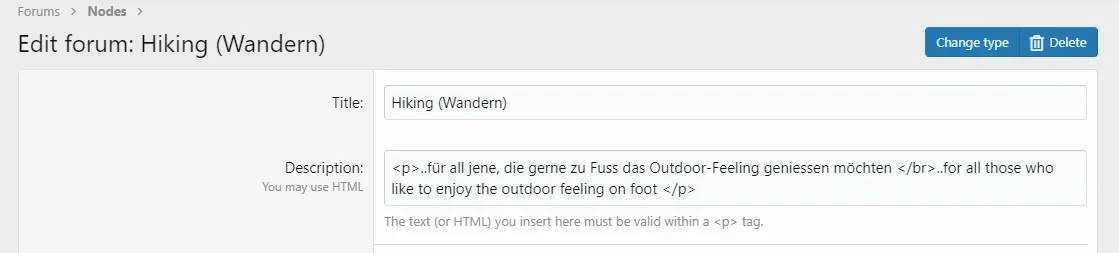
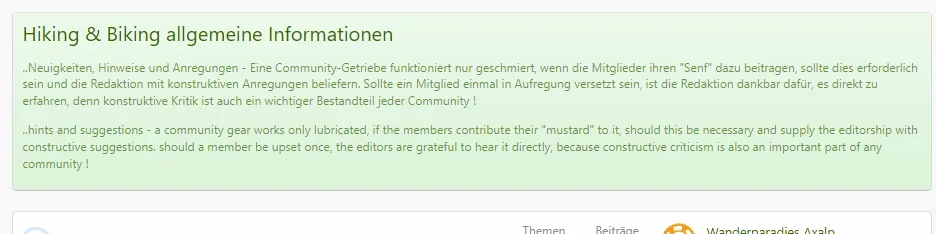
Hi, personally, I am currently not completely thrilled by the fact that static content (for example, forum) can not be adjusted via the voice control content (see screen shots). At the moment I am checking if it makes sense to display the topic titles additionally in 2 languages. It becomes bad if a 3rd or even 4th language is added, consequently everything becomes bloated and no longer readable. In short, it looks like a patchwork.

Question in the round; who of you already had a similar situation and how was this solved, or is there a very reliable translation app, so that the user can read along in his desired language?
 

Attachments

  • fourm_xf_02072022_fields_multilingual.webp
    fourm_xf_02072022_fields_multilingual.webp
    14.2 KB · Views: 5
  • fourm_xf_02072022_fields_multilingual_2.webp
    fourm_xf_02072022_fields_multilingual_2.webp
    27.3 KB · Views: 5
Back
Top Bottom