Crazy amount of guests

but the changes in the template files will need to be checked if merged successfully on every theme update.
I never edit template files, but create template modifications that are tied to my own add-ons. Saves a lot of grief during upgrades, no more merging (which has always been a frustration with XF), and I can look over the list of template modifications to see if any are not being detected. (You can do a simple search/replace, or use regex to search and replace what needs changing.)

I've been thinking of creating a resource here just for this procedure, but am not really qualified to do so.
 
I never edit template files, but create template modifications that are tied to my own add-ons.
Yup... I don't do template edits either, even for stuff I do to my own theme, regardless of plugins, I do it all through custom template modifications, exactly as you outlined, template updates and I can see exactly where something isn't working, fix it quickly, no ongoing issue.
 
Yup... I don't do template edits either, even for stuff I do to my own theme, regardless of plugins, I do it all through custom template modifications, exactly as you outlined, template updates and I can see exactly where something isn't working, fix it quickly, no ongoing issue.
And when I mess something up (as I typically do), with one click I can disable the modification so I don't disrupt the forum.

Where it really helps is when developing a theme on a private server--I can bundle up all those template modifications into add-ons, and that makes it a simple task to transfer these to the live forum. As opposed to having to remember which templates I modified, and applying the same edits to the live forum.
 
@Anthony Parsons
you need to put the wealth of knowledge in an article or guide resources for CF members.
It becomes a useless exercise, things change to fast in this discussion. You can open ChatGPT or Claude, point them at this thread, ask them to summarise it, ask them to find the latest options in this thread, for the issues you have. It will walk you through doing anything you need to do, just ask for a dummies guide, step by step, tell it your server setup, everything and anything else about your setup, forum version, DNS, etc, hell, just ask it to ask you yes / no questions whether you have something or not, it will help you greatly solve your problems.

Every site is unique, and bot mitigations are unique to some degree, which comes from your raw access logs, however, you have to first modify them to capture the right information.
 
template modifications
I'm not very familiar with XF styles, but this sounds like a good principle - similar with the way customizations were done also in WordPress: you'd never ever ever modify a theme/style directly, instead create a child theme/style where you'd make all customizations. This way the software could update the original theme without conflicts or overwriting your customizations, and ideally your customizations would still apply afterwards.

So the suggestions before were the crude approach to modify the theme directly, but there would be a better way to have the same outcome - just wasn't the purpose of that post to go in detail into how to properly change themes/styles.
 
It becomes a useless exercise, things change to fast in this discussion. You can open ChatGPT or Claude, point them at this thread, ask them to summarise it, ask them to find the latest options in this thread, for the issues you have. It will walk you through doing anything you need to do, just ask for a dummies guide, step by step, tell it your server setup, everything and anything else about your setup, forum version, DNS, etc, hell, just ask it to ask you yes / no questions whether you have something or not, it will help you greatly solve your problems.

Every site is unique, and bot mitigations are unique to some degree, which comes from your raw access logs, however, you have to first modify them to capture the right information.
I also think it would be helpful to have your rules in one place though - in a sticky thread maybe. I've used two of them and they are very helpful - I'm currently still using the one for fake robots. People can pick and choose when they know what each rule does, and depending on their site and specifics of their bot swarm.
 
There seems to be some activity on the bot front: I do see loads of new, never before seen ASNs from all over Europe and the US that proxycheck reports since a couple of hours. Almost all data centers. Many smaller entities but also things like AS36351 IBM Cloud with quite a bunch of different IPs trying to access.
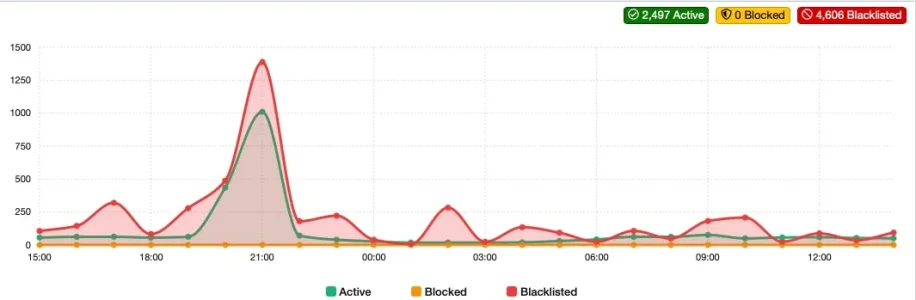
There was btw. a bit of a bot spike yesterday evening on my forum and the fact that there were loads of new ASNs involved impressively showed the limitations that the approach via IP Threat Manager has:

Bildschirmfoto 2026-10-13 um 14.54.18.webp

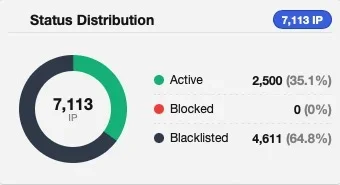
I've aggregated a blocking list of 100+ countries and more than 650 ASNs plus whatever got automatically added to the blacklist by proxycheck.io over the last months. For the last couple of months this proved to be working perfectly fine with only very few additions or adjustments needed. As you can see, during the spike about 1.450 IPs were blocked but sadly about 1.000 passed. Which leads to 2.500 passing in a 24h window:

Bildschirmfoto 2026-10-13 um 14.55.20.webp


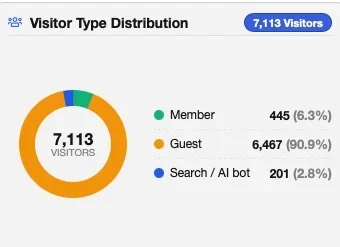
While the number of members was on a normal level but rather a tad lower than the usual ~550/day the number of search bots was just about half of the usual - and the number of guests exploded:

Bildschirmfoto 2026-10-13 um 14.54.40.webp

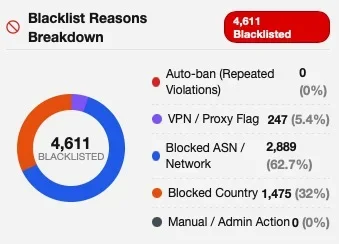
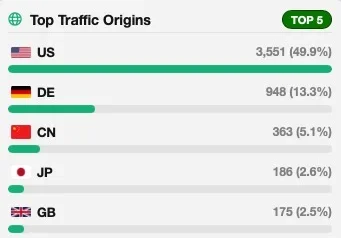
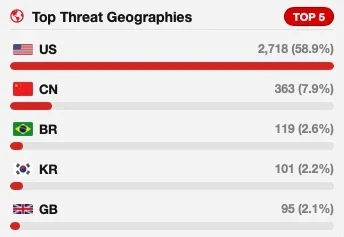
Neither country nor ASN blocks could catch them as they came from new ASNs from countries that I have not blocked (and for the most part don't want to block either) plus they were pretty distributed in between those:

Bildschirmfoto 2026-10-13 um 14.55.02.webp

Bildschirmfoto 2026-10-13 um 14.54.52.webp
Bildschirmfoto 2026-10-13 um 14.55.10.webp

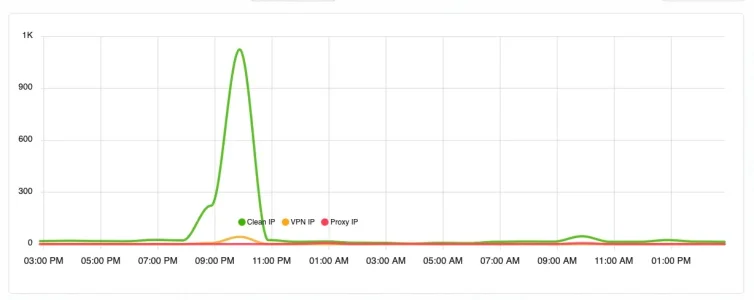
In a situation like that, proxycheck comes into play - that's why it exists: To identify bad players in real time, based on its IP reputation database. Sadly, it is missing a lot, especially in terms of resident proxies but also in terms of datacenter proxies and scrapers. This proved again yesterday and while it caught some the vast majority went straight through:

Bildschirmfoto 2026-10-13 um 14.53.21.webp
Proxycheck only get's asked if for a given IP there is not already a local rule (which is why there is such a flat line normally) and in this case it identified 42 bots while about 1.000 went straight through (and you can bet that 99,99% of them were bots indeed). It is not uncommon for proxycheck to only detect parts or a fraction of the baddies - but usually it detects enough of them that I can identify bad ASNs reliably and block them. So it is rather an indicator than a full prototection and this is exactly why I block that many ASNs. Not so this time. It seems it was a whole new set of proxies and ASNs involved, so new, that neither proxycheck nor me had seen any of them before. Maybe a migration of bots away from the Yandex data centers that burned down over the weekend (and that were blocked on my site as Russia is blocked)?
I'll have to dive deep into the logs to find out where they all came from and what they targeted at.

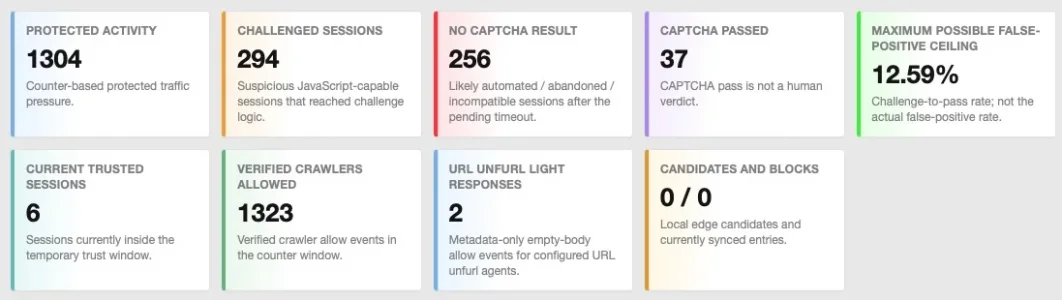
Next in line is botguard, up to deal with whatever IP Threat Monitor has missed. Turns out: The numbers for the 24h window were not different from the last days:

Bildschirmfoto 2026-10-13 um 14.58.55.webp

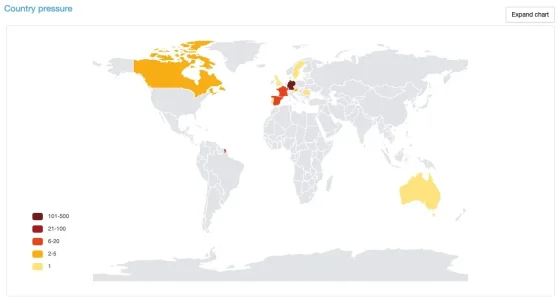
Just the countries that challenged IPs came from were a bit wider spread:

Bildschirmfoto 2026-10-13 um 14.59.16.webp
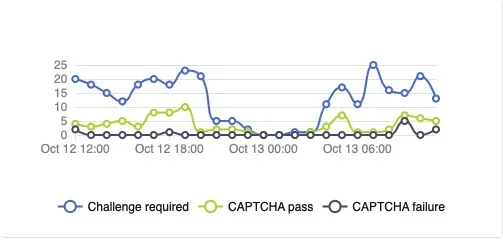
However: As I've already seen that there were quite some IPs from the US involved it is clear that Bot Guard has ignored them - the question is why. Same goes for traffic from other countries: I would have expected (or rather hoped for) a peak in challenges between 8 and 9 pm, but there was none. Rather the opposite: After 8 pm challenges dropped to 5 per hour:
Bildschirmfoto 2026-10-13 um 15.36.38.webp
It may be, that these bots were targeting non existent pages or pages that are only accessible for members (in this case Bot Guard ignores them) or that Bot Guard missed to identify them. Diving into the logs will show what was the case.

However: It was a helpful punch on the nose. I've already been thinking that being able to force challenge some countries would be beneficial and will go further down that route. Maybe this will lead to finally use Cloudflare, maybe not.
 
Last edited:
There was btw. a bit of a bot spike yesterday evening on my forum and the fact that there were loads of new ASNs involved impressively showed the limitations that the approach via IP Threat Manager has:

View attachment 347113

I've aggregated a blocking list of 100+ countries and more than 650 ASNs plus whatever got automatically added to the blacklist by proxycheck.io over the last months. For the last couple of months this proved to be working perfectly fine with only very few additions or adjustments needed. As you can see, during the spike about 1.450 IPs were blocked but sadly about 1.000 passed. Which leads to 2.500 passing in a 24h window:

View attachment 347117


While the number of members was on a normal level but rather a tad lower than the usual ~550/day the number of search bots was just about half of the usual - and the number of guests exploded:

View attachment 347116

Neither country nor ASN blocks could catch them as they came from new ASNs from countries that I have not block (and for the most part don't want to block either) plus they were pretty distributed in between those:

View attachment 347120

View attachment 347118
View attachment 347119

In a situation like that, proxycheck comes into play - that's why it exists: To identify bad players in real time, based on its IP reputation database. Sadly, it is missing a lot, especially in terms of resident proxies but also in terms of datacenter proxies and scrapers. This proved again yesterday and while it caught some the vast majority went straight through:

View attachment 347121
Proxycheck only get's asked if for a given IP there is not already a local rule (which is why there is such a flat line normally) and in this case it identified 42 bots while about 1.000 went straight through (and you can bet that 99,99% of them were bots indeed). It is not uncommon for proxycheck to only detect parts or a fraction of the baddies - but usually it detects enough of them that I can identify bad ASNs reliably and block them. So it is rather an indicator than a full prototection and this is exactly why I block that many ASNs. Not so this time. It seems it was a whole new set of proxies and ASNs involved, so new, that neither proxycheck nor me had seen any of them before. Maybe a migration of bots away from the Yandex data centers that burned down over the weekend (and that were blocked on my site as Russia is blocked)?
I'll have to dive deep into the logs to find out were they all came from and what they targeted at.

Next in line is botguard, up to deal with whatever IP Threat Monitor has missed. Turns out: The numbers for the 24h window were not different from the last days:

View attachment 347125

Just the countries that challenged IPs came from were a bit wider spread:

View attachment 347123
However: As I've already seen that there were quite some IPs from the US involved it is clear that Bot Guard has ignored them - the question is why. Same goes for traffic from other countries: I would have expected (or rather hoped for) a peak in challenges between 8 and 9 pm, but there was none. Rather the opposite: After 8 pm challenges dropped to 5 per hour:
View attachment 347126
It may be, that these bots were targeting non existent pages or pages that are only accessible for members (in this case Bot Guard ignores them) or that Bot Guard missed to identify them. Diving into the logs will show what was the case.

However: It was a helpful punch on the nose. I've already been thinking that being able to force challenge some countries would be beneficial and will go further down that route. Maybe this will lead to finally use Cloudflare, maybe not.
Cloudflare has it's limitations too but it can do a lot. It maybe needs a bit of both as I've blocked some ASN's as well.

Checking my logs today revealed One Cable to be a source of some residential proxies (that weren't going to whats new). Four different companies from three different countries routing through One Cable USA. As it doesn't affect residential users or affect VPN's (apparently) I've just blocked that ASN which is 401560.

It was only 9 IP's but 4 of them solved an interactive challenge so I blocked the ASN.

My new rule is still working great though - no genuine guests getting blocked, numbers really low in analytics and only real humans and verified robots on the forum list.

However I think maybe the bots will start trying to get round it. A few have already migrated to using mobile instead of desktop for whats new - but they got challenged and couldn't solve it so got blocked.

None of the desktop ones carry a referer (that might change!).

@Anthony - which was your rule for catching Chrome 144 etc again please - older versions. I had 5 rp's using that today - going to different paths to what's new. But they can solve challenges. Although it's only 5 IP's and not causing an issue I'd like to nip them in the bud.
 
Last edited:
Cloudflare has it's limitations too but it can do a lot.
Sure. If I go down that route I will use it as an additional layer at first at least and leave the existing setup in place behind it. Besides not becoming fully dependent from CF (and being able to switch away fast if I want to) this would also make possible to find out what CF is missing, at least to a degree. May be I will find a way other than CF for country and ASN challenging - we'll see.
 
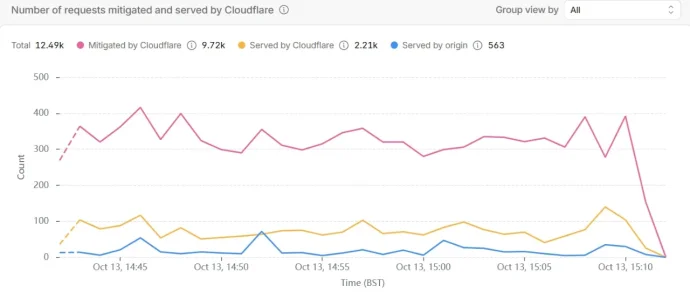
This is just a 30 minute snapshot of analytics as the 24 hour one hasn't caught up yet since the new rule. But nice low numbers, compared to 1.7 million the other night.

The device statistics are what made me think, logically, the bots are all on desktop and virtually no one else is - it's about 50/50 Windows and Mac and a small number of Linux. As they were virtually all requesting whats-new, it was just a rule for that. AI can be a useful tool but it only does what you ask it to. I asked it to give me information from logs to decide whether the rule would work and then write a rule to block desktop users that were going to whats-new (and then added a referer for genuine guests). Not that I'd 100% rely on a rule AI writes but this one looked straightforward and checked it elsewhere before using.

30 min 2.webp
 
Does anyone know how to skip all CF actions for logged in users - not just CF challenges, but also allowing on-site images to load properly? I've got a skip rule for the
Code:
and any(http.request.cookies["xf_user"][*] ne "")
cookie which should be skipping all custom rules currently implemented for bots. It does skip the managed challenge, however images (such as avatars, node icons, and certain others) still show broken. Users from these countries say they get a CF challenge when trying to access the image URL directly. I'd like to challenge certain countries while skipping them for users who are logged in, but just cannot find a way around this.
 
Do you have hotlink protection turned on? You probably need to use a VPN to see the issue, then use your browsers Network tab to inspect if the cookie is present in the request. If its not matching in the browser, then it can't match that request.

You could also put your logged in skip rule above your country rule, that will also tell you something.

You can also use the events themselves, the action and matching rule to help guide you on rule placement. But you need to understand if the browser is matching your rule.
 
Does anyone know how to skip all CF actions for logged in users - not just CF challenges, but also allowing on-site images to load properly? I've got a skip rule for the
Code:
and any(http.request.cookies["xf_user"][*] ne "")
cookie which should be skipping all custom rules currently implemented for bots. It does skip the managed challenge, however images (such as avatars, node icons, and certain others) still show broken. Users from these countries say they get a CF challenge when trying to access the image URL directly. I'd like to challenge certain countries while skipping them for users who are logged in, but just cannot find a way around this.

I believe this should satisfy the condition as a skip rule:
Code:
http.request.cookies["xf_user"] contains "xf_user"
 
Do you have hotlink protection turned on? You probably need to use a VPN to see the issue, then use your browsers Network tab to inspect if the cookie is present in the request. If its not matching in the browser, then it can't match that request.

You could also put your logged in skip rule above your country rule, that will also tell you something.

You can also use the events themselves, the action and matching rule to help guide you on rule placement. But you need to understand if the browser is matching your rule.
Yeah it's very close to the top above everything else except the search indexing rule, and I've been testing with my VPN. Thank you!
I believe this should satisfy the condition as a skip rule:
Code:
http.request.cookies["xf_user"] contains "xf_user"
Sadly I get this error trying this instead of what I've already tested:

Code:
'http.request.cookies["xf_user"] contains "xf_user"' is not a valid value for expression because could not parse filter expression: Filter parsing error (1:33):http.request.cookies["xf_user"] contains "xf_user"
^^^^^^^^ cannot perform this operation on type Array(CompoundType { layers: 0, len: 0, primitive: Bytes })
 
As an update to my block on desktops and whats new (with a referer) rule 2. It is still stopping virtually all of the bots - the residential proxies - it doesn't block members and has a referer for genuine guests (the bots don't carry a referer). It then moved to being mainly US hosting/data centres (not residential), the ASN's for which are now being challenged and mostly stopping them.

As expected, some (a small amount) of residential proxies from the desktop block rule, migrated by starting to using mobiles, some started adding a referer. However that particular group didn't solve challenges at the next rule and were stopped.

So of the ones that don't go to Whats new or other challenge paths, I had the remainder analysed by Claude. They were all desktop ones again but using older versions of Linux Chrome or Windows Chrome - they either bypassed rule 2 due to using mobiles or a referer - or bypassed rule 2 because they weren't going to whats new, search, members, threads or posts.

So set up a new fingerprinting challenge rule 3 for those last night (Claude created that rule so I tried it) and that stopped most of them - some still solved the challenge but not many. The Windows Chrome ones were left out of that rule as they solved challenges.

Of the Windows Chrome ones, that solve challenges and get to the server (a small pool but I suppose it could get bigger) they were all US and using Windows Chrome 144 (residential proxies), and a few on Windows Chrome 146 (Microsoft Azure) that solved challenges

So it has narrowed down which ones can solve challenges. Part of doing all this is so I can remove the country challenge for the US. It's the US that is the biggest issue at the moment. I could let all of them on and just live with it. But then it might increase and it rankles slightly letting them through when they solve challenges.

It's not such a bad thing that genuine US guests get a Cloudflare challenge, but I'd like to stop the bots as much as possible and remove the US country challenge so genuine US visitors don't get a challenge.

So thinking about what to do about the small pool that solve challenges. I'd like to block them but that risks blocking genuine guests with older browsers. So options at the moment are:

1) Do a redirect rule for the Windows Chrome 144 with a friendly html page for genuine guests - but problematic really.
2) Just accept them getting through. I might as well lift the US country challenge anyway as they solve the challenge and get through anyway
3) Something Claude suggested, which I quite like the idea of - which is leave the whole of the US challenged but allow mobile users to pass it as most users are mobile users and there are no bots using mobiles getting that far - at the moment. The Windows bots that can solve challenges would still get through but there aren't that many, but that challenge is still blocking others. If the numbers increased, I could look again. Edit: I've done that now, so hardly any genuine US guests get challenged.

This is the remaining pool - small numbers compared to what's been happening before. And really I don't need to stop anything else as the numbers are so low. So it's more for the sake of it.

The groups that get through to the origin (ie solve challenges)


GroupWhat it isGets past challenges?
Windows Chrome/144129 IPs in 22h, mostly US home ISPs (Comcast, Verizon, Charter) plus Colombia and Ecuador. 337 requests.Yes, they passed challenges (first requests on rule 4 paths without a referer reached the origin).
Windows Chrome/146 (Microsoft/Azure)137 IPs, all US, only the two service-worker files, 286 requests.Unknown. They never request real pages, so I can’t say if they solved anything. It’s a separate group from the 144 ones.
Linux Chrome/15480 IPs before your 01:50 change, 44 after.Partly. Rule 3 roughly halves them.
Mac Chrome/1425 IPs reached the origin.Mostly stopped.

This is the new rule 3 which challenges some ASN's (US hosting sites mainly that were found to be sending bots), and the fingerprinting rule.

Would be grateful for @Anthony Parsons take on the fingerprinting part to see if it's ok.

Challenge rule 3

((ip.src.asnum in {212238 212286 30058 204139 210906 204646 203346 203020 9009 3257}) or (http.user_agent contains "X11; Linux" and http.user_agent contains "Chrome/154" and not http.user_agent contains "CrOS") or (http.user_agent contains "Macintosh" and http.user_agent contains "Chrome/142")) and not cf.client.bot and not http.cookie contains "xf_user"

So my rules at the moment are

1) Block rule - a few countries and ASN's and Anthony's fake bots rule
2) Block rule - specific desktops going to whats-new - with a referer for genuine guests
3) Challenge rule - US data centre ASN's and fingerprinting (as above).
4) Challenge rule - whats new, members, search, ams, threads, posts, misc/cookies
5) Challenge rule - countries - including US but not Uk - this is a catch all for paths not addressed earlier. Previously US was allowed through but now they are all coming from the Us I had to include it here temporarily.

All with not cf.client.bot and allowing xf_user. Rule 4 has a referer so genuine guests don't get challenged. Bots with a referer get challenged at rule 5. I could combine some of these challenge rules to free up slots but am monitoring at the moment.

It's stil a bit of an experiment the rule 2 though. It was manageable before but I had no control over rising numbers. So at the moment it's not so much about the numbers - but about knowing what's what.

Right now, on my site, and for the past 2 days, I only have members, verified robots and genuine guests - between 28 and 45 at various times - with the odd one or two ip appearing that is a bot occasionally. It's a small forum. No genuine guests are being blocked - except from the country and ASN blocks where I wouldn't normally have members. However the other reason for doing this is there are some countries I would like to unblock - Philippines, Thailand, Brazil and Mexico as I would potentially have members from there - very rarely but it has happened - but those countries are too problematic until the rest is slowed down. Might have to just accept that.

It would be interesting to see what happened though. But maybe those are the countries with the bots that solve challenges.

Edit - asked Claude to check previous logs for Thailand and Philippines before I blocked them again and nearly all desktop but all carried a referer, and they also solved challenges, so they would definitely get through again. So leaving them blocked for now. They were part of a big swarm.

Thought some of this might be helpful to others although different sites have different circumstances etc. Having said that I think blocking specific desktops exempting xf_user and with a referer to avoid blocking genuine guests - might be an option for other sites as well? Providing the bots are only going to whats new and providing the bots don't have a referer. Which this swarm hitting me didn't have. But it only worked because Thailand Philippines were blocked (amongst others like China).

 
Last edited:
Also could someone check this rule for me please - I want to make sure the not cf.clientbot bit at the end is right and applies to all the fake bots.

It's a list of ASN blocks, then a list of country blocks, then blocks meta bots and deepseek. Then it's the list of fake bots to be blocked followed by not cf.clientbot. I'm not sure if all the brackets are right in the last section. Deepseek was found from germany doing things it shouldn't have been doing so probably a fake one.

(ip.src.asnum in {132203 45090 133478 139341 132591 134103 137876 58835 45102 24429 37963 38369 45104 134963 60924 136188 7497 9393 62429 10099 136907 55990 151610 141180 56041 56046 58453 56045 56040 132510 23724 58461 134774 24400 4811 17621 56044 24444 27665 55836 24547 11664 47589 329227 134739 17557 17882 42961 57764 132525 21299 7713 9930 24757 24445 24556 8359 27725 5384 2609 140308 38266 56042 4812 56047 27789 27775 11816 9329 21003 151491 28118 327934 30986 27800 28287 4134 4809 4837 9929 4808 9808 58807 4788 27699 28573 264663 265944 272112 12389 60095 8452 24863 36992 45899 45758 7552 38019 137542 63526 136255 136442 132148 136780 136210 1547 6810 1680 15344 51375 212616 398781 401560 210906} and not cf.client.bot) or (ip.src.asnum eq 62874 and not cf.client.bot and not http.cookie contains "xf_user") or (ip.src.country in {"BD" "BY" "BR" "CN" "EG" "IQ" "IL" "KZ" "KG" "MY" "MX" "MM" "RU" "VN" "DO" "TH" "PH"} and not cf.client.bot) or (lower(http.user_agent) contains "meta-externalagent") or (lower(http.user_agent) contains "meta-webindexer") or (lower(http.user_agent) contains "meta-externalads") or (lower(http.user_agent) contains "deepseekbot") or (http.user_agent contains "Googlebot" or http.user_agent contains "bingbot" or http.user_agent contains "Applebot" or http.user_agent contains "DuckDuckBot" or http.user_agent contains "Google-InspectionTool" or http.user_agent contains "AdsBot-Google" or http.user_agent contains "GPTBot" or http.user_agent contains "ClaudeBot" or http.user_agent contains "PerplexityBot" or http.user_agent contains "CCBot" or http.user_agent contains "facebookexternalhit" or http.user_agent contains "Twitterbot" or http.user_agent contains "DeepSeekBot") and (not cf.client.bot)
 
Kind reminder - don't let this become an obsession, investing countless hours in experimenting for continuously diminishing returns, towards the unattainable objective of having 0 bots on the forum. The entire purpose of this thread is to defend your server against excessive load that makes it unusable for regular visitors and/or increases your invoice dramatically, not to make it perfect.

You got to a combination of rules and constraints which keeps the number of visitors in the order of tens or hundreds, which do not bring the server to its knees? Great. Are the waves of bots being mitigated without this becoming noticeable to your users? Excellent. Time to let it go. :D At this point, playing with a hamster is more fulfilling than adjusting another rule again and throwing more logs into analysis for which countries to hunt next.
 
Kind reminder - don't let this become an obsession, investing countless hours in experimenting for continuously diminishing returns, towards the unattainable objective of having 0 bots on the forum. The entire purpose of this thread is to defend your server against excessive load that makes it unusable for regular visitors and/or increases your invoice dramatically, not to make it perfect.

You got to a combination of rules and constraints which keeps the number of visitors in the order of tens or hundreds, which do not bring the server to its knees? Great. Are the waves of bots being mitigated without this becoming noticeable to your users? Excellent. Time to let it go. :D At this point, playing with a hamster is more fulfilling than adjusting another rule again and throwing more logs into analysis for which countries to hunt next.
Fair point :-) - I had a couple of quiet days so decided to tackle it and wanted to understand more. Plus I hate them 😂 And it did give results!
 
Fair point :-) - I had a couple of quiet days so decided to tackle it and wanted to understand more. Plus I hate them 😂 And it did give results!

Also, there's a max amount of bytes you can use per rule. Something like 4096 or something like that. Lists can only be so long.
 
The entire purpose of this thread is to defend your server against excessive load
I don't think so. Different people have different goals and while we all want to be protected against excessive load some aim for more and want also to protect from content theft and scraping personal information of their users and all of that ending up in AI models.
While I agree that the hunt for perfection and locking out every single bot will probably burn you out (and can thus not be recommended) these are two vastly different goals which lead to different strategies. This has been said countless times in this thread and it is pretty annoying when still s/o claims the only goal would be limiting server load and declares all other goals as either not valid or not existent.
 
Back
Top Bottom