That is interesting - we have an LG TV! Although it's about 5 years old I think. I have any smart devices on a separate guest network on our router at home. But it seems that would make no difference to this particular issue if it's something on a device.Guys, be cool. We're in the same boat.
There are over 200 countries on this planet, there's not a single legislation which magically can resolve this. There is pressure on manufacturers of smart devices, like smart TVs for example, to validate more closely the applications that are published in their appstores and prevent the use of their devices as a potential distributed botnet, proxy etc. Even if the consumer is asked to give their consent, most of the time they have no idea what they're consenting to.
Just a fresh example, LG has been at the heart of an ongoing scandal in which they use their smart TVs to literally record audio of what people say in their homes, they scan the home network to identify what other devices do they have, and this way to feed more data into their own advertising network. The LG Ad Network's CEO, banned by other organizations after lots of dodgy stuff, is claiming that "we own the glass in the livingroom" - the "glass" (screen) which people paid thousands of pebbles to own. LG claims that the consumer has the option to refuse the terms of use which gives consent to this level of tracking of everyone in your home, but then the TV is nearly unusable and continuously nags you to accept.
The residential proxy stuff is not a standalone application; it's a component added to various apparently innocent apps, like games, which are "free". Instead of getting revenue from advertising, the developers of those games get revenue from allowing their apps to be bundled with the proxy functionality. The proxy access is then managed by some commercial entities in countries far far away, which get paid by scrapers to let them use the proxies for harvesting internet contents, and a small part of this revenue trickles down to the game developers.
Smart TVs in particular are more appealing to run such applications than a home PC; they have very capable CPUs and operating system, unlike other much more specialized "smart" appliances, and they offer no way for the consumer to monitor what's going on in there (as one could do on a PC). Unlike computers, TVs are powered 24/7 and have internet access typically in a home which does not have the advanced networking equipment to observe that the TV is transferring gigabytes of data per day even when it's in stand-by (which could as well mean just display and audio amplifier powered off, but the CPU running).
We're getting to the point where some people have been advising for years to never ever ever hook up a smart TV to the wired or wireless network in a home, and the manufacturers are learning to circumvent that - they are actively searching for open hotspots to connect to automatically or to create a wireless mesh with TVs from the neighbors which might have internet connection. It is very, very, very intrusive, and there is no one legislative body that can control that. Especially not in the States which are protecting the interests of corporations, not the consumer.
Regarding the 6 user-agent strings, that might simply be a list within the scraping tool gathering data through the proxies, or perhaps there are 6 different variants/editions of scraping tools. The answer to "why 6" doesn't help in any way; at most we can target those specifically with rules, but it's a temporary measure until they start using another one, another 6 or another 100 user agents, real or not.

You are using an out of date browser. It may not display this or other websites correctly.
You should upgrade or use an alternative browser.
You should upgrade or use an alternative browser.
Crazy amount of guests
- Thread starter Levina
- Start date
-
- Tags
- bot swarms guests
Without reading back - has anyone raised the PWA app in this topic? My initial issue was extremely high levels of service_worker.js - which seemingly turned out to be caused by the number of bots hitting the forum. Some are specifically hitting sw/cache.json and sw/offline. Or triggering them at least. I think this is related to the PWA app isn't it? It is not really used on my forum and I don't have push notifications enabled - I was considering actually removing it - but is that actually possible once it's set up?
Slight issue in that I cannot seem to find how to create the name and secret password in Cloudflare. Under Rules, there is no Transform Rules heading. If you or anyone else could suggest where to find this. I went under Rules - Overview and it's thoroughly confusing.How I reduced the huge guest/bot traffic with Cloudflare and protected the origin server
After experiencing the same huge increase in guest traffic described in this thread, I thought I would document exactly what I did, step by step, in case it helps other XenForo administrators.
This is not intended as a universal set of blocking rules. The important part is the method:
- Analyse the server access logs.
- Put the website behind Cloudflare.
- Create targeted Cloudflare rules based on what the logs actually show.
- Prevent direct access to the origin server, so Cloudflare cannot simply be bypassed.
1. What we found in the access logs
The forum suddenly went from normal guest numbers to several hundred concurrent guests, sometimes close to 1,000, including during the night.
The raw web server logs made the problem much easier to understand.
During one period we analysed:
- 25,055 HTTP requests reached the origin.
- 22,938 of them (91.6%) used exactly the same suspicious User-Agent.
- The requests were distributed across thousands of different IP addresses.
So blocking individual IP addresses was clearly not going to be an effective solution.
In our case, we also found some heavily represented ASNs and a very specific browser User-Agent being reused across thousands of IPs.
Your traffic will probably be different, so I strongly recommend analysing your own access logs instead of copying someone else's IP/ASN blocking rules.
2. Put the website behind Cloudflare
The first step was to proxy the website through Cloudflare.
Instead of:
Code:Visitor → Origin server → XenForo
we now have:
Code:Visitor → Cloudflare → Origin server → XenForo
Only the web hostnames need to be proxied.
Mail, FTP, control panel and other services can remain DNS-only if required by your hosting setup.
Once DNS propagation is complete, normal HTTP/HTTPS traffic should therefore reach Cloudflare before reaching the web server.
3. Create targeted Cloudflare security rules
I did NOT immediately challenge the entire XenForo installation.
Instead, I looked at the access logs and created targeted rules.
In our case these included:
- Blocking one ASN responsible for a significant amount of the abusive traffic.
- Managed Challenge for
/whats-new/.- Managed Challenge for
/search/.- Managed Challenge for the exact suspicious User-Agent identified in the access logs.
For example, a path rule can look like:
Code:starts_with(http.request.uri.path, "/search/") and not cf.client.bot
Action:
Code:Managed Challenge
Thenot cf.client.botpart allows Cloudflare verified bots to be excluded from the rule.
For the suspicious User-Agent, I used an exact match rather than challenging all visitors to XenForo threads.
That rule alone eventually recorded more than 18,000 events with a 0% Challenge Solve Rate.
I would NOT recommend blindly copying a User-Agent, ASN or country block from another forum.
Use your own logs to identify what is actually attacking your site.
4. The remaining problem: Cloudflare can potentially be bypassed
This is the part that I think is particularly important.
Putting your DNS behind Cloudflare does not necessarily make your origin server inaccessible.
If someone knows the origin IP, they may potentially connect directly to it while supplying the correct hostname.
Instead of:
Code:Bot | v Cloudflare | v Origin
the bot could attempt:
Code:Bot ──────────────> Origin
In that situation, your Cloudflare WAF/challenge rules are irrelevant because Cloudflare never sees the request.
Ideally, this should be prevented at firewall/server level by only allowing Cloudflare to access HTTP/HTTPS.
However, this was not possible with my shared hosting environment.
So I used a Cloudflare custom request header combined with.htaccess.
5. Create a secret header in Cloudflare
In Cloudflare, go to the rules section and create a Request Header Transform Rule.
The terminology may vary slightly depending on the Cloudflare interface, but the objective is:
Code:Incoming requests: All requests Modify request header: Operation: Set static Header name: X-My-Origin-Auth Value: <LONG RANDOM SECRET>
Do NOT useX-My-Origin-Authas your real production header name just because it appears in this example.
Choose your own header name.
More importantly, generate a long random value and keep it secret.
Conceptually Cloudflare will now send this to the origin:
Code:X-My-Origin-Auth: a-long-random-secret-value
Do not put the blocking rule into.htaccessyet.
First test that this actually works.
6. Create a temporary PHP test
Create a temporary file in the web root, for example:
test-cloudflare.php
Contents:
PHP:<?php if (!empty($_SERVER['HTTP_X_MY_ORIGIN_AUTH'])) { echo 'CLOUDFLARE_OK'; } else { echo 'CLOUDFLARE_ABSENT'; }
If you chose a different HTTP header name, adjust the PHP variable accordingly.
For example:
Code:X-My-Origin-Auth
becomes:
Code:HTTP_X_MY_ORIGIN_AUTH
in PHP's$_SERVERarray.
This PHP file does NOT display the secret. It only tells us whether the header exists.
7. Test normal access through Cloudflare
Visit:
Code:https://www.example.com/test-cloudflare.php
through your normal browser.
You should see:
Code:CLOUDFLARE_OK
If you see:
Code:CLOUDFLARE_ABSENT
STOP HERE.
Do not add the blocking rule.
Your Cloudflare Transform Rule is either not working or the header is not reaching the origin.
8. Test direct access to the origin
Now we want to deliberately bypass Cloudflare.
You need to know your origin server IP for this test.
With curl, you can force a connection directly to the origin while preserving the correct hostname/SNI.
For example:
Code:curl --resolve www.example.com:443:ORIGIN_IP https://www.example.com/test-cloudflare.php
On Windows you may need:
Code:curl.exe --resolve www.example.com:443:ORIGIN_IP https://www.example.com/test-cloudflare.php
This request goes directly to the origin rather than resolving the hostname normally through Cloudflare.
The expected result is:
Code:CLOUDFLARE_ABSENT
So before doing any blocking, you should have successfully demonstrated:
Code:Normal access through Cloudflare: CLOUDFLARE_OK Forced direct access to origin: CLOUDFLARE_ABSENT
9. Only now block direct access in .htaccess
Once BOTH tests above are successful, the origin can be configured to reject requests that do not contain the correct secret.
Near the beginning of.htaccess, before the normal XenForo rewrite rules, add:
Code:<IfModule mod_rewrite.c> RewriteEngine On RewriteCond %{HTTP:X-My-Origin-Auth} !^YOUR_RANDOM_SECRET$ RewriteRule ^ - [F,L] </IfModule>
Replace:
X-My-Origin-Auth
with your own header name, and:
YOUR_RANDOM_SECRET
with EXACTLY the same random value configured in Cloudflare.
The check should validate the actual secret, not simply check whether the header exists.
Otherwise somebody could potentially bypass the protection simply by adding an empty/fake header with the correct name.
10. Test the website immediately
First visit the forum normally.
It should work exactly as before:
Code:Visitor | v Cloudflare | | Adds secret v Origin | | Secret accepted v XenForo
If the website returns 403 through normal access, immediately remove/disable the new.htaccessrule and check the Cloudflare header configuration.
11. Verify that direct origin access is now blocked
Repeat the direct-origin curl test, this time against the homepage:
Code:curl -I --resolve www.example.com:443:ORIGIN_IP https://www.example.com/
On Windows:
Code:curl.exe -I --resolve www.example.com:443:ORIGIN_IP https://www.example.com/
The expected result is now:
Code:HTTP/1.1 403 Forbidden
while:
Code:https://www.example.com/
continues to work normally.
At that point you have effectively achieved:
Code:INTERNET | v CLOUDFLARE | WAF / Challenges | Adds secret header | v ORIGIN | Is secret valid? / \ YES NO | | v v XenForo 403
And a crawler trying to bypass Cloudflare gets:
Code:Bot → Origin IP → No valid secret → 403 Forbidden
12. Clean up
Once everything has been verified, delete:
test-cloudflare.php
It is no longer needed.
Keep a copy of the working.htaccessbefore making future changes, and obviously keep the Cloudflare secret private.
Important considerations
This method is useful when you cannot restrict the origin to Cloudflare IP ranges at firewall/server level, for example on some shared hosting platforms.
It also means that Cloudflare becomes part of the availability path for the website. If the Cloudflare Transform Rule is removed or stops adding the header while the.htaccessrestriction remains active, the origin will return 403.
So document the setup somewhere for yourself. Six months from now it is very easy to forget why that strange custom header exists in.htaccess.
Also be careful if the same document root serves other hostnames that are NOT proxied through Cloudflare. The.htaccessrule above would block them too. In that situation the rule should be scoped to the appropriate hostname(s).
Finally, this doesn't magically identify or eliminate every crawler.
What it does is ensure that automated traffic can no longer simply bypass the filtering layer by connecting directly to the origin.
From there, Cloudflare rules can actually do their job, and you can adjust them based on what your own access logs show.
In our case this has been considerably more effective than trying to chase thousands of rotating IP addresses.

Slight issue in that I cannot seem to find how to create the name and secret password in Cloudflare. Under Rules, there is no Transform Rules heading. If you or anyone else could suggest where to find this. I went under Rules - Overview and it's thoroughly confusing.
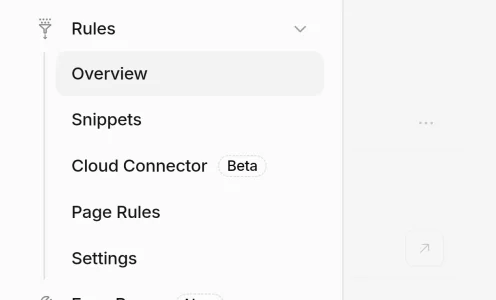
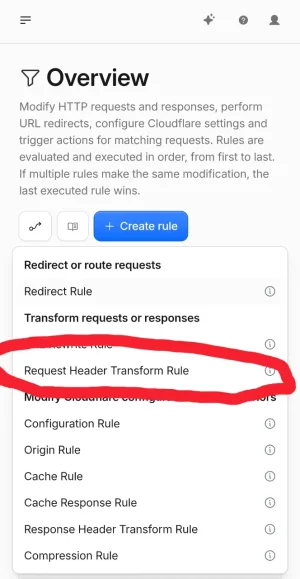
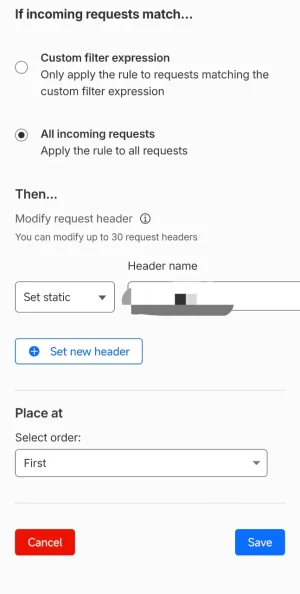
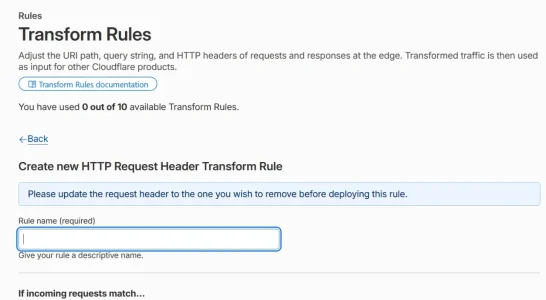
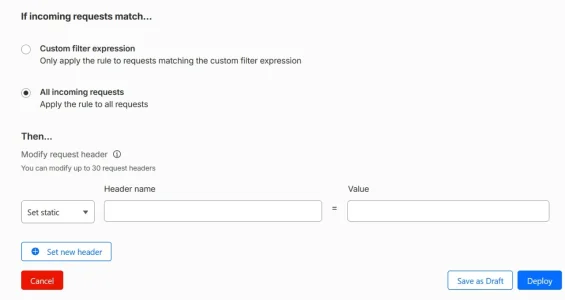
Yes, that's right. 
For the Cloudflare Transform Rule:
Don't add the .htaccess restriction yet.
First I would check that Cloudflare is actually adding your secret header when it sends the request to your server.
Create a temporary PHP file in the root of your XenForo installation, for example:
Put this in it:
Important: PHP converts HTTP header names when exposing them through $_SERVER.
So if your Cloudflare header is:
PHP sees it as:
Obviously change that in the PHP code if you choose a different header name.
Now visit:
through your normal browser.
You should see:
If you see
Once you have confirmed
You can bypass Cloudflare deliberately from a command prompt with:
That connects directly to the origin while still using your forum hostname for HTTPS.
If everything is working correctly, the direct request should return:
So at this point you have proved both things:
Only after those two tests would I modify .htaccess.
At the very top of the existing XenForo .htaccess file, before the existing XenForo rewrite rules, add:
Replace
Then immediately test your forum normally.
It should work exactly as before.
Finally repeat the direct-origin curl test:
This time you should get:
If you do, the origin is effectively closed to normal direct HTTP requests:
Once everything has been tested, delete test-cloudflare.php.
And obviously don't post the real secret value anywhere.
One final precaution: keep a copy of your original .htaccess before changing it. If anything goes wrong, restoring the original file immediately removes the restriction.
For the Cloudflare Transform Rule:
- Give the rule any descriptive name you like.
- Apply it to all incoming requests.
- Choose Set static.
- In the Header name field enter your own header name, for example:
X-My-Origin - In the Value field enter a long random secret value.
- Deploy the rule.
Don't add the .htaccess restriction yet.
First I would check that Cloudflare is actually adding your secret header when it sends the request to your server.
Create a temporary PHP file in the root of your XenForo installation, for example:
test-cloudflare.phpPut this in it:
PHP:
<?php
if (!empty($_SERVER['HTTP_X_MY_ORIGIN'])) {
    echo 'CLOUDFLARE_OK';
} else {
    echo 'CLOUDFLARE_ABSENT';
}
Important: PHP converts HTTP header names when exposing them through $_SERVER.
So if your Cloudflare header is:
X-My-OriginPHP sees it as:
HTTP_X_MY_ORIGINObviously change that in the PHP code if you choose a different header name.
Now visit:
https://www.yourforum.com/test-cloudflare.phpthrough your normal browser.
You should see:
Code:
CLOUDFLARE_OKIf you see
CLOUDFLARE_ABSENT, stop there and don't modify .htaccess yet.Once you have confirmed
CLOUDFLARE_OK, the next test is even more useful if you know your origin server IP.You can bypass Cloudflare deliberately from a command prompt with:
Code:
curl --resolve www.yourforum.com:443:YOUR_ORIGIN_IP https://www.yourforum.com/test-cloudflare.phpThat connects directly to the origin while still using your forum hostname for HTTPS.
If everything is working correctly, the direct request should return:
Code:
CLOUDFLARE_ABSENTSo at this point you have proved both things:
Code:
Normal request through Cloudflare -> CLOUDFLARE_OK
Direct request to origin -> CLOUDFLARE_ABSENT
Only after those two tests would I modify .htaccess.
At the very top of the existing XenForo .htaccess file, before the existing XenForo rewrite rules, add:
Code:
# Force requests through Cloudflare
<IfModule mod_rewrite.c>
    RewriteEngine On

    RewriteCond %{HTTP:X-My-Origin} !^YOUR_SECRET_VALUE$
    RewriteRule ^ - [F,L]
</IfModule>
Replace
X-My-Origin with the exact header name you created in Cloudflare and YOUR_SECRET_VALUE with the exact secret value.Then immediately test your forum normally.
It should work exactly as before.
Finally repeat the direct-origin curl test:
Code:
curl -I --resolve www.yourforum.com:443:YOUR_ORIGIN_IP https://www.yourforum.com/This time you should get:
Code:
HTTP/1.1 403 ForbiddenIf you do, the origin is effectively closed to normal direct HTTP requests:
Code:
Visitor/Bot
    |
    v
Cloudflare
    |
    | + secret header
    v
Origin server -> allowed


Visitor/Bot
    |
    | direct to origin IP
    | no secret header
    v
Origin server -> 403 Forbidden
Once everything has been tested, delete test-cloudflare.php.
And obviously don't post the real secret value anywhere.
One final precaution: keep a copy of your original .htaccess before changing it. If anything goes wrong, restoring the original file immediately removes the restriction.
Thanks yes. So it's ok to set the cloudflare header now and then leave checking for another day? And then when checking done, complete the .htaccess. Would you mind checking to see if my .htaccess looks right - ready for when needed? Obviously I don't have the actual Header name and real key in this yet.
Code:
#       Mod_security can interfere with uploading of content such as attachments. If you
#       cannot attach files, remove the "#" from the lines below.
#<IfModule mod_security.c>
#       SecFilterEngine Off
#       SecFilterScanPOST Off
#</IfModule>

ErrorDocument 401 default
ErrorDocument 403 default
ErrorDocument 404 default
ErrorDocument 405 default
ErrorDocument 406 default
ErrorDocument 500 default
ErrorDocument 501 default
ErrorDocument 503 default

<IfModule mod_rewrite.c>
    RewriteEngine On

    # Block any request missing the Cloudflare secret word
    RewriteCond %{HTTP:X-My-Origin-Auth} !^YOUR_RANDOM_SECRET$
    RewriteRule ^ - [F,L]
</IfModule>

<IfModule mod_rewrite.c>
        RewriteEngine On

        #       If you are having problems with the rewrite rules, remove the "#" from the
        #       line that begins "RewriteBase" below. You will also have to change the path
        #       of the rewrite to reflect the path to your XenForo installation.
        #RewriteBase /xenforo

        #       This line may be needed to workaround HTTP Basic auth issues when using PHP as a CGI.
        #RewriteRule .* - [E=HTTP_AUTHORIZATION:%{HTTP:Authorization}]

        RewriteCond %{REQUEST_FILENAME} -f [OR]
        RewriteCond %{REQUEST_FILENAME} -l [OR]
        RewriteCond %{REQUEST_FILENAME} -d
        RewriteRule ^.*$ - [NC,L]

RewriteRule ^(data/|js/|styles/|install/|favicon\.ico|crossdomain\.xml|robots\.txt) - [NC,L]
        RewriteRule ^.*$ index.php [NC,L]
</IfModule>
BrowserMatchNoCase "Bytedance" bad_bot
BrowserMatchNoCase "Bytespider" bad_bot
BrowserMatchNoCase "Baiduspider" bad_bot
BrowserMatchNoCase "BIDUBrowser" bad_bot

<RequireAll>
 Require all granted
 Require not env bad_bot
</RequireAll>Yes, absolutely.
You can deploy the Cloudflare header now and leave the testing until another day.
At this stage Cloudflare is simply adding an extra private HTTP header to requests sent to your origin. Nothing on your server is checking it yet, so it won't block visitors or change how XenForo works.
The important thing is:
Do not activate the .htaccess part until you've completed the two tests.
So you can safely do this in stages:
Then whenever you're ready:
As for the .htaccess you've prepared, yes, the placement looks right to me.
You currently have:
That's exactly where I would put it: before XenForo's normal rewrite rules.
Having two separate
Obviously, before actually using it:
One thing I would suggest: don't put the active protection into .htaccess yet.
Keep this prepared version somewhere separately for now, or leave those three protection lines commented out.
For example:
Then there is no possibility of accidentally uploading the file with the placeholder secret and immediately giving everyone a 403.
Once you've done the PHP and direct-origin tests, uncomment it, insert the real header name/key, upload it and immediately check the forum.
And keep the original working .htaccess locally as a backup before doing that.
You can deploy the Cloudflare header now and leave the testing until another day.
At this stage Cloudflare is simply adding an extra private HTTP header to requests sent to your origin. Nothing on your server is checking it yet, so it won't block visitors or change how XenForo works.
The important thing is:
Do not activate the .htaccess part until you've completed the two tests.
So you can safely do this in stages:
Code:
TODAY

Cloudflare Transform Rule
        |
        | adds secret header
        v
Origin
        |
        v
XenForo normally
Then whenever you're ready:
Code:
1. Create test-cloudflare.php

2. Normal browser test
   -> CLOUDFLARE_OK

3. Direct-origin curl test
   -> CLOUDFLARE_ABSENT

4. Only then add/enable the .htaccess protection

5. Check the forum normally
   -> forum works

6. Repeat direct-origin curl test
   -> HTTP 403

7. Delete test-cloudflare.php
As for the .htaccess you've prepared, yes, the placement looks right to me.
You currently have:
Code:
ErrorDocument 401 default
ErrorDocument 403 default
...

<IfModule mod_rewrite.c>
    RewriteEngine On

    # Block any request missing the Cloudflare secret word
    RewriteCond %{HTTP:X-My-Origin-Auth} !^YOUR_RANDOM_SECRET$
    RewriteRule ^ - [F,L]
</IfModule>

<IfModule mod_rewrite.c>
    RewriteEngine On

    # Normal XenForo rewrite rules...
That's exactly where I would put it: before XenForo's normal rewrite rules.
Having two separate
<IfModule mod_rewrite.c> blocks is also fine. You don't need to merge them.Obviously, before actually using it:
X-My-Origin-Authmust be replaced with exactly the same header name you configured in Cloudflare.YOUR_RANDOM_SECRETmust be replaced with exactly the same secret value.
One thing I would suggest: don't put the active protection into .htaccess yet.
Keep this prepared version somewhere separately for now, or leave those three protection lines commented out.
For example:
Code:
# <IfModule mod_rewrite.c>
#     RewriteEngine On
#     RewriteCond %{HTTP:X-My-Origin-Auth} !^YOUR_RANDOM_SECRET$
#     RewriteRule ^ - [F,L]
# </IfModule>
Then there is no possibility of accidentally uploading the file with the placeholder secret and immediately giving everyone a 403.
Once you've done the PHP and direct-origin tests, uncomment it, insert the real header name/key, upload it and immediately check the forum.
And keep the original working .htaccess locally as a backup before doing that.
All done - both checks passed, .htaccess saved. Site still online - just waiting to see what happens nowStick closely to the procedure, and if you follow each step carefully, there’s no reason it shouldn’t work.
Will download some more logs in a bit.Edit - Claude says it's not working. But at least the site is working. Double checked my Header name and secret key are identical in both .htaccess and Cloudflare, which they are. However I did paste the secret key from word into notepad and then copies notepad to paste into .htaccess if that makes any difference.
But if it's really not working then after last time, I would suspect my server preventing something. On the other hand maybe Claude is wrong and there just aren't any hitting the origin IP.
Last edited:
I wouldn't assume it isn't working just from Claude's interpretation of the logs yet.
The definitive test is the direct-origin test after the .htaccess rule has been enabled.
Run this again:
If you now get:
then it is working correctly, regardless of what Claude thinks it sees in the access log.
The fact that your site is still working normally is actually encouraging, because it means requests coming through Cloudflare are arriving with the correct header and are being accepted by .htaccess.
Copying the secret via Word/Notepad shouldn't normally matter, although hidden whitespace or a strange character could theoretically cause trouble. But if there were a mismatch between the Cloudflare secret and the .htaccess secret, your normal site should now be returning 403 as well.
So I would do the direct-origin curl test first before changing anything else.
If it returns 403, leave the configuration alone.
If it returns 200, then we can look at why the .htaccess rule isn't being enforced on your server.
The definitive test is the direct-origin test after the .htaccess rule has been enabled.
Run this again:
Code:
curl.exe -I --resolve www.yourforum.com:443:YOUR_ORIGIN_IP https://www.yourforum.com/If you now get:
Code:
HTTP/1.1 403 Forbiddenthen it is working correctly, regardless of what Claude thinks it sees in the access log.
The fact that your site is still working normally is actually encouraging, because it means requests coming through Cloudflare are arriving with the correct header and are being accepted by .htaccess.
Copying the secret via Word/Notepad shouldn't normally matter, although hidden whitespace or a strange character could theoretically cause trouble. But if there were a mismatch between the Cloudflare secret and the .htaccess secret, your normal site should now be returning 403 as well.
So I would do the direct-origin curl test first before changing anything else.
If it returns 403, leave the configuration alone.
If it returns 200, then we can look at why the .htaccess rule isn't being enforced on your server.

There are online syntax checkers or validators for configuration files. For .htaccess, there are https://htaccess.madewithlove.com/ (descriptive, evaluates every line as it goes through it and the result that Apache would throw) and https://www.htaccesscheck.com/ (just syntax check) for example.
A "headless" computer is one that is running without a monitor (head) or keyboard or direct user interaction. All servers are headless (well, most of the time, unless they go in maintenance mode and some technician cannot access it remotely and has to bring in a monitor). So a headless browser is one that's running in such a way that it does not display anything on screen and it's exclusively used for a bot to interpret what that browser is displaying and to interact with it as if it was a human clicking around. It's just one more type of bot.
There are legitimate businesses doing a similar approach for automation, in cases where the application that needs to be automated does not offer absolutely any form of automation, just human interaction on screen. If you ever recorded a macro in Excel, it should sound familiar, just on a much bigger scale. That's the case for UIPath, for example, leading global company in the process automation business, which creates automation workflows to interact with a virtual session of an application window on some server, simulating what a person would click and type on screen, just hundreds of times faster.
Of course when the idea exists, someone had to copy it and use it for bad things...
Robot Headless Browser - what the heck is that?!
A "headless" computer is one that is running without a monitor (head) or keyboard or direct user interaction. All servers are headless (well, most of the time, unless they go in maintenance mode and some technician cannot access it remotely and has to bring in a monitor). So a headless browser is one that's running in such a way that it does not display anything on screen and it's exclusively used for a bot to interpret what that browser is displaying and to interact with it as if it was a human clicking around. It's just one more type of bot.
There are legitimate businesses doing a similar approach for automation, in cases where the application that needs to be automated does not offer absolutely any form of automation, just human interaction on screen. If you ever recorded a macro in Excel, it should sound familiar, just on a much bigger scale. That's the case for UIPath, for example, leading global company in the process automation business, which creates automation workflows to interact with a virtual session of an application window on some server, simulating what a person would click and type on screen, just hundreds of times faster.
Of course when the idea exists, someone had to copy it and use it for bad things...

Right, after messing with this enough, here's the "ASN lookup to IP lists to XF2's XML Ban List Generator"... I did a quick skim-over to make sure the code works, and doesn't have glaring issues with naughty input variables. Issues came to be with XenForo and default LAMP/LEMP server configurations.You've given me an idea to vibe code something...
ASN IPv4 and IPv6 query and exporter from RADB, and formatted into a XF2 capable XML file.
I'm going to get vibin' on it now...
https://tools.amaterrible.dev/xf2ipbantool/
I don't plan to include (or have Grok include it, anyways) an ASN or IP address name/provider lookup. Tools exists for that:
- ISP Name lookup: https://mxtoolbox.com/asn.aspx
- IP to ASN lookup: https://asn.cymru.com
Please be aware that if and when you use this tool to import an absolutely massive amount of ASN's CIDR ranges, be it via the unconsolidated or consolidated XML file, you will potentially run into one of two issues:
max_input_varsbeing set extremely low or kept at default (1000).- It is wise to download the part files zip over the full xml files to escape from this particular issue. Yes, it will take longer to import, but the import won't get fussy about reaching a maximum import item count.
- If possible, attempt to have this set to a significantly higher value, 10,000 is generally sensible on most server configurations. Anything more generally becomes problematic at varying levels of the server 'stack'.
- Server timeouts while importing (60s or less).
- In servers such as nginx,
fastcgi_connect_timeout,fastcgi_send_timeout, andfastcgi_read_timeoutshould be notably increased to 600s (10 minutes). Default is 60s or so. - Within php settings,
max_execution_timeandrequest_terminate_timeoutshould be significantly increased from its default to something similar to the fastcgi_* items from above.
- In servers such as nginx,
With that all said... unfortunately, XenForo's admin panel for IP ban management is very basic. Performing massive-bulk actions isn't viable via the web panel unless addons are created for it. With that said, if you want to rid of certain banned IP ASNs, you can run this SQL query:
SQL:
DELETE FROM `xf_ip_match` WHERE `reason` = 'AS45102';AS45102 with the value of the ASN you want to remove from the ban list.Similar threads
- Replies
- 6
- Views
- 189


- Replies
- 8
- Views
- 222

