
They finished about midnight, my time. None of the business sites I host were touched by this, this seemed personal to xenforo only.
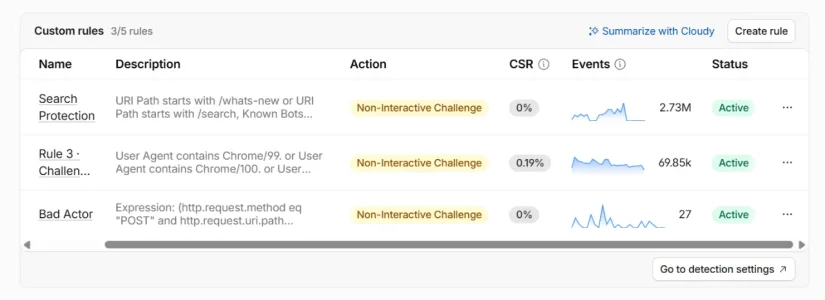
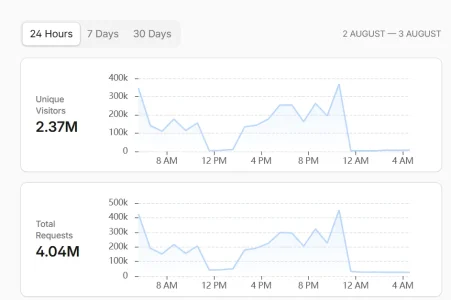


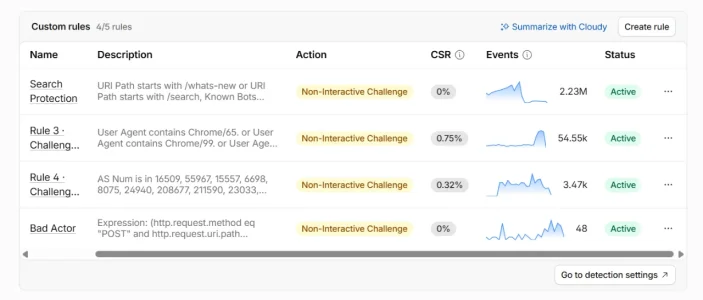
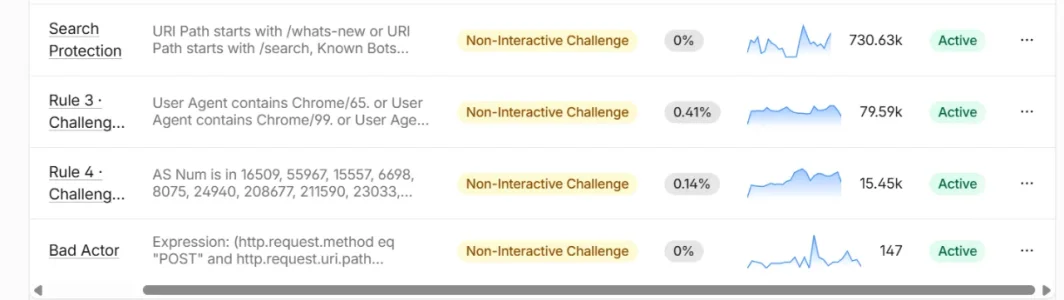
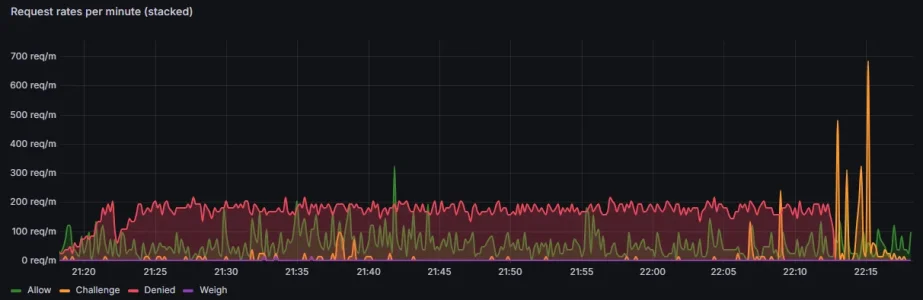
Looks like some of my rules: search, whats-new, reply a.o. on a Managed Challenge. The string quote= too.I'm using a Managed Challenge. Here are a few of my relevant rules. I have them separated so I can see exactly how much each route is being abused.
2.91M requests to /forum/search with a 0.01% solve rate...
View attachment 342141


Likely an account stuffing/rainbow attack. Always a good idea to force challenge those sorts of end points.Hi folks. Does anyone have an excessive amount of visitors to the Log in page? The "Log in" path is always my top path on Google Analytics nowadays, and I'm struggling to find any pattern via Cloudflare. Is there a way to add a challenge to XF's log in page without causing issues? Whenever I do so, it affects the log-in pop-up from coming up due to errors and directs users to check the browser console for error details.
EDIT: I've implemented a challenge to all attempts at trying to log in, rather than just opening the pop-up itself. Already seeing a ton of entries. Hopefully this works.

Gone ahead and done this as well. We had a rate limit that blocked anyone failing 5 or more password attempts for an hour, but that's definitely not enough on its own. Thanks all!I typically remove the overlay option on all the login links and then make cloudflare challenge anything hitting the /login route. Helps reduce account compromises too.

Hi folks. Does anyone have an excessive amount of visitors to the Log in page? The "Log in" path is always my top path on Google Analytics nowadays, and I'm struggling to find any pattern via Cloudflare. Is there a way to add a challenge to XF's log in page without causing issues? Whenever I do so, it affects the log-in pop-up from coming up due to errors and directs users to check the browser console for error details.
EDIT: I've implemented a challenge to all attempts at trying to log in, rather than just opening the pop-up itself. Already seeing a ton of entries. Hopefully this works.
I typically remove the overlay option on all the login links and then make cloudflare challenge anything hitting the /login route. Helps reduce account compromises too.
PAGE_CONTAINER template and remove the data-xf-click="overlay" attribute from both your desktop and mobile login anchor tags.(http.request.uri.path in {"/forum/login/" "/forum/register/"}). It's blocked 11 requests just since I started typing this message...
Yes! This has been driving me crazy because I could not match up the Google Analytics hits to actual requests in my log file.
Great idea! I've just set this up.
For anyone wondering how, just search yourPAGE_CONTAINERtemplate and remove thedata-xf-click="overlay"attribute from both your desktop and mobile login anchor tags.
I have paired that with a Managed Challenged Cloudflare rule targeting(http.request.uri.path in {"/forum/login/" "/forum/register/"}). It's blocked 11 requests just since I started typing this message...
Unfortunately same.Even after rolling this out, I'm still getting a ton of traffic to the "Log in" page on my XenForo site according to GA4 real-time reports.
It can't be right, as it's a lot more traffic than Cloudflare or my raw logs are reporting.
Something else is going on here, it might be some kind of GA4/XenForo bug. Any ideas?

I have a rate limit on CF for this. I don't have any issues with login or register. Your logs will show /login/keep-alive. My only grievance is the nasty actors trying to maliciously take out my server right now... failing... but still trying nonetheless.

Now that's funny.

That is helping today, thanks.bots are hitting primarily /search
Had 19K+ guests trying to hit /search today. wookie_user in the rule instead of xf_user).

 9to5mac.com

In 20+ years I've never had a issue with any kind of denial of service attack that wasn't easily handled until earlier in this year when my sites got taken out by the Aisuru-Kimwolf botnet. My understanding from the ISP that manages my server is that compromised smart devices including TVs and streaming devices were responsible for a large proportion of the botnet.
I think it was aimed at as many ISP's and server providers as possible. What do you do with that though? They're all legitimate residential IP's in use by even their own customers.I suspect that the attack was aimed at the ISP
Even though it's a UK based ISP for UK based customers that's a very relevant question and I believe it did present an issue. In this particular case I think it was found the majority of IPs originated from Brazil and as the majority of my members are either European or US based the ISP was able to whitelist IPs within the danger area and blacklist the rest. It took a while but appeared to work and as far as I know those lists have now been removed.I think it was aimed at as many ISP's and server providers as possible. What do you do with that though? They're all legitimate residential IP's in use by even their own customers.
Mozilla/5.0 (Macintosh; Intel Mac OS X 10_15_7) AppleWebKit/537.36 (KHTML, like Gecko) Chrome/145.0.0.0 Safari/537.36 (compatible; meta-externalagent/1.1 (+https://developers.facebook.com/docs/sharing/webmasters/crawler)) rapidly hitting random pages? From my logs, all of 57.141.4.0/24 in this instance is being utilized to evade rate limiting.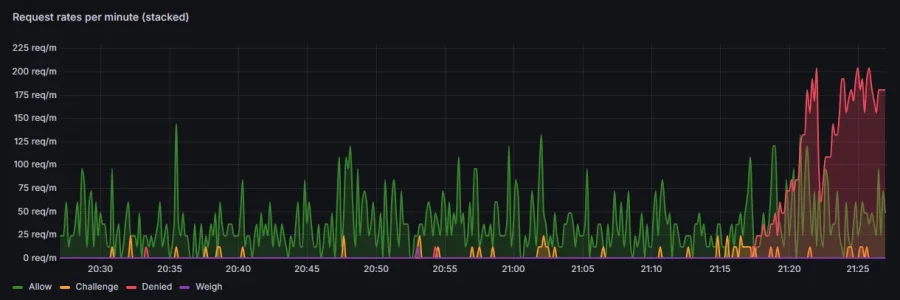


We use essential cookies to make this site work, and optional cookies to enhance your experience.
