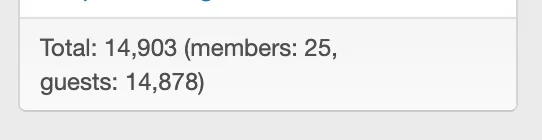
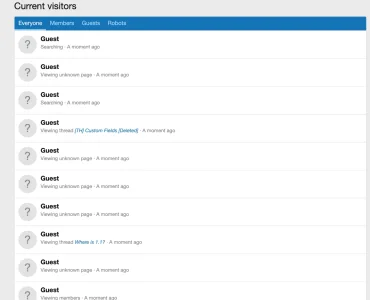
Crazy amount of guests

On the flipside, this is why a well tuned server works best, because then you don't have to worry about the extra costs of third parties and just let them go, doing nothing to your server load because your server can handle it. Its where you put your money, and time. This is also where Cloudflare comes into its own, because stopping traffic at DNS means they never hit your server to make that request to proxycheck, which means less $$$$
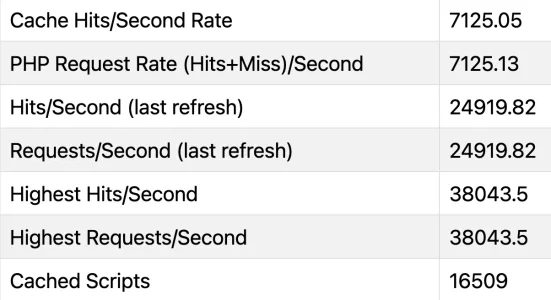
+1 💯 Yup tuning the server backend helps tremendously. A client of mine handles additional 70K guests easily and CPU utilisation doesn't move beyond <40% with 7K to 38K PHP requests/second with Zend OpCache assist of course :cool: Peak the server has handled is ~ 75K PHP requests/second

And yes Cloudflare stops the request before it hits the server which is more important if your backend server isn't powerful enough or optimised enough to handle it.
1780013279652.webp
 
Welp, it's been a quiet night after the peak of bots from yesterday's afternoon, to no merit of my own. Whoever manages the bots might have just figured out that it's too expensive to run them against my domain and get continuously challenged or directly blocked, and moved on to other lower-effort domains.

It's like protecting your bicycle against theft: there is no failproof protection against a determined, well prepared, patient and resilient thief, even if you spend far more on protections than on the bike itself, but against the opportunistic thief it's often sufficient to simply make your bicycle more effort than another. It sucks, but it is what it is.

Meanwhile I also noticed that CloudFlare's filters are not perfect either. There's a rule with

Code:
(ip.src.country in {"T1" "CN"}) or (ip.src.asnum in {...})

with a list of nearly 100 unique ASNs, and still a bot from China Telecom matching both the country code and one of the ASNs still got through. How and why, beats me. For now I split up the long list into 5 different lists of 20 ASNs each, maybe CF overflows or something...
 
+1 💯 Yup tuning the server backend helps tremendously. A client of mine handles additional 70K guests easily and CPU utilisation doesn't move beyond <40% with 7K to 38K PHP requests/second with Zend OpCache assist of course :cool: Peak the server has handled is ~ 75K PHP requests/second

And yes Cloudflare stops the request before it hits the server which is more important if your backend server isn't powerful enough or optimised enough to handle it.

View attachment 338793
A bit off topic: But those stats are a fairly awesome indication of a well configured and optimized server infrastructure (well oiled machine)! Very nice!
 
Welp, it's been a quiet night after the peak of bots from yesterday's afternoon, to no merit of my own. Whoever manages the bots might have just figured out that it's too expensive to run them against my domain and get continuously challenged or directly blocked, and moved on to other lower-effort domains.

It's like protecting your bicycle against theft: there is no failproof protection against a determined, well prepared, patient and resilient thief, even if you spend far more on protections than on the bike itself, but against the opportunistic thief it's often sufficient to simply make your bicycle more effort than another. It sucks, but it is what it is.

Meanwhile I also noticed that CloudFlare's filters are not perfect either. There's a rule with

Code:
(ip.src.country in {"T1" "CN"}) or (ip.src.asnum in {...})

with a list of nearly 100 unique ASNs, and still a bot from China Telecom matching both the country code and one of the ASNs still got through. How and why, beats me. For now I split up the long list into 5 different lists of 20 ASNs each, maybe CF overflows or something...
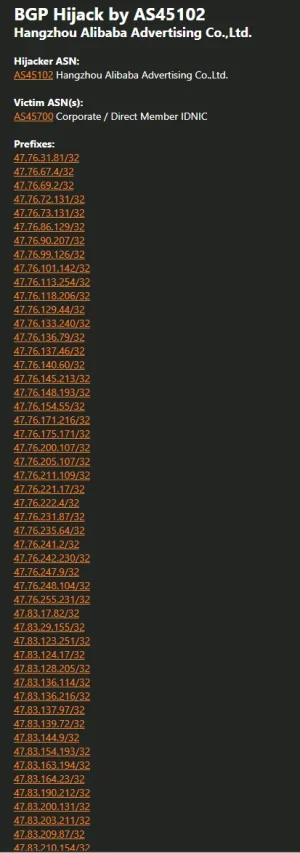
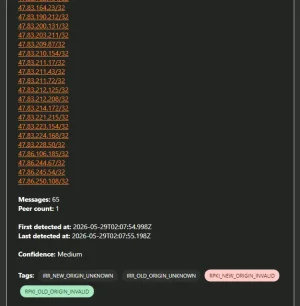
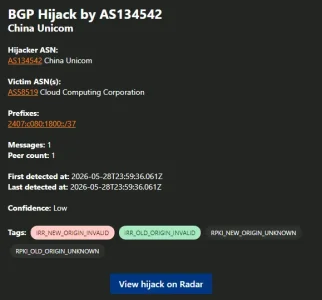
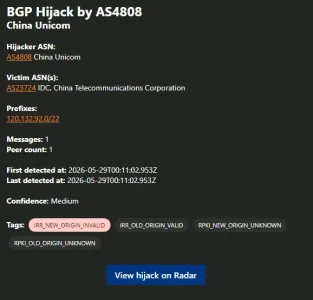
If you subscribe to Cloudflare Radar, you'll come to understand fairly quickly that Chinese ISP's (be it residential, commercial, and/or government) are constantly hijacking same-country ASNs and sometimes out-of-country ASNs. So i wouldn't be surprised if what you've observed is the same thing happening.

Here's a few examples from earlier this evening...

MailClient-05-29_02-18-ee94c005-041d-49b7-8a7b-c69c5c7fb4d9.webpMailClient-05-29_02-19-42fda23d-5f74-48f5-babc-ca20040d7416.webp

MailClient-05-29_02-20-d9c9bc3a-cb09-41ff-ac67-99bb398a182a.webp

MailClient-05-29_02-21-cb2b162c-30e5-4164-9b5b-8ed0a3ae02a2.webp
 
Very interesting, and at the same time disempowering. Even if I would be aware of such an event happening, I still can't do anything about it. And for just 2 bot hits, it's not worth the effort.

It's actually a bit satisfying to know that, by swapping around the order of rules, I'm forcing the bots to struggle to resolve the challenge and then be blocked based on their origin, and if they somehow pass through that and do get to an actual server response, to find out that the contents they're looking for is now for members only.
 
Welp, it's been a quiet night after the peak of bots from yesterday's afternoon, to no merit of my own. Whoever manages the bots might have just figured out that it's too expensive to run them against my domain and get continuously challenged or directly blocked, and moved on to other lower-effort domains.
I am not so sure that this is actively managed - the bots come and go in waves and probably don't target your forum/domain specifically. I'd assume they simply grab whatever they can get hold of and forums, having way more pages and links than the average website, are an area where it is hard to hide such an attack.

Meanwhile I also noticed that CloudFlare's filters are not perfect either.
Why don't you block China as a country completely? If you don't have regular audience there there will be nothing good or relevant coming from there.
 
Look closer at the rule above. It is supposed to fully block TOR, China, or ASNs from a list, including ASN 4811 of the visitor's IP. I can see the IP in the CF log being rejected 5 times within 2 seconds this morning. But I could also see the IP in the forum's "who's online", which should be impossible if CF rule has filtered all matching traffic.
 
Look closer at the rule above. It is supposed to fully block TOR, China, or ASNs from a list, including ASN 4811 of the visitor's IP. I can see the IP in the CF log being rejected 5 times within 2 seconds this morning. But I could also see the IP in the forum's "who's online", which should be impossible if CF rule has filtered all matching traffic.

Is your origin secured? E.g. you've configured apache or whatever you're using for the site to only respond to cloudflare servers. If not, its possible they are hitting the ip of your origin directly themselves.
 
I might be a noob, but hopefully not THAT noob ;) The hosting is configured to exclusively allow inbound connections from CloudFlare's published list of IPs (v4 and v6). That was a necessary step, as the hosting is Hetzner - they're big and have decent packages, but they also host some trash that does a lot of poking and probing from within the same datacenter, which had to be clamped down fairly soon after moving there.
 
I might be a noob, but hopefully not THAT noob ;) The hosting is configured to exclusively allow inbound connections from CloudFlare's published list of IPs (v4 and v6). That was a necessary step, as the hosting is Hetzner - they're big and have decent packages, but they also host some trash that does a lot of poking and probing from within the same datacenter, which had to be clamped down fairly soon after moving there.

Are you blocking or challenging the ASNs etc?
 
At CloudFlare, the rule BLOCKS the country and the ASNs.

At hosting level, .htaccess in the root blocks anything other than CloudFlare.
 
At CloudFlare, the rule BLOCKS the country and the ASNs.

At hosting level, .htaccess in the root blocks anything other than CloudFlare.
Have you had a look in the http analysis or whatever cloudflare calls it (sorry just out to dinner atm so cant check) and had a look at user agent and so on? Maybe its tricking cloudflare into think its a good bot sometimes, or something like that
 
I did, the user agent was or impersonated a regular browser. The CF rule also doesn't allow known bots, good or bad, to pass through. The only explanation I have is that CF's rules are only nearly 100% with a few exceptions. It wouldn't be the first weird thing seen in big scale IT...
 
About whitelisting VPN providers in Osman’s add-on. I didn’t change the default so NortonVPN, NordVPN and Opera VPN are the only ones trusted at the moment. But I use Mozilla VPN and visiting as a guest I got blacklisted immediately. And I’ve just received an email from a member also blacklisted. So how do you all handle this?
 
Interesting news from the Netherlands: Joint operation by Police and NCSC takes down major botnet. In the announcement, they effectively shutdown/curtailed 17 million hijacked devices, controlled by 200 servers, but seemed limited in detail.

ArsTechnica posted this article later on: https://arstechnica.com/security/2026/05/botnet-of-more-than-17-million-devices-dismantled/ - which was much more detailed. Depicting that this botnet shutdown was also able to shutdown a massive residential botnet.

I'd be curious to know if folks are beginning to see a lessening on ResiProxies due to this, and shifting back into known datacenter ranges.
 
About whitelisting VPN providers in Osman’s add-on. I didn’t change the default so NortonVPN, NordVPN and Opera VPN are the only ones trusted at the moment. But I use Mozilla VPN and visiting as a guest I got blacklisted immediately. And I’ve just received an email from a member also blacklisted. So how do you all handle this?

Mozilla VPN does not seem to publish it's IP-ranges, so it cannot be unblocked easily. But it seems to use infrastructure of Mullvad VPN which is recognized by Proxycheck (at least I've seen it in the dashboard a couple of times). So possibly unblocking Mullvad should solve the issue. This should (I assume) be possible by using the string "Mullvad" in the settings. In theory, one could also unblock the IPs of Mullvad directly but this is prone to failure and less reliable, the more as they will typically change to a degree regularly. So the first option is clearly preferable.

Maybe it would be helpful to discuss config options of the IP Threat Monitor add on rather in the discussion thread of the add on as it is then more helpful and easier to find for other users of the add on. :)
 
Interesting news from the Netherlands: Joint operation by Police and NCSC takes down major botnet. In the announcement, they effectively shutdown/curtailed 17 million hijacked devices, controlled by 200 servers, but seemed limited in detail.

ArsTechnica posted this article later on: https://arstechnica.com/security/2026/05/botnet-of-more-than-17-million-devices-dismantled/ - which was much more detailed. Depicting that this botnet shutdown was also able to shutdown a massive residential botnet.

I'd be curious to know if folks are beginning to see a lessening on ResiProxies due to this, and shifting back into known datacenter ranges.
It will probably put a bit of a dent in the amount of residential proxies but I doubt that it will change the general trend. What is interesting however: The Ars Technica article specifically mentions Asocks. Asocks advertise on their webpage specifically to developers of apps the option to integrate it into their apps as an option to earn money by making users of apps residential proxy hosts, using whitewashed wording:

Increase your revenue with an innovative app monetization tool that improves user experience and ensures their privacy.

They also name a couple of existing "partners" on that page:


Bildschirm­foto 2026-05-30 um 07.52.49.webp

Also, Asocks does seem to share at least parts of its IP pool with other providers of residential proxies, judging from the logs I find in my proxycheck.io dashboard. I.e. the one I shared recently. Proxycheck seems to have invested into discovering residential proxy networks recently, as more and more of these are discovered by name over the last weeks and in many cases the same IPs are used by multiple proxy services and also by VPN providers. Possibly this may affect only parts of their IP pool, yet it is for one a warning to pay attention when selecting a VPN provider (to not accidentally become a mule for bad actors unknowingly) and secondly the hit against Asocks may possibly hit other proxy providers partly as well as a very welcome collateral damage.

A couple of proxy providers I found in my logs that share IPs with Asocks according to proxycheck.io are:
  • Nullproxies
  • IP Royal
  • Packetstream
  • reProxy
  • oxylabs
  • evomi
As these are just random findings there may obviously be more.
 
Mozilla VPN does not seem to publish it's IP-ranges, so it cannot be unblocked easily. But it seems to use infrastructure of Mullvad VPN which is recognized by Proxycheck (at least I've seen it in the dashboard a couple of times). So possibly unblocking Mullvad should solve the issue. This should (I assume) be possible by using the string "Mullvad" in the settings. In theory, one could also unblock the IPs of Mullvad directly but this is prone to failure and less reliable, the more as they will typically change to a degree regularly. So the first option is clearly preferable.

Maybe it would be helpful to discuss config options of the IP Threat Monitor add on rather in the discussion thread of the add on as it is then more helpful and easier to find for other users of the add on. :)
Yes! I found that out yesterday when I checked the IP address the VPN was using in AbuseIPDB. I added Mullvad to the whitelist and that did the trick.
 
Last edited:
Back
Top Bottom