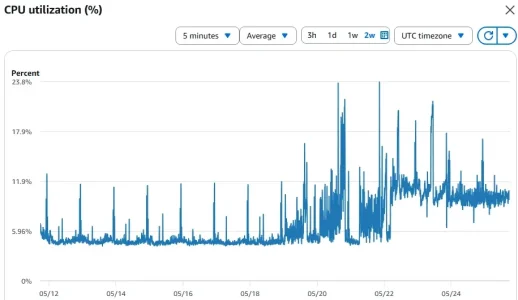
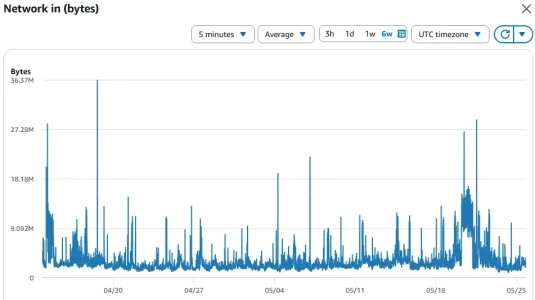
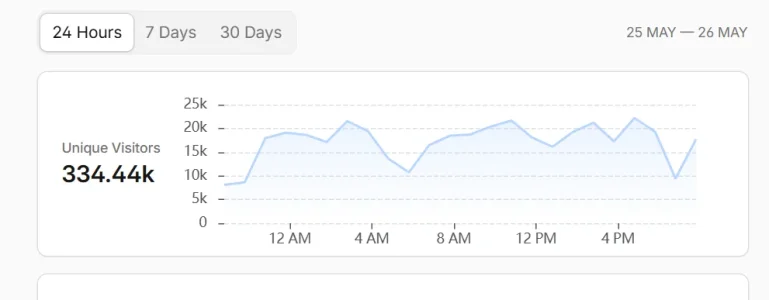
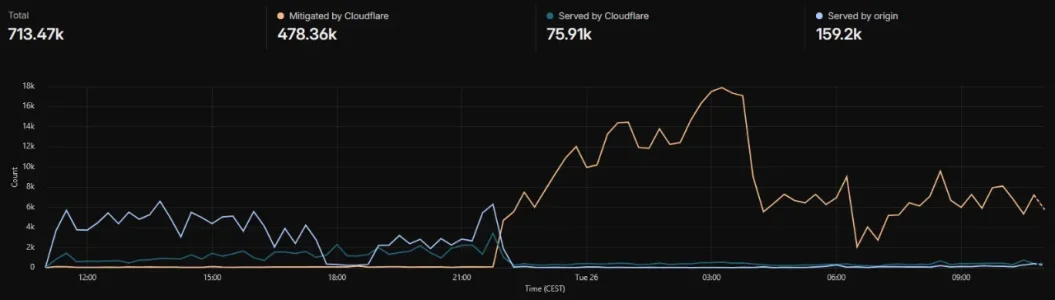
Crazy amount of guests

XTR threat monitor works on everything, hosting has nothing to do with anything. If you have Xenforo running, its just an addon, like any other addon. You won't have access to firewalls and such, but you can use Cloudflare.

If you need help, reach out to me. I am retired, I help people for free which gives me something to do.
That's really kind, Anthony. I'll keep that in mind. Thank you.
 
Hey everyone, late joiner to the party but I see that the music's still on. Thanks to @ES Dev Team for pointing me here.

Very interesting read so far, and it feels like a massive gulp of fresh air to see that I'm not the only one pulling my hair out.

My forums have been swarmed gradually more and more for weeks. One of them is so low-key that I could just put it in full private mode. The other one is another story, but your ideas are encouraging.

Stuff I've seen so far:
  • dumb abusive hammering from the big cloud providers especially from China was easy to spot and cut out through CloudFlare filtering of AS numbers, almost 100 of them so far
  • getting 2 consecutive hits on the same URL (thread, post, whatever) from 2 IPs in very different places in the world, this has been consistent for weeks and clearly indicates 1) coordination and 2) access through residential proxies;
  • the hits from the same IP are so rare that they cannot trigger fail2ban rules that are based exactly on abusive access from the same source in a short period of time
  • a couple of weeks they tried scraping personal data and were hitting all profile pages until I chopped off nearly all permissions for Guests
  • I can't remember which big name spider (facebook?) was drilling directly my forum attachments onto R2 storage, trying to bypass forum permissions and probably attempt content recognition in photos; coupled with some spiders' complete disregard for robots.txt directives and Google's announcement to no longer return site links to searches and instead keep the user in an AI conversation loop, all of it made me throw the towel on all spiders of any sort, and block them all in CloudFlare
  • in recent days the bots are hitting by the thousands the /misc/cookies page with all sorts of GET parameters
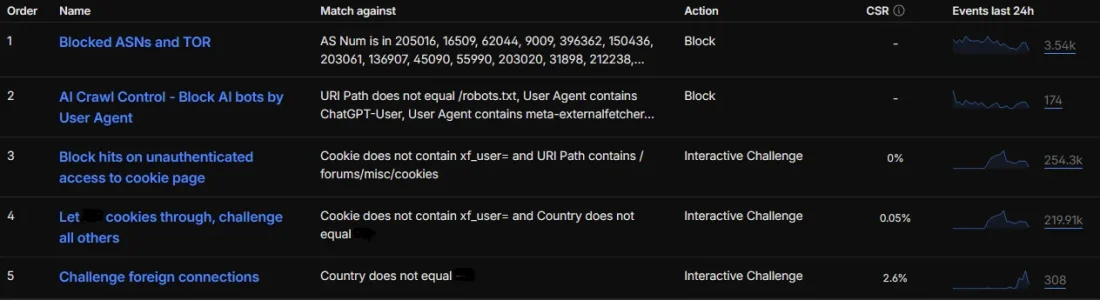
Roughly half an hour ago I enabled two rules that force interactive challenge for anyone who isn't logged in (doesn't have the xf_user= cookie) and two other criteria. The first was for direct hits to /misc/cookies , which got 7.29k hits in 30 minutes. The second was using geofencing for the country targeted by the forum; this got 10.3k hits in 30 minutes.

So far so good, I haven't seen single digit visitors in quite some time.
 
So i disabled fail2ban on a system i also had cloudflare on as a test ( non-xenforo ).
For the record, i have a mostly stock cloudflare configuration with some country bans.

Lots of protection slip through with fail2ban disabled, a primary reason is that cloudflare's rate limiting lacks the flexibility we have with fail2ban. Somehow i have a higher base load too.

1779739497296.webp


Here's the xenforo site i'm running, which is equivalent to xenforo's board by post size and user activity.
It is just running fail2ban and a lot of custom rate limiters, some ASN bans.

Haven't had to bother with banning ASNs lately, we have some slip through events, but they are rarely severe, fail2ban can nab a decent % of it

1779739842237.webp

I think fail2ban is feasible to use today 98% of the time; an ideal pairing is something that also looks at a service like proxycheck.io on top to identify the waves of residential proxies and take an action like request a proof of work when the score is too high.

Strongly considering building such a thing but we'll try anubis as an addon layer first.
 
12 hours later, the forced interactive challenge is keeping bots away. For a brief period of silence.

233k hits on the /misc/cookies page without authentication, with a 0% Challenge Solve Rate (CSR).

202k hits on the rest of the forum from abroad without having the authenticated cookie already, with a 0.05% CSR.

And just for the kicks, the last rule is to challenge visitors from abroad (even if having the user cookie) - 123 hits with 5,69% CSR, most probably mine.

Now I'm starting to see the double-visit pattern again, this time coming through IPv6 through Google's transit/datacenter in the country, so that they're not being challenged by CloudFlare's interactive captcha. Now I have to figure out how to block those f'ers...

[edit] Behold, me data... Bots seem to have caught on in a few hours already. If only CloudFlare would offer more options for action, like a permanent redirect to the homepage for login/registration or to some data poisoning endless maze, or even to simply return a HTTP 200 with a blank page when needed - eat up those residential proxy credits with no useful data collected...
 

Attachments

  • 2026-05-26 111524.webp
    2026-05-26 111524.webp
    21.3 KB · Views: 13
  • 2026-05-26 111641.webp
    2026-05-26 111641.webp
    44.9 KB · Views: 10
Last edited:
Mines nailing it, it seems.
Screenshot 2026-05-26 204921.webpScreenshot 2026-05-26 204846.webp

Thats got about everything other than my normal 100k of legit traffic. That managed challenge is:

Code:
(ip.src.asnum in {139341 24620 211590 210558 133210 14061 51167 150493 201814 209605 215930 209854 202877 31898 150895 9009 216071 48090 213737 270716 51396 59651 211273 62240 396986 138699 150436 60068 213438 45899 45293 213230 137409 23033 786 55967 20473 203020 18779 45905}) or (ip.src in {91.224.92.0/24 141.98.11.0/24 75.119.128.0/19 185.194.178.0/24})
 
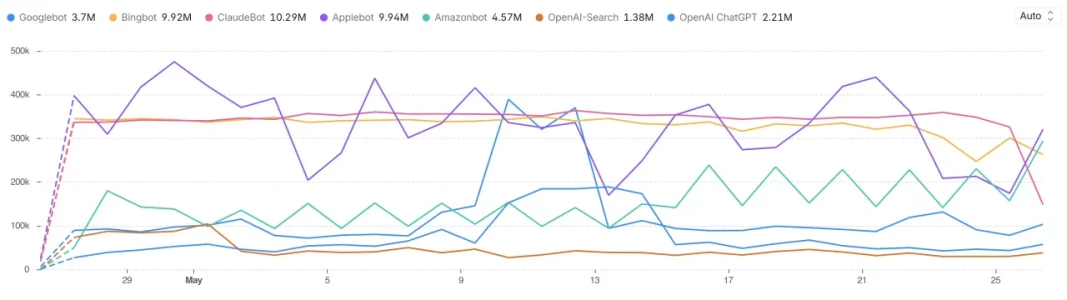
ClaudeBot, Amazonbot and Applebot on the rise. ClaudeBot dropped as did some target rate limit testing at Cloudflare level. Fortunately, server optimisations I have in place allow this forum to handle comfortable the extra 50,000 to 70,000 guests hitting the forums.

Cloudflare custom dashboard just tracking the usual bot culprits. Bots desperately after our data LOL

Those tracked bots account for 15-20% of all requests!

1779836427171.webp
 
I definitely have a lot of Applebot right now. But not the others. I think I blocked Amazonbot.
 
I thought I would share the Cloudflare rules I am currently using to help reduce bot traffic and wasted server resources on a XenForo forum.

This is not a complete “security setup”, and it is not meant to replace normal Cloudflare bot protection, server-level hardening, XenForo updates, or sensible permissions.

It is just a practical rule set that may help people who are dealing with noisy crawlers, fake bots, AI bots, repeated guest requests, or general bot-related load.

I use these alongside Cloudflare’s general bot protection options. I also recommend reviewing Cloudflare’s AI bot settings and disabling/blocking the AI crawlers you do not want.

If you want to replicate this setup, build the rules in the order shown below.

1. Skip rules for your own admin IP​


Action: Skip

This should be your own trusted admin IP address, not mine or anyone else’s.

Use your own static IP, VPN IP, office IP, or other trusted source.

Code:
(ip.src eq YOUR.ADMIN.IP.ADDRESS)

Example only:

Code:
(ip.src eq 203.0.113.10)

If your IP changes regularly, be careful with this rule.

2. Skip rules for robots.txt and ads.txt​


Action: Skip

This allows normal access to robots.txt and ads.txt.

Code:
(http.request.uri.path eq "/robots.txt") or
(http.request.uri.path eq "/ads.txt")

3. Block sensitive XenForo resources​


Action: Block

This blocks direct requests to sensitive XenForo paths that should generally not be publicly accessed.

Code:
(http.request.uri.path eq "/admin.php") or
(http.request.uri.path wildcard r"/admin.php/*") or
(http.request.uri.path eq "/install") or
(http.request.uri.path wildcard r"/install/*") or
(http.request.uri.path eq "/api") or
(http.request.uri.path wildcard r"/api/*") or
(http.request.uri.path eq "/src") or
(http.request.uri.path wildcard r"/src/*") or
(http.request.uri.path eq "/internal_data") or
(http.request.uri.path wildcard r"/internal_data/*") or
(http.request.uri.path eq "/library") or
(http.request.uri.path wildcard r"/library/*") or
(http.request.uri.path eq "/cmd.php") or
(http.request.uri.path wildcard r"/cmd.php/*") or
(http.request.uri.path eq "/htaccess.txt")

Note: If you use the XenForo API, be careful with the /api part. You may need to remove or adjust that section.

4. Challenge fake search/social bots​


Action: Managed Challenge

This challenges requests that claim to be major bots, but are not verified by Cloudflare as legitimate bots.

The important part is:

Code:
not cf.client.bot

That means real verified bots should be excluded, while fake ones get challenged.

Code:
not cf.client.bot and
(
lower(http.user_agent) contains "googlebot" or
lower(http.user_agent) contains "googlebot-image" or
lower(http.user_agent) contains "mediapartners-google" or
lower(http.user_agent) contains "google-read-aloud" or
lower(http.user_agent) contains "adsbot-google" or
lower(http.user_agent) contains "adsbot-google-mobile" or
lower(http.user_agent) contains "googleother" or
lower(http.user_agent) contains "google-inspectiontool" or
lower(http.user_agent) contains "storebot-google" or
lower(http.user_agent) contains "bingbot" or
lower(http.user_agent) contains "duckduckbot" or
lower(http.user_agent) contains "facebookexternalhit" or
lower(http.user_agent) contains "facebot" or
lower(http.user_agent) contains "twitterbot" or
lower(http.user_agent) contains "hetrixtools"
)

5. Challenge non-beneficial crawlers​


Action: Managed Challenge

This challenges a range of crawlers that may not provide much benefit to a forum, but can still consume plenty of resources.

You may want to remove some of these if you want them crawling your site.

Code:
lower(http.user_agent) contains "ahrefsbot" or
lower(http.user_agent) contains "mj12bot" or
lower(http.user_agent) contains "dotbot" or
lower(http.user_agent) contains "semrushbot" or
lower(http.user_agent) contains "serankingbacklinksbot" or
lower(http.user_agent) contains "barkrowler" or
lower(http.user_agent) contains "awariobot" or
lower(http.user_agent) contains "trendictionbot" or
lower(http.user_agent) contains "proximic" or
lower(http.user_agent) contains "criteobot" or
lower(http.user_agent) contains "ias crawler" or
lower(http.user_agent) contains "ias_crawler" or
lower(http.user_agent) contains "ttd-content" or
lower(http.user_agent) contains "adkerneltopiccrawler" or
lower(http.user_agent) contains "sirdatabot" or
lower(http.user_agent) contains "uipbot" or
lower(http.user_agent) contains "yandexbot" or
lower(http.user_agent) contains "yandexrenderresourcesbot" or
lower(http.user_agent) contains "yandeximages" or
lower(http.user_agent) contains "baiduspider" or
lower(http.user_agent) contains "bytespider" or
lower(http.user_agent) contains "qwantbot" or
lower(http.user_agent) contains "petalbot" or
lower(http.user_agent) contains "coccocbot" or
lower(http.user_agent) contains "yisouspider" or
lower(http.user_agent) contains "chatgpt-user" or
lower(http.user_agent) contains "oai-searchbot" or
lower(http.user_agent) contains "claudebot" or
lower(http.user_agent) contains "claude-searchbot" or
lower(http.user_agent) contains "perplexitybot" or
lower(http.user_agent) contains "youbot" or
lower(http.user_agent) contains "amazonbot" or
lower(http.user_agent) contains "amzn-searchbot" or
lower(http.user_agent) contains "leikibot" or
lower(http.user_agent) contains "surdotlybot" or
lower(http.user_agent) contains "webcrawler" or
lower(http.user_agent) contains "feedly" or
lower(http.user_agent) contains "applebot" or
lower(http.user_agent) contains "headlesschrome" or
lower(http.user_agent) contains "semrushbot-ba" or
lower(http.user_agent) contains "baiduspider-render"

I prefer using Managed Challenge here rather than immediately blocking everything. That gives you a bit more room to monitor what is happening before deciding whether to become more aggressive.

6. Challenge unauthenticated guest requests to common XenForo areas​


Action: Managed Challenge

This targets unauthenticated guest GET requests to common XenForo areas that can be hit repeatedly by bots or crawlers.

It excludes verified bots and logged-in users.

Code:
not cf.client.bot
and http.request.method eq "GET"
and not any(http.request.cookies["xf_user"][*] ne "")
and (
http.request.uri.path wildcard r"/forums/*" or
http.request.uri.path wildcard r"/threads/*" or
http.request.uri.path wildcard r"/whats-new/*" or
http.request.uri.path wildcard r"/search/*" or
http.request.uri.path wildcard r"/members/*"
)

This may be too aggressive for some forums, especially if you rely heavily on guest browsing.

Check your Cloudflare events after enabling it and adjust as needed.

7. Rate limit repeated guest requests​


This is a rate limiting rule, not a normal custom WAF rule.

Action: Interactive Challenge
Threshold: More than 20 requests per minute
Counting characteristic: IP address

Code:
(
http.request.uri.path wildcard r"/forums/*" or
http.request.uri.path wildcard r"/threads/*" or
http.request.uri.path wildcard r"/whats-new/*" or
http.request.uri.path wildcard r"/search/*" or
http.request.uri.path wildcard r"/members/*"
)
and not cf.client.bot
and http.request.method eq "GET"

I currently use this at around 20 requests per minute.

Depending on your forum, you may want a higher or lower threshold.

General notes​


  • Do not blindly copy this without checking your own site.
  • If you use the XenForo API, review the /api block carefully.
  • If your forum relies heavily on guest traffic, be careful with the guest challenge rule.
  • Use Managed Challenge first where possible.
  • Only move to hard blocking when you are confident.
  • Check Cloudflare security events after enabling each rule.
  • Build the rules in the order shown above if you want to replicate this setup.
  • Use your own IP address in the admin skip rule.
  • Review Cloudflare’s AI bot controls separately and block the AI crawlers you do not want.

This setup has helped reduce a lot of pointless bot and crawler traffic before it reaches XenForo.

It will not suit every forum exactly as-is, but it should be a useful starting point for anyone dealing with bots, fake crawlers, AI scrapers, or repeated guest traffic.
 
How did you deploy this one please?
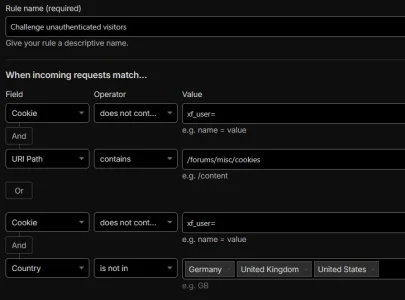
CloudFlare Dashboard > domain you manage > Security > Security Rules > + Create rule > Custom rule.

Here's an example expression and how you can build that visually in the dashboard.

Code:
(not http.cookie contains "xf_user=" and http.request.uri.path contains "/forums/misc/cookies") or (not http.cookie contains "xf_user=" and not ip.src.country in {"DE" "GB" "US"})
1779861829664.webp

It is just a practical rule set that may help people
An excellent collection of rules, thank you very much!

Just a grain of salt on some of it, though: some of the rules are based on conventions that robots should follow robots.txt directives, and that all applications, including browsers, scripts or bots, should correctly identify themselves through user-agent.

Both conventions are largely ignored these days, and might not be worth the trouble of trusting them too much. The appeal of grabbing all the possible data and monetizing it is far greater than the zero penalty of breaching a gentleman's agreement that was based on principles of trust and fairness. Any rules that are based on this will only partially and temporarily work, as long as the bots' maintaners are willing to continue to abide to the conventions.

There are bots which do read robots.txt, but only a few of them do follow the allow or disallow directives; others take it as hints on which URLs to probe for juicy stuff, and many other robots which ignore it altogether.

Scrapers in particular going through residential proxies and through scraping services try their best to simulate a real person so that they blend into the general traffic. It's only the pattern of their visits that gives them away, not the client characteristics they provide as user-agent.
 
Last edited:
CloudFlare Dashboard > domain you manage > Security > Security Rules > + Create rule > Custom rule.

Here's an example expression and how you can build that visually in the dashboard.

(not http.cookie contains "xf_user=" and http.request.uri.path contains "/forums/misc/cookies") or (not http.cookie contains "xf_user=" and not ip.src.country in {"DE" "GB" "US"})

View attachment 338675


An excellent collection of rules, thank you very much!

Just a grain of salt on some of it, though: some of the rules are based on conventions that robots should follow robots.txt directives, and that all applications, including browsers, scripts or bots, should correctly identify themselves through user-agent.

Both conventions are largely ignored these days, and might not be worth the trouble of trusting them too much. The appeal of grabbing all the possible data and monetizing it is far greater than the zero penalty of breaching a gentleman's agreement that was based on principles of trust and fairness. Any rules that are based on this will only partially and temporarily work, as long as the bots' maintaners are willing to continue to abide to the conventions.

There are bots which do read robots.txt, but only a few of them do follow the allow or disallow directives; others take it as hints on which URLs to probe for juicy stuff, and many other robots which ignore it altogether.

Scrapers in particular going through residential proxies and through scraping services try their best to simulate a real person so that they blend into the general traffic. It's only the pattern of their visits that gives them away, not the client characteristics they provide as user-agent.

Yeah this is far from being my only defensive structure. I do also have others which I started to share as free add-ons, like the server resource saver I linked above. Another I'm working to release soon.
 
Last edited:
The expression was also provided in the post above, I just edited it to make it a block of code.

However some of the more complex expressions cannot be converted back into the expression builder automatically. The example at point #6 in @zeeb0t 's post above breaks the expression builder because it has nested logic combining "and" and "or" operators. The expression builder is more simplistic than that, seems to accept "or" between top level blocks containing "and". 🤷‍♂️ Only shows why the expression builder is a good place to start for beginners, but the more powerful stuff requires getting hands dirty with code.
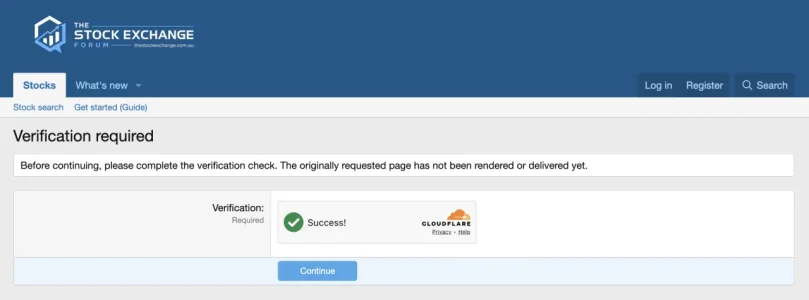
 
As I hinted at before...

I’ve been packaging up a free XenForo add-on I’ve been working on and testing on my own production forum.

The basic idea is this: scrapers and AI crawlers often try to look “new” by changing IP addresses, clearing cookies, or coming back from different networks. So instead of only looking at an IP address or a cookie, this add-on also uses an open-source library called FingerprintJS.

FingerprintJS looks at a range of browser and device signals and generates a visitor ID. It is not magic, and it is not treated as proof that someone is human or a bot, but it gives the add-on another way to recognise when similar traffic may be coming back again.

That matters because a lot of scraping traffic does not behave like a normal person reading a forum. It may rotate through IPs, hit lots of pages quickly, trigger repeated errors, skip normal JavaScript or cookie behaviour, access unusual routes, or keep coming back looking “fresh”.

The add-on records those behaviour signals against the visitor profile. For example: how often pages are requested, whether the browser keeps a normal session, whether JavaScript checks complete, whether the same visitor ID appears across different IPs, whether one IP produces lots of visitor IDs, whether it keeps hitting missing/error pages, and whether it has previously failed or passed a CAPTCHA.

From there, it builds a risk score. A higher score means the traffic is behaving less like a normal person browsing the forum and more like automated scraping traffic.

When that score gets high enough, the visitor can be shown the CAPTCHA service you already have configured in XenForo before they can continue.

Over time, your XenForo starts building a clearer picture of the repeat troublemakers in the bot zoo - and can keep more of them in their cage.

Still testing and polishing, but it’s getting close...

Screenshot 2026-05-27 at 8.49.28 pm.webp
 
That's a very interesting approach, and hopefully a very good alternative for people who'd rather avoid adding CloudFlare as a completely new dependency in their chain.

I will still pursue CF filtering for the simple reason that it prevents something in my own hosting from going far deeper than IP addresses to fingerprint visitor devices, because that would make my life a whole lot harder to explain the monstrosity of GDPR compliance to some bureaucrats, to prove that I have informed the visitor about the data being collected and obtained their consent before storing any of it... yeeeesh. The easiest way to address an issue is to make sure that the issue cannot manifest itself at all. So the more filtering I can offload to CF upstream, based on very high level rules about the country or ISP or presence of a cookie or whatever that can not be easily and directly linked to an individual, and before that traffic even reaches my forum, the better.

[edit] Just caught a bot sneaking in: identifies itself as Facebook External Hit and came through... a residential connection. Man, these are desperate to try ANYTHING to get in!
 
Last edited:
The basic idea is this: scrapers and AI crawlers often try to look “new” by changing IP addresses, clearing cookies, or coming back from different networks. So instead of only looking at an IP address or a cookie, this add-on also uses an open-source library called FingerprintJS.

FingerprintJS looks at a range of browser and device signals and generates a visitor ID. It is not magic, and it is not treated as proof that someone is human or a bot, but it gives the add-on another way to recognise when similar traffic may be coming back again.

That matters because a lot of scraping traffic does not behave like a normal person reading a forum. It may rotate through IPs, hit lots of pages quickly, trigger repeated errors, skip normal JavaScript or cookie behaviour, access unusual routes, or keep coming back looking “fresh”.
Nice, you can do that at Nginx web server level with similar fingerprint nginx modules.

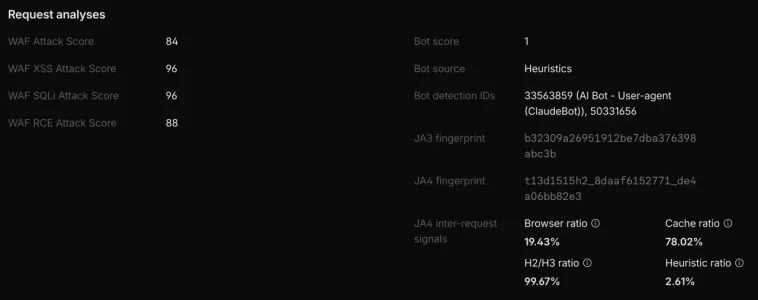
Cloudflare Enterprise plans have ja3 and ja4 fingerprint support https://developers.cloudflare.com/bots/additional-configurations/ja3-ja4-fingerprint/ as part of Cloudflare Enterprise Bot Management. It's very powerful been using it on my Cloudflare Enterprise plan for past 5+ yrs :)

CF Enterprise plans also have detection ids tracking and usage for CF WAF https://developers.cloudflare.com/bots/additional-configurations/detection-ids/

Example for ClaudeBot request in CF Security Events analytics

1779888903792.webp

CF JA4 Signal Intelligence fields explained https://developers.cloudflare.com/b...ons/ja3-ja4-fingerprint/signals-intelligence/

Shame it's CF Enterprise plan only.
 
Nice, you can do that at Nginx web server level with similar fingerprint nginx modules.

Cloudflare Enterprise plans have ja3 and ja4 fingerprint support https://developers.cloudflare.com/bots/additional-configurations/ja3-ja4-fingerprint/ as part of Cloudflare Enterprise Bot Management. It's very powerful been using it on my Cloudflare Enterprise plan for past 5+ yrs :)

CF Enterprise plans also have detection ids tracking and usage for CF WAF https://developers.cloudflare.com/bots/additional-configurations/detection-ids/

Example for ClaudeBot request in CF Security Events analytics

View attachment 338700

CF JA4 Signal Intelligence fields explained https://developers.cloudflare.com/b...ons/ja3-ja4-fingerprint/signals-intelligence/

Shame it's CF Enterprise plan only.

Yeah there's a few different ways to achieve it, but its often out of reach for the typical forum admin. I'm going to release the add-on soon that makes it click and play.

But also, this is application level heuristic. I'm not going to say off the bat that it's better than what Enterprise are cooking. However application level heuristic provides certain benefits over broad-level stuff.
 
That's a very interesting approach, and hopefully a very good alternative for people who'd rather avoid adding CloudFlare as a completely new dependency in their chain.

I will still pursue CF filtering for the simple reason that it prevents something in my own hosting from going far deeper than IP addresses to fingerprint visitor devices, because that would make my life a whole lot harder to explain the monstrosity of GDPR compliance to some bureaucrats, to prove that I have informed the visitor about the data being collected and obtained their consent before storing any of it... yeeeesh. The easiest way to address an issue is to make sure that the issue cannot manifest itself at all. So the more filtering I can offload to CF upstream, based on very high level rules about the country or ISP or presence of a cookie or whatever that can not be easily and directly linked to an individual, and before that traffic even reaches my forum, the better.

[edit] Just caught a bot sneaking in: identifies itself as Facebook External Hit and came through... a residential connection. Man, these are desperate to try ANYTHING to get in!

Anything you can keep away from the origin is a win IMO
 
Back
Top Bottom