That's bit more complex. I've tried to understand this bot for months and did not get my head around it. I've then loads of connections by this user agent and, assumed it would be legitimate, it is somewhat unclear what it does. Facebook offers a description, but it is pretty broad. Upon other things it does create preview of content that has been shared on Facebook (but also loads of other things). As you, I noticed that these connections typically came from residential connections. Plus the user agent was often somewhat strange as well (including things like i.e. "like Twitterbot", which would not make any sense for a genuine Meta/Facebook-bot). So I blocked this useragent entirely - problem solved. The issue is that these requests often come along with a genuine session of a forum visitor from the same IP, sometimes even people that are logged into the forum. So it does not seem to be as easy as to say "evil bot that is using residential proxies". I have simply given up at one point and blocked it entirely and no one complained afterwards, so blocking it does probably do no harm.[edit] Just caught a bot sneaking in: identifies itself as Facebook External Hit and came through... a residential connection. Man, these are desperate to try ANYTHING to get in!

You are using an out of date browser. It may not display this or other websites correctly.
You should upgrade or use an alternative browser.
You should upgrade or use an alternative browser.
Crazy amount of guests
- Thread starter Levina
- Start date
-
- Tags
- bot swarms guests

From what I can gather and have witnessed - sometimes the likes of Facebook may be using the client device to actually pre-fetch some page. So you see the agent coming from some residential IP. It could be genuine, but I am not sure.That's bit more complex. I've tried to understand this bot for months and did not get my head around it. I've then loads of connections by this user agent and, assumed it would be legitimate, it is somewhat unclear what it does. Facebook offers a description, but it is pretty broad. Upon other things it does create preview of content that has been shared on Facebook (but also loads of other things). As you, I noticed that these connections typically came from residential connections. Plus the user agent was often somewhat strange as well (including things like i.e. "like Twitterbot", which would not make any sense for a genuine Meta/Facebook-bot). So I blocked this useragent entirely - problem solved. The issue is that these requests often come along with a genuine session of a forum visitor from the same IP, sometimes even people that are logged into the forum. So it does not seem to be as easy as to say "evil bot that is using residential proxies". I have simply given up at one point and blocked it entirely and no one complained afterwards, so blocking it does probably do no harm.

Makes sense, I would totally expect facebook to use the client installed on users' devices for distributed data gathering (beyond user spying) instead of using their own datacenters for it. They have access to a gazillion devices from volunteers which granted the app every permission imaginable, what's to stop them from leveraging it technically and commercially? Ethics? Pffff...
You can simply look at the Facebook docs what they say it does:Facebook may be using the client device to actually pre-fetch some page
FacebookExternalHit
The primary purpose of FacebookExternalHit is to crawl the content of an app or website that was shared on one of Meta’s family of apps, such as Facebook, Instagram, or Messenger. The link might have been shared by copying and pasting or by using the Facebook social plugin. This crawler gathers, caches, and displays information about the app or website such as its title, description, and thumbnail image.
The specific UA string that you will see in your log files will be similar to one of the following:
Note that the FacebookExternalHit crawler might bypass robots.txt when performing security or integrity checks, such as checking for malware or malicious content.
- facebookexternalhit/1.1 (+http://www.facebook.com/externalhit_uatext.php)
- facebookexternalhit/1.1
As it ignores robots.txt and the purpose is described vaguely as "primary purpose" but lacks any description of other purposes I simply block it. Easy.
The log entry typically looks something like this (old log entry from Dec. 2024):So you see the agent coming from some residential IP. It could be genuine, but I am not sure.
"Mozilla/5.0 (Macintosh; Intel Mac OS X 10_11_1) AppleWebKit/601.2.4 (KHTML, like Gecko) Version/9.0.1 Safari/601.2.4 facebookexternalhit/1.1 Facebot Twitterbot/1.0" 1078 23410
Which makes me wonder b/c of the "Twitterbot/1.0".
Possible. I don't believe in any ethics of Meta either. However: While some of my user do use Facebook many don't. Also, they barely share forum content on Facebook and we barely get visitors that got linked over from Facebook, maybe a hand full per year only.Makes sense, I would totally expect facebook to use the client installed on users' devices for distributed data gathering (beyond user spying) instead of using their own datacenters for it. They have access to a gazillion devices from volunteers which granted the app every permission imaginable, what's to stop them from leveraging it technically and commercially? Ethics? Pffff...
The amounts that this user agent shows up is far too big for that. And, as I said, it is often (if not most of the time) part of a series of requests from the very same IP that uses a normal user agent. The Facebook external hit is then typically at the end of a sequence. So what I see does not really fit the description that Facebook gives for the bot. As you I had a distributed, scraping attack in mind, hidden in some app that genuine users might have installed. But the patterns in the logs do not fit that either.
The weird thing is that I recently had this log entry (anonymized):
(xxxxxxxxxxxxxxx)-1000-0000-000b.source.akaquill.net - - [17/May/2026:15:44:36 +0200] "GET /events/some-event/?utm_source=email&utm_medium=email HTTP/1.1" 403 239 "-" "Mozilla/5.0 (Macintosh; Intel Mac OS X 10_11_1) AppleWebKit/601.2.4 (KHTML, like Gecko) Version/9.0.1 Safari/601.2.4 facebookexternalhit/1.1 Facebot Twitterbot/1.0" 2216 5845
Events are not publicly visible on my forum, so a generic bot or spider wouldn't see them or know about them. Also the source/referrer shows email - which is true as for the event in question my forum members got a PN and most therefor an email, notifying them about the PN. So this seems to be genuine. But how on earth does this user agent come together with email as a referrer?
Last edited:

 errors. And no I haven't done any of the suggestions yet lol. Can't tell who's real or not - Analytics is useless for same reason. Oh well.
As promised, this is now released as a free beta:
LINK: XF Bot Guard
This is the add-on I hinted at earlier in the thread.
The short version is that it gives XenForo a native behaviour-based bot challenge layer. It is aimed at the exact sort of “why do I have hundreds/thousands of guests?” traffic that often turns out to be scrapers, AI crawlers, bad crawlers, proxy traffic, or other automated visitors pretending to be fresh users.
It does not just look at one IP address and make a decision.
It combines things like:
The important thing to understand is that it is not only a “first request” test. It monitors behaviour over time. That means some slower or more careful crawlers may become more obvious as their pattern builds up.
A scraper may rotate IPs, clear cookies, or try to look new, but if it keeps showing similar browser characteristics, bad session continuity, odd route activity, or suspicious request patterns, Bot Guard can start connecting those dots.
It is not magic, and it is not a firewall. It runs inside XenForo, so it is not pretending to replace Cloudflare, your WAF, or proper server-level security.
But because it runs inside XenForo, it can see things a generic edge layer often cannot see: XenForo routes, sessions, content context, logged-in state, CAPTCHA state, fingerprint history, and forum-specific behaviour.
For most practical scrapers, being forced into a CAPTCHA challenge means they are effectively blocked from continuing.
A few notes before installing:
https://xenforo.com/community/resources/xf-bot-guard.10508/
Hopefully this helps put a few more of the repeat troublemakers in the bot zoo back in their cage.
LINK: XF Bot Guard
This is the add-on I hinted at earlier in the thread.
The short version is that it gives XenForo a native behaviour-based bot challenge layer. It is aimed at the exact sort of “why do I have hundreds/thousands of guests?” traffic that often turns out to be scrapers, AI crawlers, bad crawlers, proxy traffic, or other automated visitors pretending to be fresh users.
It does not just look at one IP address and make a decision.
It combines things like:
- browser fingerprinting
- cookie/session continuity
- request velocity
- fingerprint/IP relationships
- one fingerprint appearing across changing IPs
- one IP producing lots of different fingerprints
- missing JavaScript/fingerprint signals
- repeated error/missing page behaviour
- sensitive route probing
- CAPTCHA pass/fail history
The important thing to understand is that it is not only a “first request” test. It monitors behaviour over time. That means some slower or more careful crawlers may become more obvious as their pattern builds up.
A scraper may rotate IPs, clear cookies, or try to look new, but if it keeps showing similar browser characteristics, bad session continuity, odd route activity, or suspicious request patterns, Bot Guard can start connecting those dots.
It is not magic, and it is not a firewall. It runs inside XenForo, so it is not pretending to replace Cloudflare, your WAF, or proper server-level security.
But because it runs inside XenForo, it can see things a generic edge layer often cannot see: XenForo routes, sessions, content context, logged-in state, CAPTCHA state, fingerprint history, and forum-specific behaviour.
For most practical scrapers, being forced into a CAPTCHA challenge means they are effectively blocked from continuing.
A few notes before installing:
- This is a beta.
- It is free, but proprietary freeware rather than open source.
- XenForo CAPTCHA should be configured before enabling it.
- Start with the defaults.
- Watch the Bot Guard log after enabling.
- Do not expect it to stop every possible bot on earth. A real-browser scraper with JS, stable cookies, careful timing, and CAPTCHA solving can still exist.
https://xenforo.com/community/resources/xf-bot-guard.10508/
Hopefully this helps put a few more of the repeat troublemakers in the bot zoo back in their cage.
We need the Trophy reaction.


So, I installed the IP Threat Monitor, inserted API keys from proxycheck.io and Maxmind, filled in a long list of countries to block, added some AS numbers. And traffic is increasing again, now at 5.968 and rising. I also see blocked countries in the list of visitors. And checking the proxycheck.io dashboard it doesn't look good. I went with the 40,000 queries plan but look at this, with 18 hours to go:
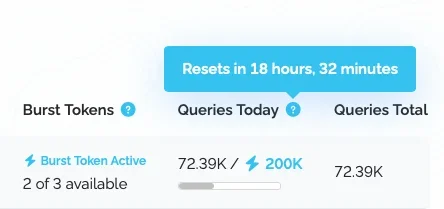
This is crazy! Luckily they have this Burst token something, but that won't be enough.
And I experienced moments of pretty bad lag a few times.
I'm also now seeing bots from countries I can't block. What I do I do with those?
This is crazy! Luckily they have this Burst token something, but that won't be enough.
And I experienced moments of pretty bad lag a few times.
I'm also now seeing bots from countries I can't block. What I do I do with those?
Did you get a Maxmind Key and fill it in the add on settings? Should look like that:I also see blocked countries in the list of visitors.
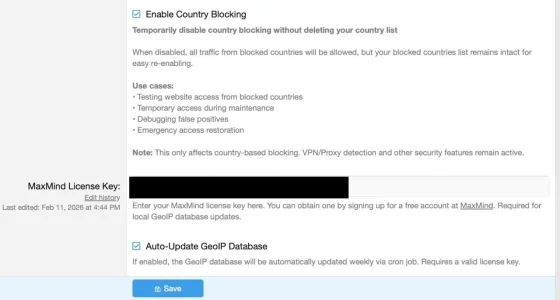
If you just installed it go in APC to Tools -> Cron, search for the update job an run it manually. Looks like that:

If you see blocked countries in the dashboard of proxycheck this means that the add on queries proxycheck for the country, not using maxmind. Using maxmind will dramatically save on API calls.
@smallwheels
Yes, both keys from proxycheck.io and Maxmind are installed, but indeed, the one from Maxmind just an hour ago. I ran the cron job and traffic is rapidly coming down now. Looking at the dashboard queries seem to hold at 89k. Phew. Thanks!
Yes, both keys from proxycheck.io and Maxmind are installed, but indeed, the one from Maxmind just an hour ago. I ran the cron job and traffic is rapidly coming down now. Looking at the dashboard queries seem to hold at 89k. Phew. Thanks!
You'll have to increase the granularity of the blocking. As IP Thread Monitor works IP based this means (from big to small):I'm also now seeing bots from countries I can't block. What I do I do with those?
- Country
- ASN (while an ASN might span IPs based in several countries)
- Network
- IP
So in the end the only issue that is left is residential proxies (using normal end users internet connection) in countries where you do have regular users. This may affect the US heavily, as in fact loads of residential proxies come from there. In my case I did bite the bullet and blocked the ASNs of a lot of regular US internet providers to calm this down - however: This means that visitors from the US that are not logged in will be blocked. A price to pay and not a nice one, but as I only do have a hand full regular users from the US I can sadly live with that.
On top of Thread Manager I block some patterns via .htaccess, but being on XF Cloud this is not available for you.
Possibly you need to block more ASNs. Roughly about how many have you blocked currently? Mine is at 545 blocked ASNs at the moment (added a hand full since I gave you the list). Possibly up to ~100 of them may be residential, the rest should be safe to use. With the residential ones it depends from your audience and target group.added some AS numbers. And traffic is increasing again, now at 5.968 and rising.
Also, over time your blacklist of previously blocked IPs grows. As I understand it, if these come back again they will be blocked directly, w/o asking proxycheck first. So over time API calls will go down again. Also, some will simply give up, especially if you manage to block the network/IP/ASN of the controlling instance. I do use Threat Monitor for ~four months now and am down to ~1.500 API queries on normal days (but did not suffer from bots to the extend you have).

Not sure what happened over the past few days but mine have dropped greatly. And I haven't changed anything.
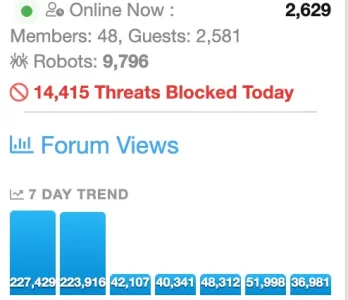
They come in waves.
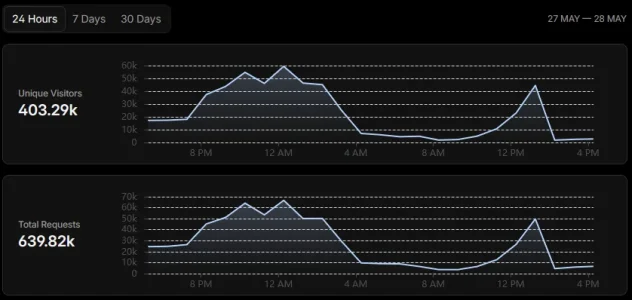
My forum came in their crosshairs heavily from May 22nd:
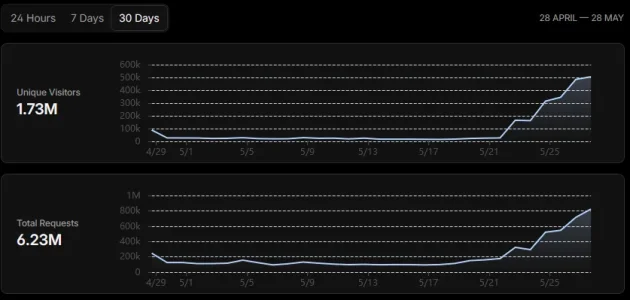
But if I look at the pattern over the past 24 hours, it was massively hit during nighttime in Europe, then another wave built up and suddenly dropped as I kept fine tuning the filters.
The two rules requiring solving an interactive challenge for unauthenticated users hammering directly forum paths they're not supposed to visit as guests (managing own account, using forum search, accessing members pages, trying direct messages etc.) were triggered nearly half a million times in the past 24 hours, and only 0.08% of the first rule's 184k triggers and 0.00% of the second rule's 284k triggers were actually resolved and allowed through.
Meanwhile out of the 639k requests getting into CloudFlare, just a bit under 25k actually reached the hosting and were answered by XenForo.
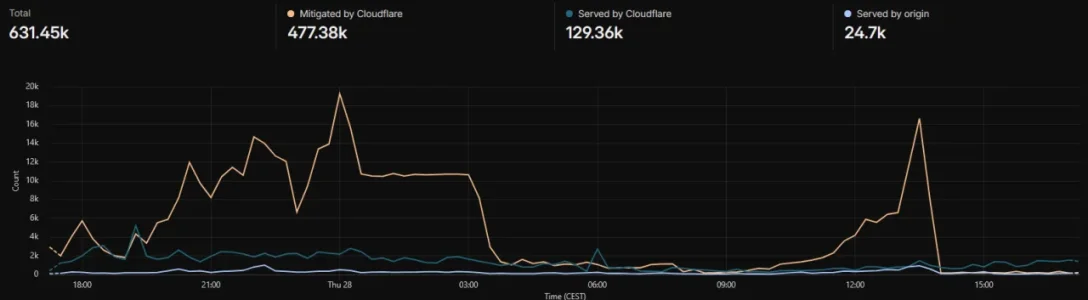
It's been quiet since 2pm. We'll see tomorrow what else they came up with overnight. It's never over.
PS: and on the other smaller forum set private, someone took a list of possible exploitable paths of all sorts of plugins and scripts people might use, and went through them all with a loop running curl. At least he didn't even make an effort to appear smart.
My forum came in their crosshairs heavily from May 22nd:
But if I look at the pattern over the past 24 hours, it was massively hit during nighttime in Europe, then another wave built up and suddenly dropped as I kept fine tuning the filters.
The two rules requiring solving an interactive challenge for unauthenticated users hammering directly forum paths they're not supposed to visit as guests (managing own account, using forum search, accessing members pages, trying direct messages etc.) were triggered nearly half a million times in the past 24 hours, and only 0.08% of the first rule's 184k triggers and 0.00% of the second rule's 284k triggers were actually resolved and allowed through.
Meanwhile out of the 639k requests getting into CloudFlare, just a bit under 25k actually reached the hosting and were answered by XenForo.
It's been quiet since 2pm. We'll see tomorrow what else they came up with overnight. It's never over.
PS: and on the other smaller forum set private, someone took a list of possible exploitable paths of all sorts of plugins and scripts people might use, and went through them all with a loop running curl. At least he didn't even make an effort to appear smart.
Last edited:

Looks really nice. Have you tested this on a large forum yet?
What i wanted to know is if it performs well at scale.
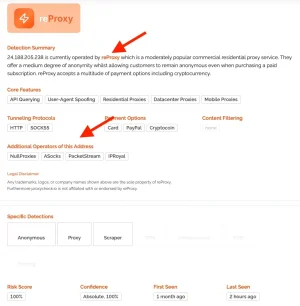
Btw: Most reports about proxy providers mention, that they would share their IP pools quite often. So different shell companies and branding that are effectively using the same infrastructure. I found one hint to that in my proxycheck logs, too:
Looks really nice. Have you tested this on a large forum yet?
What i wanted to know is if it performs well at scale.
I have it running on my forum at thestockexchange.com.au - not enormously busy but probably 40k impressions per day.... and very little bad bot activity
 a guest user count that would make most smile on here hehe
I allow only good known bots and the rest get dealt with by both the cloudflare rules I shared before, and my addon...
Taken just now around 6.30am local time
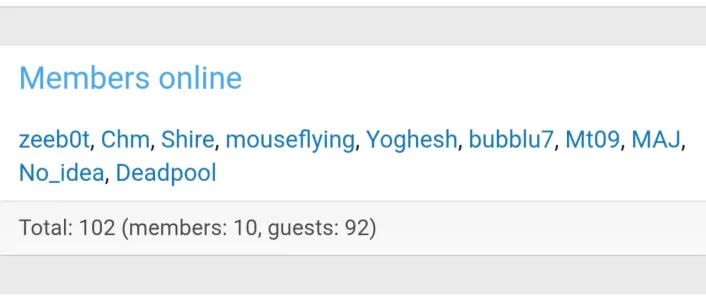
Right now on my forum (11pm local time):a guest user count that would make most smile on here hehe

Both make me smile
 nicely done
Once they know they're being blocked, they give up fairly fast. On the flipside, this is why a well tuned server works best, because then you don't have to worry about the extra costs of third parties and just let them go, doing nothing to your server load because your server can handle it. Its where you put your money, and time. This is also where Cloudflare comes into its own, because stopping traffic at DNS means they never hit your server to make that request to proxycheck, which means less $$$$@smallwheels
Yes, both keys from proxycheck.io and Maxmind are installed, but indeed, the one from Maxmind just an hour ago. I ran the cron job and traffic is rapidly coming down now. Looking at the dashboard queries seem to hold at 89k. Phew. Thanks!
Basically, you're going to need a Pro Plan, so you can pay a third party or put it into your server to handle it.
I'm running a little experiment right now, where I have everything off, except one ASN I have blocked from India which gave me daily human spam.
Similar threads
- Replies
- 6
- Views
- 189


- Replies
- 8
- Views
- 222

