Crazy amount of guests

Damn, you had to ban linux users huh :(


If they are using real browsers, then yes, they can get around almost anything. The more people who use anubis, the higher the cpu tax will be on these bot farms and we could theoretically make the job too expensive if tons of people use something like anubis, so it's a good thing your site is making them pay the tax. I think the only way it could work is that everyone has to pay the tax, though.

We may join you in helping deliver 1 of the 1000 tiny cuts needed soon.

View attachment 334014

I notice they are getting more clever and more distributed too.
The number of guests on my site no longer affects volume less and frequency of rotation more.
I have yet to go in there and look for more subnets to ban. I'm thinking of writing something that automatically bans those..
I wouldn't say that I've banned Linux users, but filtering out HeadlessChrome UAs. That's a version of chrome that has absolutely no GUI. Which generally translates to a bot/scraper.

Unfortunately, todays event wasn't a good sign to see. Primarily due to how Anubis was being solved for some clients on a challenge level of 5. Going higher in these levels tends to become problematic for legitimate users. Guess I can make much more surgical challenge levels to certain clients matching certain browser criteria. Upping challenge levels to those CIDR blocks aren't an ideal method any more when it comes to Residential Proxies getting used.

Ugh... just ugh.
 
I don't expect any UA identification to work in the future. The majority of bots i see are randomizing theirs.

The way i would configure anubis:
  • users submit 5 seconds of CPU time
  • we retain the 'user passed the check' for 30 days so a real user only needs to pass it rarely
  • rework the anubis UI to resemble a welcome screen so it's more friendly

You can't differentiate between logged in users and not on a webserver level, but if you could, you could have one standard for guests and a super lax one for people who are logged in.

I think this involves the custom software i've been thinking about.
 
You can't differentiate between logged in users and not on a webserver level, but if you could, you could have one standard for guests and a super lax one for people who are logged in.
Well you could check for the login cookie. Granted you'd not be validating its contents, but the lack of one certainly indicates a guest, even if the presence of one doesn't 100% mean logged in valid member. I tend to do that in our (nginx) logs so I can idly grep out member or guest traffic depending on what I want when I'm watching it.
 
You can't differentiate between logged in users and not on a webserver level, but if you could, you could have one standard for guests and a super lax one for people who are logged in.

IP Tread Monitor does that and it is indeed very helpful:


While from architectural point of view it is not optimal to have the protection layer run within the application that shall be protected itself and (also expectably) with very high traffic forums one might run into load issues if this is your first and only filter point it seems a good solution for smaller forums and is very helpful if you are i.e. on shared hosting and thus can't i.e. install a dedicated firewall.
 
Well you could check for the login cookie. Granted you'd not be validating its contents, but the lack of one certainly indicates a guest, even if the presence of one doesn't 100% mean logged in valid member. I tend to do that in our (nginx) logs so I can idly grep out member or guest traffic depending on what I want when I'm watching it.

Interesting. How do you accomplish this? do you have a custom log format?

While from architectural point of view it is not optimal to have the protection layer run within the application that shall be protected itself and (also expectably) with very high traffic forums one might run into load issues if this is your first and only filter point it seems a good solution for smaller forums and is very helpful if you are i.e. on shared hosting and thus can't i.e. install a dedicated firewall.

I'm still in the middle of building my thing, but i thought about this a lot and it turned me off from this plugin. It's interesting otherwise.

I have a little script now that can write all the data for a web hit to PHP in about 0.02ms, then use a background job to bulk insert it into a database, and another background process to periodically analyze the agregate of the data on a long term and short term basis.

This gives us a 0.02ms hit on our web script and the worst thing that can happen is that the analysis part runs behind ( if that happens, your webserver is close to being hosed anyway )

The shared webhost problem is cured by copying the xenforo/wordpress design of keeping track of when the cronjob was last run and initiate it in a background process when the user hits the page next

If someone told me they had a close to zero impact protection system, i'd use it instead of have to build it :D


On that note, in times of high traffic, fail2ban runs behind since it's single threaded.
With fail2ban being built with python, which is 4-5x slower than PHP, i think it is very possible to do in-app protection with my idea, maybe something less intensely focused on moving the overhead out of the PHP script.
 
do you have a custom log format?
Well a slightly tweaked one in this case just replacing the remote user with either guest or member. The snippets from our Nginx config are just a new log format and a map for the cookie:
NGINX:
  log_format  xen  '$remote_addr - $member [$time_local] "$request" '
                    '$status $body_bytes_sent "$http_referer" '
                    '"$http_user_agent" "$http_x_forwarded_for"';
NGINX:
  map $cookie_xf_user $member {
    default  guest;
    '~[a-z]' member;
  }

I'm still in the middle of building my thing
I must get back to building my own system, best laid plans and all that. Taking a similar approach to you it sounds, but mirroring requests (minus the HTTP body) to another server and recording them there, then feeding that data into a database for analysis. We also honeypot some URLs to quickly identify the probing scripts and proxy those requests off to a different location for analysis banning :)
 
I have a small forum, usually a few hundred guests at most. The last days the number of guests have been unusually high, around 3000 and climbing. We now have over 4800 guests. That's not normal. Many "Viewing unknown page" or "Latest content", with a warning sign. IP addresses are from all corners of the world. Many from south America, Brazil mostly. Also saw quite a number from Vietnam of all places, but everywhere else too.

We're on Cloud and I don't know what to do. Could we be under attack? We have been in the past, a few times I think. For reasons I cannot possibly fathom; we're a small photography forum for crying out loud.
Go for cloudfare free dns and setup your site with Security Rules.
Give a managed challenge for all unverified bots (90% of your issue will be resolved)>
 
Go for cloudfare free dns and setup your site with Security Rules.
Give a managed challenge for all unverified bots (90% of your issue will be resolved)>
Maybe you should have read more than just the start posting of the thread but rather the 11 pages followig it until now. Then you'd have realized that your ill-led "advice" does not work at all.
 
A bit of a changing trend over the last week: Regarding countries where malicious traffic comes from the US have always been within the top five over the last weeks with Brazil, Argentinia, India, Bangladesh, China and Vietnam being the strongest competitors. However: In the meantime the US have stabilized their position being number one source of scraping and other malicious traffic. Continuously four times as much malicious requests from the US than from any other country. Apart from the immense amount of resident proxies in the US I recently see a clear trend towards way more bad requests coming from data centers in the US compared to earlier - all sorts of Proxies, VPNs or direct scraping attempts. One can clearly see that (apart from the usual bigger cloud providers that simply don't care what their services are used for) there's quite a bunch of rogue hosting companies in the US that have proven to be notorious for this kind of traffic continuously since I started monitoring more than a year ago and traffic from them is on the rise.
The rise towards more VPNs and data centers and possibly less resident proxies can be also seen in countries within Europe. GB/UK and Canada made it into my top five blocked countries today mainly caused by that (but with very small numbers compared to the US: GB/UK on place 3 with ~15% of blocked IPs in the last 24 hours compared to the number of blocked IPs from the US, Canada on place 5 with 7%). These are mainly driven by the ASNs of companies that distribute the IPs of their ASNs through many different countries, so typically not by hosting companies inside UK and Canada. These kind of companies are often notoriously showing up when it comes to malicious traffic and many of them seem potentially to serve malicious traffic as one of their main business drivers as it seems.
 
Last edited:
I recently see a clear trend towards way more bad requests coming from data centers in the US compared to earlier - all sorts of Proxies, VPNs or direct scraping attempts.
Yup. Its why I block most server providers, especially the big ones, Linode, DigitalOcean, Amazon, Microsoft, etc. Nobody is legitimately surfing the web from a server provider, they either have a VPN or Proxy on a VPS to hide themselves.

Singapore and US are my top two right now.
 
Whilst generally that might be true one spanner we see is a lot of Apple Privacy Guard clients - who are just normal people who don't realise that this shiny privacy feature on their phone is a VPN. We also have quite a lot of corporate users whose traffic is filtered via things like zScaler. That all said I think for most general forum users (we host a lot of other stuff that legitimately needs to be accessed from other servers) you're probably right! :)
 
Whilst generally that might be true one spanner we see is a lot of Apple Privacy Guard clients - who are just normal people who don't realise that this shiny privacy feature on their phone is a VPN. We also have quite a lot of corporate users whose traffic is filtered via things like zScaler. That all said I think for most general forum users (we host a lot of other stuff that legitimately needs to be accessed from other servers) you're probably right! :)
I have a lot of users that come via the Apple Privacy Relay (which under the hood uses infrastructure from Akamai, Cloudflare and others). Those have a free ride into the forum as the IP-Ranges are known. I am talking about ASNs like i.e.

AS207990 HostRoyale Technologies Pvt Ltd
AS36352 HostPapa
AS20473 The Constant Company LLC
AS202044 Getechbrothers MB
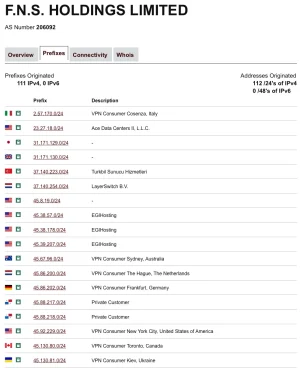
AS18779 EGIHosting
AS395954 Leaseweb LAX
AS41564 Orion Network Limited
AS51765 Oy Crea Nova Hosting Solution Ltd
AS45090 Shenzhen Tencent Computer Systems Company Limited
AS399275 Solid Systems LLC

and many, many more (including the big cloud hosters). Including the ASNs of resident proxies in total I've currently blocked 388 ASNs from around the world. Today, a whopping 71% of requesting IPs were blocked, an all time high. On good days it is just 30%, around 40%-ish is normal. Not much bad traffic is coming through any more and no complaints from real users. I've been "collecting" these ASNs since late 2024 - the list is pretty consistent and many of those ASNs are constant sources of scraping, spamming or hacking attempts. It is however still growing, but not very fast.
 
I took the advice here, and set a script in iptables to manage everything to pretty much cloudflare and my static ip.

I put through 170k in an hour yesterday, and the server barely noticed it, from its normal 40k per hour. Tuning the server was the best thing I could have done.
 
Be careful - Azure and Bing are on the same ASN's
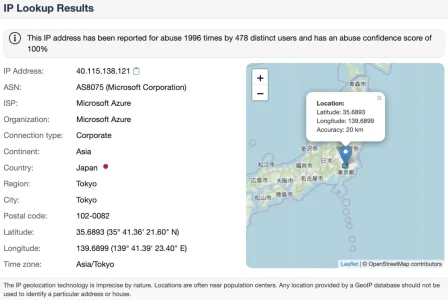
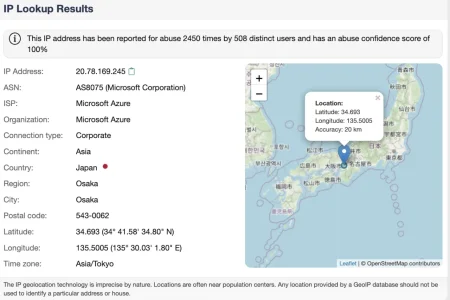
The fact that Microsoft is using one single gigantic ASN w/o any useful segmentation for absolutely everything they do and offer shows once more the ignorance that this company has as inherent part of their company culture: They simply optimize only for themselves, no matter what negative effects this may have on others. What I see from Azure are for the most part scanning for weaknesses and configuration files - to an enourmous extend. Microsoft does not care at all as long as they get paid, else the situation would not look like that for IPs from Azure:

Bildschirmfoto 2026-02-22 um 15.19.59.webp
Bildschirmfoto 2026-02-21 um 23.21.34.webp

As Bing is completely irrelevant for gaining traffic (let alone registered users) for my forum judging from my statistics and the Bing webmaster console (despite having indexed way more pages of my forum than google and my forum having a way better ranking in Bing than in Google) it would probably do no harm to throw Bing under the bus along with the rest of the ASN for being part of an evil and ignorant empire.

However: The IP-ranges that bing uses are well known and easy to find out, so one can whitelist them. The useragent ist transmitted in the request and furthermore reverse dns always points to *.search.msn.com for any genuine traffic coming from the Bing indexer. So with a little love in the approach it is easy to block Microsofts AS8075 and still let Bing come through.

I do block these scanning for configuration files and other weaknesses via regular expressions in .htaccess (no matter where they come from) to keep my 404-statistic clean and usable. The IP Threat Monitor add on that I am using does a brilliant job in letting Bing though and filtering out the rest of the ASN automatically.
 
Back
Top Bottom