Crazy amount of guests

I would be interested to see how many other people are taking abuse from 57.141.*
I've blocked meta's bots via .htaccess ages ago and also blocked meta's ASN32934 (which includes 57.141.*) completely. So no issue here. You may however have "some" IPs left to block to lock Meta's own IPs out from your forum:

IPV4:


IPV6:

 
You may however have "some" IPs left to block to lock Meta's own IPs out from your forum:

I'm only concerned about the abusive ones, if my guests are under 500 I am happy, as soon as I see thousands I will go back and ban the top 1-2 most abusive bots. I'm not interested in all the extra security stuff and fancy addons, member clicks, cloudflare notices and such. In my opinion they degrade the experience, I am so tired of waiting for sites to load because of captcha or cloudflare delays.

Then even the downtimes when cloudflare takes down half the internet, that does not interest me.

I simply block what is abusive on my forum and I don't rely on another factor like cloudflare that can take my site down. On my forum I have documented downtime of cloudflare and for a little bit it happened quite frequently. Seems better now but mark my words, they are such a big target another down time is imminent. If I can do the same by simply adding a few IP blocks and a 403 error message I will take that. No cloudflare delays makes my day.

PS. The cloudflare notice on Xenforo is annoying every time I visit and they are getting billions of pages of free advertising while charging you to use their services. If anything they should pay me to show the cloudflare notice. (yeah I know they have a limited free plan).
 
What baffles me, is that I have about 25+ sites, and the only two that get hit, are both Xenforo forums. Other sites get traffic spikes, but nothing like what the XF ones get. Not even in the same ballpark. IMO, someone is personally targeting XF sites to cause trouble.
From articles I've read about the negative parts of AI, some of the AI agents tend to weight opinion over fact; they'll target Reddit, forums, social media, etc., and give those greater weight than actual factual data. Which is why much of what they spew is incorrect. And that is what we tell forum members when we ban the posting of AI content--we do block AI scrapers as best we can, but for those that get through, we don't need them scraping and giving greater weight to AI-generated content that may already be suspect. (That's aside from wanting our members to give their thoughts, not the output of a machine.)

Given that bias, it explains how some of these agents are hammering away on forums. I don't run anything but XenForo anymore, but I wonder if any of my old systems, or vBulletin, would have gotten the same abuse. I bet they would have. Blogs on WordPress probably get hit also; mine are low-traffic and not well indexed (my choice), so those are not a good example. But with blogs being more static in nature (maybe one blog post a day) vs. a busy forum getting hundreds if not thousands a day, blogs may not be hit quite as hard.

BTW, just thinking about it now, our old vBulletin 3.7 would never have survived these bot swarms, even with Cloudflare protections. I had it so heavily modified to deal with heavy traffic that I couldn't stomach upgrading it to 3.8 or 4.0. We converted it to XF in 2011 or 2012. I remember seeing our load drop in half once we went online and traffic settled in. For that alone, we were thankful.
 
I'm only concerned about the abusive ones, if my guests are under 500 I am happy, as soon as I see thousands I will go back and ban the top 1-2 most abusive bots. I'm not interested in all the extra security stuff and fancy addons, member clicks, cloudflare notices and such. In my opinion they degrade the experience, I am so tired of waiting for sites to load because of captcha or cloudflare delays.

Then even the downtimes when cloudflare takes down half the internet, that does not interest me.

I simply block what is abusive on my forum and I don't rely on another factor like cloudflare that can take my site down. On my forum I have documented downtime of cloudflare and for a little bit it happened quite frequently. Seems better now but mark my words, they are such a big target another down time is imminent. If I can do the same by simply adding a few IP blocks and a 403 error message I will take that. No cloudflare delays makes my day.

PS. The cloudflare notice on Xenforo is annoying every time I visit and they are getting billions of pages of free advertising while charging you to use their services. If anything they should pay me to show the cloudflare notice. (yeah I know they have a limited free plan).
I just have Robot Facebook declaring itself quite a lot at the moment so will block it and the meta-agents, although your meta agents seemed to be declaring themselves. I don't see any sign of that in guests - but it would be interesting to see if some of those guests disappear if blocking meta.

I do use Cloudflare after being hit with a swarm of 5000 - mostly residential proxies - it became fruitless trying to block IP's or just ASN's so Cloudflare became essential at that point. I also hate seeing a Cloudflare "are you human" page - but there are ways round that so it only appears for bots and not genuine humans.

For example you can whitelist registered members (xf_user cookie) in a cloudflare rule, so they don't get a challenge at all and the site just works normally for them. You can also set a referer so genuine guests don't get challenged either (they have a referer cookie just for landing on the site whereas bots go directly to a uri path). Although some bots can fake a referer but I'm ok with 300 or so getting through. Cloudflare is currently blocking 700,000 from my site! That is a huge number and no way I could just block all individual IP's as they are world-wide residential proxies.

So it's something worth considering if you ever get a huge bot swarm :-) I have never had Cloudflare go down on me - if it has happened in the past four years it must have been very quick as I have had no issues at all in the Uk. I do have some "bad bots" blocked in .htaccess as well. That kept things fine for a few years - until this big hit recently.

Having said I'm ok with 300 or so, I'm not really because of what they are doing, rather than the numbers - harvesting images, scraping articles etc.
 
Last edited:
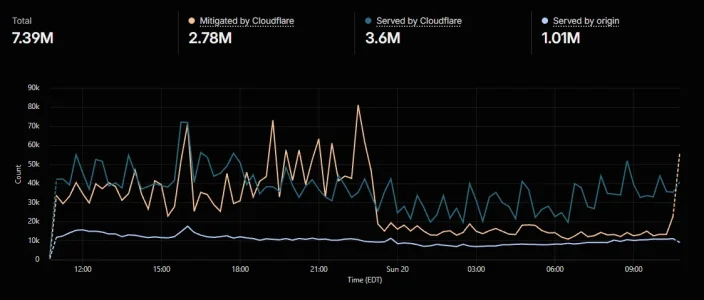
The last 24 hours have been interesting. Not a short bot swarm like before, but more of an ongoing presence for about 12 hours, giving up around 11:30pm. (Can't look back further to see when this started due to the 24 hour limit for analytics.)

1789916494597.webp

We had a little extra traffic but nothing the server couldn't handle. Our origin numbers stayed in a comfortable range with only one minor blip around 16:00 EDT.
 
According to my server logs, the server itself is already blocking meta-externalagent with a 406. Which is interesting as I haven't blocked it anywhere - not in cloudflare, robots.txt or .htaccess. So it must be a server side security thing perhaps?

I'm weighing up which Facebook ones are ok to block and which not to block. Because Robot Facebook is facebookexternalhit (I think) and if I block that, any forum links on facebook probably wouldn't render properly. I think that one comes to the forum when one of the forum links is posted on facebook.
 
Because Robot Facebook is facebookexternalhit (I think) and if I block that, any forum links on facebook probably wouldn't render properly. I think that one comes to the forum when one of the forum links is posted on facebook.
In theory yes. However: I had so many visits using the user agent facebookexternalhit that my forum would be very frequently and prominently linked on Facebook - which is not the case. Most of these visits came from client IPs, so I assume those were resident proxies. Also Facebook themselves state that they use this bot for other purposes as well but stay a little vague regarding the concrete purpose. And they say it may ignore robots.txt "for security or integrity checks or the checks for malware". Consequence: It does not follow any protocol, it comes in numbers, so it is blocked. End of the drama. Simple.
 
That is a point - I have no real presence on facebook or other meta sites but do have the odd backlink. So bots could be hitting the links, triggering Robot Facebook to crawl - or something else entirely!
 
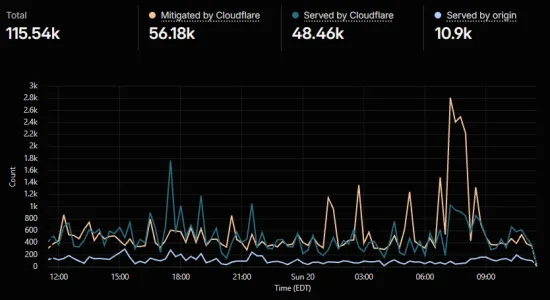
Here is traffic from a much smaller forum (which is also the oldest, dating to 1997). The origin looks a little lumpy but still well within the server's limits.

1789918566471.webp

For any server I operate, I have monit set up to email me when resources exceed certain numbers I have set. I haven't had a notification since last week.

FWIW, the smaller forum above is on a set of three smaller cloud servers I set up years ago. One runs only Apache and PHP (and therefore, XF), where a second is tuned for MariaDB, and the third runs only Elasticsearch. I did it more as an experiment to see how everything would work and, years later, I do like this setup. The ES server doesn't need that much in the way of resources, and I consider it "expendable" since, if I need to fire up a new one, I don't need to recover the data from a backup--I can reload the snapshot of my setup and have XF rebuild the search index. The other two are backed up in at least two different places, including a nightly cloud backup using rclone that syncs a rotating set of backups.

For a much larger forum? I don't know that it would be affordable to run three smaller servers vs. one larger one. I would need to chew on some analytics to figure out how much in resources I would need to allocate to each smaller server. I might even consider a fourth server to use as a proxy, where I could do all our heavy filtering (I would shift to anubis and other firewall measures), then feed that to the actual web server that XF runs on.

That's way off topic I know, but it's all in the back of my head as I look to the future, and preparing for bot swarms that we'll all have to tackle again.
 
I've left Robot Facebook/facebookexternalhit for now. But blocked the following in a Cloudflare block rule:

meta-externalagent, meta-externalfetcher, meta-webindexer and meta-externalads

Even though the server was already blocking meta-externalagent - means the server won't need to now.
 
FWIW, the smaller forum above is on a set of three smaller cloud servers I set up years ago. One runs only Apache and PHP (and therefore, XF), where a second is tuned for MariaDB, and the third runs only Elasticsearch. I did it more as an experiment to see how everything would work and, years later, I do like this setup. The ES server doesn't need that much in the way of resources, and I consider it "expendable" since, if I need to fire up a new one, I don't need to recover the data from a backup--I can reload the snapshot of my setup and have XF rebuild the search index. The other two are backed up in at least two different places, including a nightly cloud backup using rclone that syncs a rotating set of backups.

For a much larger forum? I don't know that it would be affordable to run three smaller servers vs. one larger one. I would need to chew on some analytics to figure out how much in resources I would need to allocate to each smaller server. I might even consider a fourth server to use as a proxy, where I could do all our heavy filtering (I would shift to anubis and other firewall measures), then feed that to the actual web server that XF runs on.
Like. A classic approach, rarely seen today. You could beef up the setup by creating a private network between the hosts and only the firewall having a public IP. And then adding a log host for aggregating all the log files and a jump host as the only start point for your ssh-sessions. But then you would need quite a big of traffic to justify such a setup today. :-) One could create something like that on a single machine with virtualization, but that would leave out all the fun. ;)
 
meta-externalfetcher
If I recall correctly, this one is a 50/50 item to block. When you see this particular UA, this is from users linking your website to another user or making a post referencing your website. That could be Instagram, Threads, Facebook, Whatsapp, and even Meta.ai. Up to you if you want to fully block that one. It is a mixed bag on that one - you have to use analytics to judge the filtering of that.
 
If I recall correctly, this one is a 50/50 item to block. When you see this particular UA, this is from users linking your website to another user or making a post referencing your website. That could be Instagram, Threads, Facebook, Whatsapp, and even Meta.ai. Up to you if you want to fully block that one. It is a mixed bag on that one - you have to use analytics to judge the filtering of that.
Thanks. I've seen no different to solve rates or the number of bots on the site so I'll remove that one again. Thanks.
 
Curious about Amazonbot. It hasn't appeared in my robots list for a long time. In fact a few years ago I disallowed it in robots.txt as it was quite aggressive. I must have removed that at some point as it's no longer in robots.txt. But according to Cloudflare it is crawling the site hourly and is allowed. Yet it doesn't show up as Robot Amazon. Presumably it is just appearing as a guest - which is not great.
 
Curious about Amazonbot. It hasn't appeared in my robots list for a long time. In fact a few years ago I disallowed it in robots.txt as it was quite aggressive. I must have removed that at some point as it's no longer in robots.txt. But according to Cloudflare it is crawling the site hourly and is allowed. Yet it doesn't show up as Robot Amazon. Presumably it is just appearing as a guest - which is not great.
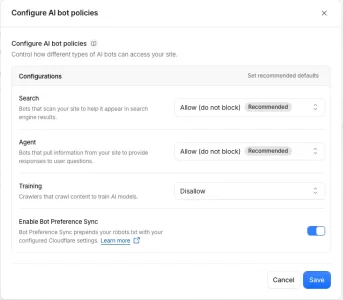
For your robot.txt you can set preferences in Cloudflare - Security > Settings > Bot Traffic > Configure AI bot policies.
Not all bots will respect the robots.txt of course, but the decent ones at least will.

Here's how I set mine:

Schermafbeelding 2026-09-20 om 23.29.36.webp
 
For your robot.txt you can set preferences in Cloudflare - Security > Settings > Bot Traffic > Configure AI bot policies.
Not all bots will respect the robots.txt of course, but the decent ones at least will.

Here's how I set mine:

View attachment 345176
This article mentioned some changes as from 15 September. Presumably shown in your screenshot already.

"What changes on September 15?
We are making the following changes to Bot Management and AI Crawl Control:

  1. Block and Block on pages with ads now apply to mixed-use crawlers, including Applebot, Bingbot, and Googlebot, so either setting impacts search as well as training. To stop training and keep search, use Disallow AI Training.
  2. “Block AI Bots” will be deprecated in favor of the more granular Search, Training, and Agent controls.
  3. Managed Robots.txt will be deprecated in favor of Bot Preference Sync. Customers who enabled Managed Robots.txt will migrate to the new system.
  4. Disallow AI Training will become part of the recommended configuration for certain new domains.
  5. Existing customers will have their preferences migrated to the new controls as described below."
 
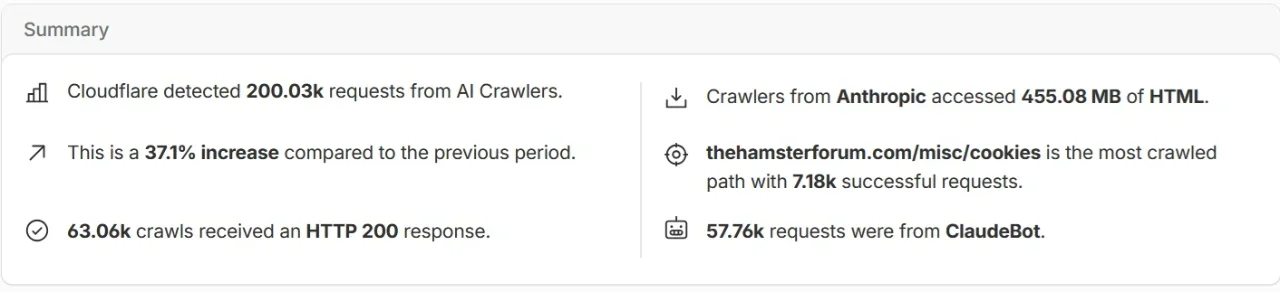
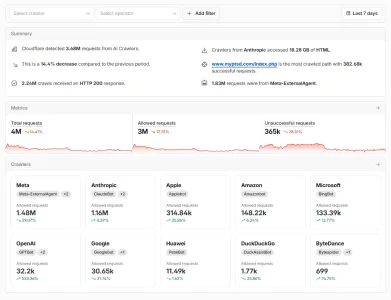
I hadn't really investigated the AI Crawl aspect of Cloudflare before. But looking at the statistics, it looks like ClaudeBot is crawling a lot! And Applebot a huge amount as well.

Crawlers.webp
 
Meta is still the most aggressive for me, which I see across all sites I manage.

I figured it out, it's actually the new Muse training thing, they are hitting sites like crazy to train muse, their new AI model.

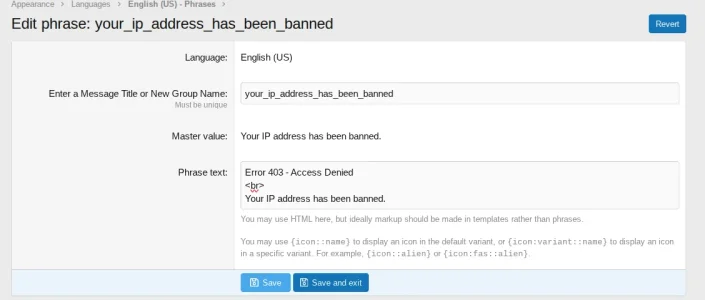
Just block IP 57.141.* using the star and it goes away in 2 days. Also add a 403 message to the block IP phrase if you know how.

Screenshot (54).webp
 
Back
Top Bottom