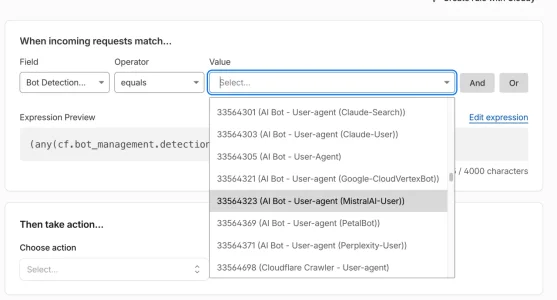
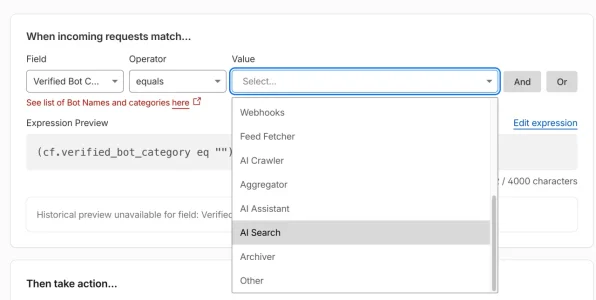
Crazy amount of guests

Is this just for paid cloudflare or available on the free version?

AI is now telling me to block all China IP's in Cpanel block IP address. Does that sound like a good idea or not? Presumably groups of IP's rather than individual ones.
If using Cloudflare in full now, @Anthony Parsons posted an excellent custom made string as a whitelist + catchall filter. You probably should consider using it: https://xenforo.com/community/threads/crazy-amount-of-guests.233649/post-1788822

Once you've done that, and if you have full control over your web server, change the native port from 443 to something like 2443 or 4443, something that isn't 443. Then begin restricting with other configuration rules.
 
If using Cloudflare in full now, @Anthony Parsons posted an excellent custom made string as a whitelist + catchall filter. You probably should consider using it: https://xenforo.com/community/threads/crazy-amount-of-guests.233649/post-1788822

Once you've done that, and if you have full control over your web server, change the native port from 443 to something like 2443 or 4443, something that isn't 443. Then begin restricting with other configuration rules.
Thank you. I didn't quite understand all that. I think nothing I do in Cloudflare is going to stop the China bots as they seem to be bypassing cloudflare. The numbers have dropped a bit this evening but they are still almost all from China and all looking at "latest content". I mean there's not that much latest content! Haven't they had enough yet?!!
 
Ok so the raw logs show they are not Cloudflare Ip addresses and they were hitting Whats New hard at 4 a second or something.

So I went ahead and whitelisted cloudflare IP's in .htaccess. Expecting it to stop - and it didn't seem to work. So something must be not quite right - any thoughts. I originally had the bad bot syntax in there from @philmckrackon and then added the Cloudflare IP whitelist with help from Claude - but something clearly isn't working right. Server uses Litespeed. Baiduspider is still being blocked with a 403 after I changed .htaccess so it seems to only the the cloudflare IP's not being whitelisted. I have this at the end of .htacess.

</IfModule>
BrowserMatchNoCase "Bytedance" bad_bot
BrowserMatchNoCase "Bytespider" bad_bot
BrowserMatchNoCase "Baiduspider" bad_bot
BrowserMatchNoCase "BIDUBrowser" bad_bot

<RequireAll>
<RequireAny>
Require ip 173.245.48.0/20
Require ip 103.21.244.0/22
Require ip 103.22.200.0/22
Require ip 103.31.4.0/22
Require ip 141.101.64.0/18
Require ip 108.162.192.0/18
Require ip 190.93.240.0/20
Require ip 188.114.96.0/20
Require ip 197.234.240.0/22
Require ip 198.41.128.0/17
Require ip 162.158.0.0/15
Require ip 104.16.0.0/13
Require ip 104.24.0.0/14
Require ip 172.64.0.0/13
Require ip 131.0.72.0/22
Require ip 2400:cb00::/32
Require ip 2606:4700::/32
Require ip 2803:f800::/32
Require ip 2405:b500::/32
Require ip 2405:8100::/32
Require ip 2a06:98c0::/29
Require ip 2c0f:f248::/32
</RequireAny>
Require not env bad_bot
</RequireAll>


Before adding the Cloudflare IP whitelist it was just this

</IfModule>
BrowserMatchNoCase "Bytedance" bad_bot
BrowserMatchNoCase "Bytespider" bad_bot
BrowserMatchNoCase "Baiduspider" bad_bot
BrowserMatchNoCase "BIDUBrowser" bad_bot

<RequireAll>
Require all granted
Require not env bad_bot
</RequireAll>
 
Last edited:
The issue with China though, is it seems to be bypassing Cloudflare, so nothing I set in Cloudflare affects them.
Shared hosting... this is exactly what CF authenticated origin is for. You can do this in .htaccess:

Code:
<RequireAll>
    Require ip 173.245.48.0/20
    Require ip 103.21.244.0/22
    Require ip 103.22.200.0/22
    Require ip 103.31.4.0/22
    Require ip 141.101.64.0/18
    Require ip 108.162.192.0/18
    Require ip 190.93.240.0/20
    Require ip 188.114.96.0/20
    Require ip 197.234.240.0/22
    Require ip 198.41.128.0/17
    Require ip 162.158.0.0/15
    Require ip 104.16.0.0/13
    Require ip 104.24.0.0/14
    Require ip 172.64.0.0/13
    Require ip 131.0.72.0/22
    Require ip 2400:cb00::/32
    Require ip 2606:4700::/32
    Require ip 2803:f800::/32
    Require ip 2405:b500::/32
    Require ip 2405:8100::/32
    Require ip 2a06:98c0::/29
    Require ip 2c0f:f248::/32
</RequireAll>

But your IP is still exposed on shared hosting via many means, and when that's available, people will hit it directly to pull your content. Origin pulls can't be spoofed because Cloudflare presents a client certificate as part of the TLS handshake itself, not something added afterwards that could be faked. When you set Apache to require and verify that certificate, everything else gets rejected at the connection level, so hitting your IP all day achieves nothing. You're forcing everyone through CF if they want content, and you control that traffic. They either go through CF and get served (or forcibly rule controlled now) or they hit your IP directly and get nothing, because they can't present a certificate signed by Cloudflare's CA.
 
Shared hosting... this is exactly what CF authenticated origin is for. You can do this in .htaccess:

Code:
<RequireAll>
    Require ip 173.245.48.0/20
    Require ip 103.21.244.0/22
    Require ip 103.22.200.0/22
    Require ip 103.31.4.0/22
    Require ip 141.101.64.0/18
    Require ip 108.162.192.0/18
    Require ip 190.93.240.0/20
    Require ip 188.114.96.0/20
    Require ip 197.234.240.0/22
    Require ip 198.41.128.0/17
    Require ip 162.158.0.0/15
    Require ip 104.16.0.0/13
    Require ip 104.24.0.0/14
    Require ip 172.64.0.0/13
    Require ip 131.0.72.0/22
    Require ip 2400:cb00::/32
    Require ip 2606:4700::/32
    Require ip 2803:f800::/32
    Require ip 2405:b500::/32
    Require ip 2405:8100::/32
    Require ip 2a06:98c0::/29
    Require ip 2c0f:f248::/32
</RequireAll>

But your IP is still exposed on shared hosting via many means, and when that's available, people will hit it directly to pull your content. Origin pulls can't be spoofed because Cloudflare presents a client certificate as part of the TLS handshake itself, not something added afterwards that could be faked. When you set Apache to require and verify that certificate, everything else gets rejected at the connection level, so hitting your IP all day achieves nothing. You're forcing everyone through CF if they want content, and you control that traffic. They either go through CF and get served (or forcibly rule controlled now) or they hit your IP directly and get nothing, because they can't present a certificate signed by Cloudflare's CA.
Thank you very much. What I have in .htaccess is supposed to be what you've put above, but because it also incorporates the four bad bots blocked the start and end are slightly different so that's why I was querying if the syntax was correct. If I just do it on its own, as above, I then remove the bad bot bit :-) Which I'd like to keep blocking even if I do whitelist cloudflare IP's

So because I have the bad bot syntax as well as the cloudflare whitelist, I have this at the top and bottom - and I'm not sure if that's correct.

</IfModule>
BrowserMatchNoCase "Bytedance" bad_bot
BrowserMatchNoCase "Bytespider" bad_bot
BrowserMatchNoCase "Baiduspider" bad_bot
BrowserMatchNoCase "BIDUBrowser" bad_bot

<RequireAll>
<RequireAny>
Require ip CLOUDFLARE LIST OF IP'S

</RequireAny>
Require not env bad_bot
</RequireAll>


So is the Require Any bit ok with the bad bot aspect as well please? I'm wondering if it's not working due to some server restriction or whether it's the syntax.

Is Authenticated Origin pulls available on shared hosting and free Cloudflare plan please?
 
So my update is 1) Server doesn't accept whitelisting Cloudflare IP's in .htaccess (shared hosting). 2) A lot of the bots are bypassing Cloudflare - presumably going to the origin IP. I looked up quite a few IP's in the guestlist, checked them out and blocked all their ASN's in a Cloudflare rule. What this showed was:

Blocked by Cloudflare:
Tencent, Huawei Cloud

Bypassing Cloudflare block:
Alibaba, CSTNET, China Unicom, Chinanet backbone, China mobile communications corporation

Chinanet and CSTNET are in the guest list a lot. Chinanet is the worst and is actually flagged as an abusive IP in ipinfo.io

Gave up checking out all the IP's after that. The numbers have gone down slightly but not a lot.

What is also interesting is I already had China blocked as a country and that didn't stop any of them. It took blocking individual ASN's.
 
Last edited:
So my update is 1) Server doesn't accept whitelisting Cloudflare IP's in .htaccess (shared hosting). 2) A lot of the bots are bypassing Cloudflare - presumably going to the origin IP. I looked up quite a few IP's in the guestlist, checked them out and blocked all their ASN's in a Cloudflare rule. What this showed was:

Blocked by Cloudflare:
Tencent, Huawei Cloud

Bypassing Cloudflare block:
Alibaba, CSTNET, China Unicom, Chinanet backbone, China mobile communications corporation

Chinanet and CSTNET are in the guest list a lot. Chinanet is the worst and is actually flagged as an abusive IP in ipinfo.io

Gave up checking out all the IP's after that. The numbers have gone down slightly but not a lot.

What is also interesting is I already had China blocked as a country and that didn't stop any of them. It took blocking individual ASN's.
Well, since you're limited on most of the aforementioned options, here's some files that could be utilized somewhere.

I need to know what IP addresses from China Unicom and Chinanet to give a more precise ASN blocklist.
 

Attachments

Thank you! Chinanet apparently has over 110 million IP addresses according to AI. Quite a few of the ones in my guest list start with 180

Asked Google for some IP ranges

1. The "180" Series Blocks
As you noticed, a massive portion of the traffic originates here. These ranges account for millions of IPs:
  • 180.96.0.0 to 180.127.255.255 (Aggregated CIDR: 180.96.0.0/11)
  • 180.128.0.0 to 180.159.255.255 (Aggregated CIDR: 180.128.0.0/11)
  • 180.160.0.0 to 180.175.255.255 (Aggregated CIDR: 180.160.0.0/12)

2. The "218" & "219" Series Blocks
This is ChinaNet's oldest and most historically active backbone chunk:
  • 218.0.0.0 to 218.31.255.255 (Aggregated CIDR: 218.0.0.0/11)
  • 218.64.0.0 to 218.95.255.255 (Aggregated CIDR: 218.64.0.0/11)
  • 218.96.0.0 to 218.127.255.255 (Aggregated CIDR: 218.96.0.0/11)
  • 219.128.0.0 to 219.159.255.255 (Aggregated CIDR: 219.128.0.0/11)

3. Core "100" and "110" Series Blocks
These contain heavy provincial traffic allocations (like Guangdong and Jiangsu networks): [1, 2]
  • 113.64.0.0 to 113.95.255.255 (Aggregated CIDR: 113.64.0.0/11)
  • 113.96.0.0 to 113.111.255.255 (Aggregated CIDR: 113.96.0.0/12)
  • 114.80.0.0 to 114.111.255.255 (Aggregated CIDR: 114.80.0.0/12)
  • 116.224.0.0 to 116.239.255.255 (Aggregated CIDR: 116.224.0.0/12)
  • 121.16.0.0 to 121.31.255.255 (Aggregated CIDR: 121.16.0.0/12)
  • 121.32.0.0 to 121.47.255.255 (Aggregated CIDR: 121.32.0.0/12) [1]

4. Other Massive ChinaNet Blocks
  • 14.144.0.0 to 14.159.255.255 (Aggregated CIDR: 14.144.0.0/12)
  • 36.40.0.0 to 36.63.255.255 (Aggregated CIDR: 36.40.0.0/11)
  • 42.224.0.0 to 42.239.255.255 (Aggregated CIDR: 42.224.0.0/12)
  • 58.240.0.0 to 58.255.255.255 (Aggregated CIDR: 58.240.0.0/12)
  • 61.128.0.0 to 61.159.255.255 (Aggregated CIDR: 61.128.0.0/11)
  • 183.0.0.0 to 183.63.255.255 (Aggregated CIDR: 183.0.0.0/10)
 
The biggest problem I can see in your htaccess, is that you aren't denying everything else. Its one thing to put CF IP's in htaccess, but you have to deny everything else if you want everything via CF. Back to... depends on your apache version to how you do that.
 
@Alvin63 : This sounds pretty chaotic overall.

Two "members" joined up last night and this morning - one from India, one from Singapore. Their IP's seem to be residential proxies. One wrote an incredibly normal sounding useful post. The other wrote a normal sounding post linking their article on substack. The article is also normal. However I read somewhere that what they do is get the post approved and then go back to the article and edit it with various spam stuff in it. So it seems the spammers are getting cleverer.

I could turn on bot fight mode in cloudflare but somehow I'm a bit nervous about doing it

Google AI suggested setting a rate limiting rule in Cloudflare? Does that sound like an option?

I'm not even sure if it's working! I tried toggling it on in the Cloudflare app and got an oops message "10400 bad request cannot enable fight mode while Enable JS is disabled." So I logged into cloudflare and turned it on there and it turned on ok. But haven't noticed any reduction in guests in the past hour.

So how long does it take bot fight mode to start working? It has made no difference whatsoever on my site since last night.

So it seems I already had a cloudflare rule to block Mexico which is why mexico was being blocked and bot fight mode didn't seem to be doing anything else except challenging the odd USA one.

So I have now set up a rule to block China. And another rule to set a managed challenge for Singapore - except for google and other approved search engines. Got the line from Claude so I hope it's ok.

Managed challenge is working for Singapore and bot fight mode is challenging the odd other country. However, despite the block on China, and bot fight mode, it is not affected - the vast majority of guests are still from china and even though Singapore has disappeared, the guest numbers are still the same! So presumably this suggests China IP's are bypassing cloudflare. AI suggested adding something to .htaccess to block anything that doesn't have the header CF-Connecting-IP.

The issue with China though, is it seems to be bypassing Cloudflare, so nothing I set in Cloudflare affects them. But yes I think looking at a rule to stop What's New being scraped would help. If China was just using residential proxies then blocking should have stopped all traffic from China. So that leaves me assuming that China is going direct to the Origin IP (which is concerning), OR the IP's aren't actually from China and are being re-routed somewhere and the label in my guest list has them labelled incorrectly?

However I'm wondering about tryign this addon for the ones that are bypassing Cloudflare. However that could also increase the demand on server cpu if it's at forum level and that has been the issue I'm trying to resolve. (...)


AI is now telling me to block all China IP's in Cpanel block IP address. Does that sound like a good idea or not? Presumably groups of IP's rather than individual ones.

So would this actually work for my china bots if they are bypassing cloudflare? Or are they not bypassing it and just circumventing checks? Also I now have some Mexico IP's back! Mexico was being blocked.


You have quite a bunch of tools and switches and try to push them in a somewhat chaotic way w/o knowing what you are doing and are not understanding the outcome neither instead of going for a somewhat systematic approach. As I understand it the situation is as follows:

  • you have loads of guests/bots visiting your forum that you want to get rid of
  • you are on shared hosting
  • the option that you have are (from outer to inner) Cloudflare, Firewall via C-Panel, .htaccess, XF-add ons, settings within stock XF.

You should decide first on which of your layers/options you want to start working.

As you say you want to lower the load as the main goal...

However that could also increase the demand on server cpu if it's at forum level and that has been the issue I'm trying to resolve.

... I would start working inside out and starting with permission settings within XF, as already suggested back on Sunday:

The fastest and easiest to ease up load is to not allow guest to use the search and to see the "what's new" page.

Did you set these permissions appropriately?

As you say the bots would circumvent Cloudflare and you would not be able to limit access to Cloudflare IPs only the question is why? Dis you try to make use of the C-Panel "Firewall" you mentioned? I have never seen those but had assumed that it should be able to do the trick.

As you say you want to block certain countries and IP-Ranges or ASNs and CF would not work for you here the IP-Threat manager add-on is a very userfriendly way to to that. I've been using it for that purpose since the beginning of the year and managed to lock out almost all bots. It is dead simple to lock out countries and ASNs, I would however stay away from blocking single IPs as this is a totally fruitless game of whack-a-mole. With IP-Threat-Monitor along with the proxycheck.io API that it uses you should be able to mitigate the issue massively within minutes which then buys you time to sorrowfully learn how to configure .htaccess, firewall and CF to a working state if you feel that you have still to high loads. However: Network administration is a profession for a reason and needs knowledge - AI cannot replace that.
 
Last edited:
I see the option in my CF free accounts
Not showing in either of mine. Per their blog post, it's only available on a trial basis, before they throw it behind a paywall.

Get started​

Precursor is rolling out now and can be enabled directly from your Cloudflare dashboard. Precursor will be free to use until our GA release later this year.

No sense in trying it if they're going to take it away, and no idea if they are going to paywall it for certain account levels (pro, business, etc.) or if it will be another additional-cost service.
 
@Alvin63 : This sounds pretty chaotic overall.


You have quite a bunch of tools and switches and try to push them in a somewhat chaotic way w/o knowing what you are doing and are not understanding the outcome neither instead of going for a somewhat systematic approach. As I understand it the situation is as follows:

  • you have loads of guests/bots visiting your forum that you want to get rid of
  • you are on shared hosting
  • the option that you have are (from outer to inner) Cloudflare, Firewall via C-Panel, .htaccess, XF-add ons, settings within stock XF.

You should decide first on which of your layers/options you want to start working.

As you say you want to lower the load as the main goal...


... I would start working inside out and starting with permission settings within XF, as already suggested back on Sunday:


Did you set these permissions appropriately?

As you say the bots would circumvent Cloudflare and you would not be able to limit access to Cloudflare IPs only the question is why? Dis you try to make use of the C-Panel "Firewall" you mentioned? I have never seen those but had assumed that it should be able to do the trick.

As you say you want to block certain countries and IP-Ranges or ASNs and CF would not work for you here the IP-Threat manager add-on is a very userfriendly way to to that. I've been using it for that purpose since the beginning of the year and managed to lock out almost all bots. It is dead simple to lock out countries and ASNs, I would however stay away from blocking single IPs as this is a totally fruitless game of whack-a-mole. With IP-Threat-Monitor along with the proxycheck.io API that it uses you should be able to mitigate the issue massively within minutes which then buys you time to sorrowfully learn how to configure .htaccess, firewall and CF to a working state if you feel that you have still to high loads. However: Network administration is a profession for a reason and needs knowledge - AI cannot replace that.
Well it was feeling quite chaotic :-) Especially when I suddenly had members, who looked and sounded genuine, joining up from unexpected countries in the middle of a bot storm.

I was also looking for information and didn't know where to start.

I spent today adding a lot of countries to the managed challenge in Cloudflare, which was working well for Singapore (with a rule that excluded Google, Bing et al).

That has got the numbers down a bit. Time will tell how many still bypass cloudflare as I've only just finished that.

And I learned today that almost all shared hosting, using CPanel can't allow Cloudflare IP whitelisting in .htacess because the use an IP restoration mechanism mod_remotetip, unmasking the real ip for cloudflare which is why whitelisting cloudflare IP's in .htaccess is prevented because it would block everyone probably. But that if shared hosting doesn't have cpanel (Eg Hostinger and Siteground) you can whitelist the Cloudflare IP's in .htaccess.

Thank you for the recommendation for IP Threat Monitor, I'm just chipping away at things when I have time and thanks for the list if IP's to block from @BrettC .

I'm now trying to work out the best way to do IP blocking within Xenforo as I don't want to mess anything up by overloading the server doing that.

I haven't done anything with permissions. I don't want to block genuine visitors but my brain can only handle one thing at a time!

In the middle of all that I'm annoyed and gob-smacked I have an origin IP that has been leaked - it was new to me just over a month ago when I moved server. Which is when all the extra bots appeared.
 
The biggest problem I can see in your htaccess, is that you aren't denying everything else. Its one thing to put CF IP's in htaccess, but you have to deny everything else if you want everything via CF. Back to... depends on your apache version to how you do that.
Thank you - as I can't do it anyway now due to cpanel/shared hosting, maybe I'll try and work that out another day :-) I was given the bad bot code on here and it works. I have no idea what I'm doing in that respect otherwise!
 
Anyway the managed challenge reduced them by about 500 but they are still getting through from India, Brazil, Indonesia and many other countries. So most are still bypassing Cloudflare.

Apparently there are only 4.3 million IPV4 addresses in the world. Could the bots possibly know all of them by now?
 
How I reduced the huge guest/bot traffic with Cloudflare and protected the origin server

After experiencing the same huge increase in guest traffic described in this thread, I thought I would document exactly what I did, step by step, in case it helps other XenForo administrators.

This is not intended as a universal set of blocking rules. The important part is the method:

  1. Analyse the server access logs.
  2. Put the website behind Cloudflare.
  3. Create targeted Cloudflare rules based on what the logs actually show.
  4. Prevent direct access to the origin server, so Cloudflare cannot simply be bypassed.

1. What we found in the access logs

The forum suddenly went from normal guest numbers to several hundred concurrent guests, sometimes close to 1,000, including during the night.

The raw web server logs made the problem much easier to understand.

During one period we analysed:

  • 25,055 HTTP requests reached the origin.
  • 22,938 of them (91.6%) used exactly the same suspicious User-Agent.
  • The requests were distributed across thousands of different IP addresses.

So blocking individual IP addresses was clearly not going to be an effective solution.

In our case, we also found some heavily represented ASNs and a very specific browser User-Agent being reused across thousands of IPs.

Your traffic will probably be different, so I strongly recommend analysing your own access logs instead of copying someone else's IP/ASN blocking rules.


2. Put the website behind Cloudflare

The first step was to proxy the website through Cloudflare.

Instead of:

Code:
Visitor → Origin server → XenForo

we now have:

Code:
Visitor → Cloudflare → Origin server → XenForo

Only the web hostnames need to be proxied.

Mail, FTP, control panel and other services can remain DNS-only if required by your hosting setup.

Once DNS propagation is complete, normal HTTP/HTTPS traffic should therefore reach Cloudflare before reaching the web server.


3. Create targeted Cloudflare security rules

I did NOT immediately challenge the entire XenForo installation.

Instead, I looked at the access logs and created targeted rules.

In our case these included:

  • Blocking one ASN responsible for a significant amount of the abusive traffic.
  • Managed Challenge for /whats-new/.
  • Managed Challenge for /search/.
  • Managed Challenge for the exact suspicious User-Agent identified in the access logs.

For example, a path rule can look like:

Code:
starts_with(http.request.uri.path, "/search/") and not cf.client.bot

Action:

Code:
Managed Challenge

The not cf.client.bot part allows Cloudflare verified bots to be excluded from the rule.

For the suspicious User-Agent, I used an exact match rather than challenging all visitors to XenForo threads.

That rule alone eventually recorded more than 18,000 events with a 0% Challenge Solve Rate.

I would NOT recommend blindly copying a User-Agent, ASN or country block from another forum.

Use your own logs to identify what is actually attacking your site.


4. The remaining problem: Cloudflare can potentially be bypassed

This is the part that I think is particularly important.

Putting your DNS behind Cloudflare does not necessarily make your origin server inaccessible.

If someone knows the origin IP, they may potentially connect directly to it while supplying the correct hostname.

Instead of:

Code:
Bot
 |
 v
Cloudflare
 |
 v
Origin

the bot could attempt:

Code:
Bot ──────────────> Origin

In that situation, your Cloudflare WAF/challenge rules are irrelevant because Cloudflare never sees the request.

Ideally, this should be prevented at firewall/server level by only allowing Cloudflare to access HTTP/HTTPS.

However, this was not possible with my shared hosting environment.

So I used a Cloudflare custom request header combined with .htaccess.


5. Create a secret header in Cloudflare

In Cloudflare, go to the rules section and create a Request Header Transform Rule.

The terminology may vary slightly depending on the Cloudflare interface, but the objective is:

Code:
Incoming requests: All requests

Modify request header:

Operation: Set static
Header name: X-My-Origin-Auth
Value: <LONG RANDOM SECRET>

Do NOT use X-My-Origin-Auth as your real production header name just because it appears in this example.

Choose your own header name.

More importantly, generate a long random value and keep it secret.

Conceptually Cloudflare will now send this to the origin:

Code:
X-My-Origin-Auth: a-long-random-secret-value

Do not put the blocking rule into .htaccess yet.

First test that this actually works.


6. Create a temporary PHP test

Create a temporary file in the web root, for example:

test-cloudflare.php

Contents:

PHP:
<?php

if (!empty($_SERVER['HTTP_X_MY_ORIGIN_AUTH'])) {
    echo 'CLOUDFLARE_OK';
} else {
    echo 'CLOUDFLARE_ABSENT';
}

If you chose a different HTTP header name, adjust the PHP variable accordingly.

For example:

Code:
X-My-Origin-Auth

becomes:

Code:
HTTP_X_MY_ORIGIN_AUTH

in PHP's $_SERVER array.

This PHP file does NOT display the secret. It only tells us whether the header exists.


7. Test normal access through Cloudflare

Visit:

Code:
https://www.example.com/test-cloudflare.php

through your normal browser.

You should see:

Code:
CLOUDFLARE_OK

If you see:

Code:
CLOUDFLARE_ABSENT

STOP HERE.

Do not add the blocking rule.

Your Cloudflare Transform Rule is either not working or the header is not reaching the origin.


8. Test direct access to the origin

Now we want to deliberately bypass Cloudflare.

You need to know your origin server IP for this test.

With curl, you can force a connection directly to the origin while preserving the correct hostname/SNI.

For example:

Code:
curl --resolve www.example.com:443:ORIGIN_IP https://www.example.com/test-cloudflare.php

On Windows you may need:

Code:
curl.exe --resolve www.example.com:443:ORIGIN_IP https://www.example.com/test-cloudflare.php

This request goes directly to the origin rather than resolving the hostname normally through Cloudflare.

The expected result is:

Code:
CLOUDFLARE_ABSENT

So before doing any blocking, you should have successfully demonstrated:

Code:
Normal access through Cloudflare:

CLOUDFLARE_OK


Forced direct access to origin:

CLOUDFLARE_ABSENT


9. Only now block direct access in .htaccess

Once BOTH tests above are successful, the origin can be configured to reject requests that do not contain the correct secret.

Near the beginning of .htaccess, before the normal XenForo rewrite rules, add:

Code:
<IfModule mod_rewrite.c>
    RewriteEngine On

    RewriteCond %{HTTP:X-My-Origin-Auth} !^YOUR_RANDOM_SECRET$
    RewriteRule ^ - [F,L]
</IfModule>

Replace:

X-My-Origin-Auth

with your own header name, and:

YOUR_RANDOM_SECRET

with EXACTLY the same random value configured in Cloudflare.

The check should validate the actual secret, not simply check whether the header exists.

Otherwise somebody could potentially bypass the protection simply by adding an empty/fake header with the correct name.


10. Test the website immediately

First visit the forum normally.

It should work exactly as before:

Code:
Visitor
   |
   v
Cloudflare
   |
   | Adds secret
   v
Origin
   |
   | Secret accepted
   v
XenForo

If the website returns 403 through normal access, immediately remove/disable the new .htaccess rule and check the Cloudflare header configuration.


11. Verify that direct origin access is now blocked

Repeat the direct-origin curl test, this time against the homepage:

Code:
curl -I --resolve www.example.com:443:ORIGIN_IP https://www.example.com/

On Windows:

Code:
curl.exe -I --resolve www.example.com:443:ORIGIN_IP https://www.example.com/

The expected result is now:

Code:
HTTP/1.1 403 Forbidden

while:

Code:
https://www.example.com/

continues to work normally.

At that point you have effectively achieved:

Code:
                         INTERNET
                            |
                            v
                       CLOUDFLARE
                            |
                    WAF / Challenges
                            |
                  Adds secret header
                            |
                            v
                         ORIGIN
                            |
                    Is secret valid?
                       /         \
                     YES          NO
                      |            |
                      v            v
                   XenForo        403

And a crawler trying to bypass Cloudflare gets:

Code:
Bot → Origin IP → No valid secret → 403 Forbidden


12. Clean up

Once everything has been verified, delete:

test-cloudflare.php

It is no longer needed.

Keep a copy of the working .htaccess before making future changes, and obviously keep the Cloudflare secret private.


Important considerations

This method is useful when you cannot restrict the origin to Cloudflare IP ranges at firewall/server level, for example on some shared hosting platforms.

It also means that Cloudflare becomes part of the availability path for the website. If the Cloudflare Transform Rule is removed or stops adding the header while the .htaccess restriction remains active, the origin will return 403.

So document the setup somewhere for yourself. Six months from now it is very easy to forget why that strange custom header exists in .htaccess. :)

Also be careful if the same document root serves other hostnames that are NOT proxied through Cloudflare. The .htaccess rule above would block them too. In that situation the rule should be scoped to the appropriate hostname(s).

Finally, this doesn't magically identify or eliminate every crawler.

What it does is ensure that automated traffic can no longer simply bypass the filtering layer by connecting directly to the origin.

From there, Cloudflare rules can actually do their job, and you can adjust them based on what your own access logs show.

In our case this has been considerably more effective than trying to chase thousands of rotating IP addresses.

 
Back
Top Bottom