Crazy amount of guests

So it seems I already had a cloudflare rule to block Mexico which is why mexico was being blocked and bot fight mode didn't seem to be doing anything else except challenging the odd USA one.

So I have now set up a rule to block China. And another rule to set a managed challenge for Singapore - except for google and other approved search engines. Got the line from Claude so I hope it's ok. Apparently cf.client.bot includes google, bing, yandex, duck duck go and various others.

(ip.src.country eq "SG" and not cf.client.bot)
 
Managed challenge is working for Singapore and bot fight mode is challenging the odd other country. However, despite the block on China, and bot fight mode, it is not affected - the vast majority of guests are still from china and even though Singapore has disappeared, the guest numbers are still the same! So presumably this suggests China IP's are bypassing cloudflare. AI suggested adding something to .htaccess to block anything that doesn't have the header CF-Connecting-IP. I'm a bit wary of doing that or trying AI code in .htaccess. Any assistance on that gratefully received.
 
When I put my site behind Cloudflare the first thing I did was blocking dozens of countries. And I had a second rule for ASNs. The number of guests plummeted. And then started to climb again with residential proxies so blocking countries and ASNs wasn't really helpful.

I then began to change my tactics, trying different things, one at a time and monitoring its effect.

I ended up with 3 custom rules: one blocking certain bots, one blocking paths where no one is welcome and one with a managed challenge for paths I can't block like "What's New" and /reply (excluding logged in users of course). I also turned off Search for guests as the bots were hammering it and actually using it to harvest member profiles from threads.

It took quite some time to finetune because every time I closed a window, they found another. But making one change at a time and monitoring the effect made me end up with a set-up that works very well for me. And when sometimes the bots start hammering the same threads again and again I activate a Rate limiting rule for /threads (also excluding xf_user). Once a wave is over, I disable it.

My members when logged in never see Cloudflare. And genuine guests get the verification window, they check the box, done.

I never use Bot Fight Mode.

Now you can say: well, you have a small forum. Yes, I do. I would even say I have a tiny forum. But before Cloudflare we would have up to 38,000 guests. So I don't know if the size of a forum matters much to be honest.
 
When I put my site behind Cloudflare the first thing I did was blocking dozens of countries. And I had a second rule for ASNs. The number of guests plummeted. And then started to climb again with residential proxies so blocking countries and ASNs wasn't really helpful.

I then began to change my tactics, trying different things, one at a time and monitoring its effect.

I ended up with 3 custom rules: one blocking certain bots, one blocking paths where no one is welcome and one with a managed challenge for paths I can't block like "What's New" and /reply (excluding logged in users of course). I also turned off Search for guests as the bots were hammering it and actually using it to harvest member profiles from threads.

It took quite some time to finetune because every time I closed a window, they found another. But making one change at a time and monitoring the effect made me end up with a set-up that works very well for me. And when sometimes the bots start hammering the same threads again and again I activate a Rate limiting rule for /threads (also excluding xf_user). Once a wave is over, I disable it.

My members when logged in never see Cloudflare. And genuine guests get the verification window, they check the box, done.

I never use Bot Fight Mode.

Now you can say: well, you have a small forum. Yes, I do. I would even say I have a tiny forum. But before Cloudflare we would have up to 38,000 guests. So I don't know if the size of a forum matters much to be honest.
Thank you. The issue with China though, is it seems to be bypassing Cloudflare, so nothing I set in Cloudflare affects them. But yes I think looking at a rule to stop What's New being scraped would help. If China was just using residential proxies then blocking should have stopped all traffic from China. So that leaves me assuming that China is going direct to the Origin IP (which is concerning), OR the IP's aren't actually from China and are being re-routed somewhere and the label in my guest list has them labelled incorrectly?

My forum is also small and it is only max 5,600 bots at the moment but it keeps increasing so I'd like to stop the chinese ones.
 
what they do is get the post approved and then go back to the article and edit it with various spam stuff in it
The only justifiable scenario to enable post editing feature is for people posting and immediately discovering they've made a typo or forgot something, so they want to make the correction right away. There is no other legitimate reason to let people edit their posts more than, say, 15 minutes after submitting them. If they have some corrections to make, they can report their own posts and ask a mod to change something, but generally the unlimited ability to edit posts is only a (wide) open door for potential abuse - from going back to hide their mistakes in a discussion which already advanced, or bots abusing approved posts. So good forum practice is for non-moderating members to have limited editing and deletion privileges.

And then started to climb again with residential proxies so blocking countries and ASNs wasn't really helpful.
Remember to think in defense layers. Blocking countries and ASNs are each serving their (limited) purpose and chipping away at the problem. There is no magic single fix for all scenarios, but a combination of different tools and techniques to ideally drop the survival rate of bot intrusion to nearly zero. The only single perfect fix to prevent bots is to take the forum entirely offline.
 
The only justifiable scenario to enable post editing feature is for people posting and immediately discovering they've made a typo or forgot something, so they want to make the correction right away. There is no other legitimate reason to let people edit their posts more than, say, 15 minutes after submitting them. If they have some corrections to make, they can report their own posts and ask a mod to change something, but generally the unlimited ability to edit posts is only a (wide) open door for potential abuse - from going back to hide their mistakes in a discussion which already advanced, or bots abusing approved posts. So good forum practice is for non-moderating members to have limited editing and deletion privileges.
Would not agree here. On my forum there are a couple of people maintaining long-term posts that get more or less frequently updated or changed deliberately, the simplest being a list of event dates for the ongoing year. Surly, this is not the standard use case but I don't see your "only justifiable use case".
On the other hand, regarding spam links: I did have this happen once and it wasn't an edit. A spammer registered, quoted another post that contained a link, and changed the link target in the quote. This was the only occurrence happening within four years.
The other issues that you mention did not happen on my forum but then I think (and hope) I do barely have sleeper bots on my forum and I have not had a spammer in the last two years since I massively upgraded the registration hurdle for those.

Still I've limited editing time for most users some time last year, for one simple but sad reason: Over the years we had a couple of silent or loud rage quits and some of those deleted all their content which is against out TOS and made a couple of discussions pretty useless to read. In many cases it was possible to restore the content, but it is somewhat time intensive. As not many do edit posts later I've set the limit to something like two days or so and if anyone wants to be excluded from that he will.
 
So that leaves me assuming that China is going direct to the Origin IP (which is concerning),
the standard advice when using CF is to only accept connections from CF b/c your assumption is a standard problem.
OR the IP's aren't actually from China and are being re-routed somewhere and the label in my guest list has them labelled incorrectly?
No. It may happen (rarely) that IPs are not within a country which the database says it would be in or there is some short term hick up where two databases locate an IP in a different country but no matter what: Re-routing would not lead to the effects you see.

Blocking countries and ASNs are each serving their (limited) purpose and chipping away at the problem.
There are some countries where flat out blocking does no harm for most forums and locks out bots and there are loads of ASNs that can safely be blocked w/o any harm to any forum. There are quite a bunch of ASNs where nothing but bots and malicious traffic comes from. Loads of them. So why not lock them out flat instead of wasting effort and computing time on them? Both ways may deliver huge gains in terms of limiting bots.
 
the standard advice when using CF is to only accept connections from CF b/c your assumption is a standard problem.

No. It may happen (rarely) that IPs are not within a country which the database says it would be in or there is some short term hick up where two databases locate an IP in a different country but no matter what: Re-routing would not lead to the effects you see.


There are some countries where flat out blocking does no harm for most forums and locks out bots and there are loads of ASNs that can safely be blocked w/o any harm to any forum. There are quite a bunch of ASNs where nothing but bots and malicious traffic comes from. Loads of them. So why not lock them out flat instead of wasting effort and computing time on them? Both ways may deliver huge gains in terms of limiting bots.
Unfortunately I can't just restrict the server to Cloudflare IP's only as I'm on shared hosting so can't whitelist them. If I did it in .htaccess, it would conflict with my access/zero trust set up from Cloudflare.

However I'm wondering about tryign this addon for the ones that are bypassing Cloudflare. However that could also increase the demand on server cpu if it's at forum level and that has been the issue I'm trying to resolve.

@puterfixer, members do only have 20 minutes for editing posts, so I'd just need to keep an eye on new members. Or If I suspect them just set their permissions not to edit their posts at all.

 
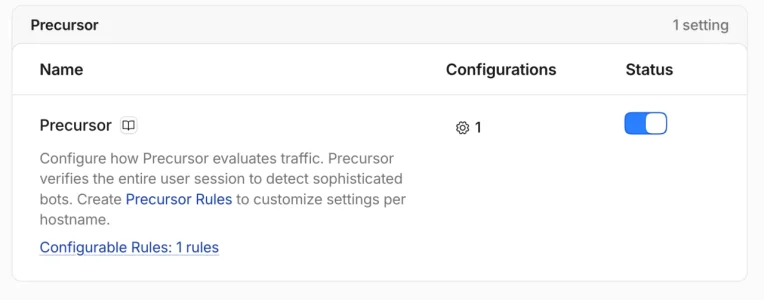
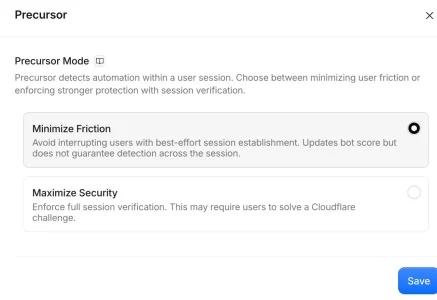
Cloudflare Precursor https://blog.cloudflare.com/introducing-precursor/

1788715811767.webp
1788715819941.webp
Opera AI summary :)

Key points — summary and extracted highlights

  • What Precursor is
    • A client-side, session-based verification system from Cloudflare that continuously collects behavioral signals via dynamically injected JavaScript to distinguish humans from automated or agentic traffic.
    • Designed as a complement to Turnstile and part of Cloudflare’s Enterprise Bot Management.
  • Why it matters
    • Modern bots can appear legitimate in short bursts (execute JS, pass single CAPTCHAs); consistent human behavior across a session is harder to fake.
    • Evaluating behavior across full sessions raises cost and complexity for bot operators and reduces unnecessary friction for genuine users.
  • How it works (high-level)
    1. Injection & collection: Cloudflare injects a lightweight, obfuscated script into HTML responses that attaches event listeners (pointer, keyboard, focus, visibility). Events are serialized, buffered, and periodically sent for analysis.
    2. Evaluation: Edge servers deserialize payloads; multiple evaluators cross-check streams (e.g., pointer activity vs. page visibility) and raise signals into a shared detection registry.
    3. Session integration: Behavioral signals are session-scoped and accumulate over the visitor’s session (so refreshing can't erase the behavioral signature). Signals feed bot scores, challenge decisions, and detection heuristics.
    4. Privacy by design: Captured data is minimized (e.g., keyboard timing, not keys), evaluated as aggregates, not exposed to customer dashboards or tied to persistent user identities; used internally for bot detection.
  • Types of signals and intuition
    • Example: mouse movement — human paths show arcs, corrections, tremors and variable timing; bots often show linear or mathematically ideal motions. Precursor aggregates many such signals over time to detect automation.
  • Integration with analytics and protections
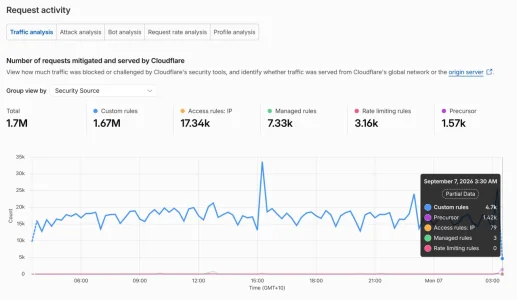
    • Adds session-based views to Security Analytics so teams can examine full visitor journeys and see where sessions diverge or show automation.
    • Feeds directly into existing systems: bot score, challenges, and security rules—immediate benefit with no app code changes required.
  • Deployment and options
    • Rolls out now; free until GA later this year.
    • Can be run in low-friction (observe-only) mode or enforce stricter verification (e.g., require Challenges if session not verified).
    • Enabled from the Cloudflare dashboard per zone.
  • Benefits and trade-offs
    • Improved detection precision and fewer interruptions for legitimate users.
    • Forces bot developers to simulate entire sessions (harder/expensive).
    • Designed to minimize privacy impact while providing stronger signals.
In action

1788716674910.webp
 
Last edited:
I see the option in my CF free accounts
So would this actually work for my china bots if they are bypassing cloudflare? Or are they not bypassing it and just circumventing checks? Also I now have some Mexico IP's back! Mexico was being blocked.
 
So would this actually work for my china bots if they are bypassing cloudflare? Or are they not bypassing it and just circumventing checks? Also I now have some Mexico IP's back! Mexico was being blocked.
Try and see 🤓
 
Try and see 🤓
Can't find it. What do you think about blocking China IP's in cpanel? AI is suggesting open the cpanel folder, open the datastore folder inside it, copy the China CIDR list into it and save. Sounds a bit risky!
 
Still I've limited editing time for most users some time last year, for one simple but sad reason: Over the years we had a couple of silent or loud rage quits and some of those deleted all their content which is against out TOS and made a couple of discussions pretty useless to read. In many cases it was possible to restore the content, but it is somewhat time intensive. As not many do edit posts later I've set the limit to something like two days or so and if anyone wants to be excluded from that he will.
I limited editing time recently after a dormant account became active and edited an old post, hiding links in punctuation marks. So I've set editing time to 24 hours. And I was happy I did when a while ago somebody stormed out in a huff and could only delete what they had posted that day and not more.
 
It's there in the free tier, I could enable it and add at least one rule (optional though). Remains to be seen what sort of conditions would make sense in the rule - will wait for smarter people to test this though, as my forum is no longer in the crosshairs and can't really check a difference between "before" and "after"... This might be however just for a user's cf_clearance cookie to be adjusted across multiple page interactions/page loads/site visits with some local js, and then the cf_clearance to be referenced in other rules elsewhere as a rough degree of trust in a visitor to be human or agentic.

[later edit, and slightly offtopic]
a dormant account became active and edited an old post

Old accounts getting compromised through leaked passwords is not new. What helped me was @AndyB 's Security Lock Manager addon, which disables accounts which have not been logged in half a year or more. If they ever try to log in again, they have to reactivate their account through an e-mail link - not really horrible for a legitimate returning member, but a hurdle for a bot using stolen credentials.
 
Last edited:
AI is suggesting this code in .htaccess to block everything that doesn't have a Cloudflare header - while still allowing Cloudflare Zero Trust to work - thoughts? a) on the code itself b) on how safe this is to do!

# DROP ALL TRAFFIC BYPASSING CLOUDFLARE
RewriteEngine On
RewriteCond %{HTTP:CF-Connecting-IP} ^$
RewriteRule .* - [F,L]
 
Back
Top Bottom