Crazy amount of guests

Lesson I learned... a high quality router with capabilities is essential nowadays.
For sure. 👍 I haven't used a consumer-based router in a long time. (And when I did, I would often load alternate firmware like DD-WRT on it so I could have at least some control over the network. )

BTW, and a little off-topic, it made a huge difference in our home's WiFi signal when I got rid of consumer-based equipment and got a UniFi "flying saucer." A UniFi U6-LR is the latest, which I've had for a few years now. The entire house gets a strong usable signal, although if I'm at the back of our lot outdoors, the signal is not all that good. (I have an older UniFi AP I could mount in the garage if I had to.) There might be better WAPs out there but for our needs (our house isn't all that big), it works without issue.
 
Honestly a good configured xenForo can easily handle even 1 million requests in a minute. We tested this on a $10 server when someone DDoS a client site. But after this when the attacks got more intensified we have up our firewalls using just CloudFlare. I think if servers and XF are configured properly these number of robots are nothing. We didn't even feel any lag in speed of website.
DDoS v mass-scraping are two whole different issues... unfortunately. Traditionally, a DDoS attack will just flood the front-facing servers with connections, and with a proper configuration/infrastructure to shun/filter the attack, along with proper caching and distributed connectivity will absorb that without too much issues these days.

Now, with mass scraping on the other hand, that hits the SQL DB directly, even with caching. On a large enough attack (that is what it is at this point), you're now ending up with CPU, RAM, and File Store I/O getting hammered... and that is ignoring any bandwidth constraints that may exist (1Gbps/10Gbps/etc.).

That is not a good solution. If a spammer uses one IP from a /24 range, then you are blocking 255 legitimate IP's for that one. Now that is different if they're using different IP's within that same block, but that is rarely the case.

Expand that - now each block is larger, then you're wiping out thousands of IP's for one bad one. That is a crazy approach if you don't want to cause legitimate users future access issues. Spammers rarely use the same IP over and over. You have to assess their behaviour before blocking, understand what they're doing and how they're doing it, otherwise you will just spend your time blocking massive amounts of good IP's.
CIDR or single IP blocking is a legitimate solution. It is effectively the more concise blocking method prior to ASN blocking. Now, should it be the golden ticket? Absolutely not. If anything, IP blocking should be highly temporary unless the CIDR block has been a source/vector of constant attacks.

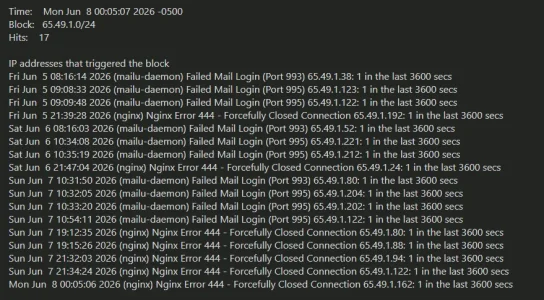
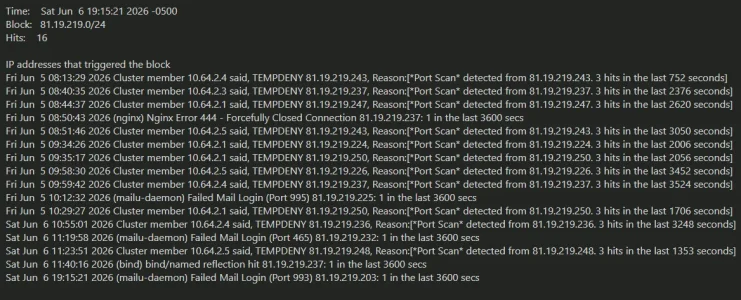
For example, this is from one of my firewalls... these whole /24's have recently been a persistent source of probing and rainbow attacks for a good while.

MailClient-06-08_09-37-a259dee4-51e5-4ee1-8f40-3170ad7c552c.webp MailClient-06-08_09-44-d660a7c2-ab42-48e7-832d-f966e71c97df.webp


Looks like 'smart TV's are being weaponized by bright data to turn these TVs into residential proxies.
Quite nasty.

The article provides no answers for server operators, only local router operators. The author reverse engineered a few things though.
https://blog.includesecurity.com/20...vingroom-is-a-node-in-the-aiscraping-economy/
Why does that not surprise me? Most folks in the infosec community knew many many many years ago that the IoT craze (including SmartTVs) blew security and caution to the wayside. Now those loose ends being commercialized/willfully exploited just feels... eugh.

Unfortunately that plan is out of reach for just about all of us here with limited budgets.
There are non-cloudflare alternatives when feature-desire cost becomes a problem. However, it means one would need: 1) an extensive knowledge of linux, 2) knowledge of RBLs, blocklists, etc., 3) how to integrate those content lists into a locally hosted solution, 4) how to manage bad-actors sufficiently.

Anubis, IronWall, WicketKeeper, various captcha platforms, CrowdSec, Fail2Ban+reverse proxy of your choosing (nginx, apache, traefik, etc.) all exist. It just depends on how much time you wish to devote to such implementations.

For sure. 👍 I haven't used a consumer-based router in a long time. (And when I did, I would often load alternate firmware like DD-WRT on it so I could have at least some control over the network. )

BTW, and a little off-topic, it made a huge difference in our home's WiFi signal when I got rid of consumer-based equipment and got a UniFi "flying saucer." A UniFi U6-LR is the latest, which I've had for a few years now. The entire house gets a strong usable signal, although if I'm at the back of our lot outdoors, the signal is not all that good. (I have an older UniFi AP I could mount in the garage if I had to.) There might be better WAPs out there but for our needs (our house isn't all that big), it works without issue.
brave-06-08_08-05-a30f25aa-d874-4be2-9297-7abe38e1b01e.webp
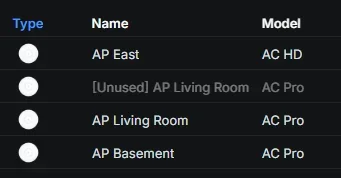
They've been excellent devices, but I think it's time to upgrade my flying saucers. That 'Unused' AP was a spare, and that spare died on me about a year ago... go figure. :-)

I use to have an Engenius ECB1750 until i transitioned everything over to Ubiquiti. I'm fairly certain that old device violated every FCC power limitation known to man. Signal was so strong that the broadcasted signal was visible about 0.4mi away from my house on my mobile devices. :D
 
Unfortunately that plan is out of reach for just about all of us here with limited budgets.
Cloudflare customers can now use Cloudforce One threat intelligence directly within the WAF to block high-risk traffic https://blog.cloudflare.com/realtime-threat-intel-waf-rules/

We are excited to announce a new integration that brings Cloudflare’s vast threat intelligence directly into your WAF engine: you can now write proactive rules using live intelligence data. This means you can add more intelligence context to protect your application against known bad actors — before they even attempt to touch your infrastructure.

By populating specialized fields during the early stages of a request, the WAF can now screen traffic based on:

  • Who is attacking by matching specific threat actor names
  • Who they are targeting via the industry or country filters to see who the IP has targeted in the past
  • What type of attack using enriched threat context, filtering by attack type (DDoS, WAF, cybercrime, etc.) and the timeframe it was last seen
 
Looks like 'smart TV's are being weaponized by bright data to turn these TVs into residential proxies. (...)
https://blog.includesecurity.com/20...vingroom-is-a-node-in-the-aiscraping-economy/
What is somewhat funny is that in the article there's a link to a recommendation / briefing of the FBI regarding resident proxies:


While it is probably good that they pay attention their definition of what resident proxies are leaves a bit to be desired:

What is a residential proxy?​

A residential proxy is an intermediary server between individuals and websites they visit to make their connections appear to originate elsewhere. Legitimate IP addresses assigned by an Internet Service Provider (ISP) to consumers' Internet of Things (IoT)1 devices, such as TV streaming devices, digital picture frames, smartphones, tablets, and routers are used to route traffic. Once an internet-connected device is compromised, the device's IP address can be used by threat actors to mask their online illegal activity, making the consumer appear responsible.

Understanding how residential proxies work​

A residential proxy is used to route users’ requests through another IoT device, typically located elsewhere in the world. When selecting an IP address, users can choose which country they would like the IP address from, down to the city and state. Doing so alters the users' IP address from the perspective of the website to that of the device the traffic was routed through.
 
There are non-cloudflare alternatives when feature-desire cost becomes a problem. However, it means one would need: 1) an extensive knowledge of linux, 2) knowledge of RBLs, blocklists, etc., 3) how to integrate those content lists into a locally hosted solution, 4) how to manage bad-actors sufficiently.

Anubis, IronWall, WicketKeeper, various captcha platforms, CrowdSec, Fail2Ban+reverse proxy of your choosing (nginx, apache, traefik, etc.) all exist. It just depends on how much time you wish to devote to such implementations.
I'm hoping when things calm down later this summer, I can start looking into some of these things. It might even be worth spinning up a cheap server to try some of these on my own to learn about them.

They've been excellent devices, but I think it's time to upgrade my flying saucers. That 'Unused' AP was a spare, and that spare died on me about a year ago... go figure. :-)
My garage is outdoors and not attached to the house, so, no climate control. My spare (which is an AC PRO) might be something I deploy in warmer months when I'm outdoors a lot more, but bring it indoors for the colder, wetter months.

Given the footprint of our house the U6-LR (long range) covers everything nicely. It is not even optimally mounted--for the room it's in, I could not mount it on the ceiling, so it is on a wall, and the main radiation pattern is out the edges of the "saucer." That may explain why it does so well in the 2nd floor or the basement. I may find a way to ceiling mount it and run some signal strength tests to see if anything improves laterally (like outdoors). We don't have a large enough area to warrant more than one of these, beyond a boost outdoors.

Neither one has died on me. However, my U6-LR was having some issues for a while, but I bought a new Ubiquiti PoE injector (no off-brand in other words) and haven't had a problem since. The injector was from my AC PRO, as the U6-LR did not ship with one.

Cloudflare customers can now use Cloudforce One threat intelligence directly within the WAF to block high-risk traffic https://blog.cloudflare.com/realtime-threat-intel-waf-rules/
Very interesting. When I get time a month or so from now, I'm going to have to read all this in depth.
 
Oh... you need to be a Cloudforce One subscriber, whatever that means.
It means whatever you'll ever own will belong to Cloudflare in future as you won't have enough money to pay for it.

You gave them your data, they made use of it, created a monopoly...

Bildschirmfoto 2026-06-08 um 23.06.04.webp

... and now you have to pay for what they made from your data:


Typically, this means a very expensive option:

Bildschirmfoto 2026-06-08 um 23.11.30.webp
 
Jesus. This site is slowly loading here and of course, a LOT of visitors.

Got me thinking, how is my website now? It is the middle of the night here...
A couple dozen users and....32k visitors! Holy damn.

This is getting way out of control 😔
 
Captain Obvious stepping in: source-based filtering (individual IPs, or broadened to entire subnets or AS numbers of ISPs, or countries) might be a good blanket filter for sources from where you do not expect any legitimate traffic, or the exceptions are rare enough to not be worth the trouble to give them a hall pass of sorts. But it is inadequate for residential proxies that mix with your normal visitors. Those need to be differentiated by behavior or other common characteristics.

The user-agent is useless, and will continue working for the diminishing minority of bots that still follow it. At best it becomes a way to whitelist the specific bot traffic you might still want to allow (for example DuckDuckGo spiders), but only in conjunction with also checking the source IP (so that you don't allow bad bots falsely claiming to be Google but coming from Tencent).

User logged in cookie might work for a while, until the bots discover that providing a fake cookie lets them through the network filter rule. Then they end up on the forum itself, where the next level of filtering would be applied. One variant is to ignore the fake cookie mismatching the user hash and serve the requested page as guest, the other is to throw an error about the invalid cookie. No idea how XenForo behaves at this moment, but either scenario is consuming some CPU and queries to the DB, so they'll have to be streamlined.

Another possible option is for the forum to allow a limited low number of daily page views per IP as guest, after which the visitor is redirected to the registration page. If implemented properly with server-side tracking (not cookie-based which can be tricked), it could partially avoid the load on the server instead of delivering hundreds or thousands of pages per day to some scraper bot leveraging the default unlimited-free-to-read permissions of the Guest/Unregistered group.

Considering the load on the server:
  • The lowest burden on the server is to block specific traffic upstream.
  • Somewhere in the middle are caching mechanisms for guests to receive pre-generated static pages that do not go through most of the PHP scripts and database queries, and are refreshed once every X minutes and only if the content has changed. A limited number of "free" unregistered page views per day per IP would limit this even further.
  • The highest burden on the server is for one guest request to consume several network ports, to execute a bunch of PHP scripts (depending on CPU), to run several database queries (depending on CPU and disk speed), and to generate a page every single time a guest asks for it.
The typical bottleneck on servers is on the slow disk input/output for database queries. The difference between NVMe SSD, SATA SSD and spinning disks can be directly correlated with how responsive a site might seem, but it also depends on the hosting's capacity planning - there's a difference between 200 or 5000 clients and their sites competing for the same bandwidth of disk access, and the only option in your control might be to move host.

But with that bottleneck resolved, the second unavoidable bottleneck is the TCP/IP stack of communication ports. A server can basically use a maximum of roughly 64 thousand network ports on its IP to communicate with clients, which are kept open from the moment a client initiates a connection with a query until the server puts together the response (serving static files from disk or cache or assemblying a response through PHP scripts and database queries) and that response is transferred in its entirety back to the client, then the connection is closed and the port can be reused for the next request. Minimizing that time between request and finishing the response through various filters and optimizations will improve the number of overall requests the server can handle per minute, but at any given time one server cannot have more than about 64 thousand active connections.

Consider also that a typical visitor's browser will launch tens or >100 connections just for viewing just one page - one is the HTML of the page, the others are for CSS files, javascript files, any embedded images or anything else delivered from the server. So 64 thousand connections could realistically mean just a few thousand real visitors, before your server is overloaded. The options are then to trim down on the illegitimate requests and/or to add more servers behind a load balancer so that overall capacity is now in multiple of 64 thousand parallel connections. But that's going beyond the typical hosting category :)

[edit] Firefox's Inspector > Network shows that loading this page made nearly 40 connections to the XenForo server: 1 HTML, 11 CSS, 14 JS, 12 images. And a bunch others to gravatar, some CDN contents and a few onedollarstats.

 
Last edited:
Another possible option is for the forum to allow a limited low number of daily page views per IP as guest, after which the visitor is redirected to the registration page. If implemented properly with server-side tracking (not cookie-based which can be tricked), it could partially avoid the load on the server instead of delivering hundreds or thousands of pages per day to some scraper bot leveraging the default unlimited-free-to-read permissions of the Guest/Unregistered group.
From what I see in my logs the typical scraping via residential proxies does (in opposite to scraping from data centers) a single page view (plus most of the time only using fewer requests for the same page than a real user) and then rotates the IP. So limiting page views per IP or session won't help against residential proxy scraping though Zombie hosts in many cases (albeit it may help in some cases and with scrapers that do not use residential proxies). IP-rotating after every single request or page view is even advertised by most sellers of residential proxies as an option that can be configured in their backend by the buyer.
 
Can we trust any accesses from Zscaler? They claim to be some sort of corporate VPN/security service. Yet I see a lot of accesses from them, and I have yet to be convinced that the unwanted bot traffic isn't being funneled through them.

 
Oh... you need to be a Cloudforce One subscriber, whatever that means.
It looks as though you need to be an Enterprise-level customer and then have to communicate with CF to get it activated. So...it's not a simple add-on that costs a few bucks per month. Although I'm not 100% certain of this.
 
Can we trust any accesses from Zscaler?
My employer uses Zscaler to scale (heh) down the use of Cisco VPN licenses; at a couple hundred thousand employees, costs add up. It's also a sort of selective VPN which decides which traffic goes directly to the internet and which goes through Zscaler and into the corporate intranet (depending on corporate configuration). I'd guess that it is a fairly expensive and compliance/security-scrutinized way for bots to try sneaking onto the internet.
 
Can we trust any accesses from Zscaler? They claim to be some sort of corporate VPN/security service. Yet I see a lot of accesses from them, and I have yet to be convinced that the unwanted bot traffic isn't being funneled through them.

I am questioning myself the same thing as some of the traffic coming from there seems to be somewhat dubios. On the other hand it seems to target rather corporate customers and some traffic from there seems genuine, so I do not block it until now.

I'd guess that it is a fairly expensive and compliance/security-scrutinized way for bots to try sneaking onto the internet.
Yet I would not bet on that they don't use it, based on the observations of my traffic. Did not get a clear picture until now.
 
I found a new kid on the block today in my logs: A bunch of IPs coming from "AS59651 Alex Largman", registered in Israel and partly subleased to a "Beyond Tomorrow Ltd", trying to gain access from various countries. Had not had this ASN in my logs before, so I became a bit curious.

It is btw. worth blocking this ASN altogether. I've seen it yesterday for the first time in the proxycheck.io logs for identified proxies but was not bothered enough for the moment to block the complete ASN. When I just looked at my live access log I saw literally dozens of different IPs from that ASN visiting my forum in parallel while within the same timeframe proxycheck had identified only 2 IPs from this ASN to be proxies or other malicious machines.

As there is no way that "good" or desired traffic is coming from this ASN this means: Proxycheck currently only detects a fraction of the bots coming from there and lets 90-99% through. Therefore banning the whole ASN manually is the best strategy and adequate as well w/o any collateral damage.
This "AS59651 Alex Largman" has become pretty active today in my logs and Proxycheck identifies loads of IPs from it in the meantime as well. A (for my forum) relatively large ;) number comes out of Finland, somewhat unsual, but also from France and other European countries and overall from many different IP-ranges. Proxycheck categorizes the hosts as "compromised server" (which seems a bit implausible, given the huge number that all belong to the same ASN but are located in vastly different IP-ranges and countries) and states these are all used by "scrape.do", a provider of resident proxies that is well known, sadly. So once more the advice to block this ASN as there has never come anything good from there and this probably won't change in future.
 
I'd guess that it is a fairly expensive and compliance/security-scrutinized way for bots to try sneaking onto the internet.
That was my thought also--it doesn't seem like a product where you select from a menu and get access after paying. What little I poked around, it seems like you have to go through a representative to select your product(s) and get onboarded. They list some major corporations as clients, so this does not seem like a small-budget product.

Yet I would not bet on that they don't use it, based on the observations of my traffic.
Even if they were able to get past Zscaler's possible gatekeeping...what better way to spoof "human" traffic than through what is perceived as a legitimate business running through a VPN?

I temporarily removed them from my ASN list for managed challenges. The reason I'm trying this--we had a good member let us know that he gets an error from Cloudflare (the Ray ID was expired--I couldn't filter it out in our logs anywhere), meaning that there was something about his corporate computer that prevented him from accessing the site. Maybe JavaScript or cookies are limited/disabled, or they run something else on the computer that triggers the challenge or blocking. I would think that once he got past the challenge, then log in (where we have the xf_user cookie whitelisted), he wouldn't have any issues.

The only thing we block now are certain unwanted bot categories, and a handful of search engine bots from Russia or China (and a few from elsewhere) who have no business scraping us, and/or have engaged in harmful scraping practices that loaded us up with hundreds of hits from their IP addresses at a time. Everything else is a managed challenge.
 
This "AS59651 Alex Largman" has become pretty active today in my logs and Proxycheck identifies loads of IPs from it in the meantime as well.
I put that ASN (59651) in our managed challenge list when you first posted it. I don't have time to check my logs today but will see how much activity we're getting from that. I don't want to maintain a list of several hundred ASNs but, upon recommendation here, I do add those who are identified with heavy bot traffic.
 
A bit more about how Bright Data (previously known as Luminati) are using common consumer devices, specifically Smart TVs and set top boxes) as residential proxies by getting game developers to include their proxy libraries in their apps.

I did try to decipher their docs on Bright Shield
a risk management suite of solutions, ensures scraping activities are being done legally, ethically and in a compliant manner, protecting both the business doing the scraping, and the target website.
It does look a bit like a "protection scheme" - pay us (a lot of) money and we'll limit how much our proxies hit your site, but I might be misreading it.
 
DDoS v mass-scraping are two whole different issues...

To me, they are becoming synonymous because the defense techniques are approximately the same.

There are non-cloudflare alternatives when feature-desire cost becomes a problem. However, it means one would need: 1) an extensive knowledge of linux, 2) knowledge of RBLs, blocklists, etc., 3) how to integrate those content lists into a locally hosted solution, 4) how to manage bad-actors sufficiently.

This is a huge problem for the internet.

Anubis is quite a rig to setup; and they won't do under $50/month for unlock customization for you. So you gotta crack it, but that might get you in trouble down the line.
Crowdsec isn't really free once you want to get cloudflare-like capabilities out of it. And install looks difficult.
Crowdsec is also a lead-in to some insanely expensive services.

Crowdsec is sad because you can't form your own crowd. Ideally you could link your blocklists with other servers you manage and save yourself a lot of CPU time / traffic.

Still workin' on my alternative.

The user-agent is useless, and will continue working for the diminishing minority of bots that still follow it. At best it becomes a way to whitelist the specific bot traffic you might still want to allow (for example DuckDuckGo spiders), but only in conjunction with also checking the source IP (so that you don't allow bad bots falsely claiming to be Google but coming from Tencent).

For google, i whitelist IP ranges. I think anyone is making a big mistake by whitelisting a user agent string.

User logged in cookie might work for a while, until the bots discover that providing a fake cookie lets them through the network filter rule. Then they end up on the forum itself, where the next level of filtering would be applied. One variant is to ignore the fake cookie mismatching the user hash and serve the requested page as guest, the other is to throw an error about the invalid cookie.

Yep... one of a few reasons why it's ideal to have the protection inside the application. More information is available inside.
I also think the cookie shouldn't just pass people.. it should reduce the threat score though.

Another possible option is for the forum to allow a limited low number of daily page views per IP as guest, after which the visitor is redirected to the registration page. If implemented properly with server-side tracking (not cookie-based which can be tricked), it could partially avoid the load on the server instead of delivering hundreds or thousands of pages per day to some scraper bot leveraging the default unlimited-free-to-read permissions of the Guest/Unregistered group.

I've ran this rule on fail2ban for a year and it's good at stopping slow/mildly distributed scrapers.
A prerequisite in your apache/nginx configuration is to exclude logging all images and files. Then you're left with just the CPU generating hits.
And you absolutely must whitelist crawlers first, or you are cooked.
 
Back
Top Bottom