I just moved servers from Hostinger, which has hpanel - to a server with cpanel. And honestly cpanel looks horrible! It's like something from the 90s and very messy once you open an area and see folders - not easy to look at. Just saying. The hpanel was clean, simple and easy to use.

You are using an out of date browser. It may not display this or other websites correctly.
You should upgrade or use an alternative browser.
You should upgrade or use an alternative browser.
Cpanel - ugh
- Thread starter Alvin63
- Start date

I have used both and while cPanel is not as pretty as hPanel it is much more robust with many more features.
I'll take cPanel over hPanel any day.
I'll take cPanel over hPanel any day.
Thanks. Well I don't understand what all the extra folders are on the left above public_html but I guess they are there for a reason.
Do you know how I download a copy of public_html without downloading the whole home directory (which looks like it will take hours).
Do you know how I download a copy of public_html without downloading the whole home directory (which looks like it will take hours).

You may be looking at the old cPanel theme, cPanel is a very mature product (more than 30 years): https://en.wikipedia.org/wiki/CPanelAnd honestly cpanel looks horrible
It's the same company that owns Plesk.
The latest cPanel style looks like this:

Normally you might compress (zip) and download so either select public_html then compress or click into it, select all folders and files then compress and download. Give it a useful name before downloading.Do you know how I download a copy of public_html
Yes in that case you’ll get all the stuff above public_htmlThanks I tried compressing and zipping but it kept throwing errors so I've just downloaded the whole home directory.
Is this what you tried?
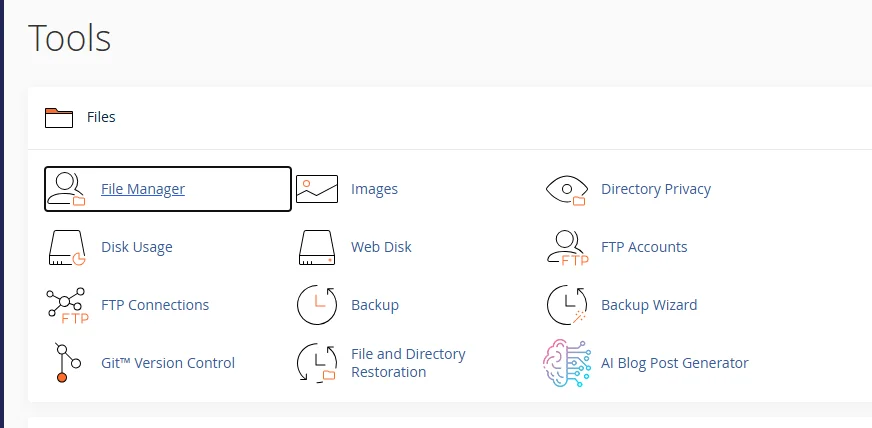
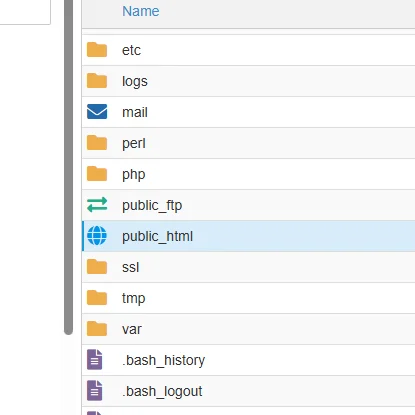
Right click:
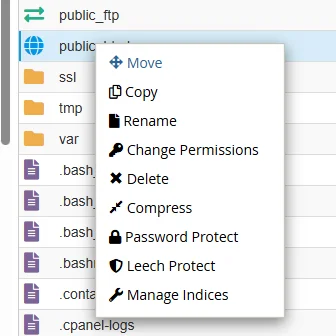
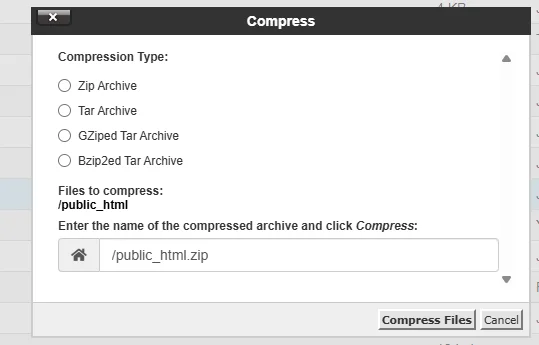
Right click:
Yes but right clicking wouldn't do anything - it doesn't turn blue like that and I don't get a right click menu, so I selected all the contents of public_html and selected compress and zip but the file name kept being rejected.
Maybe the migration isn't fully completed yet? My public_html on the left is just a yellow folder. It was migrated this morning, checked it online and then pointed cloudflare to it and it was up and running. But I think maybe there are some tidying up bits to do tomorrow.
Maybe the migration isn't fully completed yet? My public_html on the left is just a yellow folder. It was migrated this morning, checked it online and then pointed cloudflare to it and it was up and running. But I think maybe there are some tidying up bits to do tomorrow.

I might learn that bit at some pointWHy not use an FTP client isntead of using file manager in cpanel? I don't know anyone who actually uses file managaer through cPanel.

Interesting article about its history here. Built by a 14 year old in his bedroom in 1996. And what happened since.

 www.taskade.com
History of cPanel & WHM: From 1996 to the AI Era (2026)
Complete history of cPanel & WHM from 1996 to 2026 - Nick Koston's bedroom project, the 2019 Oakley price hike, and what replaces cPanel in the AI era.
www.taskade.com

It's pretty simple, download an FTP client like Filezilla, then input your hosting's server's info (usually ftp.whateveryourdomainanmeis.com) and your cpanel username & password, and bam you'll be connected, you'll see all your folders (public_html, etc) and then just upload everything within the public_html directory and you're good to go.I might learn that bit at some point
and yes, right clicking would work

Ok I've got it worked out now - phoned the server. I was looking at all the yellow folders on the left, - the blue globe public_html is in the right pane. So ignore public_html yellow folder on the left and right click on the blue globe. A lot of nesting it seems.
Similar threads

- Replies
- 5
- Views
- 151

- Replies
- 6
- Views
- 96
- Question
- Replies
- 7
- Views
- 124

- Replies
- 5
- Views
- 99

