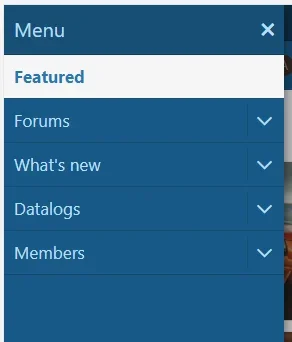
Collapse Hamburger Menu

Ozzy47

Well-known member
Licensed customer
Is there a way to make the sidebar navigation default to collapsed? When Forums (or any section you’re in) is expanded by default, there is little visibility:

E041DE4F-765B-42E5-B442-DE45B3872481.webp
 
It looks like the canvas menu is built in js in XF -> Core -> Structure.js

There's a click handler XF.OffCanvasClick
And menu builder XF.OffCanvasBuilder

I imagine finding where the initial is-active class in there is being applied and preventing it would solve it.
 
I was just searching for this same thing and came up with a way that works but there may be a better way. Hopefully this topic isn't out-dated.

What I ended up doing is creating a template modification on PAGE_CONTAINER along with installing the following add-on:

The "Find" part of the modification is:
<xf:macro name="nav_entry"
arg-navId="{$navSection}"
arg-nav="{$navEntry}"
arg-selected="{{ $navSection == $pageSection }}"
arg-shortcut="{$i}" />
And the "Replace" is:
<xf:if is="$xf.mobileDetect && $xf.mobileDetect.isMobile()">
<xf:macro name="nav_entry"
arg-navId="{$navSection}"
arg-nav="{$navEntry}"
arg-selected=""
arg-shortcut="{$i}" />
<xf:else />
<xf:macro name="nav_entry"
arg-navId="{$navSection}"
arg-nav="{$navEntry}"
arg-selected="{{ $navSection == $pageSection }}"
arg-shortcut="{$i}" />
</xf:if>
Of course if you start off in desktop size and shrink it it'll still be expanded. Or the opposite in the other direction but I wouldn't expect users to be doing that.

Basically, there's no active tab when using a mobile device, which keeps the menu collapsed.
 
Back
Top Bottom