Other Claude Coding. Just WOW

Having used Grok and ChatGPT coding, I just want to say, Claude coding makes them both look stupid. Like, really really dumb. Claude coding is on steroids. Builds to OOP standard, just blows my mind.

Another update. I agree that Claude Code AI (now known as CC) is good but the addon I am working to create is very complicated and in depth CC is loosing its mind by not understanding all the controller classes needed to create this addon and neither do I, but I am learning.
I cannot wait to fully build and release this automotive based addon with the help of CC.
 
Having used Grok and ChatGPT coding, I just want to say, Claude coding makes them both look stupid. Like, really really dumb. Claude coding is on steroids. Builds to OOP standard, just blows my mind.
Yup, check out Claude Code + ChatGPT Codex desktop and CLI apps. If you want the best these are the 2 to use. I've been using them both along with other AI models and dabbling in AI for a few years now. Helpful as I just started doing AI related work for some clients too :D

I rebuilt my Centmin Mod site https://centminmod.com with Claude Code along with the custom data trained AI chat bot with Centmin Mod data 🤓

Last month started my own AI substack sharing my AI adventures mainly with Claude Code and ChatGPT Codex so check it out - guaranteed you'd learn something new https://ai.georgeliu.com :D

Right now I use Claude Code as primary but created skills to allow me to get Claude Opus models to consult within the same chat session with and get 2nd opinion verification with ChatGPT Codex GPT-5.5, ZAI GLM 5.1 and now added DeepSeek V4 Pro https://ai.georgeliu.com/p/deepseek-v4-in-claude-code-kilo-code and playing with re-adding Gemini CLI Gemini 3.1 Pro to the mix. I never rely on a single AI for tasks :)

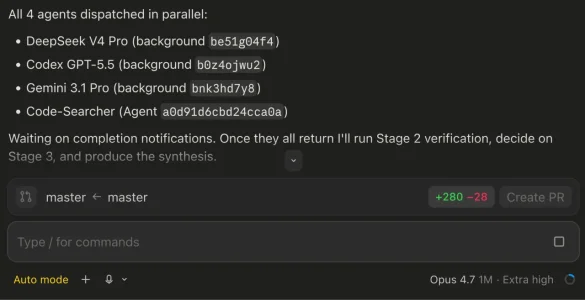
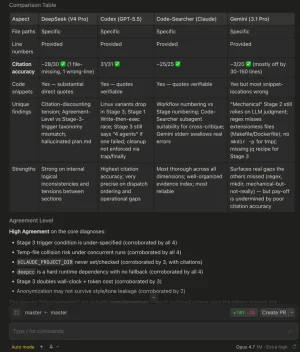
Example tested the 2nd opinion verification on Skill itself - 2nd opinion verification of the changes made to add Gemini 3.1 Pro to itself for implementation from DeepSeek V4 Pro, Codex GPT-5.5, Google Gemini 3.1 Pro and my custom Code-Searcher agent (Sonnet 4.6) then consult with primary Claude Opus 4.7 to get a more accurate understanding and context for coding etc :cool:

Using Claude Code MacOS desktop app and mult-AI model verifications of code/changes to get a more accurate implementation :)

1778639874511.webp

1778640167966.webp

I have and am using Claude Code right now. I usually have had great results but right now it's having some issues helping me. But, it is helping.
Unfortunately, Claude released Opus 4.7 with adaptive thinking only and not with Opus 4.6 and earlier models thinking budget method, so for Opus 4.7 prompt instruction + adaptive thinking influence performance, accuracy and instruction following more than previous models. It means Opus 4.7 may need adjusting your prompting methods compared to previous models. If you can't get a handle on changed prompting for Opus 4.7, can always try going back to Opus 4.6. I wrote how you can re-add Opus 4.6 and Opus 4.5 model selection back into /model slash command too https://ai.georgeliu.com/p/regain-access-to-claude-opus-46-and

I ran benchmarks for this and shared on my AI Substack for folks to read and understand:
And Opus 4.7 usage tips from Boris Cherny creator of Claude Code + my own tips at
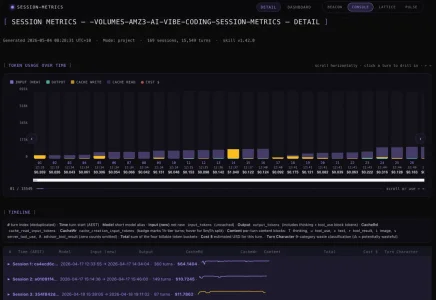
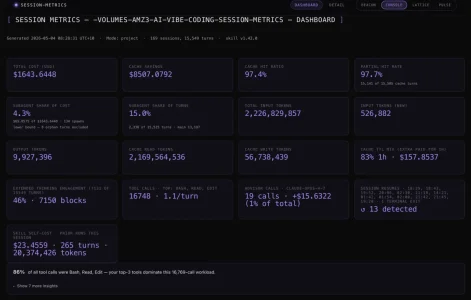
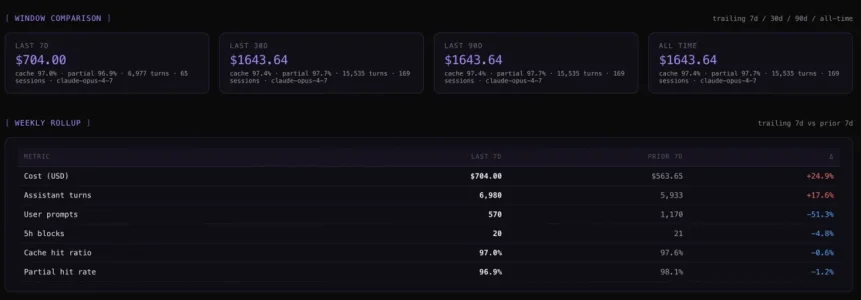
For Claude Code users, I also created Session-metrics plugin https://ai.georgeliu.com/p/my-claude-code-plugin-marketplace to track your token and cost usage including token caching at individual session level, project level or entire instance level as some folks are reporting prematurely hitting session usage limits.

I've not experience this premature session usage limits issues as I shared how I use Claude Code and optimisation tips at https://ai.georgeliu.com/p/i-saved-7189-on-claude-code-tokens

Example for one of my session-metrics plugin exported HTML (supports md, json, csv formats too) dashboards for Claude Code usage for one project - the session-metric plugin itself :D

HTML dashboard has 4 theme styles to choose from Beacon, Console (default), Lattic and Pulse.

1778640640972.webp
1778640715815.webp
1778640731001.webp
1778640752531.webp

Hope it helps with your Claude Code and AI adventures :D
 
Last edited:
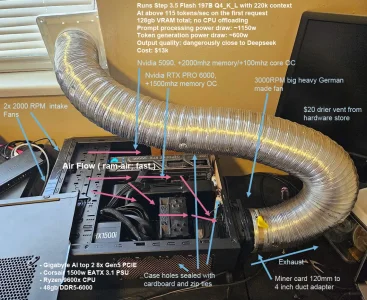
My clients forbid my team from transmitting their source code to a third party due to the large privacy implications and risk of leak ( that's happened many times before, also these services are required to log in a place government can read it, and i don't trust my government to keep my client's source code secure ), so we built a local solution that can serve all 8 programmers.

Pros: it's never down, the model is consistent, always fast, you won't be contacted by the feds for asking weird questions, and token cost is electricity cost ( cheap! )
Cons: it's smarts are equivalent last year's hot AI models, so it needs more guidance than say, today's claude. High upfront cost.
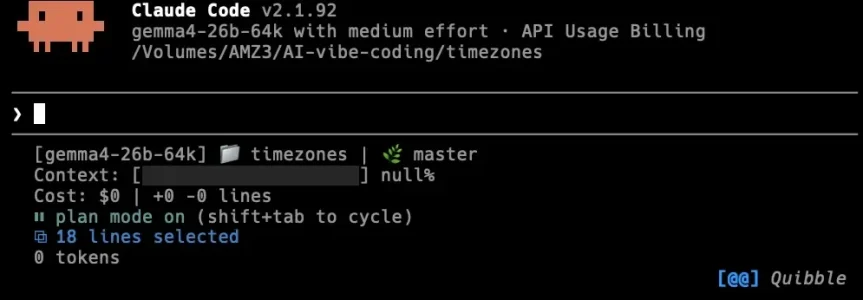
Some people are vibe coding on models smaller than this these days but we like this model because it's very smart, very detail oriented, has low hallucinations, and is quick. The only downside is that it it's breadth of information isn't as strong as a big model, so sometimes we still consult deepseek about very hard/nuanced things.

baby-agi-2.75.webp
 
I rebuilt my Centmin Mod site https://centminmod.com with Claude Code along with the custom data trained AI chat bot with Centmin Mod data 🤓

Last month started my own AI substack sharing my AI adventures mainly with Claude Code and ChatGPT Codex so check it out - guaranteed you'd learn something new https://ai.georgeliu.com :D
Both look amazing, thanks George. I will certainly follow along on the AI website.
Pros: it's never down, the model is consistent, always fast, you won't be contacted by the feds for asking weird questions, and token cost is electricity cost ( cheap! )
Cons: it's smarts are equivalent last year's hot AI models, so it needs more guidance than say, today's claude. High upfront cost.
Yer, currently in the process of building an AI system for business, reduce the staff workload on scanning tasks, email management, etc. Mine isn't as heavy with the GPU, just a 5070TI, but it will be 128GB DDR5 6000 CL36 for ollama modelling. It will be an adventure, that is for sure.
 
Yer, I've had a weeks back and forth with Claude about the right build for the task its being asked to do. I challenged the crap out of it to ensure there was no AI BS it wasn't considering. Between RAM and 16G GPU to help with the lifting, paired with a MSI MAG X870E Tomahawk MAX, Ryzen 9 7900x. I learnt some stuff in that conversation, I thought throwing a 16 core at it would be better, but apparently not. AMD CPU's are better at AI than Intel. Go figure. DDR5 5600 is worse for AI with AM5 than 6000 CL36 (faster and lower latency - 1:1 FCLK ratio bonus). Go less, performance suffers, go more and performance suffers. For AM5 the perfect choice is 6000 which perfectly matches CPU memory controller.

I honestly found the learning curve quite fascinating to build a purpose built machine with such precise choice of parts for optimal AI performance.
 
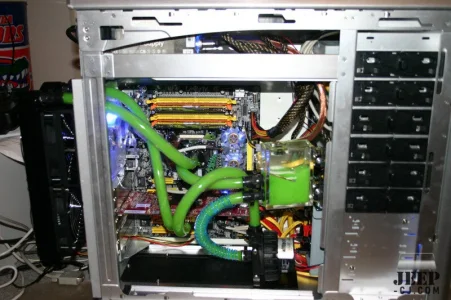
A bit of an older image but I prefer water cooling. The new rig has dual GPU, CPU and ram cooling. The monster dual fan radiator on the back of the case does a good job. Updated pic to follow.
1000004679.webp
 
Last edited:
Nice. Yer, the board I have has dual PCIE5 slots so I can add a second 5070TI if needed in the future, depending whether our needs grow or not for its internal use. I'm planning that AI usefulness will grow as I become accustomed to just what its capable of doing to help reduce staff time on menial tasks, so they can concentrate on better things that make money, not cost the company money.
 
My rig uses all non use time folding for health cures. Mainly proteins. The software maxes out GPU resources (GPUs are actually faster than CPUs) and generates a huge amount of heat. If you want to test your rig and want to check overclocking stability it is a great test.
 
Last edited:
A plug for FAH... Contribute your PC resources if you can. As a serious rheumatoid arthritis person I hope we can some day find cures. I am in no way affiliated with FAH except for helping the project.

The Folding@home project (FAH) is dedicated to understanding protein folding, the diseases that result from protein misfolding and aggregation, and novel computational ways to develop new drugs in general. Here, we briefly describe our goals, what we are doing, and some highlights so far.

What is protein folding and how is it related to disease?​

Proteins are necklaces of amino acids, long chain molecules. They are the basis of how biology gets things done. As enzymes, they are the driving force behind all of the biochemical reactions that make biology work. As structural elements, they are the main constituent of our bones, muscles, hair, skin and blood vessels. As antibodies, they recognize invading elements and allow the immune system to get rid of the unwanted invaders. For these reasons, scientists have sequenced the human genome – the blueprint for all of the proteins in biology – but how can we understand what these proteins do and how they work?

However, only knowing this sequence tells us little about what the protein does and how it does it. In order to carry out their function (e.g. as enzymes or antibodies), they must take on a particular shape, also known as a “fold.” Thus, proteins are truly amazing machines: before they do their work, they assemble themselves! This self-assembly is called “folding.”

What happens if proteins don’t fold correctly?​

Diseases such as Alzheimer’s disease, Huntington’s disease, cystic fibrosis, BSE (Mad Cow disease), an inherited form of emphysema, and even many cancers are believed to result from protein misfolding. When proteins misfold, they can clump together (“aggregate”). These clumps can often gather in the brain, where they are believed to cause the symptoms of Mad Cow or Alzheimer’s disease.
 
Just gonna say, building an AI PC is one expensive exercise. I'm at AUD$4600 and I haven't got the GPU yet. Decided to suck it up and get the 5090 to just not have any issues from the get go, as after some research and working the math, if only 3 staff were querying lookup 20 times hourly at $30 an hr for staff (which they are all more than that), then it was nearly $3k annually saved just in their time from waiting for the AI to process. Wife has more staff than that, and the machine will do more than just that action, so sucking up the AUD$6k price tag of the 5090 is worth the cost I guess after having more data to assess.
 
Just gonna say, building an AI PC is one expensive exercise. I'm at AUD$4600 and I haven't got the GPU yet. Decided to suck it up and get the 5090 to just not have any issues from the get go, as after some research and working the math, if only 3 staff were querying lookup 20 times hourly at $30 an hr for staff (which they are all more than that), then it was nearly $3k annually saved just in their time from waiting for the AI to process. Wife has more staff than that, and the machine will do more than just that action, so sucking up the AUD$6k price tag of the 5090 is worth the cost I guess after having more data to assess.
Depending on context sizes you work with, you probably need 3x 32GB RTX 5090s heh
 
Just gonna say, building an AI PC is one expensive exercise. I'm at AUD$4600 and I haven't got the GPU yet. Decided to suck it up and get the 5090 to just not have any issues from the get go, as after some research and working the math, if only 3 staff were querying lookup 20 times hourly at $30 an hr for staff (which they are all more than that), then it was nearly $3k annually saved just in their time from waiting for the AI to process. Wife has more staff than that, and the machine will do more than just that action, so sucking up the AUD$6k price tag of the 5090 is worth the cost I guess after having more data to assess.

It's very painful, however.. your AI will end up handling sensitive data, and not leaking that to a remote service is priceless.
So is being able to pick/tune the model to your needs. And also it's very easy to get better uptime than paid services, lol.

One thing you don't need is a good CPU and good ram. Run everything on GPU. What do you do want is a fast data bus, because in a commercial application, you're probably looking at two cards or more.

If you can tolerate noisy fans, consider a pair of AMD Radeon R9700 Pros. This is currently the top performance/memory to dollar ratio hardware.
Nvidia hardware is great if you can afford it.

At my shop we do senior level engineering work on very hard projects. Our AI must be very close to commercial level quality. That's how we ended up with a 128gb of VRAM setup. Less exacting use cases might be happy with a ~30b model on 32gb of vram.
 
Depending on context sizes you work with, you probably need 3x 32GB RTX 5090s heh
You're possibly right about that. I am going to start somewhere, see how it goes, then if needed, I upgrade to a RTX Pro 6000 to solve GPU memory outright. I can't envisage any need for our use to be beyond that level, and that is possibly overkill still.
not leaking that to a remote service is priceless.
This is the big one for us.

I just did a little research on this, and my build is perfect for simply the GPU upgrade IF needed in the future, jump from a 5090 to Pro 6000 workstation. Not like I would have any issue selling a 5090 for $1k less than retail on ebay.
 
Last edited:
The price of the RTX PRO 6000 has gone up 20% since i bought it a few months ago.
It is a nice upgrade path to have a dual x8 GPU board and be able to slap one of those in.
But damn, it hurt my wallet to get one then and more painful now.

AMD has some exciting PCIE hardware coming up with very big ram. No idea on the cost.
Intel and Mac are both underpowered and not a good deal for the $ once you consider the low perf

Unfortunately two 5090s is not very useful since the range of 60-120b models is small.
In open source models, there's lots of ~32b models and a decent amount of ~200b models.. just nothing serious in between!
 

Similar threads

Back
Top Bottom