
Change Navigation Tab existing text

Neil E.

Active member
Licensed customer
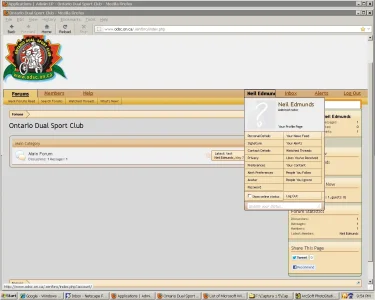
In this screen capture you can see where my name in the tab has been truncated. This is the text I want to change to say: "Profile" instead of the actual username. This would be fixed text instead of a random length username (the username shows up in enough places already).

Also, at the lower left part of the screen, how do I turn OFF the URL that pops up?
 

Attachments

  • xenforo7.webp
    xenforo7.webp
    73.4 KB · Views: 45
In this screen capture you can see where my name in the tab has been truncated. This is the text I want to change to say: "Profile" instead of the actual username. This would be fixed text instead of a random length username (the username shows up in enough places already).

Admin CP -> Appearance -> Templates -> navigation_visitor_tab

Replace the red code:

Rich (BB code):
	<!-- account -->
	<li class="navTab account Popup PopupControl PopupClosed {xen:if $tabs.account.selected, 'selected'}">
	
		<a href="{xen:link account}" class="navLink accountPopup" rel="Menu"><strong>{$visitor.username}</strong></a>
		
		<div class="Menu JsOnly" id="AccountMenu">
			<div class="primaryContent menuHeader">
				<xen:avatar user="$visitor" size="m" class="NoOverlay plainImage" title="{xen:phrase view_your_profile}" />
				
				<h3><a href="{xen:link members, $visitor}" class="concealed" title="{xen:phrase view_your_profile}">{$visitor.username}</a></h3>
				
				<xen:if hascontent="true"><div class="muted"><xen:contentcheck>{xen:helper usertitle, $visitor}</xen:contentcheck></div></xen:if>
				
				<ul class="links">
					<li class="fl"><a href="{xen:link members, $visitor}">{xen:phrase your_profile_page}</a></li>
				</ul>
			</div>

Like so:

Rich (BB code):
	<!-- account -->
	<li class="navTab account Popup PopupControl PopupClosed {xen:if $tabs.account.selected, 'selected'}">
	
		<a href="{xen:link account}" class="navLink accountPopup" rel="Menu"><strong>Profile</strong></a>
		
		<div class="Menu JsOnly" id="AccountMenu">
			<div class="primaryContent menuHeader">
				<xen:avatar user="$visitor" size="m" class="NoOverlay plainImage" title="{xen:phrase view_your_profile}" />
				
				<h3><a href="{xen:link members, $visitor}" class="concealed" title="{xen:phrase view_your_profile}">{$visitor.username}</a></h3>
				
				<xen:if hascontent="true"><div class="muted"><xen:contentcheck>{xen:helper usertitle, $visitor}</xen:contentcheck></div></xen:if>
				
				<ul class="links">
					<li class="fl"><a href="{xen:link members, $visitor}">{xen:phrase your_profile_page}</a></li>
				</ul>
			</div>

Also, at the lower left part of the screen, how do I turn OFF the URL that pops up?

You can't. That's part of the browser.
 
Thank you sir! Worked a treat.

p.s. Remove the "probably" from your avatar text ......

I tried to make my avatar fit the boundary and gave up.
 
Back
Top Bottom