wickedstangs Well-known member Licensed customer Jul 5, 2012 #1 I keep getting this error.. How can I fix this..
R ragtek Guest Jul 5, 2012 #2 change the option "Maximum Attachments per Message" (acp, search for Maximum Attachments per Message" (using the search is easier and faster^^ Upvote 0 Downvote
change the option "Maximum Attachments per Message" (acp, search for Maximum Attachments per Message" (using the search is easier and faster^^
wickedstangs Well-known member Licensed customer Jul 5, 2012 #3 ragtek said: change the option "Maximum Attachments per Message" (acp, search for Maximum Attachments per Message" (using the search is easier and faster^^ Click to expand... I have 22 in there... Should I change it to 0? Upvote 0 Downvote
ragtek said: change the option "Maximum Attachments per Message" (acp, search for Maximum Attachments per Message" (using the search is easier and faster^^ Click to expand... I have 22 in there... Should I change it to 0?
wickedstangs Well-known member Licensed customer Jul 6, 2012 #4 still can't upload images.. Upvote 0 Downvote
Jake Bunce Well-known member Licensed customer Jul 6, 2012 #5 The error means you have exceeded the limit. You can either increase the limit (what ragtek said) or remove some existing attachments from that post. Upvote 0 Downvote
The error means you have exceeded the limit. You can either increase the limit (what ragtek said) or remove some existing attachments from that post.
R ragtek Guest Jul 6, 2012 #6 hm, there's something strange the value is "22" but the error msg shows -2 change it to something different and try again Upvote 0 Downvote
hm, there's something strange the value is "22" but the error msg shows -2 change it to something different and try again
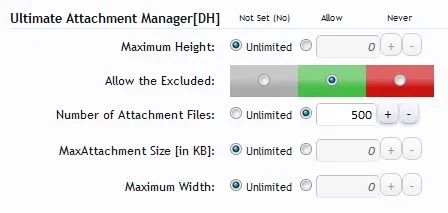
wickedstangs Well-known member Licensed customer Jul 6, 2012 #7 Jake Bunce said: The error means you have exceeded the limit. You can either increase the limit (what ragtek said) or remove some existing attachments from that post. Click to expand... ok, I think I found my issue I changed the unlimited to 500 and it works again... Upvote 0 Downvote
Jake Bunce said: The error means you have exceeded the limit. You can either increase the limit (what ragtek said) or remove some existing attachments from that post. Click to expand... ok, I think I found my issue I changed the unlimited to 500 and it works again...
R ragtek Guest Jul 6, 2012 #8 wickedstangs said: ok, I think I found my issue I changed the unlimited to 500 and it works again... View attachment 31274 Click to expand... ok, this explains why your value wasn't the same as the standard xf option Upvote 0 Downvote
wickedstangs said: ok, I think I found my issue I changed the unlimited to 500 and it works again... View attachment 31274 Click to expand... ok, this explains why your value wasn't the same as the standard xf option
wickedstangs Well-known member Licensed customer Jul 6, 2012 #9 thanks Jake and ragtek for the help... Upvote 0 Downvote





 (using the search is easier and faster^^