Advanced Traffic Statistics: Live Radar & WAF Security

Advanced Traffic Statistics: Live Radar & WAF Security 1.7.6

No permission to download
How are your traffic stats compated to Google Analytics how accurate are yours?
Hi, thank you for the great question.

Our add-on does not sync with or directly compare itself to Google Analytics; instead, it operates via a native management system that runs directly server-side. This ensures greater privacy and gives you total control over your data.

Regarding accuracy, the system allows you to analyze traffic using two distinct metrics:

  1. Total Views (Native XenForo Management):This metric counts every single page load. While useful for gauging overall traffic volume and retrieving historical data, it does not reflect the number of unique individuals (e.g., if a user visits 5 threads, it will count as 5 views).
  2. Unique Visitors (Based on IP):This is the most accurate metric for understanding your actual audience size. The count is based on IP addresses: even if a user accesses the forum 10 times in a day or visits multiple pages, they are counted as 1 unique visitor. This provides much more precise data compared to simple page views.
The Bot Advantage:A key strength of our system compared to standard analytics is our Bot Intelligence. The system doesn't just count hits; it actively recognizes, classifies, and separates human traffic from bot traffic (crawlers, spiders, etc.). This provides you with clean, realistic statistics that other tools often struggle to distinguish effectively.

I hope this answers your question!
 
Hello, I have the Pro version. The plugin is great, thank you. My question is, the country flags of visitors aren't showing up. What could be wrong?

  • Make sure you have enabled it in your settings: Enable GeoIP> YES
If enabled, tracks the country of origin for IP addresses.

Geolocation works via the file contained in the installation zip _data/GeoLite2-Country.mmdb make sure it is present in src/addons/Statistiche/_data
Check file permissions: The .mmdb file must be readable by the web user (usually www-data)

Alternatively or if you want recognition to be faster, install it on your server: maxminddb
 
  • Make sure you have enabled it in your settings: Enable GeoIP> YES
If enabled, tracks the country of origin for IP addresses.

Geolocation works via the file contained in the installation zip _data/GeoLite2-Country.mmdb make sure it is present in src/addons/Statistiche/_data
Check file permissions: The .mmdb file must be readable by the web user (usually www-data)

Alternatively or if you want recognition to be faster, install it on your server: maxminddb
I checked everything correctly, but it still doesn't display.
 
I checked everything correctly, but it still doesn't display.
Have you checked that the _data/GeoLite2-Country.mmdb file is present in src/addons/Statistics/? Have you tried installing maxminddb on your server? What operating system does your server use and what PHP library does it use? Is it a shared, managed space? Are there any restrictions affecting the execution of .mmdb files?
 
Have you checked that the _data/GeoLite2-Country.mmdb file is present in src/addons/Statistics/? Have you tried installing maxminddb on your server? What operating system does your server use and what PHP library does it use? Is it a shared, managed space? Are there any restrictions affecting the execution of .mmdb files?
I have a forum on hosting, there is no way to install it maxminddb, PHP 8.4.14 (ioncube), FastCGI (Apache)
 
I have a forum on hosting, there is no way to install it maxminddb, PHP 8.4.14 (ioncube), FastCGI (Apache)
Hi, thank you for the additional details!

Regarding the maxminddb extension, even on shared hosting, it is often worth contacting your hosting provider's support team directly. Many hosts are willing to enable or install specific PHP extensions like maxminddb for your account upon request.

However, don't worry if they decline: the add-on is designed to automatically fall back to a pure PHP reader. You do not need to activate or configure anything for this to happen; it triggers automatically as long as the .mmdb file is in the correct folder. The extension only makes the process faster, but it is not strictly required for the country flags to work.

Here are the most likely causes for the flags not displaying in your current setup:

  • Cloudflare or Reverse Proxy: Are you using Cloudflare or a similar proxy service? If so, XenForo might be reading the proxy's IP addresses instead of the actual users' IPs. The GeoIP database cannot resolve proxy IPs to a country.
  • PHP 8.4 Compatibility: You are using PHP 8.4, which is very new. There is a chance that the pure PHP fallback reader is throwing a silent compatibility error in the background. Please check your XenForo Server Error Log (in the Admin Control Panel) to see if there are any errors related to GeoIP or MaxMind.
  • Folder Case Sensitivity: Since FastCGI/Apache environments on Linux are strictly case-sensitive, please double-check that the directory path is exactly src/addons/Statistiche/_data (with a capital "S") and that the .mmdb file has the exact capitalization.
Could you let me know if you are using Cloudflare, or if you see anything in your XenForo error logs?
 
Supergatto updated Advanced Traffic Statistics: From Insight to Active Defense with a new update entry:

📋 Final Summary for the Changelog (1.6.9)

  • Community Pulse (New): Added a new historical chart comparing Attachment Size (MB) and Attachment Count. This replaces the reactions chart to provide a more technical overview of server resource usage.
  • Unified Security Core: Synchronized the detection lists between the Firewall and the Report. The system now consistently recognizes and handles hundreds of User Agents, including Applebot (which is now correctly classified as "Good").
  • Hacker Tools Block:...

Read the rest of this update entry...
 
Hi, thank you for the additional details!

Regarding the maxminddb extension, even on shared hosting, it is often worth contacting your hosting provider's support team directly. Many hosts are willing to enable or install specific PHP extensions like maxminddb for your account upon request.

However, don't worry if they decline: the add-on is designed to automatically fall back to a pure PHP reader. You do not need to activate or configure anything for this to happen; it triggers automatically as long as the .mmdb file is in the correct folder. The extension only makes the process faster, but it is not strictly required for the country flags to work.

Here are the most likely causes for the flags not displaying in your current setup:

  • Cloudflare or Reverse Proxy: Are you using Cloudflare or a similar proxy service? If so, XenForo might be reading the proxy's IP addresses instead of the actual users' IPs. The GeoIP database cannot resolve proxy IPs to a country.
  • PHP 8.4 Compatibility: You are using PHP 8.4, which is very new. There is a chance that the pure PHP fallback reader is throwing a silent compatibility error in the background. Please check your XenForo Server Error Log (in the Admin Control Panel) to see if there are any errors related to GeoIP or MaxMind.
  • Folder Case Sensitivity: Since FastCGI/Apache environments on Linux are strictly case-sensitive, please double-check that the directory path is exactly src/addons/Statistiche/_data (with a capital "S") and that the .mmdb file has the exact capitalization.
Could you let me know if you are using Cloudflare, or if you see anything in your XenForo error logs?
Thank you, I'll look into it and figure it out. Thanks for your help.
 
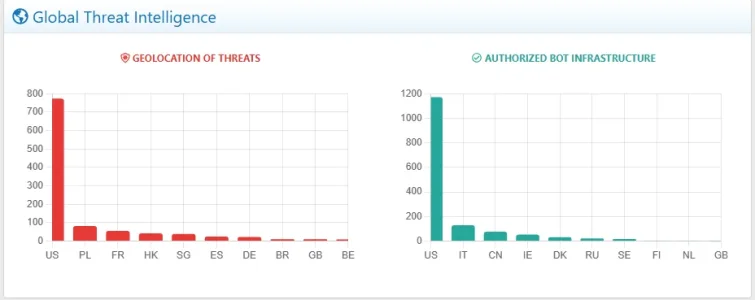
In the 1.7.1 PRO release, still in testing phase, will be present a graph that geolocalizes Good and Bad Bots. We'll publish it in a few days. It's currently giving excellent results in our forum. :cool:
1770763056728.webp
 
Supergatto updated Advanced Traffic Statistics: From Insight to Active Defense with a new update entry:

Update 1.7.1 - Global Threat Intelligence 🌍 & File Health Fix

We are thrilled to announce the release of Advanced Traffic Statistics version 1.7.1!

This update introduces a crucial analysis tool for your forum's security and resolves some annoying bugs reported by the community.

🚀 Main New Feature: Global Threat Intelligence​

With version 1.7.1, we've introduced a new section dedicated entirely to the "Cyber-Geography" of your traffic. Leveraging GeoIP integration (MaxMind or Cloudflare), the add-on now maps not just human...

Read the rest of this update entry...
 
Important Bug Report


I am using 1.7.1 and on all unedited files and unedited templates for this.

I was reviewing the latest changes this afternoon when I noticed an odd bug.

If I went to a forum or What's New page, I noticed a threads that should have more than one view would only have one view, so I checked several threads, looked via on a different IP logged off, several page refreshes, no change. I can log back in as admin and look, still no change.

Its like it locked the thread count on threads or forums in forums and What's New, and maybe others.

So I disabled the addon, and refreshed a few times, and all the page hits went from 1 to their actual respective numbers.

I will keep it off for the time being until this can be isolated.


edit to add: someone correct me if I am wrong please, but I am under the impression that when logged in , that number updates on the page view, but when logged off, the viewable updated number is determined by the cache setting in the cloud setup?
 
Last edited:
Just noticed that I am now getting server errors for some reason, with the addon disabled.

Stack trace​

#0 src/XF/Job/Manager.php(275): XF\Job\ContentIndexNow->run(8)
#1 src/XF/Job/Manager.php(205): XF\Job\Manager->runJobInternal(Array, 8)
#2 src/XF/Job/Manager.php(89): XF\Job\Manager->runJobEntry(Array, 8)
#3 src/XF/Cli/Command/RunJobs.php(58): XF\Job\Manager->runQueue(false, 8)
#4 src/vendor/symfony/console/Command/Command.php(298): XF\Cli\Command\RunJobs->execute(Object(Symfony\Component\Console\Input\ArgvInput), Object(Symfony\Component\Console\Output\ConsoleOutput))
#5 src/vendor/symfony/console/Application.php(1040): Symfony\Component\Console\Command\Command->run(Object(Symfony\Component\Console\Input\ArgvInput), Object(Symfony\Component\Console\Output\ConsoleOutput))
#6 src/vendor/symfony/console/Application.php(301): Symfony\Component\Console\Application->doRunCommand(Object(XF\Cli\Command\RunJobs), Object(Symfony\Component\Console\Input\ArgvInput), Object(Symfony\Component\Console\Output\ConsoleOutput))
#7 src/vendor/symfony/console/Application.php(171): Symfony\Component\Console\Application->doRun(Object(Symfony\Component\Console\Input\ArgvInput), Object(Symfony\Component\Console\Output\ConsoleOutput))
#8 src/XF/Cli/Runner.php(115): Symfony\Component\Console\Application->run(Object(Symfony\Component\Console\Input\ArgvInput), Object(Symfony\Component\Console\Output\ConsoleOutput))
#9 cmd.php(17): XF\Cli\Runner->run()
#10 {main}
 
Important Bug Report


I am using 1.7.1 and on all unedited files and unedited templates for this.

I was reviewing the latest changes this afternoon when I noticed an odd bug.

If I went to a forum or What's New page, I noticed a threads that should have more than one view would only have one view, so I checked several threads, looked via on a different IP logged off, several page refreshes, no change. I can log back in as admin and look, still no change.

Its like it locked the thread count on threads or forums in forums and What's New, and maybe others.

So I disabled the addon, and refreshed a few times, and all the page hits went from 1 to their actual respective numbers.

I will keep it off for the time being until this can be isolated.


edit to add: someone correct me if I am wrong please, but I am under the impression that when logged in , that number updates on the page view, but when logged off, the viewable updated number is determined by the cache setting in the cloud setup?
"Thank you for the detailed report. We have analyzed your stack trace and the symptoms.

Diagnosis:
  1. The Stack Trace (ContentIndexNow): This error is related to Search Indexing and is likely a side-effect of disabling an addon while background tasks were running. It does not originate from the Statistiche code itself.
  2. The Stuck View Counts: XenForo updates thread views via "Deferred Jobs" (background tasks) for performance reasons. The behavior you described (counts updating immediately after disabling the addon) suggests that the XenForo Job Runner was stalled or delayed. The data was there, waiting in the queue, but the system couldn't process it fast enough.
The new 1.7.1 update introduced intensive GeoIP checks and Bot Logging on every page load. On busy forums, this might be causing a slight bottleneck that delays the standard XenForo jobs (like updating view counts).
We are investigating optimizing the database queries in the Listener.php to prevent this bottleneck.Could you please check your Server Error Log in the Admin CP for any errors explicitly mentioning Statistiche or MaxMind? That would confirm if a specific query is timing out."

I have prepared an optimized version of the core file (Listener.php) that introduces an intelligent Cache Throttling system. It reduces database write operations by about 90% without losing tracking accuracy.

Instructions:
  1. Access your server via FTP.
  2. Go to: src/addons/Statistiche/
  3. Rename the existing Listener.php to Listener.php.old (this is your backup, so you can revert if needed).
  4. Upload the attached Listener.php to that folder.
  5. Re-enable the add-on from the Admin Control Panel.
⚠️ Important Note:Since you are manually modifying a core file, XenForo's File Health Check will likely flag this file as containing "Unexpected Contents". Please ignore this warning for now. It is false positive caused by this manual hotfix.The warning will disappear automatically once you upgrade to the official version 1.7.2 when released.
 
Last edited:
  • Like
Reactions: CTS
bottleneck.Could you please check your Server Error Log in the Admin CP for any errors explicitly mentioning Statistiche or MaxMind? That would confirm if a specific query is timing out."
No other different server errors logged. Just 4 of the ones, above.

  1. Access your server via FTP.
  2. Go to: src/addons/Statistiche/
  3. Rename the existing Listener.php to Listener.php.old (this is your backup, so you can revert if needed).
  4. Upload the attached Listener.php to that folder.
  5. Re-enable the add-on from the Admin Control Panel
I am hosted on the XF cloud and do not have FTP access or ability to edit core files. I will wait for an installable update.
 
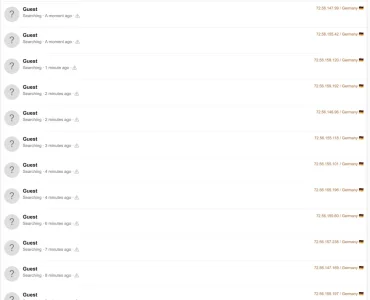
I got hit again today, used the Emergency Block. Funny thing is, they all show from Germany, but every single one traces to Russia. Using WhatIsMyIpAddress.com


stats.webp
 
Supergatto updated Advanced Traffic Statistics: From Insight to Active Defense with a new update entry:

Advanced Traffic Statistics 1.7.3 - Performance & Visual Update

Changelog:

  • NEW: Top Blocked Bots Chart: Added a new horizontal bar chart to the main report page. It displays today's "Top 10 Blocked Bots," giving you immediate visual feedback on exactly who is attacking your forum and being stopped by the AI/Junk Shields.
  • PERFORMANCE: Core Optimization: Implemented an optimized version of the core file (Listener.php) featuring a smart cache limiting system. This reduces database write operations by...

Read the rest of this update entry...
 
No other different server errors logged. Just 4 of the ones, above.


I am hosted on the XF cloud and do not have FTP access or ability to edit core files. I will wait for an installable update.
I uploaded version 1.7.3, which should fix your problem. Let me know. :)
 
  • Like
Reactions: CTS
I got hit again today, used the Emergency Block. Funny thing is, they all show from Germany, but every single one traces to Russia. Using WhatIsMyIpAddress.com
It is very common for Russian botnets to use cheap VPS hosting or compromised servers located in Germany (e.g., heavily used data centers). Technically, the IP is assigned to Germany (which is why the add-on flags it as DE), but the actor behind it is in Russia. In any case, the most important thing is that the Block button worked and protected your forum!
 
Back
Top Bottom