
You are using an out of date browser. It may not display this or other websites correctly.
You should upgrade or use an alternative browser.
You should upgrade or use an alternative browser.

Advanced Traffic Statistics: Live Radar & WAF Security 1.7.6
No permission to download
- Thread starter Supergatto
- Start date

Supergatto updated Advanced Traffic Statistics: From Insight to Active Defense with a new update entry:
Advanced Traffic Statistics 1.7.3 - Performance & Visual Update
Read the rest of this update entry...
Advanced Traffic Statistics 1.7.3 - Performance & Visual Update
Changelog:
- NEW: Top Blocked Bots Chart: Added a new horizontal bar chart to the main report page. It displays today's "Top 10 Blocked Bots," giving you immediate visual feedback on exactly who is attacking your forum and being stopped by the AI/Junk Shields.
- PERFORMANCE: Core Optimization: Implemented an optimized version of the core file (Listener.php) featuring a smart cache limiting system. This reduces database write operations by...
Read the rest of this update entry...
Looks and works great so far. I did a full re-install.
Noted that the widget "Robots:" always shows a zero count. It shows correctly on the report page. But both the widget and the report page show the number of guests as the same and when added to the total on the reports page, the totals does not reflect the bots added on, but just members and guests.
So I cant really decide which is accurate.
I did put up the XF widget showing guests for comparison, and robots do not count there also. Just the total of members online and guests.
Noted that the widget "Robots:" always shows a zero count. It shows correctly on the report page. But both the widget and the report page show the number of guests as the same and when added to the total on the reports page, the totals does not reflect the bots added on, but just members and guests.
So I cant really decide which is accurate.
I did put up the XF widget showing guests for comparison, and robots do not count there also. Just the total of members online and guests.
Last edited:
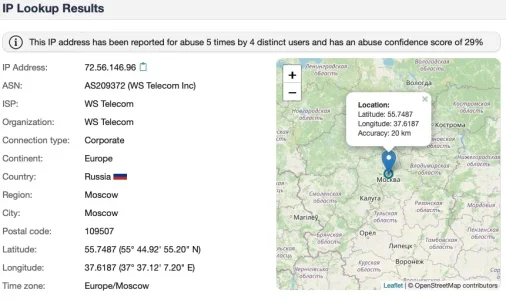
I would not buy that. The IPs belong to AS209372 (WS Telecom) which is well known for all kinds of malicious activity coming from there. An ASN well worth blocking - you won't miss anything but have less trouble. Their Website looks legit on first sight and creates the impression of an American company but if you click on their choice of currencies it is pretty obvious that this is a Russian undertaking:Technically, the IP is assigned to Germany (which is why the add-on flags it as DE), but the actor behind it is in Russia.

Their ASN spans a lot of countries, but the IPs in question are clearly located in Russia as I understand it.



https://bgp.tools/as/209372#prefixes
Maxmind (the geoDB of whome you are using in their free lite version) also say that the IP would be in Moskow:

GeoIP web services demo | MaxMind
Demo MaxMind’s GeoIP web services by entering up to 25 IP addresses. Instantly access IP geolocation data from our most accurate API solution.
www.maxmind.com
and a traceroute shows indeed the same:
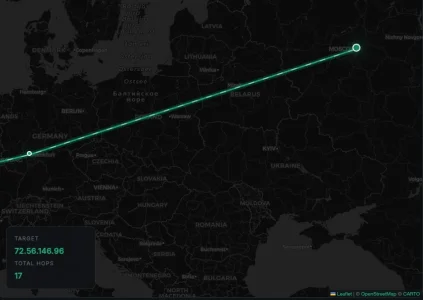
So how do you come to the conclusion the IP would be in Germany?
I am wondering how you do that, given that at the moment most of the bot traffic comes from resident proxies and until now no solution on the market is able to identify them reliably and to full extend (inc. massive corps like Couldflare taht do this for a living)? Could explain this?The Bot Advantage:A key strength of our system compared to standard analytics is our Bot Intelligence. The system doesn't just count hits; it actively recognizes, classifies, and separates human traffic from bot traffic (crawlers, spiders, etc.). This provides you with clean, realistic statistics that other tools often struggle to distinguish effectively.
Hi smallwheels,I am wondering how you do that, given that at the moment most of the bot traffic comes from resident proxies and until now no solution on the market is able to identify them reliably and to full extend (inc. massive corps like Couldflare taht do this for a living)? Could explain this?
You raise a technically excellent point. You are absolutely right: residential proxies are currently the "End Boss" of bot detection, and even massive infrastructures like Cloudflare face challenges with them because the IP itself looks clean and legitimate.
However, our "Bot Intelligence" doesn't rely solely on IP reputation (which, as you noted, is easily bypassed by residential proxies). We use a multi-layered approach specifically designed for the XenForo environment:
- Behavioral Heuristics: Since we run at the application level, we can see what the visitor is doing. Bots often follow specific navigation patterns, request pages at superhuman speeds, or ignore typical session cookies in ways that real browsers don't.
- Honeypots (Traps): This is one of our most effective tools against scrapers. The system injects invisible links or fields that human users never see or click. If a "visitor" interacts with these traps, they are instantly flagged as a bot, regardless of whether their IP is residential, mobile, or data center.
- User Agent & Fingerprinting: While easily spoofed, we cross-reference the User Agent with expected headers.
- Known Signatures: We maintain an internal database of known crawler signatures that aren't always caught by standard logs.
In our tests, this combination drastically reduces the "fake" traffic counts compared to standard raw access logs.
I hope this explains the logic behind the system!
"Hello and thanks for the feedback!I am wondering how you do that, given that at the moment most of the bot traffic comes from resident proxies and until now no solution on the market is able to identify them reliably and to full extend (inc. massive corps like Couldflare taht do this for a living)? Could explain this?
What you are seeing is actually intended behavior and follows standard XenForo logic. Here is the technical explanation:
- The "Total Online" Calculation:In XenForo (and in this add-on), the formula for "Total Online" is strictly: Members + Guests.Robots are tracked separately and are excluded from the total count by design. This is to prevent inflating your community statistics with artificial traffic. If we added bots to the total, you might see "500 users online" when only 10 are real humans, which would be misleading.
- Why the Widget shows 0 Robots vs. Report Page:
- The Widget relies on XenForo's standard "Session Activity" (lighter and cached) to minimize load on every page view. If XenForo's native system doesn't flag a visitor as a robot (or if the session cache hasn't updated yet), it might show 0 or count them as Guests.
- The Report Page uses our add-on's Advanced Tracking Engine. This engine performs a deep analysis of User Agents in real-time. That is why the Report page is much more accurate and detects bots that standard XenForo might miss or group under "Guests".
In summary: The Report page is your "Source of Truth" for detailed analysis, while the Widget provides a quick, lightweight snapshot based on standard sessions."
Fully agreed that the bot identification built into XF leaves a lot to be desired to say it politely. As far as I understand it is solely based on the submitted user agent plus if this user agent is marked as bot in the database. So it dates back to way friendlier and more honest times a couple of years ago and is not at all adequate for today's world. "/o the "known bots" add on if will find even less.
In today's world things have become way more complex and the user agent is nothing to be relied on. Clearly, fingerprinting and behavioral tracking are better ways and for the latter a systems that is integrated in XF as an add on takes advantage over external firewalls that do not know the application and cannot see the behavior.
I get the honeypot approach (that's what the spaminator addons do as well for many years successfully) and am curious about the signature database - I had expected this would be way over the top for a XF add on, let alone a free one. Heuristics - I am no so sure. While it sounds impressive it is in fact guessing, based on criteria which by nature leads to false postives as well as to false negatives, depending from the mechanism. Probably most people remember that from virus scanners on windows that went berzerk for no reason.
If I get this right this means overall that you system needs constant updating of signatures, either via an update mechanism or by a central infrastructure that is accessed via an API in real time. An on the server side, to provide the data an infrastructure that constantly monitors, analyzes and creates new signatures. Sounds like a lot of effort.
In today's world things have become way more complex and the user agent is nothing to be relied on. Clearly, fingerprinting and behavioral tracking are better ways and for the latter a systems that is integrated in XF as an add on takes advantage over external firewalls that do not know the application and cannot see the behavior.
I get the honeypot approach (that's what the spaminator addons do as well for many years successfully) and am curious about the signature database - I had expected this would be way over the top for a XF add on, let alone a free one. Heuristics - I am no so sure. While it sounds impressive it is in fact guessing, based on criteria which by nature leads to false postives as well as to false negatives, depending from the mechanism. Probably most people remember that from virus scanners on windows that went berzerk for no reason.
If I get this right this means overall that you system needs constant updating of signatures, either via an update mechanism or by a central infrastructure that is accessed via an API in real time. An on the server side, to provide the data an infrastructure that constantly monitors, analyzes and creates new signatures. Sounds like a lot of effort.
You are absolutely spot on regarding the current state of XF's native detection; relying solely on User Agent strings in 2024 is indeed like bringing a knife to a gunfight.Fully agreed that the bot identification built into XF leaves a lot to be desired to say it politely. As far as I understand it is solely based on the submitted user agent plus if this user agent is marked as bot in the database. So it dates back to way friendlier and more honest times a couple of years ago and is not at all adequate for today's world. "/o the "known bots" add on if will find even less.
In today's world things have become way more complex and the user agent is nothing to be relied on. Clearly, fingerprinting and behavioral tracking are better ways and for the latter a systems that is integrated in XF as an add on takes advantage over external firewalls that do not know the application and cannot see the behavior.
I get the honeypot approach (that's what the spaminator addons do as well for many years successfully) and am curious about the signature database - I had expected this would be way over the top for a XF add on, let alone a free one. Heuristics - I am no so sure. While it sounds impressive it is in fact guessing, based on criteria which by nature leads to false postives as well as to false negatives, depending from the mechanism. Probably most people remember that from virus scanners on windows that went berzerk for no reason.
If I get this right this means overall that you system needs constant updating of signatures, either via an update mechanism or by a central infrastructure that is accessed via an API in real time. An on the server side, to provide the data an infrastructure that constantly monitors, analyzes and creates new signatures. Sounds like a lot of effort.
To address your concerns about the infrastructure and the "Virus Scanner" effect:
You are right that a real-time, cloud-based signature database requires massive infrastructure. We made a conscious design choice not to rely on external API calls. Why? Privacy and Performance.We don't want the forum to hang while waiting for a 3rd-party server to validate a visitor, nor do we want to send user data to an external cloud.Instead, our "signatures" are delivered via add-on updates. They are a curated list of known bad actors and scrapers specific to the XenForo ecosystem, not a universal antivirus database. It’s lightweight and runs locally.
Your comparison to old virus scanners is valid. Heuristics is indeed a form of probability. To mitigate false positives, our system uses a Scoring Model rather than a binary "Block Immediately" trigger for heuristics.
- The Honeypot is the "hard" trap (high certainty).
- Heuristics (behavior/fingerprinting) add "risk points."
- We tune the system to be conservative: we would rather let a sophisticated bot pass as a "Guest" than accidentally block a real human. The goal is to give the Admin a clear picture of likely bot traffic that standard logs miss, so they can take action (like the "Emergency Block") if they see a pattern, rather than having the system go "berserk" automatically.
Still testing out and so far so good. 1.7.3
The latest update: does the Bots Blocked indicator on report page, I t doesn't show up anymore? Also it "seems" that the llm bots are no longer being identified (most notably facebook)? I saw them and so just for test purposes I put on full emergency mode. The reports page indicated no bots have been blocked on the Blocked Threats 24h graph. Now please keep in mind I am looking at the Current Visitors guests and robots list in XF. But it appears as if the likes of Barkrowler and llm bots are still getting through.
I do not have a way to verify this at this time tho.
The latest update: does the Bots Blocked indicator on report page, I t doesn't show up anymore? Also it "seems" that the llm bots are no longer being identified (most notably facebook)? I saw them and so just for test purposes I put on full emergency mode. The reports page indicated no bots have been blocked on the Blocked Threats 24h graph. Now please keep in mind I am looking at the Current Visitors guests and robots list in XF. But it appears as if the likes of Barkrowler and llm bots are still getting through.
I do not have a way to verify this at this time tho.
Hi,Still testing out and so far so good. 1.7.3
The latest update: does the Bots Blocked indicator on report page, I t doesn't show up anymore? Also it "seems" that the llm bots are no longer being identified (most notably facebook)? I saw them and so just for test purposes I put on full emergency mode. The reports page indicated no bots have been blocked on the Blocked Threats 24h graph. Now please keep in mind I am looking at the Current Visitors guests and robots list in XF. But it appears as if the likes of Barkrowler and llm bots are still getting through.
I do not have a way to verify this at this time tho.
Thank you for continuing to test the add-on and for updating to 1.7.3! These are excellent questions, and I can explain exactly what is happening behind the scenes.
1. Bots showing up in the native XenForo "Current Visitors" list:Seeing Barkrowler, Facebook, or other LLM bots in the default XF visitors list does not mean they are bypassing the block.When a bot attempts to access your site, XenForo natively registers the session immediately upon connection. If our add-on's Emergency Mode intercepts and blocks them (serving them a 403 Forbidden or a blank page), XenForo has still already logged their "attempt" in the session table.In short: they are hitting a brick wall, but XenForo still shows you that they are standing at the door.
2. The "Blocked Threats 24h" Graph and Indicator:When you activate "Full Emergency Mode", the add-on is designed to block bad traffic at the earliest possible stage of the XenForo routing process. This is done specifically to save your server's CPU and database resources during a potential attack.Because the block happens so early and aggressively, it often skips the standard database logging that populates the "Blocked Threats 24h" visual graph (to prevent your database from bloating if you are hit by thousands of requests per second).
We are looking into ways to better sync the Emergency Mode blocks with the visual UI graphs for a future update, so you get that visual confirmation without sacrificing server performance.
If you ever want to verify 100% that the block is working, you can check your server's raw access logs (cPanel/Plesk): you will see that those bot IPs are receiving a 403 or 444 error code instead of a 200 OK when Emergency Mode is on.
Thanks again for the great feedback!
It appears this is still acting up.Important Bug Report
I am using 1.7.1 and on all unedited files and unedited templates for this.
I was reviewing the latest changes this afternoon when I noticed an odd bug.
If I went to a forum or What's New page, I noticed a threads that should have more than one view would only have one view, so I checked several threads, looked via on a different IP logged off, several page refreshes, no change. I can log back in as admin and look, still no change.
Its like it locked the thread count on threads or forums in forums and What's New, and maybe others.
So I disabled the addon, and refreshed a few times, and all the page hits went from 1 to their actual respective numbers.
I will keep it off for the time being until this can be isolated.
edit to add: someone correct me if I am wrong please, but I am under the impression that when logged in , that number updates on the page view, but when logged off, the viewable updated number is determined by the cache setting in the cloud setup?
I noticed again today some threads that most certainly should show more than one view.
After some thought I went to my ACP > Tools > Cron entries
The first thing I noticed was all of my crontabs hadn't executed and showed next run time as a few days ago.
As an experiment I Disabled the Advanced Traffic addon and within a few short minutes all my crons were up to date. And the view counts were all updated.
It appears the addon is stalling the crontabs from executing.
HiIt appears this is still acting up.
I noticed again today some threads that most certainly should show more than one view.
After some thought I went to my ACP > Tools > Cron entries
The first thing I noticed was all of my crontabs hadn't executed and showed next run time as a few days ago.
As an experiment I Disabled the Advanced Traffic addon and within a few short minutes all my crons were up to date. And the view counts were all updated.
It appears the addon is stalling the crontabs from executing.
I investigated the issue and you were 100% correct. I found the bottleneck: the database cleanup tasks (like pruning old logs) were occasionally causing table locks on high-traffic forums, which in turn stalled the XenForo cron queue.
The good news is that the patch is already written. I have completely reworked the logic to move those heavy queries into a dedicated, lightweight background cron process.
The update is currently in the testing phase on my end to ensure everything runs smoothly without impacting performance. I will be releasing this update very soon, specifically optimized for high-traffic boards.
In the meantime, leaving the add-on (or just its specific cron tasks) disabled as you did is the perfect temporary workaround.
I will let you know as soon as the update is live. Thanks again for the excellent debugging!
Supergatto updated Advanced Traffic Statistics: From Insight to Active Defense with a new update entry:
Version 1.7.4 - Major Performance & Cron Optimization
Read the rest of this update entry...
Version 1.7.4 - Major Performance & Cron Optimization
Hi everyone,
Thank you for your continuous feedback! This update brings a crucial structural improvement, specifically designed to optimize performance on high-traffic boards.
Thanks to the reports from our community (specifically regarding XenForo cron entries stalling and thread views not updating), I have completely refactored how the add-on handles database maintenance.
Changelog 1.7.4:
- Major Performance Overhaul: Moved heavy database tasks (such as pruning old...
Read the rest of this update entry...

I turned this add on off as it was slowing down the loading of my homepage. However just applied the new 1.7.4 and activated it and pages are popping up instantly, like I didn't even have it enabled.
Good job! Thanks!
Good job! Thanks!
Hi!I turned this add on off as it was slowing down the loading of my homepage. However just applied the new 1.7.4 and activated it and pages are popping up instantly, like I didn't even have it enabled.
Good job! Thanks!
This is exactly what I was hoping to hear! I am thrilled that the new update has made such a noticeable difference in your forum's performance.
By moving all the heavy database processing out of the real-time widget and into a background cron task, the add-on is now super lightweight. It only performs lightning-fast data readings, which is exactly why your pages are popping up instantly again.
Thank you so much for giving the add-on another try and for taking the time to share your positive feedback. It really means a lot to me!
Enjoy the fast loading times!

Down under the 7-day trend, when I mouseover the tabs the "Visit" has an "e" on the end. Is that Italian? For me in America it should be an "s" for "Visits". If it's an Italian word, and you don't want to change it, where can I find it in the addon so I can? Thanks!
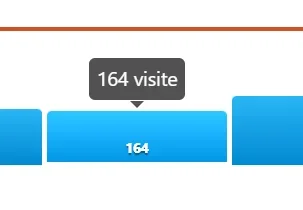
Thanks for reporting it. We'll fix it in the next release. For now, you can fix it manually if you wish.Down under the 7-day trend, when I mouseover the tabs the "Visit" has an "e" on the end. Is that Italian? For me in America it should be an "s" for "Visits". If it's an Italian word, and you don't want to change it, where can I find it in the addon so I can? Thanks!
View attachment 334200
In the xenforo admin panel, look for the template: statistiche_widget_sidebar
At approximately line 256 look for the code: title="{{ $val|number }} visite">
Change in: title="{{ $val|number }} visits">
Testing out and so far so good. Crons are running as scheduled.
*edit to add, no, looks like my cron schedule stopped around 6am yesterday.
I noticed last night on the 7 day trend graph on the widget, as well as the 30 day trend on the reports page. They seem inconsistent. Last night I went to bed and the 7 day graph on the widget showed maybe 1500 visits on the day before, and for the day I had over 3k visitors. This morning my day before was about 1500 and the todays showed around 600. This shows on both the 7 day and 30 day graphs.
edit to also add: after disabling the advanced traffic addon, then making sure all crontabs scheduled have run. Re-enabled the addon and my numbers on the 7 day and 30 day chart corrected themselves.
I also noted that I had a server error reported this morning for the Known Bots addon. I have disabled it for now in order to clearly isolate the issue.
*edit to add, no, looks like my cron schedule stopped around 6am yesterday.
I noticed last night on the 7 day trend graph on the widget, as well as the 30 day trend on the reports page. They seem inconsistent. Last night I went to bed and the 7 day graph on the widget showed maybe 1500 visits on the day before, and for the day I had over 3k visitors. This morning my day before was about 1500 and the todays showed around 600. This shows on both the 7 day and 30 day graphs.
edit to also add: after disabling the advanced traffic addon, then making sure all crontabs scheduled have run. Re-enabled the addon and my numbers on the 7 day and 30 day chart corrected themselves.
I also noted that I had a server error reported this morning for the Known Bots addon. I have disabled it for now in order to clearly isolate the issue.


Last edited: