Advanced Traffic Statistics: Live Radar, WAF & AI Security

Advanced Traffic Statistics: Live Radar, WAF & AI Security 1.8.2

No permission to download
Testing out and so far so good. Crons are running as scheduled.

*edit to add, no, looks like my cron schedule stopped around 6am yesterday.

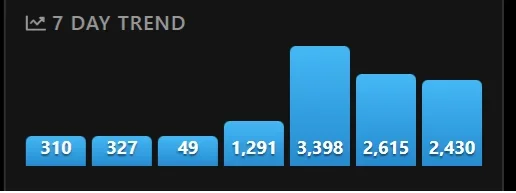
I noticed last night on the 7 day trend graph on the widget, as well as the 30 day trend on the reports page. They seem inconsistent. Last night I went to bed and the 7 day graph on the widget showed maybe 1500 visits on the day before, and for the day I had over 3k visitors. This morning my day before was about 1500 and the todays showed around 600. This shows on both the 7 day and 30 day graphs.


edit to also add: after disabling the advanced traffic addon, then making sure all crontabs scheduled have run. Re-enabled the addon and my numbers on the 7 day and 30 day chart corrected themselves.

I also noted that I had a server error reported this morning for the Known Bots addon. I have disabled it for now in order to clearly isolate the issue.

The behavior you noticed with the charts makes perfect sense and is actually great news: it proves that the system is keeping your data 100% safe.

Because XenForo processes all background tasks sequentially, if any add-on's cron throws an error (like the "Known Bots" issue you spotted) or hangs, the entire queue stops. As soon as you cleared that traffic jam by disabling the broken add-on, our background cron processed the backlog, and your charts updated perfectly.

Your detailed feedback is incredibly helpful. It actually inspired me to review the database queries to see if we can make them even more efficient.
I am currently working on the next update (version 1.7.5), which is undergoing deep testing right now. It will include several important new features alongside further performance optimizations (like database indexing) to ensure the add-on runs lightning-fast, even on massive databases.

I will keep everyone posted as soon as the release is ready.
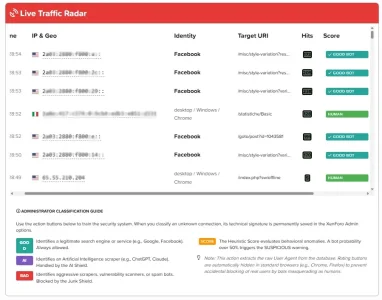
 
We're testing the next update, transforming the add-on from a simple analysis tool into a full-fledged forum security operations center. The heart of this update is the new Real-Time Traffic Radar. You'll be able to monitor the last 150 forum visits instantly.

  • Clear Identity: Instantly distinguish between humans, certified (Good) bots, AI scrapers, and unknown threats.
  • Deep Links: Every IP address is now clickable and linked directly to AbuseIPDB for instant reputation analysis.
  • Target URI: Monitor exactly which pages or tags bots are visiting at this very moment.
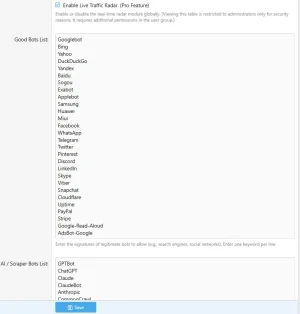
  • Intelligent Training: With the new [GOOD], [AI], and [BAD] buttons, you can classify a bot with a single click. The system will extract the technical signature (User-Agent) and save it in the options, activating the protective shield for the future.
  • Foolproof Security: The system automatically disables buttons for real browsers (Chrome, Firefox, etc.) to prevent accidental blocking of human users by impersonating bots.
  • Customizable bot list from the admin panel

The update will be available soon. Get ready to take complete control of your XenForo traffic!
live.webp
1771871516001.webp
 
Looking forward to the update.
I have been watching the cron schedule and so far no hang-ups there.


I am looking at this issue now and this is odd behavior. They have displayed this way for about an hour now.

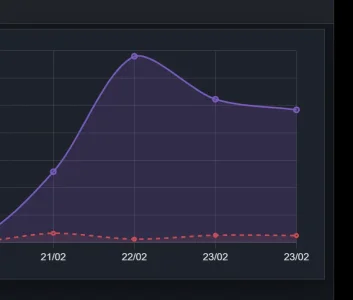
On the report page 30 day trend, I have two dates the same with different totals. They are both todays dates.
11.webp

This is also reflected on the widget 7-day trend.
12.webp
 
Looking forward to the update.
I have been watching the cron schedule and so far no hang-ups there.


I am looking at this issue now and this is odd behavior. They have displayed this way for about an hour now.

On the report page 30 day trend, I have two dates the same with different totals. They are both todays dates.
View attachment 334272

This is also reflected on the widget 7-day trend.
View attachment 334273
It cleared itself up overnight while I slept apparently and hasnt done it again as of this timestamp.

Crons running fine on schedule.
 
Looking forward to the update.
I have been watching the cron schedule and so far no hang-ups there.


I am looking at this issue now and this is odd behavior. They have displayed this way for about an hour now.

On the report page 30 day trend, I have two dates the same with different totals. They are both todays dates.
View attachment 334272

This is also reflected on the widget 7-day trend.
View attachment 334273
It just did this again. I noted that it changed over right at 00:xx Coordinated Universal Time UCT.
(I reference UTC but of course my site operates on my forum time zone.)

I do not know when this resets and corrects but I do know it will overnight sometime.

But the coincidence of the time zone UTS rolling over and the double dates and graph lines on the trend charts is hard to ignore.

The cron that last ran at 5 minutes after 00:00 UTC was Statistics - Daily Maintenance

 
Last edited:
Supergatto updated Advanced Traffic Statistics: From Insight to Active Defense with a new update entry:

Advanced Traffic Statistics v1.7.5 - The "Radar & Security" Release

This is one of the biggest updates ever released for this add-on. We've transformed the statistics into a true security command center (WAF), introducing real-time analysis tools, instant blocking actions, and a new robust data calculation engine.

✨ New Major Features (Live Traffic Radar & WAF)

  • New "Live Traffic Radar": A real-time investigative panel showing the last 150 forum accesses, detailing IP, Country, Bot/User Identity, Target URI, Hit count, and Trust...

Read the rest of this update entry...
 
Update 1.7.5 is finally live, and it marks a massive turning point! We have worked tirelessly, investing dozens of hours in coding, testing, and analyzing to transform this add-on into a true Enterprise-grade Security Center.

If you appreciate our hard work and this new release is helping you protect your forum, I have a small but incredibly valuable favor to ask:⭐ Please click here to leave a 5-star review! ⭐It only takes a minute, but it’s the best way to reward the developers, boost the project's visibility, and let us know we are heading in the right direction.

🛡️ Want to take it a step further? Upgrade to PRO!The basic add-on is and will remain free, but by purchasing a PRO License, you get a double win:
  1. Unlock the full arsenal: The new Live Traffic Radar, 1-Click IP Ban system, Active Defense Shields (AI & Junk), and advanced tech stats.
  2. Actively support future development: Your contribution is literally the fuel that allows us to maintain the code, pay for testing environments, and develop the next amazing features.
huge thank you to everyone who decides to support us (with a review or with the PRO version) and thank you for your continuous feedback. Enjoy the new update! 🎉
 
Supergatto updated Advanced Traffic Statistics: Live Radar & WAF Security with a new update entry:

Advanced Traffic Statistics v1.7.6 - "The Threat Intelligence Update"

This update expands the capabilities of the Live Radar introduced in the previous version, equipping it with a true behavioral analysis engine. The system no longer just tells you who is on your forum, but analyzes in real-time what they are trying to do.

🛡️ New Behavioral Analysis (Threat Tags)The Live Radar now scans browsing habits and automatically assigns visual micro-badges to highlight anomalous activities:

  • 🧲 [SCRAPER] (Purple): Identifies...

Read the rest of this update entry...
 
  • Like
Reactions: CTS
It just did this again. I noted that it changed over right at 00:xx Coordinated Universal Time UCT.
(I reference UTC but of course my site operates on my forum time zone.)

I do not know when this resets and corrects but I do know it will overnight sometime.

But the coincidence of the time zone UTS rolling over and the double dates and graph lines on the trend charts is hard to ignore.

The cron that last ran at 5 minutes after 00:00 UTC was Statistics - Daily Maintenance

1.7.6 installed

On the Report page, the issue described in my quote for the 30 day trend graph, has been fixed with this last update. Tnx.

On the widget 7 day trend chart, as described when the cron that ran at 5 minutes after 00:00 UTC was Statistics - Daily Maintenance, the chart again injected a day. The current day reflects the total online indicator in counts, but the yesterday bar, doesnt represent any day. It seems random. The 3rd thru the 7th are correct counts as compared to the Reports page 30 day trend chart.

So whatever you did that fixed the Reports page fixed the problem, but it isnt yet fixed on the 7 day Trend chart on the widget.

Really liking the new features with the last update.
 
1.7.6 installed

On the Report page, the issue described in my quote for the 30 day trend graph, has been fixed with this last update. Tnx.

On the widget 7 day trend chart, as described when the cron that ran at 5 minutes after 00:00 UTC was Statistics - Daily Maintenance, the chart again injected a day. The current day reflects the total online indicator in counts, but the yesterday bar, doesnt represent any day. It seems random. The 3rd thru the 7th are correct counts as compared to the Reports page 30 day trend chart.

So whatever you did that fixed the Reports page fixed the problem, but it isnt yet fixed on the 7 day Trend chart on the widget.

Really liking the new features with the last update.
Hi, I sent you a patch for the widget. Let me know. If you no longer encounter the problem, we'll release the fix for everyone in the next 1.7.7 release. :)
 
  • Like
Reactions: CTS

How we reduced our server bandwidth by discovering a Facebook "Infinite Loop" (thanks to the new Live Radar!)

Yesterday we released the 1.7.6 update (The Threat Intelligence Update) for our Advanced Traffic Statistics. One of the most important new features was the introduction of Threat Tags in the Live Traffic Radar, a system capable of analyzing bot behavior in real-time.

As soon as it was deployed on our main forum, the Radar immediately triggered an unexpected visual alarm: dozens of IPs belonging to Facebook (Meta), despite being classified as "Good Bots" (authorized), were constantly receiving the purple [SCRAPER] tag.

Analyzing the data, we made an interesting discovery.

Looking at the real-time logs, we noticed that single Facebook IPs were generating over 4,000 Hits per minute. In just a few hours, Meta's servers had generated nearly 300,000 requests to our server.

What were they looking at?The Radar showed us the exact URL: /misc/style-variation?variant=...

With XenForo 2.3, the dynamic theme switcher (Light/Dark mode) was introduced. When a forum user shares a link on WhatsApp, Messenger, or Facebook, Meta's bots rush to the server to download the link preview (title and image).However, unlike Googlebot, Facebook's crawlers are "blind" and highly aggressive: they follow every single dynamic parameter generated by the style selector, entering a literal infinite loop. They download the exact same page thousands of times, draining bandwidth and spiking CPU load with zero benefit to the forum.

Without the Live Radar and its behavioral analysis, we would never have noticed. We would have only experienced an unexplained server slowdown or anomalous monthly bandwidth consumption.

Many XenForo administrators rely entirely on the default robots.txt.default file, or don't configure it at all. This is a costly mistake in terms of hardware resources and SEO (Crawl Budget).

Thanks to the insights obtained from the Radar, we slammed the door on this massive waste of resources.Here is the ideal, optimized robots.txt file for XenForo 2.3 that we highly recommend all administrators use (to be placed in the main root directory of your server):

Code:
User-agent: *
Disallow: /admin.php
Disallow: /account/
Disallow: /attachments/
Disallow: /goto/
Disallow: /posts/
Disallow: /login/
Disallow: /register/
Disallow: /lost-password/
Disallow: /search/
Disallow: /find-new/
Disallow: /misc/style-variation

Sitemap: https://yourdomain.com/sitemap.php

💡 Why are these rules fundamental?​

  1. Disallow: /misc/style-variation: Instantly stops the infinite loop caused by Facebook and other social scrapers, saving gigabytes of bandwidth.
  2. /search/ and /find-new/: Prevents bots from triggering automated searches on your forum, which generate extremely heavy database queries.
  3. /goto/ and /login/: Prevents Google from wasting time crawling useless service pages, focusing its valuable Crawl Budget strictly on your actual content and threads, thus improving your SEO indexing.
Moral of the story: Always monitor your traffic! Sometimes the worst enemies of our server aren't hackers, but legitimate bots left completely unchecked.
 
  • Like
Reactions: CTS
Supergatto updated Advanced Traffic Statistics: Live Radar & WAF Security with a new update entry:

Update 1.7.7 - The AI Webmaster Assistant

This update introduces a major leap forward in traffic analysis, transforming your dashboard into a true Security Operations Center (SOC) powered by Artificial Intelligence, alongside important core refinements.

New Features:

  • 🤖 AI Traffic Analyzer: Added a new powerful prompt generator button. With a single click, the add-on compiles your structured real-time data (Threats, Scrapers, Bot Hits, Human vs Bot ratio) into an engineered prompt. You can easily paste it...

Read the rest of this update entry...
 

🤖 Guide: How to get an AI security analysis of your forum traffic (New in v1.7.7)​

With the release of version 1.7.7 we introduced the ability to have your server traffic analyzed directly by Artificial Intelligence (such as Gemini, ChatGPT, or Claude) to uncover hidden threats, aggressive scrapers, or bottlenecks caused by bots.

Although the system is designed to be extremely intuitive, here is a quick 3-step guide to getting the best possible results by combining your summary data with the raw logs!

Step 1: Generate and copy the "Super Prompt"

  1. Go to your main Statistics page.
  2. At the top, click the new purple "Generate AI Traffic Analysis" button.
  3. A popup will open containing a pre-formatted text (the Prompt). This text contains the instructions for the AI and the exact summary of your traffic over the last 24 hours (visits, blocked attacks, top bandwidth-consuming bots).
  4. Click on "Copy Prompt".
Step 2: Download the Emergency Logs (CSV)

  1. Close the popup and scroll down to the red Live Traffic Radar table.
  2. At the top right of the table, click the "Export CSV" button.
  3. A CSV spreadsheet will be downloaded to your computer containing the last 500 raw real-time connections (including IPs, Countries, full User Agents, and targeted URLs).
Step 3: Feed it all to the Artificial Intelligence!Now you hold the complete fingerprint of your server. All that's left is to have it analyzed:

  1. Open your favorite AI (we highly recommend Google Gemini or ChatGPT, as they excel at analyzing files).
  2. Paste the text you copied in Step 1 into the chat bar.
  3. Attach the .csv file you downloaded in Step 2 to the chat.
  4. Hit Enter!
In just seconds, the AI will cross-reference the prompt instructions with the raw CSV data and provide you with a professional, narrative report. It will tell you exactly:

  • If your Human/Bot ratio is healthy.
  • If it spotted suspicious IP addresses attempting attacks (Scanners/Brute Force) hidden inside the CSV.
  • What exact rules to add to your robots.txt file or your server Firewall to stop bandwidth waste.
All of this at zero cost and without having to configure complex API keys in your Admin Control Panel!

Try it out right now on your forums and let us know in the comments if the AI found any interesting anomalies in your traffic! 🛡️
 
The analysis works a treat! I had a French bot hammering my site. Went over to Cloudflare and added a couple of rate limiting rules on a couple of directories, and added it to country block also. Nice release, thanks!

ETA: is there any way to not count my IP address in the stats?
 
The analysis works a treat! I had a French bot hammering my site. Went over to Cloudflare and added a couple of rate limiting rules on a couple of directories, and added it to country block also. Nice release, thanks!

ETA: is there any way to not count my IP address in the stats?
Hi,

That is absolutely fantastic to hear! Catching those aggressive bots and stopping them at the Cloudflare level is exactly what the new AI Analyzer was built for. Excellent job!

Regarding your question: currently, the add-on is designed to log all physical requests made to your forum. The goal is to give you a 100% accurate picture of the true load and bandwidth consumption on your server, which naturally includes your own navigation and administrative tasks. The IP Whitelist option is there to prevent your IP from ever being blocked by our WAF, but it will still register the hits to keep the server load metrics accurate.

However, it's a very interesting suggestion! We will definitely consider adding a specific "Do not log my IP / Exclude from stats" toggle in our next major updates.

Thanks again for the great feedback and enjoy the 1.7.7 release!
 
Supergatto updated Advanced Traffic Statistics: Live Radar & WAF Security with a new update entry:

Update 1.7.8 - The "War Games" Edition (Live Threat Map)

We are incredibly excited to release version 1.7.8, which introduces one of the most visually spectacular and immersive features ever brought to Advanced Traffic Statistics!

Have you ever wanted to watch your server's automated defenses working in real-time, just like a true Cybersecurity Operations Center? Now you can.

🌟 What's New:

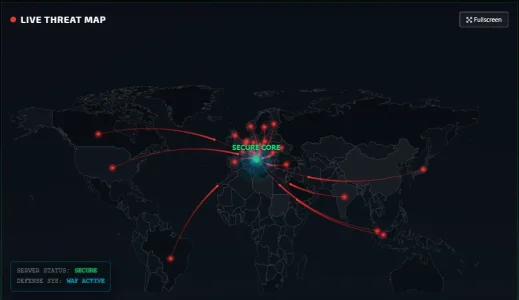
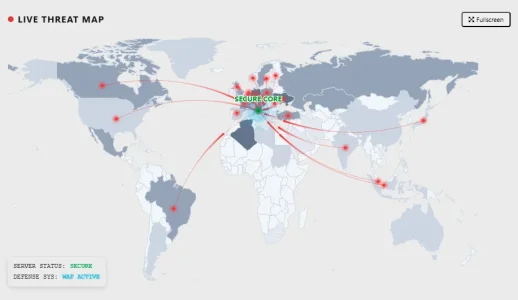
  • 🗺️ Global Live Threat Map: We have integrated a mesmerizing, fully animated interactive map right above your Live Radar. Watch in...
Read the rest of this update entry...
 
Supergatto updated Advanced Traffic Statistics: Live Radar & WAF Security with a new update entry:

Advanced Traffic Statistics 1.7.9 Released

This update focuses on resolving some visual issues, fixing a few bugs, and introducing a new control for managing public features. We recommend all users upgrade to this version.

Changelog / Release Notes:
  • Added: New option in the admin panel settings that allows you to set a specific permission for viewing the interactive map.
  • Fixed: Fixed the layout for the full-screen page when using the forum's light style.
  • Fixed: Corrected and improved some...

Read the rest of this update entry...
 
1772371430789.webp
Our interactive map isn't just a stunning visual addition—it’s a true command center for monitoring your forum traffic in real-time. Here is how to get the most out of it:

🛡️ The "Threat Shield" in Action​

The map doesn't just show visitors; it actively displays your site's protection status. The Security Shield on the map activates and becomes functional when at least one of these advanced "PRO" options is enabled:

  • Block AI Scrapers (PRO): Prevents AI training bots from scraping your unique content.
  • Block Malicious/Aggressive Crawlers (PRO): Stops crawlers that overload your server with relentless requests.
  • [EMERGENCY] Block Unknown Bots (PRO): The ultimate defense level to block any unidentified bot activity.
When these options are active, the map visually represents your defense system effectively repelling unwanted intrusions.

📍 Server Localization & Machine Accuracy​

To make your map data even more precise, you can define your "Headquarters" location:

  1. Manual Entry: If you know your data center's exact coordinates, you can manually set the Latitude and Longitude in the admin settings. This will pin your machine to an exact fixed location on the map.
  2. Automatic Detection: If you don't have the coordinates handy, don't worry! The system will automatically query your server's IP address to pinpoint its geographic location and place it correctly on the map for you.
 

Attachments

  • 1772371387781.webp
    1772371387781.webp
    25.8 KB · Views: 3
  • Like
Reactions: CTS
Supergatto updated Advanced Traffic Statistics: Live Radar & WAF Security with a new update entry:

Advanced Traffic Statistics 1.8.0 - Ultimate Privacy & Stability Update

This major update focuses heavily on Privacy (GDPR compliance), system stability, and giving you more control over your data. We highly recommend all users upgrade to this version.

What's New in 1.8.0:

  • [Privacy & GDPR] 100% Local Assets (No CDN): We have moved all external resources locally! The Interactive Map libraries (ECharts) and all country flag icons (SVGs) are now hosted directly on your server. The add-on makes zero external CDN requests...

Read the rest of this update entry...
 
  • Like
Reactions: CTS
Back
Top Bottom