Pascal Martin Member Licensed customer Dec 17, 2017 #1 Hi How to add external links on the main menu bar? I edited the template page_nav but without results. Thanks.
Hi How to add external links on the main menu bar? I edited the template page_nav but without results. Thanks.
KawaiiHannah Active member Dec 17, 2017 #2 You can go to Admin CP SETUP Public Navigation Then Add the Link Upvote 0 Downvote
Pascal Martin Member Licensed customer Dec 17, 2017 #3 Ok i found in PAGE_CONTAINER. Is it possible to add links after the link Home? How do we add sub links? Thanks for your help. Upvote 0 Downvote
Ok i found in PAGE_CONTAINER. Is it possible to add links after the link Home? How do we add sub links? Thanks for your help.
KawaiiHannah Active member Dec 17, 2017 #4 You don't have to do template edits for xF 2 they let you create menum items the way I described Upvote 0 Downvote
Pascal Martin Member Licensed customer Dec 17, 2017 #5 KawaiiHannah said: You can go to Admin CP SETUP Public Navigation Then Add the Link Click to expand... Thanks @KawaiiHannah Upvote 0 Downvote
KawaiiHannah said: You can go to Admin CP SETUP Public Navigation Then Add the Link Click to expand... Thanks @KawaiiHannah
B bangsters Member Licensed customer Dec 24, 2017 #7 Thanks. Is it also possible to disable the Contact Us at the bottom of the page? We use a Ticket System for our Contact Us page. I can add it on header via Public Navigation, but I don't see an option to remove the one at the bottom. Thanks Upvote 0 Downvote
Thanks. Is it also possible to disable the Contact Us at the bottom of the page? We use a Ticket System for our Contact Us page. I can add it on header via Public Navigation, but I don't see an option to remove the one at the bottom. Thanks
KawaiiHannah Active member Dec 24, 2017 #8 Try adding the following to your extra.less CSS: .footerLinks { display: none; } Upvote 0 Downvote
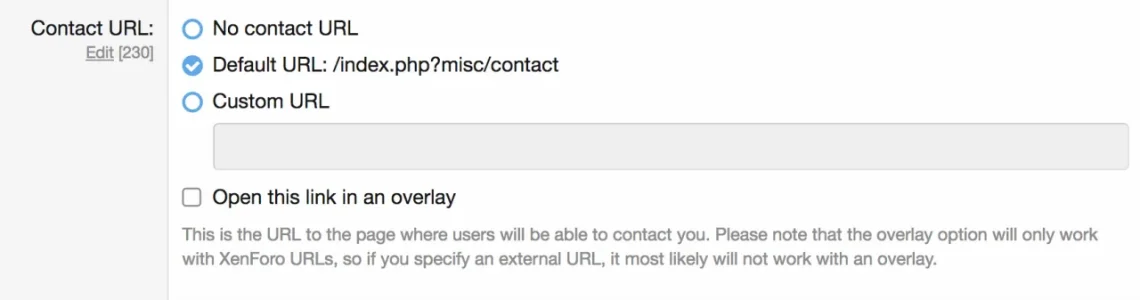
Chris D XenForo developer Staff member Licensed customer Dec 24, 2017 #9 Under Setup > Options > Basic board information you can either disable the "Contact us" link entirely, or specify the link to your ticket system: You'll notice our own "Contact us" link utilises this. Upvote 0 Downvote
Under Setup > Options > Basic board information you can either disable the "Contact us" link entirely, or specify the link to your ticket system: You'll notice our own "Contact us" link utilises this.
B bangsters Member Licensed customer Dec 26, 2017 #10 Thank you guys. Worked like a charm. Upvote 0 Downvote