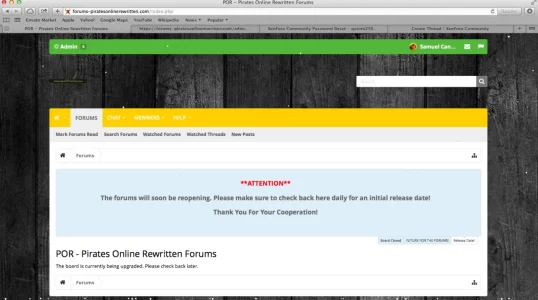
Rum Runner Entertainment Active member Licensed customer Feb 1, 2015 #1 I just uploaded a recent back-up of my site, and for some reason, the ACP is not popping up. Link: https://forums-piratesonlinerewritten.com/ Thanks!
I just uploaded a recent back-up of my site, and for some reason, the ACP is not popping up. Link: https://forums-piratesonlinerewritten.com/ Thanks!
rainmotorsports Well-known member Licensed customer Feb 1, 2015 #2 Interesting. You didnt happen to have any rules in your htaccess protecting this before? I would check the core files (admin.php) and try it with the htaccess file (or any related server rules, nginx etc) removed. Upvote 0 Downvote
Interesting. You didnt happen to have any rules in your htaccess protecting this before? I would check the core files (admin.php) and try it with the htaccess file (or any related server rules, nginx etc) removed.
Mike XenForo developer Staff member Licensed customer Feb 1, 2015 #3 Sounds like they reverted to a backup from before you upgraded. You should go to /install/ to complete the upgrade and that may resolve the issue. Upvote 0 Downvote
Sounds like they reverted to a backup from before you upgraded. You should go to /install/ to complete the upgrade and that may resolve the issue.
Rum Runner Entertainment Active member Licensed customer Feb 1, 2015 #4 Mike said: Sounds like they reverted to a backup from before you upgraded. You should go to /install/ to complete the upgrade and that may resolve the issue. Click to expand... I was able to get back using /install/, but for some reason, I keep getting this message. Upvote 0 Downvote
Mike said: Sounds like they reverted to a backup from before you upgraded. You should go to /install/ to complete the upgrade and that may resolve the issue. Click to expand... I was able to get back using /install/, but for some reason, I keep getting this message.
Rum Runner Entertainment Active member Licensed customer Feb 1, 2015 #5 Nevermind, everything is working. Thanks! Upvote 0 Downvote