
I do have loads of 404s in my logs when clients try to fetch one of these:
apple-touch-icon.png
apple-touch-icon-precomposed.png
apple-touch-icon-120x120.png
apple-touch-icon-120x120-precomposed.png
I had assumed that this would mainly be tied to PWA but it seems these also may be used for bookmarks etc. on all kind of Apple devices inc. normal computers. When searching the forums here I did find a few threads, however, not really helpful in the sense that they would have solved my problem.
I found this (from 2017 ):
):
This setting is in
Appearance -> Styles -> Style properties -> Basic options
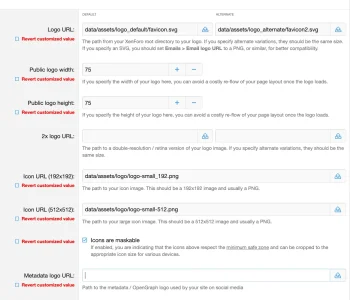
Until now it was not set, yet PWA works. Along the "metadata Logo URL" there's no helpful explanation but this:
No idea what exactly this may be. My page reneders w/o issues on social media as far as I can tell. The XF manual is not too helpful either:
I do have those, but there is not a single word about this metadata/open graph logo. I find the amount of different logos somewhat confusing...
... and think I readsomewhere that one could safe most of it by using a logo in svg-format (which I do for this exact reason). Just that I cannot find where I read it and what it was good for.
However: over the years some people seemed to have issues with this apple-touch-icon thing, but it seems not too many, judging from the number of postings.
The most promising thread was this
Yep, I've got all those fields (including the Icon URL (192x192)) filled out in the ACP just incase, but still no luck.
where it was said with the higher resolution icons (that I have) the issue should be solved. I wasn't with everyone and so someone recommended a hack (creating the icons manually, uploading them to the XF root and adjusting the Page_Container template accordingly) that I tried as well but that did not work either. Basically the same was recommended in another thread. So back to the start.
To make things more confusing in a recent thread someone says the apple-touch-icon would use the 192px icon (that I have):
Does anyone have a hint how to solve this issue?
apple-touch-icon.png
apple-touch-icon-precomposed.png
apple-touch-icon-120x120.png
apple-touch-icon-120x120-precomposed.png
I had assumed that this would mainly be tied to PWA but it seems these also may be used for bookmarks etc. on all kind of Apple devices inc. normal computers. When searching the forums here I did find a few threads, however, not really helpful in the sense that they would have solved my problem.
I found this (from 2017
):We output an apple-touch-icon entry if you enter a value for the "Metadata Logo URL" style property.
This setting is in
Appearance -> Styles -> Style properties -> Basic options
Until now it was not set, yet PWA works. Along the "metadata Logo URL" there's no helpful explanation but this:
Path to the metadata / OpenGraph logo used by your site on social media
No idea what exactly this may be. My page reneders w/o issues on social media as far as I can tell. The XF manual is not too helpful either:
Icons
You must provide the URLs of, or upload using the provided tools, two square icons to be used for the app.
These icons must measure 192x192 pixels, and 512x512 pixels. As a general rule, you should use PNG image format.
Ideally, these icons should be maskable, meaning that any vital graphical elements within them fit within the minimum safe zone when the icons are cropped by differing devices. If your icons are indeed maskable, check the box to confirm this.
Full details of maskable icons at web.dev
I do have those, but there is not a single word about this metadata/open graph logo. I find the amount of different logos somewhat confusing...
... and think I readsomewhere that one could safe most of it by using a logo in svg-format (which I do for this exact reason). Just that I cannot find where I read it and what it was good for.
However: over the years some people seemed to have issues with this apple-touch-icon thing, but it seems not too many, judging from the number of postings.
The most promising thread was this

This might be using the apple-touch-icon value and there has been a change here now as we have some additional icon fields. Setting the "Icon URL (192x192)" style property would presumably bring it back. (It previously used the metadata icon, though the implication of its use is sort of separate from are more general icon.)
Yep, I've got all those fields (including the Icon URL (192x192)) filled out in the ACP just incase, but still no luck.
where it was said with the higher resolution icons (that I have) the issue should be solved. I wasn't with everyone and so someone recommended a hack (creating the icons manually, uploading them to the XF root and adjusting the Page_Container template accordingly) that I tried as well but that did not work either. Basically the same was recommended in another thread. So back to the start.
To make things more confusing in a recent thread someone says the apple-touch-icon would use the 192px icon (that I have):

Shouldn't the Apple Touch Icon (rec: 180px) have its own value instead of using the 192px Icon URL value?
Code:
<link rel="apple-touch-icon" href="{{ base_url(property('publicIconUrl', true)) }}">- M@rc
- Replies: 0
- Forum: XenForo suggestions

Does anyone have a hint how to solve this issue?


