Fixed 2.3.7 Font Color Issue

Greenandgold

Active member
Licensed customer
Affected version
2.3.7
Occasionally users will post something, and it either appears black, or white depending on if they have dark mode or light mode. I'm not sure why because it's never happened to me and I'm not sure what is causing it. This either needs to be resolved, or there needs to be a "back to default" font option so users can fix it.
 
I might be running into the same issue (posted about it here). I'm fairly certain the users are not explicitly colorizing their posts because the BBCode always refers to the same almost-black color, RGB(20, 20, 20), which isn't one of the color picker colors. I haven't noticed a symmetrical "white" issue, but that could be down to the balance of Light/Dark users on our site.
 
They are pasting the text. So if they are using Light mode, and they grab black text and paste it, those in Dark mode will not see it.
 
They are pasting the text. So if they are using Light mode, and they grab black text and paste it, those in Dark mode will not see it.
There's some subtlety to it though, or there seems to be. I've tried every silly copy/paste scenario I can think of, trying to reproduce this. The only repros I get are when the text I copy is already BBCoded to the color I don't want it to be. :)
 
They are pasting the text. So if they are using Light mode, and they grab black text and paste it, those in Dark mode will not see it.

I agree there needs to be a solution. XF should be able to "flip" the text where needed.

My solution was to eliminate colored text entirely. In fact, I've spent time trying to find proper CSS to do eliminate it in existing posts, yet the existing CSS isn't explicit enough and I get weird side effects when I strip color from text in the message bodies. I'm not going to do a search/replace on millions of posts to eliminate colored text in the post bodies, and removing the colored text button (and/or disable the BBCode that allows it) only removes colored text going forward. Pasting in text still can be an issue as well, and the right CSS would "neuter" it properly.

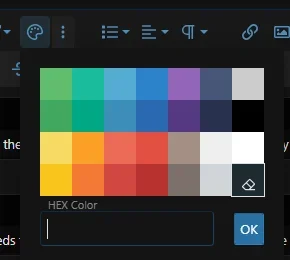
This either needs to be resolved, or there needs to be a "back to default" font option so users can fix it.

They already do.

1767717584405.webp

...but training members to actually use it is the problem. 😂 And this removes all formatting.

Here on this forum, the color selector also has a similar Remove Formatting choice:

1767717826395.webp
 
In fact, I've spent time trying to find proper CSS to do eliminate it in existing posts, yet the existing CSS isn't explicit enough and I get weird side effects when I strip color from text in the message bodies.
Actually, if this were a setting in Style Properties (strip BBCode color from message body text), that would do what I need. Maybe something similar. I don't know if the editor will have the ability to strip BBCode.

Here's one tip you can pass along to users--ask them to paste in text using Ctrl-Shift-V rather than Ctrl-V. That pastes in plain, unformatted text rather than styled text.
 
See https://xenforo.com/community/threads/dark-mode-does-not-work-well-with-color.220613/post-1735398

IMHO this is probably the only solution (apart from completely ignoring [COLOR]) so we made this a user option on (some of) our forums, eg. users can choose to
  • See colors as-is (which might create unreadble / invisible text)
  • Not see any colors
  • Only use a predefined set of colors which adjusts depending on the active variation (light / dark)

The way we implemeted this is basically a pure CSS approach, no BB code is modified.
 
We have the same problem. It appears to come from cutting, not copying, pasting or click-n-drag.


Minimal proof of concept:

1. Create a post containing:
Code:
Line 1
Line 2

2. Highlight line 1 and cut the text (Ctrl+X).

3. Switch to BB-mode and observe that it now contains colour information.


It happens at least every time you cut a line that is not the last line in the post. For some reason, we haven't been able to trigger it by cutting just a part of a line, or by cutting the last line. But any line that isn't the last line, will for some reason insert color tags after the cut.

I have no idea why that happens. Any fixes yet?
I just tried it on this support forum now, and it doesn't seem to happen here, so perhaps it's been fixed in a later version?
 
Because of this issue, which I've had for years, I've trained myself to paste text using Ctrl-Shift-V (which pastes in plain text) vs. Ctrl-V, which pastes text with whatever formatting characteristics it might have (which could be color, styling, bulleted list item, etc.).

But it's like I said earlier...getting members to do this is probably impossible, as only a few would remember to do it.

If the editor here defaulted to pasting in plain text, that would solve these issues.
 
If the editor here defaulted to pasting in plain text, that would solve these issues.
Or if we had the option to set this as default in the editor for our users, with a separate paste option via a button for formatted text (similar to how MS Word does it), that IMHO would be ideal.
 
Has anyone got a reliable reproduction case for this in the current version? It's not something I've seen for some time.

I'm pretty sure we're already stripping colours.
 
Has anyone got a reliable reproduction case for this in the current version? It's not something I've seen for some time.

I'm pretty sure we're already stripping colours.

Yes, I'm running XenForo 2.3.12, and this issue is still affecting some users.
I was also able to reproduce it myself using the method @diskutopia described. However, I can only reproduce it in Chromium-based browsers.
It does not seem to occur in non-Chromium browsers, like Firefox.
 
Having;
Code:
line 1
line 2
line 3
In XF2.2; cutting line 1in chrome results in this html in the editor
HTML:
<p><span style="background-color: transparent;">line 2</span></p><p>line 3</p>

In XF2.3 it instead results in this html in the editor;
HTML:
<p><span style="background-color: transparent; color: rgb(20, 20, 20);">line 2</span></p><p>line 3</p>
 
Back
Top Bottom