
![[XTR] Login as User](/community/data/resource_icons/10/10864.jpg?1791068286)
- Compatible XF 2.x versions
- 2.3
- License
- 1 licence = 1 site
- Updates duration
- 6 Months - US $15 / 1 Year - US $25
- Visible branding
- Yes, but removable with payment
 [XTR] Login as User
Enterprise-Grade Account Management for XenForo
What Is This Add-on?
[XTR] Login as User is a professional account management add-on that allows authorized XenForo administrators and moderators to temporarily access a member's account for support, debugging, or technical review — in a fully secure, auditable, and controlled manner.
Unlike basic alternatives available in the community, this add-on treats account impersonation not merely as a convenience feature, but as a governed administrative process — with layered security filters, complete lifecycle audit logging, CSRF protection, and ecosystem-wide guards.
Why [XTR] Login as User?
Various free add-ons exist that claim to provide this functionality. However, the vast majority of them suffer from critical architectural security gaps:
| Security Criterion | Basic Free Add-ons | [XTR] Login as User |
|---|---|---|
| Tiered permission hierarchy (member/moderator/admin) | ✗ Single permission, all accounts | ✓ 3 independent permission levels |
| Super Admin absolute protection | ✗ Not present | ✓ Code-level, unbypassable |
| Password confirmation (Sudo Mode) | ✗ Not present | ✓ Present |
| Security page lock (password/email/2FA) | ✗ Not present | ✓ Full protection |
| Financial action restriction | ✗ Not present | ✓ Present |
| CSRF protection | ✗ Incomplete | ✓ Full |
| Session timeout | ✗ Not present | ✓ Configurable |
| Full audit log (start/end/reason/status) | ✗ Login moment only | ✓ Full lifecycle |
| Group-based access restriction | ✗ Not present | ✓ Present |
| 2FA infrastructure integrity | ✗ Globally disabled during session | ✓ Fully preserved |
 Security Architecture
1. Three-Tier Permission Hierarchy
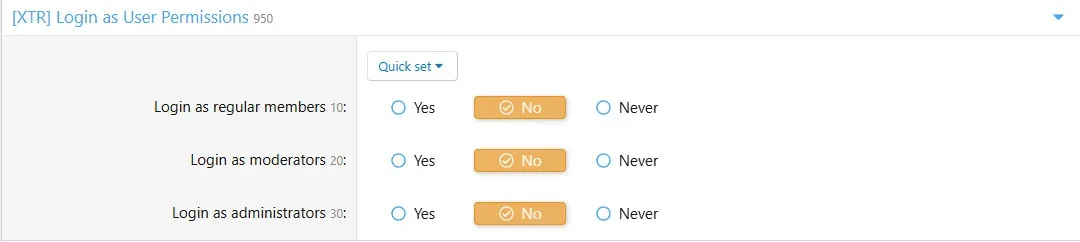
Far beyond a single "can use this feature" permission, the add-on implements a complete role hierarchy. Each level is independently assignable:
- Regular Members: xentr_login_regular permission
- Moderator Accounts: xentr_login_moderator permission
- Administrator Accounts: xentr_login_admin permission (operator must also be an admin)
- Super Administrator: Inaccessible to anyone — code-level absolute protection
2. Password Confirmation (Sudo Mode)
Before accessing any account, the operator must verify their own password within the last 5 minutes. This protects against unattended computers and hijacked sessions.
3. Security Page Shield
While in impersonation mode, the following pages are completely locked:
- Password change (account/security)
- Email address change (account/email)
- Two-step verification management (account/two-step/*)
- Passkey management
- Connected social accounts
- Application passwords
4. Financial Action Guard
While in the target account, the following actions are automatically blocked:
- Account upgrade purchases
- XENTR Credits transfer, exchange, and purchase
- XENTR DigitalStore checkout and order processing
- DBTech eCommerce payment and cart operations
5. Full CSRF Protection
All operations including login and revert are protected by XenForo's CSRF token system.
6. Session Timeout
Configurable timeout (0–1440 minutes). If the operator forgets to revert, the system automatically returns them to their original account and updates the log record.
 Full Audit Logging
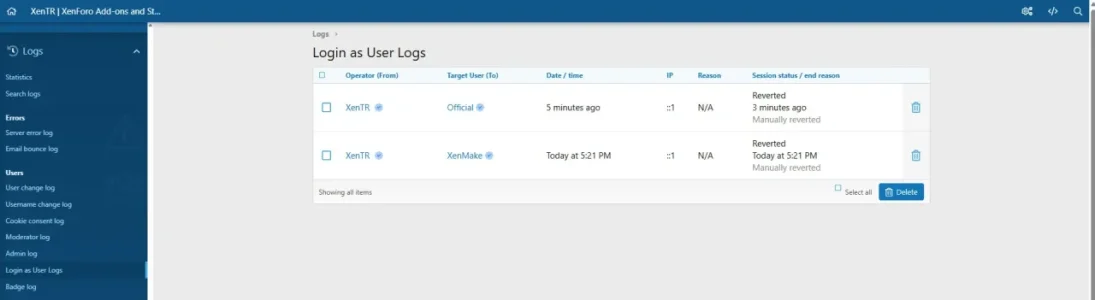
Every session records the following information completely:
| Log Field | Description |
|---|---|
| from_user_id / from_username | The operator who performed the action |
| to_user_id / to_username | The account that was accessed |
| log_date | Session start time |
| end_date | Session end time |
| status | Active / Reverted / Timed out / Failed |
| end_reason | Manual / Timeout / Password changed / Permission revoked |
| reason | Justification entered by the operator |
| ip_address | IP address of the session |
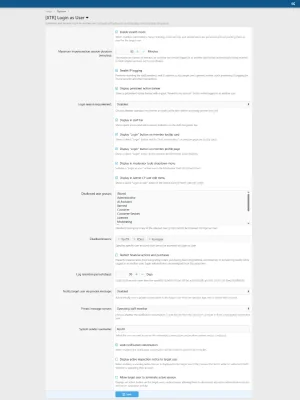
 Configuration Options
| Option | Default | Description |
|---|---|---|
| Session Timeout | 15 minutes | 0 = unlimited, maximum 1440 minutes |
| Stealth Mode | On | Preserves read markers, forum tracking, and online status |
| Stealth IP Logging | On | Operator IP is not linked to the target account |
| Info Banner | On | Shows persistent notice bar during impersonation |
| Login Reason Mode | Optional | Disabled / Optional / Required |
| Staff Bar | On | Quick access link and active session badge in staff bar |
| Member Card Button | On | Login button in member tooltip card |
| Profile Page Button | On | Login button in member profile header actions |
| Moderator Tools | On | Login option in moderator dropdown menu |
| Admin User Edit | On | Quick action in AdminCP user edit screen |
| Disallowed User Groups | Empty | Selected groups are completely inaccessible |
| Disallowed Users | Empty | Specified accounts are completely inaccessible |
| Financial Action Restriction | On | Blocks purchases and transfers |
| Log Retention Period | 90 days | 0 = keep indefinitely, maximum 730 days |
 Access Entry Points
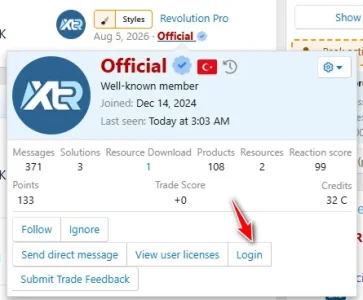
- Member Tooltip Card — "Login" button in the member popover card
- Member Profile Page — In the profile header action buttons
- Moderator Tools — "Login as User" option in the moderator dropdown menu
- Staff Bar — Quick access link and active session badge in the staff navigation bar
- AdminCP User Edit — Quick action in the admin panel user edit screen
Security Features Summary 3-tier permission system (regular member / moderator / administrator)
- Super Administrator absolute protection (code-level)
- Password confirmation requirement (Sudo Mode — 5-minute validity)
- Security page shield (password / email / 2FA / Passkey)
- Financial and commercial action protection
- Full CSRF protection (login and revert)
- Configurable session timeout with automatic revert
- Dynamic session context validation
- Full lifecycle audit log (start + end + reason)
- Stealth IP logging (operator IP not linked to target account)
- Stealth mode — read marker and tracking preservation
- Group and user-based access restriction
- Automatic log pruning (configurable retention period)
- Banned/locked account access attempt protection
- Login reason justification (optional or required)
- Full XenForo Phrase system compliance (multilingual)
-
 login-as-user-log.webp
 -
 login-as-user-permissions.webp
 -
 login-staff-bar.webp
 -
 login-user-notice.webp
 -
 memberTooltip.webp
 -
 options.webp
 -
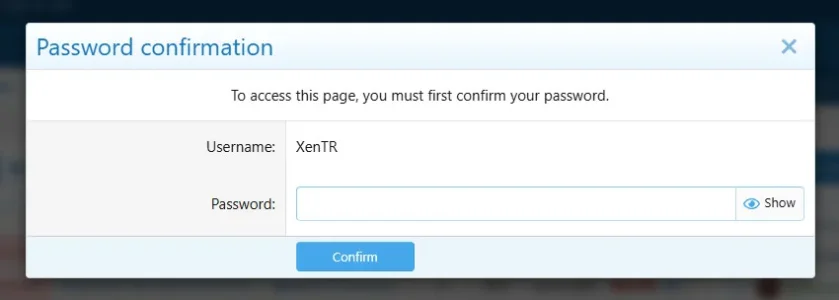 password-confirmation.webp
 -
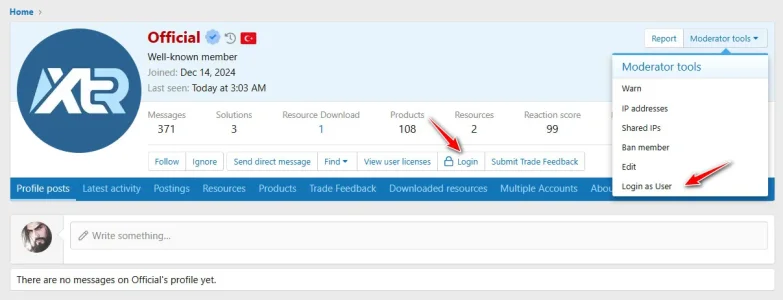 profile-login.webp
 -
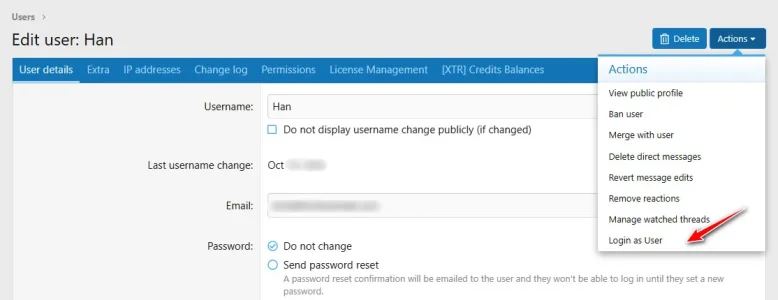 user-edit-login.webp
![[XTR] IP Threat Monitor](/community/data/resource_icons/10/10134.jpg?1763724168)
![[XTR] AI Assistant](/community/data/resource_icons/10/10205.jpg?1766866402)
![[XTR] Content Ownership & Date Manager](/community/data/resource_icons/10/10888.jpg?1791587458)
![[XTR] SMS Verification](/community/data/resource_icons/10/10654.jpg?1786285081)
![[XTR] Tiptap Editor](/community/data/resource_icons/10/10879.jpg?1791464512)