
![[XTR] Content Ownership & Date Manager](/community/data/resource_icons/10/10888.jpg?1791587458)
- Compatible XF 2.x versions
- 2.3
- Additional requirements
- PHP 8.0+, XenForo 2.3.0+
- License
- 1 licence = 1 site
- Updates duration
- 6 Months - US $12 / 1 Year - US $20
- Visible branding
- Yes, but removable with payment
[XTR] Content Ownership & Date Manager gives authorized members a convenient way to change content authors, creation dates and creation times within your XenForo community.
Correct a post published under the wrong account, restore the dates of imported content, or arrange a selection of items into a consistent timeline—all through your forum's familiar interface.
Change the author, the date, or both together. Work with an individual item or select multiple items in supported lists to apply a bulk change.
What content can you manage?
- XenForo: Threads, posts, profile posts and profile post comments.
- XenForo Resource Manager: Resources, resource updates and resource reviews.
- XenForo Media Gallery: Media items, albums and their comments.
- XENTR DigitalStore: Products, product updates and product reviews.
Designed for everyday moderation
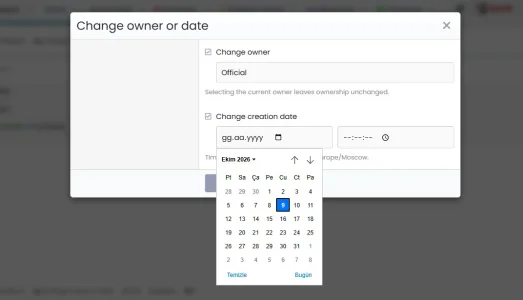
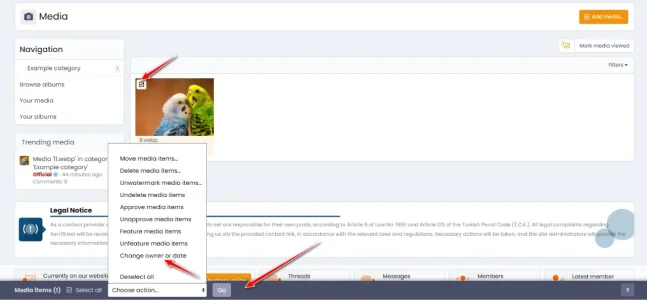
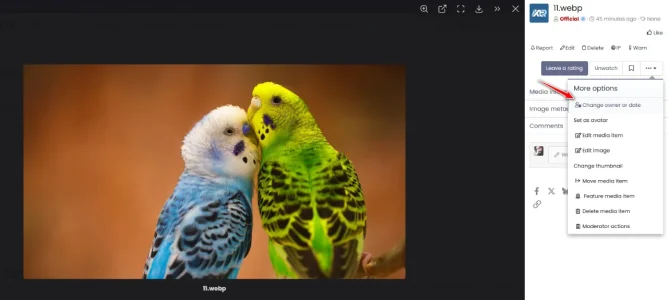
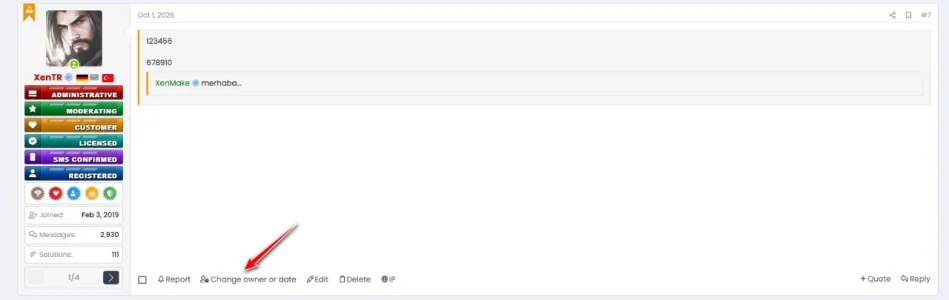
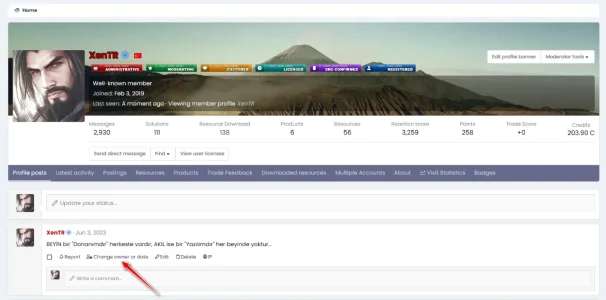
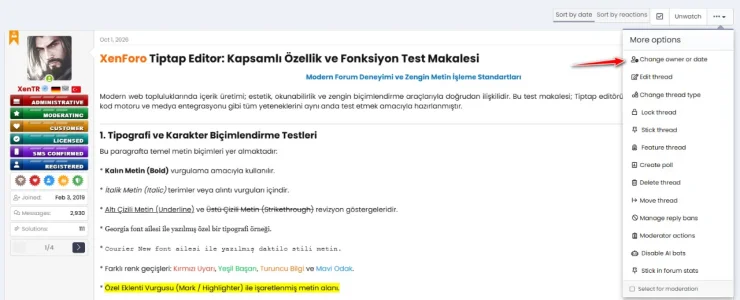
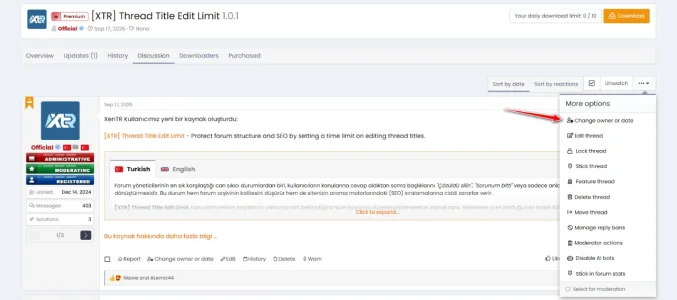
Open the change window using the Change owner or date action on the relevant content. Threads also provide access through the thread tools menu.
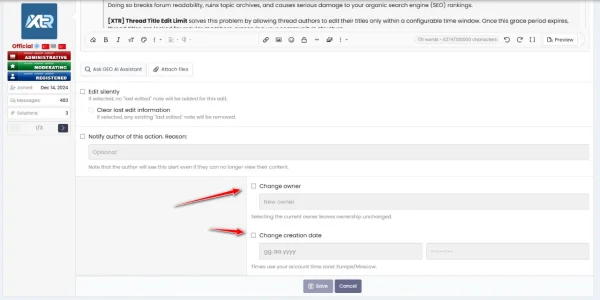
Find the new author using the username search, then choose a date and time in separate fields. Dates and times follow the account time zone of the person making the change.
You can also display these controls in supported standard edit forms, allowing moderators to make author and date changes while working on the content.
Arrange multiple items with a bulk time interval
Apply changes to multiple threads and posts, as well as supported product, resource and gallery lists.
When changing dates in bulk, a time interval lets you place successive items a chosen number of seconds apart. For example, a 5-second interval places the first item at your selected time, followed by the next items 5, 10 and 15 seconds later.
When is it useful?
- Correcting content published under the wrong member account.
- Assigning announcements, guides or business posts to the appropriate account.
- Correcting creation dates after importing content from another system.
- Organizing archived content into the intended chronological order.
- Transferring responsibility for a resource or product to another member.
- Correcting author or date information on media, albums and comments.
- Updating multiple items without opening each one individually.
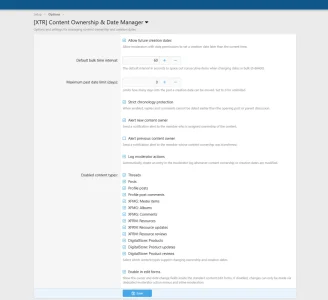
1. Allow future creation dates
Controls whether moderators can choose a date and time later than the present. Disabled by default. This does not schedule publication; it only allows a future creation date to be assigned.
2. Default bulk time interval
Sets the starting interval between successive items during bulk date changes. The default is 60 seconds, and moderators can select a different value when applying a change. A value of 0 adds no spacing; the supported range is 0–86400 seconds.
3. Maximum past date limit
Controls how far back from today a selected creation date may be. For example, 30 prevents selecting a date more than 30 days in the past. The default value of 0 disables this limit.
4. Strict chronology protection
Helps prevent replies and comments from being dated earlier than their parent content. It also prevents a thread's opening post from being moved behind existing replies. Enabled by default.
5. Alert new content owner
Sends an in-forum notification to the member receiving ownership when the author changes. Enabled by default.
6. Alert previous content owner
Sends an in-forum notification to the member whose content has been transferred. Disabled by default.
7. Log moderator actions
Records author and date changes in the moderator log. Previous and new values can be reviewed alongside the person responsible for the change. Enabled by default.
8. Enabled content types
Choose which types of content support author and date changes. For example, enable the feature for threads while disabling it for profile posts. Choices for additional products are available when those products are active.
9. Enable in edit forms
Displays the author and date controls in supported standard edit forms. Enabled by default. When disabled, dedicated action menus and supported bulk moderation remain available.
Keep control with the right people
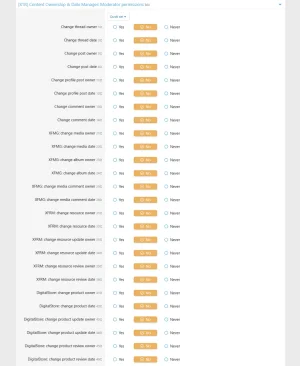
Author changes and date changes have separate permissions. You can allow a moderator to correct dates without allowing them to transfer authorship. Permissions are also separated by content type.
Relevant member counts, author details, latest post or comment information and search records are updated alongside the change. The result goes beyond simply replacing a name or date on the page.
- Change content authors, creation dates and creation times.
- Change authors and dates independently or together.
- Support for threads, posts, profile posts and profile post comments.
- Resource, update and review support when Resource Manager is active.
- Media, album and comment support when Media Gallery is active.
- Product, update and review support when DigitalStore is active.
- Dedicated change windows accessed from content action menus.
- Access through the thread tools menu.
- Optional controls in supported standard edit forms.
- Username search when choosing a new author.
- Bulk author and date changes in supported lists.
- Configurable spacing in seconds for bulk date changes.
- Date and time selection using the acting member's account time zone.
- Optional permission to assign future creation dates.
- Configurable limit for dates in the past.
- Optional chronology protection.
- Enable or disable individual content types.
- Separate author and date permissions for each supported content type.
- Independently configurable notifications for new and previous authors.
- Optional moderator action logging.
- Updates to relevant member counts, latest content information and search records.
- Thread creation dates remain synchronized with their opening posts.
- Album transfers preserve the authors of individual media items.
- Ratings linked to gallery comments follow the comment's author and date.
- Validation prevents assigning content to invalid or banned accounts.
- Selecting the current author does not trigger an unnecessary transfer.
- Appearance compatible with XenForo light and dark themes.
- Works without modifying XenForo or supported third-party add-on files.

![[XTR] IP Threat Monitor](/community/data/resource_icons/10/10134.jpg?1763724168)
![[XTR] AI Assistant](/community/data/resource_icons/10/10205.jpg?1766866402)
![[XTR] Login as User](/community/data/resource_icons/10/10864.jpg?1791068286)
![[XTR] SMS Verification](/community/data/resource_icons/10/10654.jpg?1786285081)
![[XTR] Tiptap Editor](/community/data/resource_icons/10/10879.jpg?1791464512)