
![[XFA] RM Nodes Layout - XF2](/community/data/resource_icons/9/9509.jpg?1792615803)
- Compatible XF 2.x versions
- 2.3
- Additional requirements
- XenForo Resource Manager 2.3
- License
- Unlimited - No renewal fees !
- Visible branding
- No
Give your Resource Manager categories the familiar look of a forum node list. Each category shows its icon, title, description, resource count and the latest resource, so your members see what is new at a glance.
Perfect for resource sites that want their categories to feel like the rest of the community.
 What's new in 1.1.0
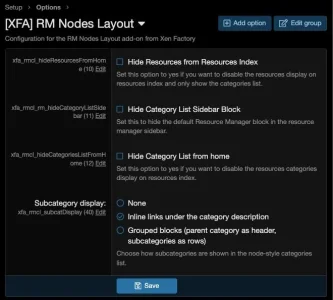
 Subcategory display: show no subcategories, inline links under the category description (each with its own icon), or grouped blocks with the parent category as header and its subcategories as rows.
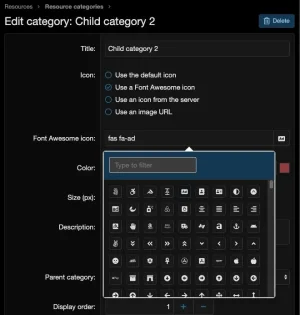
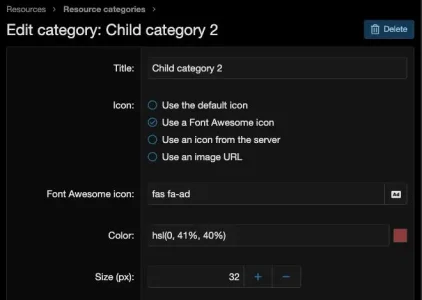
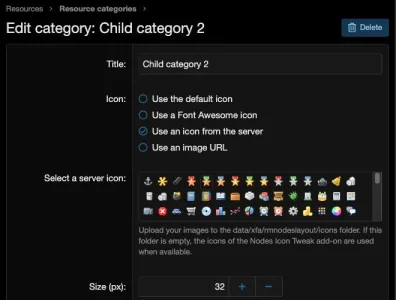
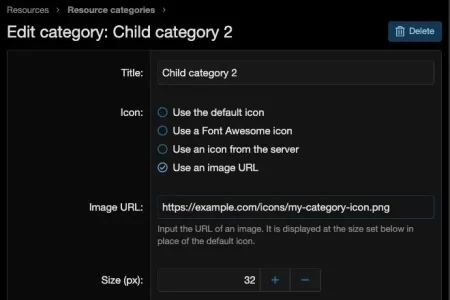
 Icon choice per category: pick the icon of each category from its edit form, using the default icon, an icon with your own colour, an image from your server, or an image URL, with a size setting.
 Features
A node-style categories list
 Familiar rows: categories on the resources index and on category pages are listed like forum nodes, with icon, title and description.
 Resource count: every category row shows how many resources it holds.
 Last resource cell: see the latest resource with its icon or avatar, title, date and author, just like the last post of a forum.
 Matching descriptions: category descriptions follow the node description setting of your style, so they look like your forum lists.
Subcategories your way
 Keep it simple: hide subcategories when you want a short, clean list.
 Inline links: list subcategories as quick links under the category description, each with its own icon.
 Grouped blocks: show each parent category as a header with its subcategories as rows below it.
Icons for every category
 Default icon: keep the standard look for categories you do not customise.
 Icon picker with colour: choose a Font Awesome icon and set its colour.
 Image from your server: select an image from the icons folder of your site.
 Image URL: use any image from a web address.
 Icon size: set the size of each category icon to fit your design.
Control for admins
 Hide the category list on the index: remove the categories from the resources index when you do not need them there.
 Hide the resources on the index: show only the categories list and leave the resources out.
 Clean sidebar: hide the default category list from the sidebar, since the main list now does the job.
 XenForo integration
 Resource Manager: works with your existing categories and the standard resources index.
- Styles: follows the node look and description settings of your style.
 Quick facts
- Requires: XenForo Resource Manager and [XFA] Core.
- Install: step by step instructions are in the readme.
 Support: visit the support forum.
 Ready to give your categories a node look?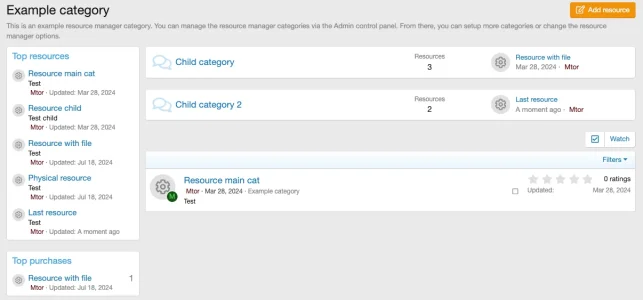

![[XFA] RM Marketplace/Shop - XF2](/community/data/resource_icons/6/6064.jpg?1791757902)
![[XFA] RM Marketplace/Shop - XF2 - Cart plugin](/community/data/resource_icons/9/9784.jpg?1745174668)
![[XFA] RM Marketplace/Shop - XF2 - Affiliate system plugin](/community/data/resource_icons/9/9866.jpg?1743350593)
![[XFA] RM Donations - XF2](/community/data/resource_icons/7/7072.jpg?1792622301)
![[XFA] RM Multiple Categories Resources - XF2](/community/data/resource_icons/7/7863.jpg?1792619019)