
![[XFA] RM Multiple Categories Resources - XF2](/community/data/resource_icons/7/7863.jpg?1792619019)
- Compatible XF 2.x versions
- 2.1
- 2.2
- 2.3
- Additional requirements
- XenForo Resource Manager 2.1.0+
- Updates duration
- Unlimited - No renewal fees !
- Visible branding
- No
Some resources belong in more than one place. This add-on lets your members list a resource in several categories at once, so visitors find it wherever they browse. Every category shows the resource, and every counter stays accurate.
Perfect for resource sites where a download fits more than one topic: themes, plugins, guides and tools.
 Features
Easy for your members
 Several categories in one go: a "Display in following categories" picker appears when adding or editing a resource.
 Change it any time: members can add or remove categories later from the edit page.
 Only valid choices: the picker offers only the categories the member can view and add resources to.
Resources found everywhere
 Listed in every chosen category: the resource appears in each category you pick, not only in the main one.
 Parent categories included: resources also show in parent categories, so categories with sub-categories stay complete.
 Correct resource counters: each category shows the right number of resources, whichever categories they are listed in.
Smooth navigation
 Breadcrumb that follows the visitor: the resource page can keep the category your visitor came from in its breadcrumb.
 Your choice: switch this behavior on or off with one simple option.
 Useful for
- Download libraries: one file shown under every topic it belongs to.
- Marketplaces: more visibility for each product in all the right categories.
- Large category trees: fewer duplicates, because one resource is enough.
 XenForo integration
 Resource Manager: works inside the add and edit resource pages and the category lists.
 Permissions: respects your category view and add resource permissions.
 RM Exclude Subcategory Resources: compatible.
 Quick facts
- Requires: XenForo Resource Manager. No other add-on is needed.
 Install: step by step instructions are in the readme.
 Support: visit the support forum.
 Ready to show resources in every right place?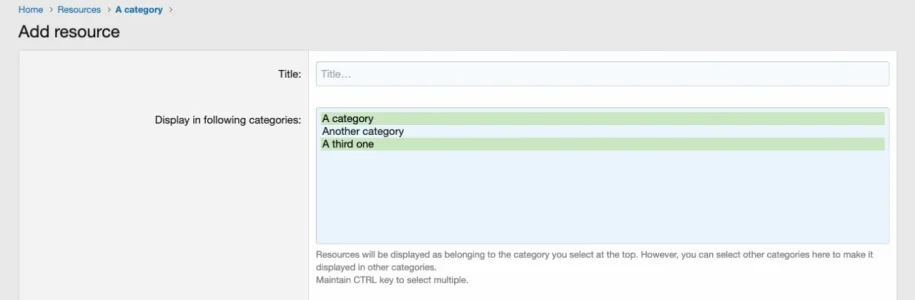

![[XFA] RM Marketplace/Shop - XF2](/community/data/resource_icons/6/6064.jpg?1791757902)
![[XFA] RM Marketplace/Shop - XF2 - Cart plugin](/community/data/resource_icons/9/9784.jpg?1745174668)
![[XFA] RM Marketplace/Shop - XF2 - Affiliate system plugin](/community/data/resource_icons/9/9866.jpg?1743350593)
![[XFA] RM Donations - XF2](/community/data/resource_icons/7/7072.jpg?1792622301)
![[XFA] RM Nodes Layout - XF2](/community/data/resource_icons/9/9509.jpg?1792615803)